How to Start a Web Hosting Business: From Your First Offer to a Business You Can Run
Plan a hosting business with WHMCS or Blesta: services, WordPress, infrastructure, pricing, domains, email, support, marketing and a launch checklist.
Starting a web hosting business means taking responsibility for other people’s websites, domains and sometimes email. Buying server capacity is one part of that job. The harder work is choosing customers you can serve well, defining what you will manage, collecting enough revenue to support the promise, and recovering calmly when something goes wrong.
You do not need to own a data centre. You do need a service you understand, a reliable way to deliver it, and a business model that pays for the work after the sale.
This guide takes you through those decisions in order. It covers reseller hosting, managed and unmanaged servers, cloud providers, control panels, WHMCS and Blesta, WordPress websites, domain registration, email, support, pricing, marketing and growth. It also explains where PD Modules can reduce repeated administration without treating automation as a substitute for operational judgement.
The practical starting point: choose one customer group, launch one clearly defined core service, use a billing system that supports your actual delivery workflow, and prove the complete customer journey before buying traffic. Add services when you can support them, rather than because a supplier’s catalogue makes them available.
Your quick-start checklist
Use this list as a route through the guide. Each item should produce something you can inspect.
- Choose a customer and a problem. Write who you serve, what they need and why they would switch or buy now.
- Define the offer. Specify resources, management responsibilities, support hours, backups, renewal terms and exclusions.
- Choose the delivery model. Reseller account, managed server, self-managed infrastructure or provider-backed cloud services must fit your skills and cash reserves.
- Check the economics. Include licences, payment costs, support time, refunds, backups and unused capacity—not just the server bill.
- Choose WHMCS or Blesta through a workflow test. Verify your gateway, registrar, panel and required modules on the platform you intend to use.
- Decide how the website and billing system fit together. A billing-system storefront can be a sensible beginning; a separate WordPress site gives you a different publishing workflow.
- Prepare the business foundations. Set up business records, customer terms, privacy information, supplier agreements and a workable abuse process.
- Build the customer journey. Enquiry, order, payment, acceptance, provisioning, welcome message, migration and support should tell one consistent story.
- Prove recovery. Restore a backup, reconcile an uncertain provisioning result and test how customers contact you during an outage.
- Launch to a small group. Watch where people hesitate and record the actual work each customer creates.
- Measure contribution and retention. Revenue, cash and profit answer different questions.
- Grow the part that works. Improve the service and documentation before expanding the catalogue or advertising budget.
A useful launch gate is simple: could another competent person fulfil the next order, answer the next support request and recover the service from your written instructions? If everything depends on what you remember, keep improving the process.
1. Choose the business before choosing the server
“Web hosting for everyone” is difficult to explain and expensive to support. A smaller, more specific starting market makes product design, documentation and marketing easier.
Possible customer groups include local professional firms, small agencies, independent shops, developers deploying applications, membership organisations and businesses moving away from an unsuitable supplier. Their needs differ. An agency may value repeatable migrations and multiple customer accounts. A small firm may value someone who can explain DNS and email without passing it between three suppliers. A developer may want predictable server access and clear limits on management.
Choose a problem you can describe in the customer’s language. “Managed hosting with help moving an existing WordPress site” is more concrete than “next-generation hosting solutions”. It still needs a definition of what managed includes, but it gives the reader a starting point.
Before building the service, ask prospective customers:
- What are you paying for now, and which parts do you actually use?
- What last caused you to contact your host?
- What would make moving worthwhile?
- Who maintains the website, and who controls the domain and email?
- What would an hour or a day of disruption mean to you?
- Do you need technical access, business reassurance, or both?
These are research questions, not a script for persuading everyone to buy. If the answers reveal that customers mainly need application support you cannot provide, change the offer or find the right delivery partner before advertising it.
A running example
Throughout this guide, imagine a small hosting team serving independent businesses with existing WordPress websites. Its initial offer is hosting, a defined migration, scheduled backups and bounded technical support. Domain registration and business email are optional related services. Website redesign and unlimited content changes are separate work.
This is a fictional planning example. The prices, staffing assumptions and calculations later in the guide are illustrations, not PD Hosting quotations or industry averages.
The team’s advantage could be a careful migration and a clear point of contact. It does not need to claim that its rented hardware is unique. Its real differentiation is the service it can repeatedly deliver and demonstrate.
2. Treat hosting as an ongoing service business
Hosting is not a shortcut to passive profit. Installing billing software, connecting a server and enabling automated orders can reduce routine work, but the business still needs attention after the first payment.
Someone must review failed jobs, manage security updates, answer customers, test recovery, reconcile supplier costs and keep the service description accurate. Those responsibilities continue during holidays, quiet sales periods and difficult incidents. A founder doing unpaid work has not eliminated the cost; they are carrying it personally.
Before launch, work out how the business operates when its usual administrator is unavailable. Record essential procedures, arrange suitable cover and avoid promises that depend on one person being constantly reachable. If the budget cannot support the advertised service, narrow the offer or launch more slowly.
For the fictional team in this guide, this means reserving time each week for maintenance and customer follow-up, keeping an incident escalation route, and reviewing finances each month. Automation supports that routine; it does not complete it once and for all.
Build a Business, Not Just Another Hosting Company
A founder’s perspective — Bulent Kocaman
I’ve been developing software since 1999. Over the years, I’ve worked with different technologies, companies, and systems. I’ve seen businesses spend enormous amounts of money solving relatively simple problems, while others manage to build remarkable things with limited resources.
One thing I’ve always believed is that you shouldn’t accept the way something works simply because that’s how everyone else does it.
When I started PD Hosting, my intention wasn’t simply to sell hosting packages. I wanted to build a hosting business where I understood the technology, controlled the infrastructure, and could solve problems without depending on someone else to do it for me.
Of course, you don’t need to develop your own operating system, control panel, or billing platform to start a hosting company. There are excellent tools available, and using them is often the sensible decision. But there’s a difference between using a tool because it solves your problem and depending on a tool because you don’t understand the problem.
For example, when something goes wrong with a customer’s website, telling them to contact another provider might be the easiest answer. However, I believe that as a hosting provider, our responsibility goes beyond simply keeping servers running. When customers trust us with their websites and services, we should be willing to investigate problems, understand what went wrong, and help find solutions, even when the issue isn’t directly caused by our infrastructure.
I also don’t believe a company’s capabilities should be judged by its number of employees, financial resources, or market share. Technology has changed what individuals and organisations can achieve. With the right knowledge, architecture, and automation, you can build and operate systems that would once have required entire teams. What matters is not how many people are involved, but what the organisation is capable of delivering.
Today, I’m continuing that same approach with PD Modules and the development of our own hosting management technologies. Not because every existing solution is bad, but because I constantly see opportunities to simplify things, connect systems, automate repetitive tasks, and make technology more accessible.
My advice to anyone starting a web hosting business is this: don’t confuse doing everything yourself with being independent. True independence comes from understanding your systems, making informed decisions, and knowing that you have options.
You don’t need to reinvent every solution. Your time is valuable, and sometimes the smartest decision is to use something that already works. But never allow the technology you choose to become a limitation you don’t understand.
Don’t compete only on price. Don’t follow every trend. Don’t assume that because something is widely used, it must be the best solution for your business.
Build your business around knowledge, reliability, responsibility, and continuous improvement.
And remember, the goal isn’t to own every piece of technology. It’s to remain in control of what you build with it.
— Bulent Kocaman
Founder, PD Hosting & PD Modules
Software Engineer & Systems Architect
3. Decide which services your hosting business will sell
A large catalogue can hide a weak offer. Each new service introduces supplier dependencies, support questions, renewal rules, failure modes and documentation work. The table below describes services your customers buy from you; the next section considers the infrastructure your business buys to deliver them.
| Service | What the customer is buying | What you must be ready to handle |
|---|---|---|
| Shared or reseller hosting | A place to run a website without managing a server | Resource limits, account isolation, restores, migrations and panel support |
| Managed WordPress hosting | Hosting plus a defined level of application care | Update scope, plugin conflicts, staging, recovery and the boundary with development work |
| Unmanaged VPS | Allocated infrastructure and agreed access | Provisioning, network and hardware escalation; a clear customer responsibility for software |
| Managed VPS | Infrastructure plus specified administration | Patching, monitoring, access, incident response and the applications included |
| Domains | Registration and ongoing management of a domain name | Registrant accuracy, renewals, transfers, disputes and supplier escalation |
| Business email | A working mailbox service with defined limits | Delivery issues, client configuration, migration, spam and account recovery |
| DNS management | Management of authoritative DNS records or zones | Correct changes, access controls, validation and recovery from mistakes |
| Object storage or backups | Storage or a managed protection service | Access permissions, retention, restore expectations, transfer charges and deletion |
None of these is automatically the most profitable or most popular choice for your customers. Validate demand with enquiries, existing customer needs, small campaigns and actual delivery costs. Search volume alone does not show whether an audience will pay enough for support.
For the running example, start with one core hosting plan and perhaps a larger resource tier. Add a domain service and a clearly scoped email option only when the team has a documented workflow for each. Postpone complex cloud catalogues until someone can explain the service and deal with its failure modes.
Do: sell a result and make its boundaries visible. Avoid: offering every provider, panel and server size before you have a repeatable way to support one.
Package the service around a real workload
Write down the kinds of websites the plan is designed for, how you assess a migration, and what happens when demand grows. Disk space alone is a poor description of capacity. CPU, memory, storage I/O, database activity, concurrent processes, file counts and transfer may become constraints first.
A quiet brochure website and an online shop can use similar disk space while creating very different loads. Collect enough information to recommend a suitable service rather than promising that every website fits the smallest plan.
If limits are shared or subject to fair use, explain them plainly. Avoid selling “unlimited” as if it removes the physical or contractual limits of the underlying service.
4. Choose the infrastructure your hosting business will buy
There are several ways to deliver hosting. They differ mainly in who carries the operational work and risk.
Buy a reseller account to sell individual hosting accounts
Here, your hosting business is the buyer: you purchase a reseller account from an upstream host, then create and sell individual hosting accounts to your own customers. Those customers buy hosting from you; they are not buying reseller accounts unless you deliberately offer that separate product. It can be a useful way to validate demand without immediately administering the operating system and the whole hosting stack.
The important questions are what access you receive, how account isolation works, which limits apply, how backups are handled and how quickly the provider responds when you need help. You also depend on its migration tools, abuse handling and exit process.
Ask to see the actual customer and reseller experience. A sales page saying “white label” does not explain which names appear in nameservers, mail headers, network records, invoices or emergency communications. Decide which of those details matter to your brand promise.
Rent a managed VPS or dedicated server for your hosting platform
In this model, your business rents the managed VPS or dedicated server and uses it to deliver customer hosting accounts. Your customers might still buy ordinary shared hosting from you; they do not each receive a VPS merely because your underlying platform is a VPS. This can provide more control while leaving specified administration with a supplier. The word managed needs a written scope. It might cover the operating system and panel but exclude application debugging, migrations, malware clean-up or out-of-hours changes.
List the tasks and put an owner against each. If the provider patches the operating system but you promise to maintain WordPress, that application work still belongs to you or another named party.
Operate your own hosting platform on self-managed infrastructure
Here you carry more of the work: operating system updates, secure access, firewalling, monitoring, capacity, backups and recovery. You may gain flexibility, but an inexpensive server can become an expensive service once skilled time is included.
Choose this route because you can operate it, not because a tutorial made installation look easy. Being able to install a panel once is different from diagnosing a full disk, a compromised account or a failed upgrade while customers wait.
Resell provider-backed servers and cloud services to customers
This is a different offer: your customer buys a server or cloud service from your business, and a corresponding resource is delivered through your provider integration. You decide whether the customer manages its software or buys a defined management service from you. Automation connects billing to delivery. The design must account for the provider’s account structure, quotas, metering, permissions and termination behaviour.
A module can reduce repetitive provisioning work. It does not remove your responsibility for product design, funding the supplier account, setting customer expectations or handling uncertain outcomes.
Own the hardware used to deliver your hosting services
Buying equipment and placing it in a data centre adds procurement, spares, remote hands, power, networking, warranties and physical replacement to the business. This can suit an established operator with the right volume and expertise. It is rarely a prerequisite for proving a small hosting offer.
The useful question is not whether owned hardware is more “real” hosting. It is whether your chosen model can deliver the promised service at a sustainable cost.
5. Compare infrastructure suppliers for your hosting business
Cloud services also run in data centres. The meaningful comparison is between products and operating models: a rented dedicated machine, a virtual server, a managed database, object storage, or a managed hosting platform.
A single cloud VM is not automatically highly available. A dedicated server is not automatically unsuitable for a critical workload. Availability depends on the design, dependencies, monitoring and recovery process.
Separate these decisions:
- Location: where must the data and service run?
- Capacity: what resources does the workload need, including peaks?
- Responsibility: who manages the operating system, database, application and backups?
- Failure design: what happens if the machine, zone, account or provider becomes unavailable?
- Cost behaviour: which charges continue while a service is stopped, idle or waiting for deletion?
- Exit: can you export data, rebuild elsewhere and explain the move to customers?
DigitalOcean, AWS, Google Cloud, Azure or another supplier?
Avoid choosing by brand alone. Build a quote for the actual architecture and compare the whole service.
| Provider or model | Useful evaluation question | Cost and delivery details to verify |
|---|---|---|
| DigitalOcean | Does the selected service give you the operational simplicity and regions you need? | The particular plan’s billing rules, transfer allowance, backups, storage and resource limits |
| AWS | Are you evaluating Lightsail, EC2 or a more complex set of managed services? | These are different products; include storage, transfer, addresses, monitoring and recovery dependencies |
| Google Cloud | Which machine, storage, network and managed services are required? | Region, traffic paths, discounts, quotas and the assumptions used in the estimate |
| Microsoft Azure | Does the proposed combination fit the customer’s workload and administration needs? | Region, operating system, disks, network, backup and the commercial terms of the chosen offer |
| Another VPS or dedicated supplier | Is its service and support a better fit for your offer? | Replacement process, network, backups, access, terms and a practical exit route |
Use the providers’ current tools rather than copying a server price into a long-term business plan: DigitalOcean Droplet pricing documentation, the AWS pricing calculator, Google Cloud pricing calculator and Azure pricing calculator. Keep a dated copy of your assumptions and recalculate before committing to an offer.
Cloud billing rules change. Do not assume every virtual server has the same monthly cap, that stopping a VM removes every charge, or that a transfer allowance applies to every traffic path.
Security responsibility also depends on the service. For example, AWS explains that EC2 customers retain responsibilities including the guest operating system. A managed service changes the boundary; it does not make the customer’s configuration and data responsibilities disappear.
For the running example, a well-supported reseller platform or a managed server may be a more useful starting point than a multi-provider architecture. Choose extra complexity only when it solves an identified customer or operational requirement.
6. Define what you manage for your hosting customers
Customers should not have to discover the meaning of managed during an incident. Keep two agreements distinct: the management your infrastructure supplier provides to your business, and the management your business promises to its customers. Supplier support for your server does not automatically include every task you sell to a website owner.
Create a responsibility table for every offer. The following is an example of the questions to answer, not a universal definition of either model.
| Task | Decide and document |
|---|---|
| Operating system security updates | Who schedules them, who tests them, and who handles a failed update? |
| Hosting panel maintenance | Who updates the panel and checks compatibility with the rest of the stack? |
| WordPress and application updates | Are they included? What happens when an extension or custom theme breaks? |
| Malware investigation | Is detection included, is clean-up included, and what happens if the customer’s code is the cause? |
| Backups and restores | Which data, which schedule, which retention, and who requests or performs a restore? |
| Performance problems | Does support cover server health, application profiling, or both? |
| DNS and email | Which supplier owns the change, and who diagnoses delivery problems? |
| Out-of-hours incidents | What is monitored, who responds, and what response is actually staffed? |
For an unmanaged VPS, describe the infrastructure support you provide and the software tasks the customer must perform. For a managed offer, name the applications and access conditions included. Do not imply that “managed” means unlimited development, content editing or business recovery work.
A useful product-page example is: “We maintain the hosting platform and provide the backup and restore service described below. Changes to your website’s design or custom code are quoted separately.” The exact wording should match what your team and suppliers can deliver.
7. Choose the control panel your team and customers will use
A hosting panel manages technical hosting tasks. A billing platform manages commercial relationships such as orders, invoices, renewals and customer services. A website publishes and explains your offer. These roles can connect, but one does not automatically replace the others.
Licensed panels
Examples include cPanel & WHM, DirectAdmin and Plesk. Evaluate the actual edition, account or domain limits, supported operating systems, backup tools, customer permissions and billing integration.
Licensing can change as your account count or service design changes. Check the current cPanel plans, DirectAdmin features and Plesk editions when modelling the service. Do not assume that the entry edition includes the reseller workflow or account volume you need.
Free or open-source panels
Hestia Control Panel and CloudPanel are examples worth evaluating for suitable workloads. “Free” describes part of the software cost; it does not supply administration time, a support contract or every feature a commercial hosting business needs.
Verify the actual licence terms, available roles, isolation, mail architecture, backup and restore process, update policy and billing integration. Do not assume different panels are interchangeable because they can all deploy a website.
A panel acceptance test
Build a disposable test service and verify that you can create and suspend an account, apply the correct limits, change a package, renew certificates, restore data and remove the service cleanly. Check what the customer sees and which actions can be delegated safely.
For a reseller service, test whether a customer can access only their own accounts. For application hosting, test the deployment and recovery workflow your customer will really use. If the panel cannot support the commercial promise, change the promise or the panel before launch.
8. Choose between WHMCS and Blesta using your real workflow
Both WHMCS and Blesta can form the billing and service-management centre of a hosting business. The right choice depends on your required integrations, administration preferences, skills, support arrangements and total operating cost.
Do not decide from a feature-count contest. Build the same small test journey on each shortlisted platform using the gateway, registrar, panel and modules your offer needs.
| Decision | Test in WHMCS | Test in Blesta |
|---|---|---|
| Order experience | Your selected order form, options, currency and renewal cycle | Your selected order form, package group, options and access setting |
| Payments | Correct invoice state, callbacks, refunds and failed-payment handling | Correct invoice state, callbacks, refunds and failed-payment handling |
| Provisioning | The exact module and product configuration | The exact module and package configuration |
| Staff workflow | Permissions, service management, support and reporting | Permissions, service management, support and reporting |
| Extensibility | The current WHMCS edition of each required extension | The current Blesta edition of each required extension |
| Maintenance and exit | Updates, backups, exports and access to your data | Updates, backups, exports and access to your data |
WHMCS documents links into its client area and ordering workflow. Blesta’s Order System documentation explains its order forms and their access settings. Use those native workflows before adding a custom checkout layer.
This guide focuses on a stack where you can install and manage the extensions your service requires. If you choose a hosted or restricted billing arrangement, confirm its extension and file-access policy first. Do not assume every delivery model supports every add-on.
Run a weighted evaluation
Give the greatest weight to requirements that can block delivery: the correct gateway, domain integration, provisioning module, staff permissions and recovery process. Visual preference matters, but a nicer dashboard cannot compensate for an unsupported essential service.
Document a concrete reason for each score. “Works with our chosen registrar in our test” is useful. “Feels more professional” needs more explanation.
PD Modules has editions for WHMCS and Blesta. Check the current page for your platform and required module rather than assuming every screen, setting or integration behaves identically across platforms.
For the running example, either billing platform could be suitable if it passes the team’s actual order, payment, panel, support and recovery tests. The objective is a workflow the team can operate confidently.
9. Use billing as the front website, or build a separate WordPress site?
There is no single correct layout for every hosting business. Choose based on publishing needs, maintenance capacity and customer experience.
Option A: the billing system is the main website
You can use the billing platform’s public pages, order forms and client portal as the front of a simple business. Blesta, for example, provides a Portal/CMS plugin; WHMCS also has public-facing client and ordering pages that can be themed and linked.
This approach can reduce the number of systems you maintain. It may suit a focused initial offer, an existing customer base or a service where most visitors already know what they need.
The trade-off is the editorial workflow. Check how easily you can build long guides, comparison tables, landing pages and reusable content without turning every copy change into template work. Also verify how you will manage public navigation and search metadata.
Option B: WordPress for the main website, billing on a subdomain
A common arrangement is:
www.example.com: the public website, guides, service pages and company information.portal.example.com: WHMCS or Blesta, with ordering, invoices, service management and support.- A separately operated status page: service announcements that remain reachable during relevant failures.
These are illustrative addresses. The architecture separates publishing from the customer-account workflow. Visitors can read the offer on WordPress, follow a clear order link into billing and later return to the portal to manage their service.
This is a useful default for a content-led hosting business with the capacity to maintain both applications. It is an operational recommendation, not a promise that a subdomain improves search rankings.
Option C: WordPress at the root, billing in a subdirectory
You might use www.example.com/portal/ instead. This can create a consistent address structure, but routing, application updates, access controls and backups need careful design.
A subdirectory and a subdomain are URL choices. Neither automatically creates a secure isolation boundary. If both applications run as the same operating-system user with access to the same files or credentials, a compromise may cross the apparent separation.
Use separate application permissions, databases, credentials and backup plans where the deployment supports them. WordPress has its own hardening guidance; keeping the billing system maintained matters just as much.
Compare the options before choosing
| Arrangement | Strong fit | Work you must account for |
|---|---|---|
| Billing-system front site | A focused offer with modest publishing needs | Theme maintenance and the limits of the public content workflow |
| WordPress plus billing subdomain | A business investing in guides, landing pages and flexible publishing | Two applications, consistent branding and a clearly signposted handover |
| WordPress plus billing subdirectory | A deliberately integrated URL structure | Routing, permissions, application compatibility and maintenance coordination |
You do not need to make the customer portal look exactly like WordPress. Consistent branding, accurate plan details and obvious navigation are more useful than a fragile imitation maintained through extensive custom code.
Connect the two systems without duplicating the business
Keep one authoritative system for orders, customer balances, invoices and renewals. If WHMCS or Blesta performs that role, do not accidentally create a second subscription engine in WordPress for the same service.
Build direct links to the intended product or order form. Test each link in a fresh browser session: does it select the right plan, currency, billing cycle and permitted options? Does a promotion apply as intended? Does the customer know where to log in afterwards?
A marketing page and a billing product can drift apart. Assign an owner to keep resources, renewal terms and prices aligned. If values are synchronised automatically, define the source of truth and check the resulting public page. A connection is not proof that the copy is correct.
Do not add an iframe, bridge or single sign-on extension simply to hide the fact that two applications exist. Use one when it solves a specific problem and you can maintain it. Never solve account integration by sharing administrator passwords or weakening session controls.
Search and analytics across the website and portal
Keep substantial public service information accessible without a login. Private invoices, personal account pages and customer-specific content have a different purpose and should not become search landing pages.
Use appropriate indexing controls for each page type. Do not block every billing-system URL indiscriminately if that also hides useful public pages. Equally, a robots rule is not an access-control mechanism for private customer data.
For measurement, test the journey from article to service page to checkout. Configure cross-domain or subdomain tracking only where needed, apply the relevant consent rules, and keep personal data out of analytics URLs and event labels. A conversion should reflect a verified commercial event, not merely a visit to a thank-you page.
10. Put the public website and billing system on one server or separate servers?
A WordPress front website and a WHMCS or Blesta portal can have different addresses while still sharing the same server. Conversely, two applications with closely matched branding can run on completely separate infrastructure. Decide the deployment separately from the URL layout.
The systems being discussed here are your hosting business’s own website and billing portal, not the websites you sell to customers. Customer-hosting workloads introduce another separation decision.
One server: simpler to fund, but with shared failure risks
Running both applications on one server can be a reasonable early choice when resources are limited and you can configure it properly. It means fewer server environments to operate, but the applications may share CPU, memory, disks, networking and a maintenance window.
A traffic spike or full disk on the public website could affect billing. A server failure could remove both the information customers read and the portal they use to contact you. If both applications share a writable file owner or powerful database credentials, a compromise could also spread between them.
Use separate application users, databases, credentials and restricted permissions where possible. Set resource limits and monitor them. Treat each application as independently maintained even when the infrastructure is shared. Keep recoverable off-server backups rather than relying on another folder on the same machine.
Separate virtual servers: more separation, more administration
Placing the public website and billing portal on separate virtual servers lets you allocate resources, patch and restore them independently. It can reduce the impact of a public-site failure on billing, provided the network rules, credentials and integration permissions support that separation.
It adds cost and operating work. Both servers need maintenance, monitoring and recovery. A connection between them should grant only the access it needs; avoid an unnecessarily powerful integration that recreates the risk you intended to reduce.
Two VMs may still share a physical host, storage system, provider account or region. Separate server names therefore do not prove independence from every outage or administrative mistake.
Separate providers or locations: useful only when the recovery design supports it
Further separation can help with some provider or location failures, but it introduces more suppliers, access paths, billing and recovery dependencies. A second provider does not help if all account recovery depends on the same unavailable email service or one compromised administrator account.
Choose the risks you need to reduce, then test the design. Keep a usable status and communication route outside the failure you are planning for. Document where DNS, business email, backups and recovery credentials fit.
| Deployment choice | Potential benefit | Remaining responsibility |
|---|---|---|
| Separate applications on one server | Lower initial infrastructure overhead | Application permissions, resource contention and shared server failure |
| Separate virtual servers | More independent maintenance, capacity and restoration | Two environments to operate; potentially shared provider and physical dependencies |
| Separate providers or locations | Reduced exposure to selected supplier or location failures | More complex access, networking, cost and recovery coordination |
Keep the business control systems away from customer workloads where practical
Your billing database, administrative credentials and public marketing site should not simply become extra accounts on an unrestricted server full of customer-controlled code. Customer workloads may generate unexpected traffic, resource use or security incidents.
For a small launch, document any shared dependencies and the limits you will enforce. As the business grows, use a defined separation plan rather than waiting for the first incident to discover what shares a server. For our fictional team, a reasonable design to evaluate is a public WordPress server, a separately operated billing environment, customer hosting on its own platform, and an independent status route. The team still has to test and fund that arrangement.
11. Model the money before choosing the introductory discount
A hosting business can grow revenue while losing money on every additional customer. The usual cause is measuring the server bill and forgetting the work around it.
Separate these categories:
- Direct delivery costs: capacity, licences allocated to the service, backups and supplier charges.
- Transaction costs: gateway fees, currency conversion, refunds and chargeback exposure.
- Support labour: paid staff time or the owner’s time valued at a realistic replacement cost.
- Fixed operating costs: software, administration, insurance, baseline staff cover and other costs that do not move directly with each account.
- Acquisition costs: advertising, sales time, referral payments and onboarding work.
- Cash commitments: annual licences, supplier deposits, advance payments and tax reserves.
Allocations are estimates at first. Replace them with measurements as customers arrive. Do not assign every fixed cost to an imaginary future customer count and then treat the result as proven profitability.
A worked monthly example
The fictional team models one hosting account as follows. All amounts are illustrative, excluding VAT, and are not supplier or PD product prices.
| Item | Monthly amount per account |
|---|---|
| Customer revenue | £27.00 |
| Allocated infrastructure and backup cost | −£7.40 |
| Payment processing allowance | −£0.85 |
| Refund and bad-debt planning allowance | −£1.25 |
| Support labour allowance | −£5.50 |
| Contribution towards fixed costs and profit | £12.00 |
Contribution here means revenue minus the variable and allocated service costs listed above. It is a planning measure with explicitly chosen categories, not a claim that every accountant uses the same gross-margin definition.
At £480 of monthly fixed costs, the simplified break-even point is:
£480 ÷ £12 = 40 active accounts.
That is an average-cost model. Real infrastructure grows in steps: you may need another server or licence tier before the next group of customers fills it. Include those steps in a cash forecast and check whether your fixed-cost figure includes all the work needed to run the business.
Stress the assumption most likely to be wrong
Suppose support takes more time than expected and adds £10 per account. Contribution falls from £12 to £2. The same simplified break-even calculation becomes 240 accounts.
The customer price did not change. The server cost did not change. The business changed because the service promise created more work than the price could support.
This is why bounded management, readable onboarding and repeatable support are commercial decisions. Automation can help, but measure time saved rather than assuming every new module immediately lowers costs.
Margin is different from markup
If a service costs £20 to deliver and sells for £30, the £10 difference is a 50% markup on cost but a 33.3% margin on revenue. Confusing the two can undermine a whole pricing model.
State what is included in the cost figure. A margin calculated before support labour should not be presented as if it were profit after supporting customers.
Annual billing creates cash, and an obligation
Receiving twelve months of payment at once does not mean the full amount is available to spend. You still owe the service, support and relevant supplier payments over the period.
Forecast monthly delivery obligations against the cash received. Keep room for refunds, cancellations, tax, renewals and capacity expansion. Be particularly careful when a discounted annual selling price is funded by monthly upstream costs that may change.
Do not invent a universal failure rate
You cannot sensibly plan from a generic claim that a fixed percentage of hosting businesses fail, customers leave or payments fail. Definitions and markets differ.
Measure your own cohort: how many customers began, how many stayed, how many payments failed and how many were recovered. Keep voluntary cancellations separate from failed collections and migrations away after incidents.
If one of ten customers leaves, that is a serious customer conversation and a small sample. It is not yet a reliable long-term churn forecast. Record the reason, improve the service and keep measuring.
12. Price renewals, upgrades and discounts as one system
Customers should be able to understand what they pay now, what renews later and which parts of the service are optional.
Write down the initial term, renewal term, included resources, support scope, setup work, migration conditions and any usage-based charges. Decide how upgrades, downgrades, cancellation and refunds interact with supplier costs.
A discount should have a purpose: helping an appropriate customer try the service, rewarding a commitment you can support, or filling a measured capacity gap. It should not hide a product that is unprofitable at its ordinary price.
Before launching a promotion, calculate the contribution at the discounted price and decide:
- Is the discount introductory or recurring?
- Which products, cycles and customers qualify?
- What happens at renewal?
- Can it combine with other offers?
- What happens if the customer changes plan?
- Can your checkout and communications explain it accurately?
PD Discount Manager for WHMCS and PD Discount Manager for Blesta are relevant when managing offers becomes repeated administrative work. Check the edition’s supported offer controls and test the resulting order and renewal behaviour before advertising a campaign.
Keep the offer description and billing configuration aligned. A coupon being accepted is not the whole test: inspect the amount, duration, qualifying service and customer communication.
Avoid competing only on the opening price
Large suppliers may have purchasing power, broad catalogues or acquisition budgets a small business cannot match. A smaller host needs a reason to be chosen that survives the first renewal.
That might be a careful migration, support for a particular application stack, clear management responsibilities or a well-run service for an underserved audience. Be specific enough that a customer can evaluate the difference.
Do not turn every feature into a claim of superiority. Demonstrate the task: what the customer can do, what the team manages and what evidence confirms the result.
13. Handle rising costs and customer price changes openly
Panel licensing, infrastructure, staff cover, payment processing, currency movements and wider economic conditions can change your costs. Plan for that before a supplier increase leaves every renewal unprofitable.
First establish the impact on each service. A panel licence change may affect some account types more than others. A currency movement may affect one supplier, while a support problem affects only a particular product. Review the actual costs and reasonable alternatives before applying the same increase to everyone.
Decide what changes, when it changes and who is affected
Separate new orders, existing fixed terms, month-to-month services and upcoming renewals. A higher price for new customers does not itself change the agreement an existing customer already has. Check the applicable terms and consumer rules before implementing changes; a broad variation clause is not automatic permission for any increase. The CMA’s fair-contract guidance explains why transparency and fair variation terms matter.
Do not assume a universal notice period. Set the timing from the relevant contract and rules, then give customers a useful opportunity to understand their options before the change takes effect. Avoid retrospectively changing a paid term merely because a supplier has increased your costs.
Explain the change before the invoice becomes a surprise
A clear notice states the affected service, existing and new charge, billing cycle, effective date, tax treatment and reason. Explain whether anything in the service changes and what action, if any, the customer needs to take.
Keep the explanation factual. If the increase covers several costs and investment in support, say that rather than implying that one licence supplier is responsible for the entire amount. Do not describe a larger commercial repricing as a precise pass-through of a smaller supplier increase.
Provide a contact route and the applicable choices, such as a suitable lower tier, a different service or cancellation before renewal. Only offer an alternative after checking that it fits the customer’s workload. A smaller plan that cannot support the site is not a helpful retention offer.
Example of a useful customer message
A fictional renewal notice might say: “The renewal price for your named hosting plan will change from the amount shown below to the new amount on your stated renewal date. The change reflects increased platform and operating costs. Your current paid term remains unchanged. This notice lists the billing cycle and tax treatment, explains the available options and tells you how to contact us before renewal.”
In a real notice, insert the exact service, amounts, dates and applicable options. Do not make customers calculate the new charge from a percentage or discover it by opening a generic pricing page.
Implement and follow up carefully
Test the new billing configuration, including discounts, renewals, tax display and already-generated invoices. Keep a record of the change and notices, and reconcile the next invoices against the intended outcome.
Give support staff a consistent explanation and a fair way to handle disputed charges or hardship enquiries. If you sent an incorrect notice or invoice, acknowledge it and correct the affected records. Monitor cancellations, complaints and contribution after the change; a price increase that creates avoidable confusion can cost more than it recovers.
14. Put the business foundations in place
This section uses UK sources because the requirements depend on where you operate and whom you sell to. A company serving customers in other countries needs to assess those markets as well. The objective is a usable set of business documents and processes, not a badge saying that a software installation makes the business compliant.
Business identity, records and tax
Choose the structure through which you will trade and understand its record-keeping and liability implications. GOV.UK’s guide to setting up a business explains the starting options. Keep your invoices, supplier accounts, payment arrangements and public business identity consistent with that structure.
Build tax and VAT treatment into the commercial design rather than fixing invoice wording afterwards. Use the current VAT registration guidance for the applicable rules and thresholds; do not rely on an old number copied from a hosting blog.
Online selling and the contract
Make the business identity, service description, full price, term, renewal arrangements and cancellation process understandable before payment. Provide the relevant information and confirmation in a form the customer can retain. GOV.UK’s online-selling guidance is a practical starting point.
Do not use a single cancellation sentence for every domain, hosting service, business customer and consumer. The applicable treatment can differ. For UK consumer services, the Consumer Contracts Regulations provisions on early service supply address matters including an express request to start during the cancellation period. Design the checkout and records around the relevant service and customer, rather than assuming that an “instant activation” label removes cancellation rights.
Personal data and suppliers
Your business will handle account, billing and support information; hosting customers may also entrust personal data to the infrastructure. Understand the role you perform for each activity rather than applying one blanket label to the whole business.
Map the information collected, the reason for collecting it, who can access it, where it goes and when it is deleted. Prepare appropriate privacy information, supplier arrangements and security processes. Start with GOV.UK’s business data-protection guidance and the ICO’s accountability guidance.
Cookies and marketing
Do not assume that every analytics configuration has identical consent requirements. UK rules include specific exceptions with conditions; advertising and tracking choices need their own assessment. Use the ICO’s current storage and access technology guidance when designing measurement.
Similarly, “business to business” is not a reason to ignore email-marketing rules. The recipient type and activity matter; the ICO explains the distinction between corporate subscribers, sole traders and some partnerships. Build permission, objection handling and unsubscribing into your process before importing a contact list.
Policies that your team can actually apply
Prepare service terms, an acceptable-use policy, a privacy notice, a complaints route and documented cancellation and abuse processes. Describe responsibility for customer content, backup limits, suspension and supplier escalation accurately. Review them when the service changes.
PD Agreements for WHMCS and PD Agreements for Blesta can help organise versioned agreements and acceptance records. They do not decide which terms your business needs or replace the work of keeping those terms accurate.
15. Treat domain registration as a separate lifecycle
A customer may think of the domain and website as one purchase. Operationally, registration, DNS and hosting are separate services.
A registrar or its reseller integration handles registration and related lifecycle operations. Authoritative DNS determines where services point. Hosting serves the website or application. Moving one does not automatically move the others.
For a domain offer, verify:
- Who is the registrant, and are the contact details accurate?
- Which registrar fulfils the order, and how is that relationship explained?
- How are registration, renewal and transfer requests tracked?
- What notices go to the customer and which go to your team?
- What happens if payment succeeds but registration fails?
- How do expiry, recovery and transfers work for each supported domain ending?
Domain endings do not all share the same lifecycle. Do not promise a universal recovery period or transfer procedure. Nominet, for example, explains the relationship between registrars, resellers and .uk registrants, including the need to make registrants aware of its terms.
Use the customer’s correct registrant details. Putting every customer domain in the hosting company’s name creates avoidable ownership and recovery problems.
Keep renewals visible
A paid hosting subscription does not necessarily mean the domain renewal was completed. Reconcile the billing record with the registrar result and track failed renewals as an exception requiring attention.
Explain whether domain renewals are automatic, what funding or payment method is needed, and how customers can transfer away. Good exit information can make the purchase more trustworthy.
DNS management is not registration
PD DNS Manager for WHMCS and PD DNS Manager for Blesta are relevant to supported DNS-management workflows. They should not be presented as a substitute for a registrar integration.
When changing DNS, preserve the records unrelated to the move. A website migration that accidentally removes mail or verification records is a failed migration even if the homepage loads.
16. Decide what email service you are selling
Email can create substantial support work because delivery involves multiple systems and business-critical communication. Decide whether you are selling full mailboxes, forwarding, transactional delivery or a managed connection to another provider.
Those are different services:
- Mailboxes store messages and support users through mail clients or webmail.
- Forwarding redirects messages and needs its own handling of delivery and authentication behaviour.
- Transactional email carries service messages such as order confirmations and password resets.
- Marketing email needs an appropriate sending and permission-management process.
Do not describe forwarding as a complete mailbox service. PD Domain & Email Forwarder for WHMCS and the Blesta edition fit forwarding use cases; the service definition still needs to match the actual feature.
Separate customer mail from business notifications
Your billing notifications should not depend on the same fragile arrangement as a customer website. Plan how invoices, renewals, support messages and incident updates will be delivered and monitored.
For mailbox hosting, account for spam, compromised senders, storage growth, mobile clients, migration and recovery. Check whether your upstream service and staff can handle those responsibilities before including “business email” in every plan.
Authentication and delivery checks
Maintain the appropriate DNS and authentication for the sending service. SPF, DKIM and DMARC have different roles; publishing an arbitrary record is not a complete delivery strategy. Receiving providers may also apply requirements around transport, reputation, message format and unsubscribe behaviour. Google’s sender guidelines are one current reference for mail delivered to Gmail.
PD Email Deliverability for WHMCS and PD Email Deliverability for Blesta can support diagnostic work. A diagnostic result does not guarantee inbox placement and does not itself supply a mailbox or sending service.
Give customers useful escalation instructions: affected sender and recipient, approximate time, error or bounce details and the expected result. Keep sensitive message content out of routine diagnostic notes unless it is necessary and handled appropriately.
17. Plan recovery for customer services and your own business systems
A backup becomes valuable when you can recover the required service from it. “Backups enabled” says little about whether the database, files, configuration and credentials needed for recovery are all available.
Decide two things for each offer:
- Recovery point objective: how much recent data loss the recovery design is intended to tolerate.
- Recovery time objective: how quickly you aim to restore the defined service under the stated conditions.
These are design objectives. Do not turn them into contractual promises until you can support and measure them.
A fictional shop might need more frequent database protection than a brochure website because new orders change the value of recent data. A copy of yesterday’s files may be insufficient even when it restores successfully.
Write the backup specification
Record the protected data, frequency, retention, storage location, encryption and access controls. Explain whether customer-created backups are included in your retention, whether off-platform copies exist and what happens after service cancellation.
A separate directory on the same server does not protect against every server failure. An off-server copy using the same overpowered credentials may still be exposed to the same compromise. Choose separation and access controls around the risks you are trying to reduce.
Test representative restores into an isolated environment. Check that the application starts, the data is coherent and the necessary configuration is available. Record the time and missing steps. Do not overwrite a live customer website to prove that a backup can be opened.
Distinguish module rollback from business recovery
Reverting extension files is different from restoring the whole billing system, customer website or cloud resource. A rollback does not automatically undo external actions, rebuild deleted infrastructure or reverse every data change.
Keep a recovery plan for the complete service. It should include how to contact suppliers, recover administrative access, restore billing records and tell customers what has happened.
18. Design the order-to-service journey before automating it
A good billing installation does more than create an invoice. It keeps commercial and technical state understandable.
For the running example, the intended sequence might be:
Choose a plan → place an order → complete required acceptance → pay → pass the relevant review → provision → verify → send the welcome instructions → migrate or start onboarding.
The exact trigger for provisioning depends on your product and risk policy. Do not assume every paid order should immediately receive a high-cost or easily abused resource.
Define states and exceptions
Your team should be able to distinguish an unpaid order, a pending review, a provisioning job in progress, a completed service and a failed or uncertain action. The customer should receive appropriate information rather than a misleading welcome message for a service that does not exist.
Make the following tests part of launch:
| Scenario | What to prove |
|---|---|
| Successful payment and provisioning | One payment produces the intended invoice state and one correct service |
| Payment fails or is abandoned | No paid-service confirmation is sent and no unintended paid resource is created |
| Gateway callback arrives twice | The verified payment event does not create duplicate fulfilment |
| Customer returns before the callback | The browser return page is not treated as the sole proof of payment |
| Provider request times out | You reconcile the remote state before retrying creation |
| Product is unavailable or quota is reached | The customer receives an accurate pending or failure state and the team has a next step |
| Renewal payment fails | Notices, grace rules and suspension follow the documented policy |
| Cancellation is approved | Billing, access and supplier resources follow the intended timing |
These are acceptance tests for your whole integration. Do not assume a particular platform or extension passes them without testing the configuration you use.
Payment notifications should be verified through the gateway’s supported mechanism. Keep the billing application’s background jobs and callbacks working through your cache, firewall and maintenance setup. A fast marketing website is not a reason to cache private account responses or interfere with payment processing.
Reconcile before retrying
If a provisioning request times out, the provider may still have created the resource. Pressing Create again can produce a duplicate cost and a confusing customer record.
First inspect the authoritative result using the integration’s supported tools. Then decide whether to attach the existing resource, retry a confirmed failure or escalate. Keep a record of what was attempted and what was found.
Automation is most useful when it makes state and exceptions clearer. A background process that silently repeats an uncertain action creates more work than it saves.
19. Add modules where repeated work or risk justifies them
WHMCS or Blesta supplies the billing foundation. PD Modules adds a shared place to manage supported PD extensions. The modules are by Projektif Digital Ltd, offered through PD Hosting.
The starting benefit is operational consistency: you install PD Modules once for your chosen platform, then manage supported modules from within its panel instead of treating every addition as an unrelated file-upload project.
Check the current WHMCS PD Modules page or Blesta PD Modules page for installation and compatibility information. Keep changing version requirements in their maintained reference pages rather than repeating numbers throughout business guides.
Installation, updating and recovery
PD Modules provides in-panel module management and update/recovery tools. Its documented update process verifies the package and tests new files before replacing the installed files. Recent release rollback and repair are available through the module’s recovery workflow, subject to the releases available there.
That reduces the manual work around managing a portfolio. It is still sensible to maintain backups, check the actual environment and test critical workflows. Package checks are not a guarantee that every third-party theme, customisation or external service is compatible.
Do not treat file rollback as a complete business restore. It has a narrower purpose, as the recovery section above explains.
Start with a business problem, not a shopping list
| Repeated task or risk | Relevant PD module | What to check before adding it |
|---|---|---|
| Customer onboarding keeps stalling | PD Onboard | Which checklist, question and follow-up features fit the process; which need Pro |
| Staff lose the context of a support handover | PD Notes | Visibility rules, templates and the information the next person needs |
| Staff need a caller-verification workflow | PD Support PIN | Staff procedure, PIN policy and what happens if verification fails |
| Passwords are being sent through ordinary messages | PD Password Manager | Delivery mode, expiry, permissions and any Pro protections required |
| Agreements are difficult to track | PD Agreements | Document versions, acceptance workflow and accurate business wording |
| Environment checks are scattered | PD Guard | What is checked, how findings are reviewed and the action owner |
| Promotions take repeated manual work | PD Discount Manager | Qualifying products, duration and actual checkout/renewal behaviour |
Use the platform edition you operate. A shared product purpose does not mean a screenshot from one platform is an installation instruction for the other.
When the offer includes provider-backed servers
If your business model calls for cloud servers, choose a module that matches the actual provider product. The current catalogue includes these editions:
| Service being evaluated | WHMCS edition | Blesta edition |
|---|---|---|
| DigitalOcean Droplets | PD DigitalOcean Droplets for WHMCS | PD DigitalOcean Droplets for Blesta |
| AWS Lightsail | PD AWS Lightsail for WHMCS | PD AWS Lightsail for Blesta |
| Google Compute Engine | PD Google Compute Engine for WHMCS | PD Google Compute Engine for Blesta |
| Azure virtual machines | PD Azure VM for WHMCS | PD Azure VM for Blesta |
Read the current product page for the supported lifecycle controls and prerequisites. A Lightsail integration is not a generic integration for every AWS product, and a virtual-machine module does not automatically include managed application support. Decide the customer offer first, then prove the chosen module’s order, delivery and cancellation workflow.
Pidi: help inside the PD Modules workflow
Pidi is PD Modules AI Support. It can help explain the ecosystem and supported configuration workflows. Where a supported action prepares a change, review the proposed values and scope before saving, then inspect the resulting setting.
A useful question is specific: “Explain these delivery options and prepare this one setting change, leaving the other settings unchanged.” That produces a more reviewable task than “optimise everything”. The action available depends on the module and the supported workflow.
For help with the PD Modules ecosystem itself, use Pidi. PD AI Assistant for WHMCS and PD AI Assistant for Blesta serve a different purpose: they add an AI assistant for staff and, when enabled, customers, using the AI provider you connect. Choose according to who needs help and which workflow you want to support.
Free modules and All Access
A free module can be a practical way to solve a defined problem without adding a module subscription. It still needs appropriate permissions, configuration and maintenance. PD MCP Hub is available free; its useful role is a controlled connection to supported tools, not an invitation to give every AI tool unrestricted access to customer or billing operations.
See PD MCP Hub for WHMCS or PD MCP Hub for Blesta for the current scope.
If several PD modules fit your operating model, compare individual module access with the current All Access offer on the WHMCS catalogue or Blesta catalogue. Decide from the modules you will use and the current subscription terms rather than installing everything simply because it is available.
20. Make onboarding show the next useful action
A paid customer should know what happens next. “Your account is active” is not enough if the customer still needs a migration, a DNS change or help finding the portal.
For each service, define the next few actions, their owner and how completion is checked. For a website migration, that might mean collecting the right access securely, confirming the scope, scheduling the move, testing a preview and approving a DNS change.
For the running example, the welcome message should explain the portal address, support route, migration steps and which existing services must remain active during the transition. Keep it short enough to use. Link to task-specific instructions rather than including every possible control-panel feature.

WHMCS example: PD Onboard gives the customer a visible next step and progress indicator. The introductory completion-time wording belongs to this demonstration checklist; it is not a promised migration or setup time.
PD Onboard for WHMCS and PD Onboard for Blesta can organise onboarding questions and checklists. Some richer workflows, including relevant upload, reminder or live-check capabilities, require Pro; check the current edition details before designing the process around them.
A checked box is not proof that an external service works. Use evidence appropriate to the task. For a completed migration, that may include a tested website, correct DNS, working mail routes and customer confirmation.
Measure friction rather than sending more reminders
Track where onboarding stops. Is a question unclear? Does the customer lack access? Are you asking for information already held? Is the next step waiting on your own team?
Fix the cause before increasing reminder frequency. Good onboarding reduces avoidable support while making the customer more confident about the service.
21. Run migrations as controlled changes
A migration can involve website files, databases, DNS, domains, mailboxes and application configuration. These parts do not all move at the same moment.
Start with an inventory: domain and DNS ownership, authoritative nameservers, website stack, database, mail service, certificates, scheduled tasks, external integrations and any restrictions on access. Agree which parts you are moving and which remain where they are.
Take an appropriate backup before changes and establish how you will recover. Test the destination before switching public traffic, using a suitable preview method. Check the pages and functions that matter: forms, login, checkout, scheduled jobs and file uploads where relevant.
Plan for writes during the move
Copying a website once is insufficient if the old system continues taking orders or receiving uploads. Decide whether the application needs a short maintenance window, a final synchronisation or another supported migration method.
If you revert after the new site has accepted data, you must account for those new records. A rollback that loses new orders is not a safe recovery merely because the old homepage works again.
Change DNS deliberately
Identify the exact records being changed. Preserve unrelated mail, verification and service records. DNS caching means not every user switches at once; lowering a TTL at the last moment does not erase values already cached.
Keep the old service available for the planned overlap and verify the new service from suitable external checks. Confirm email delivery separately from website access. Do not tell the customer to cancel the old supplier as soon as the first page loads.
Finish with a documented acceptance check and a clear statement of what remains outstanding. If you offer a free migration, define the eligible systems, access requirements, scope and exceptions in advance so the support cost is not a surprise.
22. Design support around ownership and useful communication
Support quality depends on what happens after the first reply. A fast acknowledgement followed by repeated requests for the same information is frustrating for everyone.
Publish the support channels, hours, emergency route and realistic expectations. Distinguish an initial response target from a resolution commitment. Do not advertise round-the-clock human help unless it is actually staffed or contracted with a working escalation process.
Every active issue needs an owner, the current impact, the action being taken and a next update. If the owner changes, the context should move with the issue.
Use a simple handover note
A useful handover contains:
- The customer’s actual problem and affected service.
- The checks already completed and their results.
- Changes made, including when and why.
- What remains uncertain.
- The next action, owner and promised update.
Avoid filling notes with passwords, payment details or unnecessary personal data. Record the minimum useful context and control who can read it.
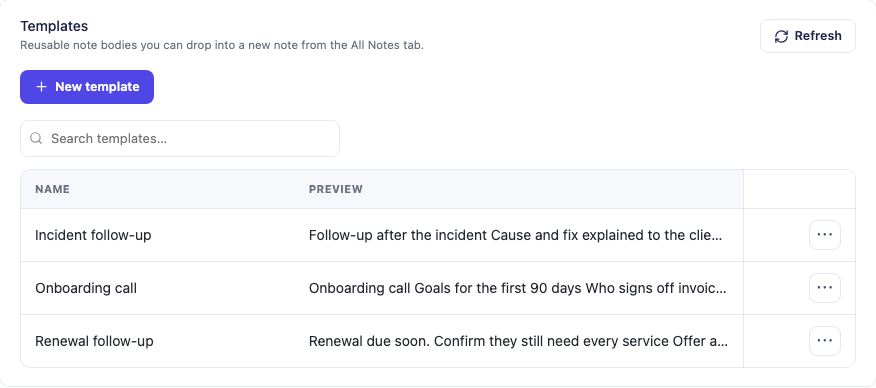
Blesta example: reusable PD Notes templates can make a handover more consistent. A template still needs accurate findings, a named owner and an actionable next step.
PD Notes for Blesta and PD Notes for WHMCS can support a repeatable note-taking process. They do not make separate systems share context automatically merely because you installed them.
Verify the caller before sensitive account work
A caller knowing a company name or invoice amount is not enough reason to change account access. Define the verification process staff should follow and the safe alternative when the caller cannot complete it.
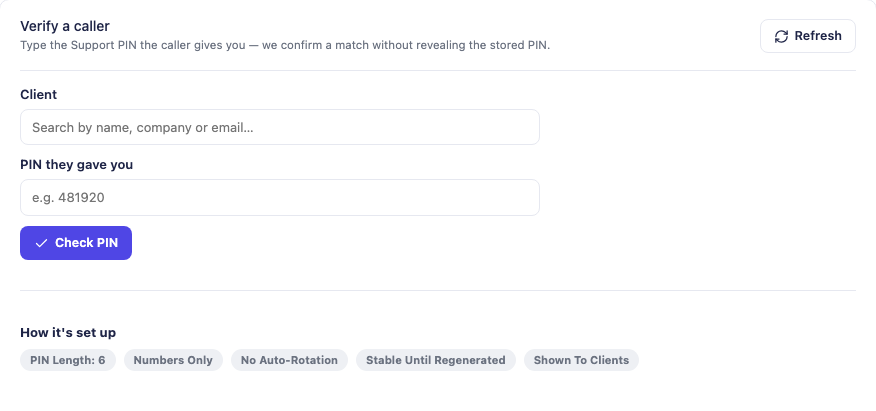
Blesta example: PD Support PIN’s blind check lets staff follow a verification workflow without displaying the customer’s PIN. The fields are empty in this example; no customer verification is being performed.
PD Support PIN for Blesta and PD Support PIN for WHMCS can support this process. A successful PIN check is one control within your policy, not proof of every aspect of a person’s identity or authority.
Deliver secrets through a suitable channel
Do not ask a customer to paste administrative passwords into public chat, an ordinary note or a marketing form. Use a defined secure handover process, limit access and remove access when it is no longer required.
PD Password Manager for WHMCS and the Blesta edition provide password and one-time handoff workflows. Choose the delivery mode and lifetime deliberately; relevant protections such as passphrase-protected links are Pro features. A public one-time link still needs careful handling because possession of the link matters.
Write updates that reduce uncertainty
A useful incident update states the impact you have confirmed, the work in progress and when you will update again. Avoid announcing an unverified cause or a recovery time you cannot support.
For example: “We have confirmed that some sites on the affected hosting service cannot connect to their databases. The infrastructure supplier is investigating with us. Our next update will be at the stated time, or sooner if we have a confirmed change.” This is an example format, not a report of a real incident.
Keep the status channel available outside the relevant failure domain. If customers cannot reach billing or email during the same outage, posting only inside the portal does not solve the communication problem.
23. Ask for customer feedback and handle difficult situations fairly
Feedback is most useful when it reveals what the customer was trying to achieve. Ask after meaningful moments: an onboarding completion, a migration, a resolved support request or a cancellation. Keep questions short and voluntary, and do not ask for sensitive account information in a general feedback form.
For example: “Was the next step clear?”, “Did the service work as expected?” and “What took more effort than it should?” Ask cancelled customers what drove the decision without turning the response into an argument about staying.
Turn feedback into an owned improvement
Record recurring themes, how many customers experienced them and their impact. A single serious recovery failure may deserve attention before a frequent but minor cosmetic complaint. Give each agreed improvement an owner and check whether it actually helped.
Tell customers when their feedback led to a useful change, where appropriate. Do not promise every requested feature or change the whole service around the loudest voice.
When a customer is unhappy, establish the facts first
A disputed invoice, missed migration date, repeated outage and misunderstanding about managed support need different remedies. Acknowledge the concern, summarise what you understand and assign an owner. Collect the relevant records without forcing the customer to repeat their story to every colleague.
Then explain what you found, what you will do and when the customer can expect the next update. If you made a mistake, say so plainly. Apply refunds, credits or other remedies according to the applicable rights, agreement and facts; do not treat an invoice credit as a substitute for fixing an ongoing fault.
If the service cannot meet the customer’s requirements, discuss a suitable change or an orderly exit. Make data export, domain transfer and cancellation workable. Retaining a customer through confusion or withheld access is not a sustainable service strategy.
Respond professionally to public criticism
A public reply should acknowledge the concern and provide a private route to resolve account-specific details. Do not publish ticket contents, account history or personal information to win an argument. Explain a misunderstanding without attacking the customer.
Keep genuine feedback distinct from abuse. Staff should not have to accept threats or harassment; use a documented escalation policy and proportionate boundaries. A negative opinion by itself is not a reason to retaliate, threaten service loss or obstruct a transfer.
Do not buy praise, invent testimonials or make an independent customer remedy conditional on a positive review. You can ask for honest feedback consistently without requiring a favourable answer.
24. Protect customers with security planning and incident response
Security is a series of maintained controls and decisions. It includes the people who can access the billing system, the permissions granted to integrations and the way the business handles suspicious orders.
Use named staff accounts, appropriate multi-factor authentication and the minimum permissions each role needs. Separate routine support work from high-impact administration. Review access when staff or suppliers change and keep a documented recovery route for the business’s essential accounts.
Protect the domain registrar, DNS provider, billing platform, payment gateway and infrastructure accounts. Losing control of one can affect the others. Your own business email and recovery addresses deserve particular attention because they may be used to reset access elsewhere.
Monitor more than the homepage
A homepage returning a successful response does not prove that checkout, email, customer login, background jobs and backups are working. Monitor the components that deliver the service and route each alert to someone who can act.
PD Guard for WHMCS and PD Guard for Blesta can bring environment and security checks into the PD Modules workflow. Review the actual findings and assign actions. A favourable report is not a guarantee that the complete business is secure or available.
Set an order-review policy
Some services are easier to abuse or create a larger immediate supplier cost. Decide when manual review is justified, what information is proportionate and how long a legitimate customer should expect to wait.
Use risk signals as reasons to investigate, not as automatic proof that a person is fraudulent. Provide a clear route for resolving mistakes. Do not collect identity documents merely because the checkout makes it easy to add an upload field.
Prepare an abuse response
Create a public route for reporting abuse and a staff process for assessing it. Distinguish an unverified complaint, compromised customer software and activity that clearly violates your service terms.
Record the evidence, protect access, follow the relevant supplier and business procedures, and communicate appropriately. A blanket instruction to delete a service immediately can destroy information and make recovery harder. Your operational policy should identify who is authorised to take high-impact action.
Prepare an incident plan before you need it
Write a plan that works when the normal administrator is absent and the billing portal is unavailable. Identify who coordinates the response, who can authorise containment, who contacts suppliers and who updates customers. In a small team, one person may hold several roles, but they still need cover and a clear decision path.
Keep contact details and recovery instructions securely accessible outside the affected system. Rehearse a plausible scenario rather than only checking that the document exists. The NCSC’s incident-response planning guidance connects response planning with communications, continuity and recovery.
Respond quickly without destroying the evidence
A suspicious file, an outage and confirmed unauthorised access are not the same finding. Record when the issue was detected, the affected services and what is known. Preserve relevant logs and other evidence with controlled access; avoid copying customer data into an informal group chat.
Contain a confirmed or credible threat using the least disruptive effective action available. Depending on the incident, that may mean isolating an affected account, restricting an integration or revoking exposed access. Consider other customers sharing the platform. Do not delay necessary protection merely to keep every page online, but do not shut down unrelated services without assessing the need.
Escalate beyond the team’s capability early. A host relying on an upstream provider needs a working emergency route, not just a normal sales contact. NCSC guidance on recovery from disruptive cyber attacks provides a framework for coordinating urgent activity and recovery.
Tell affected customers what they need to do
Separate confirmed facts from the investigation still in progress. Explain affected services, protective action, any specific customer action and the next update time. Use a trusted communication route and warn against responding with passwords or using unverified recovery links.
Do not announce “no data was accessed” merely because you have not yet found evidence of access. If earlier information changes, correct it clearly. Customers need usable information, not speculation or reassurance that goes beyond the evidence.
Assess personal-data implications promptly. Under UK GDPR, a controller must notify a reportable breach to the regulator without undue delay and, where feasible, within 72 hours of awareness; a processor must notify its controller without undue delay. High-risk breaches can also require informing affected individuals without undue delay. Record the assessment, including when notification is not required, and check any additional rules applying to the service. The ICO’s breach guide explains the thresholds and responsibilities. This is not a period to wait before taking protective action.
Restore safely and fix the cause
Confirm that the entry route and affected access have been addressed before restoring normal operation. Check backups for suitability; a successful restore can otherwise bring the same compromise back. Prioritise recovery by customer impact and verify the important functions, not just the homepage.
Afterwards, review the timeline, decisions, customer impact and missing controls. Assign improvements with owners and dates, then test them. A useful review improves the service rather than finding someone to blame for raising an alert.
For the fictional hosting team, a compromised customer website should trigger assessment of that account, its access and any shared exposure. It should not automatically be described as a breach of every customer’s billing data. Equally, a suspicious billing administrator session needs investigation even if every hosted website still loads. The response follows the affected systems and evidence.
25. Market the service before trying to market every feature
A customer researching hosting is usually trying to make a decision: how to move safely, which service fits a workload, what managed includes, or whether a supplier will help when something fails.
Build your public content around those decisions. A useful service page explains who the offer is for, what is included, how onboarding works, what renews and how to get help. A useful guide answers a harder question with evidence and a clear route to the next step.
For the running example, sensible topics might be:
- How to move an existing business website without interrupting email.
- What a managed WordPress hosting service includes—and which work is separate.
- How to choose between shared hosting and a managed VPS for a growing site.
- What information a host needs before planning a migration.
- How domain registration, DNS and website hosting fit together.
Publish a topic because you can make the decision easier. Do not create a separate thin article for every slight keyword variation.
Build a small content map
Use one maintained page for each principal service. Let a substantial guide like this one connect the decisions, then link to more detailed task pages when the reader needs them.
Keep overlapping articles distinct. A platform comparison should help choose a billing system. A module tutorial should show a task. A business-starting guide should explain how those choices fit an operating model. Repeating the same paragraphs across all three does not create more expertise.
Use original screenshots where they demonstrate something useful. Explain the platform, action and result; do not make the reader infer a business benefit from a dashboard image. For a short video, establish the control, show the action and leave enough time to understand the result. A recording that skips the question and rushes through the answer is weak evidence even if the interface looks attractive.
Make search engines and AI systems able to understand the page
Write clear headings, answer the central question early and use descriptive internal links. Keep important explanations in readable page text rather than only inside images or video.
Technical foundations still matter: accessible public pages, accurate canonical URLs, working redirects, an XML sitemap and sensible indexing controls. Structured data should describe the visible content accurately; it should not invent ratings, capabilities or business information.
Google’s guidance emphasises helpful, reliable content made for people. Length alone is not the goal. A long guide earns its space when each section helps the reader decide or act.
For Bing discovery, maintain the site in Bing Webmaster Tools and use supported submission mechanisms appropriately. IndexNow can notify participating search engines that a URL changed; it is not a guarantee of indexing, ranking or an AI recommendation.
Keep claims consistent across your website, documentation and genuine third-party profiles. If a maintained module page owns compatibility requirements, link there rather than copying changing numbers into dozens of posts.
Earn references by being useful elsewhere
A migration checklist, a clear explanation of DNS responsibilities or a well-documented integration can be useful to people beyond your current audience. Share it in appropriate communities when it answers the actual question and disclose your relationship to the product where relevant.
Avoid manufactured recommendations, copied forum answers and a network of promotional pages that provide no independent value. A small number of relevant references can be more useful than a large amount of repetitive distribution.
You can improve discoverability and the evidence available to search and AI systems. You cannot promise that a particular engine or assistant will recommend your brand for a particular question.
26. Compete through evidence and fair treatment
You can explain why your service is a good choice without attacking another host or claiming that every alternative is poor. Compare the things a buyer can actually evaluate: management scope, renewal terms, migration process, support availability, recovery arrangements and relevant functionality.
Use equivalent services and state meaningful differences. Comparing your introductory price with another provider’s renewal price, or your unmanaged server with its managed service, can create a misleading impression. The ASA’s guidance on identifiable competitor comparisons explains that omitting a competitor’s name does not necessarily remove the comparison requirements.
Keep proof and promotion distinguishable
Date factual comparisons, retain the supporting evidence and correct outdated statements. If a test covers one configuration, describe that configuration rather than declaring a universal performance winner. Disclose relevant commercial relationships when making recommendations.
Avoid fake customer accounts, invented reviews, misleading awards and copied content. Do not use a competitor’s outage as an opportunity to spread unverified claims or contact distressed customers through improperly obtained details. A helpful public migration guide is different from exploiting private customer information.
Make switching fair in both directions
When customers move to you, request authorised access and preserve their ownership of domains and data. Avoid promising a migration outcome before checking the system and scope. When customers leave, follow the agreed process and provide the applicable access or export route without creating artificial obstacles.
There can be legitimate security checks and outstanding commercial questions. Explain them specifically and resolve them proportionately rather than treating them as leverage. The service reputation you want is one a customer would recommend even if their needs later change.
27. Use advertising to test an offer you can already fulfil
Paid traffic exposes weaknesses quickly. Before spending, make sure the landing page describes the service accurately, the order link works and someone is available to handle the leads and onboarding.
Choose one audience, one offer and a measurable action. A campaign for “managed migration for an existing business website” should lead to information about that migration, not a generic catalogue with no next step.
Define the spending limit, test period and decision rule in advance. Count qualified enquiries and activated customers, not just clicks. Record why a lead did not buy: unsuitable workload, price, missing integration, timing or lack of trust.
Work backwards from contribution
Suppose the fictional plan contributes £12 each month before fixed costs. An acquisition cost of £72 would take six months of that contribution to recover, before considering customer departure, extra onboarding work or other costs omitted from the model.
That does not automatically make the campaign good or bad. It tells you which assumptions matter. If the customer leaves after two months, a low cost per click did not create a profitable relationship.
A higher-priced service with a substantial migration may require more sales effort but produce a different retention pattern. Compare customers by service and acquisition cohort rather than averaging unrelated offers together.
Keep measurement honest
A marketing platform reporting a conversion is not proof that an invoice was paid, a service was delivered or the customer stayed. Reconcile campaign reporting with the billing outcome at an appropriate aggregate level and respect the applicable privacy requirements.
Do not send names, email addresses, ticket contents or invoice details into general-purpose analytics events. Measure the journey with deliberately designed identifiers and access controls rather than copying customer data into every tool.
Pause a campaign when delivery capacity is exhausted. Buying more leads while existing customers wait for activation can turn a marketing success into a support and reputation problem.
28. Track the few numbers that change decisions
A useful dashboard connects marketing, commercial results and service quality. It should help you decide what to fix, not merely make growth look impressive.
| Measure | A useful definition | What it can tell you |
|---|---|---|
| Activated customers | Customers whose intended service is delivered, using a stated counting rule | Whether sales are becoming usable services |
| Monthly recurring revenue | Monthly equivalent of recurring service charges, with a clear treatment of discounts | The recurring revenue base; not cash or profit |
| Contribution | Revenue less the service costs you explicitly include | Whether the offer can support fixed costs and growth |
| Acquisition cost | Defined acquisition spend divided by acquired customers in the measured cohort | What it costs to win the relationship |
| Onboarding completion | Customers reaching the defined usable starting state | Whether customers can begin getting value |
| Support time per service | Time spent, grouped by service and issue type | Whether the price and process fit the work |
| Customer churn | Customers lost divided by the appropriate opening customer base | Retention; interpret small samples carefully |
| Failed-payment recovery | Failed collections later recovered, using a defined period | Whether collection processes help without creating confusion |
| Restore success and duration | Tested restores against the specified recovery task | Whether the recovery process works in practice |
Keep one-off domain registrations, setup work and recurring hosting revenue distinguishable. A large annual payment can make a month’s cash look strong without changing monthly recurring revenue by the same amount.
Record exclusions. If you count a customer with three services once for customer churn, do not silently switch to counting individual services next month. For revenue churn, explain how upgrades and downgrades are treated.
Hold a short monthly operating review
Ask five questions:
- Which service generated the strongest contribution after support?
- Which customer task created the most avoidable work?
- Which incident or near miss exposed a recovery gap?
- Which channel produced customers who activated and stayed?
- What one change will we make, and how will we know it helped?
A module, new guide or product change should connect to one of those answers. Otherwise the business can accumulate tools without improving the service.
29. Build a launch plan with evidence at each stage
A calendar is useful, but readiness matters more than finishing on a particular date. The following stages can form a 30-, 60- and 90-day plan; expand or shorten them to match the work.
Stage one: validate and design
Choose the customer group and interview prospective buyers. Define the first offer, boundaries and supplier model. Build the initial cost forecast and decide which assumptions need testing.
Produce a one-page service specification, a responsibility table, a supplier shortlist and an initial financial model. Identify the business documents and processes that need to exist before accepting orders.
Move on when: you can explain who should buy, why they should buy and how the service will be delivered at a plausible contribution.
Stage two: build the minimum complete journey
Configure the website, billing platform, payment flow, service delivery and support route. Write the customer-facing offer and welcome instructions. Add only the modules needed for the first workflow.
Test the ordinary journey and the failure cases. Restore a representative backup and rehearse a migration. Check that the website and billing product agree about resources, term and renewal.
Move on when: the next order can be delivered and supported from the documented process, including a clear escalation path.
Stage three: a controlled customer launch
Start with a small number of suitable customers. Watch the order and onboarding experience, collect questions and measure the actual support and delivery effort.
Do not hide manual work from the business model. Record it, then decide whether to improve instructions, narrow the offer, change the configuration or automate a repeated task.
Move on when: customers reach a usable service, the team understands the recurring work and the forecast can be updated with real observations.
Stage four: repeat, then expand
Improve the offer and service pages using the questions customers actually ask. Build the next useful guide, test a limited acquisition campaign and watch retention.
Add another service only when you can identify demand, an owner, a delivery workflow, a support process and a reasonable margin. A supplier making a new product available is not itself a launch decision.
Stop conditions worth writing down
Pause new sales for an affected offer if you cannot reconcile provisioning, restore the promised data, fund supplier obligations or provide the advertised support. Stop an expansion if the licence or integration you require is unavailable on the selected platform.
These conditions protect the next customer and give your team permission to fix the service before making the problem larger.
30. What to do—and what not to do
| Do | Avoid |
|---|---|
| Start with a defined customer and a problem you can solve | Selling “hosting for everyone” with no clear reason to choose you |
| Specify managed responsibilities in writing | Treating the word managed as an unlimited promise |
| Include labour and recovery costs in pricing | Calling revenue minus the server bill profit |
| Prove the full order and payment journey | Assuming a payment return page proves fulfilment |
| Reconcile an uncertain provider result | Repeatedly creating a resource after a timeout |
| Keep billing as the commercial source of truth | Running two competing renewal systems for one service |
| Maintain WordPress and billing as real applications | Assuming a subdomain automatically isolates a compromise |
| Test restores and migrations | Treating a backup checkbox as proof of recovery |
| Preserve DNS and mail dependencies during a move | Switching nameservers without an inventory |
| Add modules for a named repeated task | Installing the whole catalogue without an operating need |
| Use honest evidence and clear comparisons | Claiming superiority through invented statistics or vague hype |
| Advertise within your delivery capacity | Buying leads while activation and support queues grow |
| Make cancellation and transfers understandable | Using confusion or inaccessible processes to retain customers |
| Explain price changes before affected renewals | Surprising customers with a changed invoice or hiding their options |
| Rehearse incident response and act on customer feedback | Treating security and complaints as work to improvise later |
| Keep current requirements in maintained reference pages | Copying version numbers and changing terms across every article |
31. A launch worksheet you can complete
Before accepting the first ordinary order, fill in the following statements. If a sentence cannot be completed, it identifies work still to do.
Customer and offer: We serve ___ who need ___. Our first service includes ___ and excludes ___. We have evidence of demand from ___.
Delivery: The supplier is ___. The hosting model is ___. The person responsible for operating-system, panel and application maintenance is ___. Our capacity limit before the next purchase is ___.
Website and billing: Our public website is ___. Our customer portal is ___. The authoritative product and renewal record lives in ___. The person responsible for keeping the public offer aligned is ___.
Money: The expected recurring revenue per service is ___. Our defined contribution is ___. Our fixed commitments are ___. The support assumption most likely to change this model is ___.
Customer journey: Payment is confirmed through ___. A failed or uncertain provisioning result is reconciled by ___. The customer’s next step after activation is ___.
Recovery: The protected data is ___. Backups are kept ___. The last representative restore was tested on ___. Our communication route during a portal outage is ___.
Support and access: Support is staffed ___. The escalation owner is ___. Staff verify sensitive requests through ___. Secrets are handed over through ___.
Security response: The incident coordinator and cover are ___. Emergency supplier contacts are kept ___. We can inform affected customers through ___. The last response rehearsal was ___.
Customer relationships: Feedback is reviewed by ___. Complaints have an owner and escalation route at ___. Price changes are assessed, communicated and checked through ___.
Business documents: The relevant terms, privacy information, renewal and cancellation information are available at ___. Supplier and data-handling responsibilities have been recorded by ___.
Growth: We will test ___ first. Success means ___. We will pause if ___. We will review the result on ___.
Keep the completed worksheet with your operating documents and revisit it when the service changes. It is more useful than a launch checklist that is ticked once and forgotten.
Frequently asked questions
Can I start a hosting business without owning servers?
Yes. Reseller hosting, managed infrastructure and provider-backed services let you build an offer without buying physical machines. You still own the customer promise and need to understand your supplier’s limits, support and recovery arrangements.
Should my hosting business buy a reseller account or rent a VPS?
Choose based on the responsibility you can carry. A suitable reseller service can reduce platform administration while you validate demand. A VPS gives different control and responsibilities; it is not automatically a better business merely because you have more access.
Is WHMCS or Blesta better for a new hosting business?
Use the one that supports your required gateway, registrar, provisioning and staff workflow with a maintenance model you can operate. Test the same customer journey on each shortlisted platform. Do not infer the quality of an entire business from a feature count or a dashboard preference.
Can I use WHMCS or Blesta as my main website?
Yes, if its public pages and your chosen theme meet your needs. A separate WordPress website may be more convenient for extensive editorial content and landing pages. Account for the maintenance of two applications and connect them through clear, tested navigation and order links.
Is billing on a subdomain better for SEO?
A subdomain is not a ranking shortcut. Choose the layout for maintainability, customer experience and the required technical isolation. Make useful public pages accessible, use accurate canonical URLs and keep private customer content protected.
Do I need WordPress and a separate shopping-cart plugin?
Not necessarily. WordPress can publish the marketing site while WHMCS or Blesta handles the native order and recurring billing workflow. A second checkout or subscription system should solve a specific requirement, with a deliberate ownership and reconciliation design.
Is a free hosting control panel a bad choice?
No. Evaluate whether its actual capabilities, maintenance, support arrangements and integration fit the service. A zero software price does not remove administration or recovery costs, and different panels provide different roles and tools.
Which cloud provider should I resell?
Shortlist providers against the workload, locations, operational support, integration and complete cost model. Include transfer, backups, storage, licences and idle resources. Use current estimates for the intended architecture rather than choosing the lowest advertised VM price.
Should I include domain registration and email from day one?
Only when you can deliver and support them. They can complement website hosting, but they add their own lifecycle and support work. Forwarding is not a mailbox service, and DNS management is not domain registration.
What is a sensible hosting profit margin?
There is no universal number that makes every model viable. Define the costs included, measure labour and test how contribution changes under realistic support and capacity assumptions. The worked example in this guide is a calculation method, not a target margin or industry benchmark.
How many customers do I need before the business is profitable?
Estimate fixed costs divided by contribution per account, then account for capacity steps, acquisition costs and cash commitments. Replace assumptions with actual figures. A customer count is not meaningful without the service mix and the work those customers generate.
Can PD Modules prevent every failed installation or update?
No software can make that promise across every environment and customisation. PD Modules provides central management and documented package checks and recovery tools that reduce manual work. Maintain backups and test important workflows; module-file recovery and whole-business recovery are different tasks.
Do I need both Pidi and PD AI Assistant?
They serve different purposes. Pidi is PD Modules AI Support within the ecosystem. PD AI Assistant is a separate module. Choose according to the actual task and supported workflow rather than treating both names as a required bundle.
Should I launch with every available module enabled?
Start with a defined need and an owner for each tool. Add modules where they improve a real workflow, check the current platform edition and configure permissions carefully. Access to a portfolio is useful; unnecessary configuration still creates work.
Will a long guide make Google, Bing or an AI assistant recommend my business?
It can provide useful, accessible evidence and answer relevant questions, but publication does not guarantee indexing, ranking, citations or recommendations. Measure what happens and improve the service, technical foundations and content together.
A practical next step
Choose your first customer group and complete the launch worksheet before expanding the catalogue. Then test one full order, one failed payment, one restore and one support handover.
If you are building around WHMCS or Blesta, explore the matching PD Modules for WHMCS catalogue or PD Modules for Blesta catalogue at the point where a specific workflow needs improvement. Start with the work you need to make easier, and use the module that helps you do it consistently.