Forward a domain or its email — without hosting it. Set up URL and email forwarding inside Blesta.
Made and supported by Projektif Digital Ltd.
Runs inside PD Modules, the panel
every module installs into.
Clients & ProductivityDomains & DNSBETA
Connect the DNS backend you already run — Cloudflare, cPanel, DirectAdmin or Plesk — and every domain on it becomes something you can forward and sell.Every forward across every domain in one list — website redirects and email routing both — so a support question is answered without opening a DNS panel.Customers see their own domains and set up forwarding themselves from their account — no ticket, no waiting on you.1 / 3
PD Domain & Email Forwarder lets a hosting company or domain business sell website and email forwarding for domains that have no hosting. A customer registers a domain with you, then points it at their social page, shop or existing site, or sends sales@ and info@ to the mailbox they already use, and does it themselves from your Blesta client portal. There is no hosting service to set up, no control panel to hand out and no ticket to answer.
It is built for registrars and hosts who sell domains and want the people who only need a redirect or a forwarding address to have something to buy and something to use.
Why hosts choose PD Domain & Email Forwarder
Sell forwarding without selling hosting. A domain can forward its website, forward its email, or both, with no hosting service behind it. That gives your parked and bare domains a use, and gives you a reason to charge for it.
Customers set it up themselves. From My Tools in the client portal a customer picks a domain, enters where visitors should go and chooses the redirect type, or enters a mailbox and where its mail should land. Both are live in minutes and never reach your support queue.
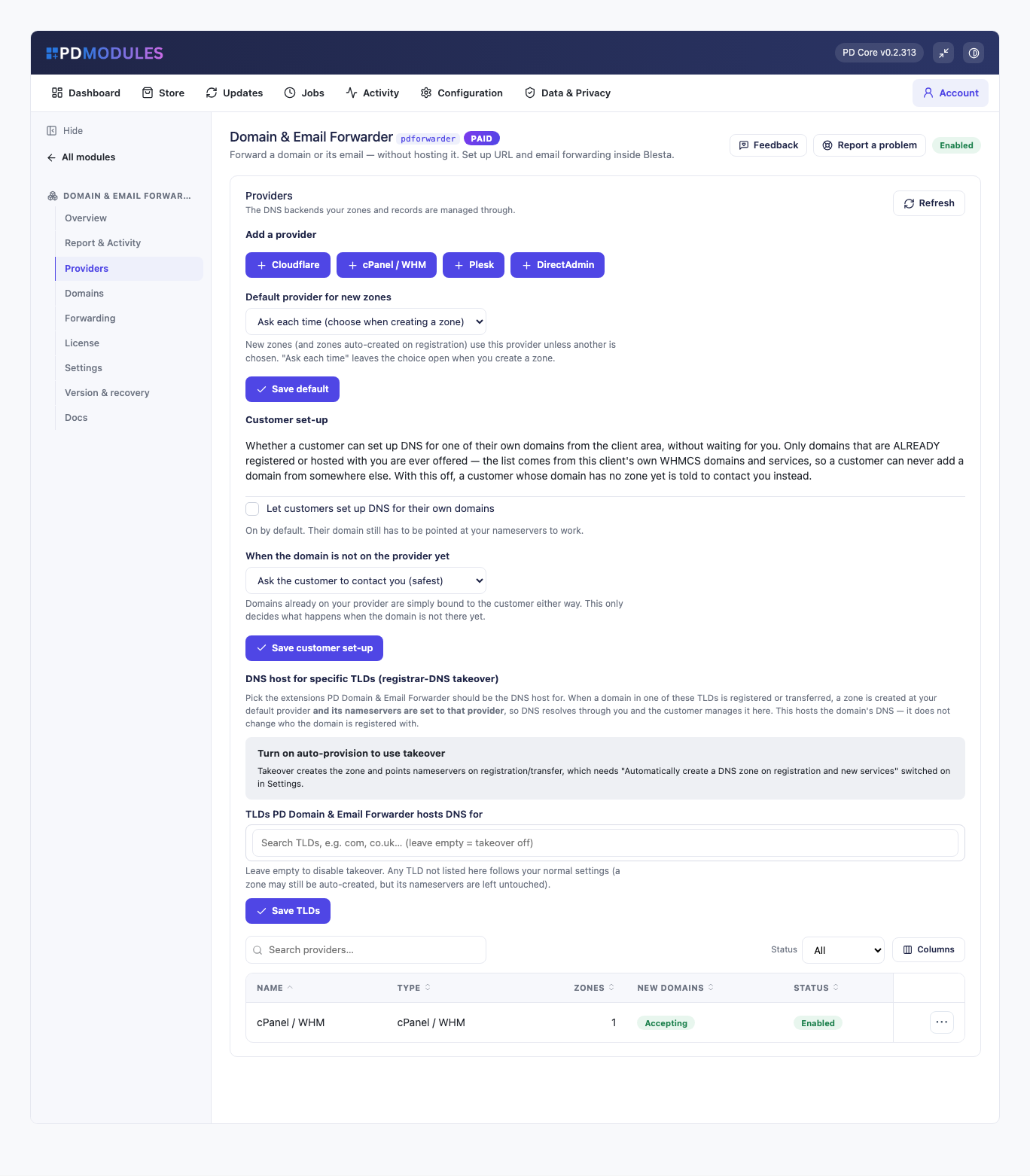
It uses the DNS you already run. Connect the DNS provider you already have and the module writes the forwarding to it. Zones are read live from the provider, so there is nothing to import and nothing to keep in step.
It warns before it breaks something. Before a forward is created, you are warned if the domain already has active hosting or if a record already answers for that name. The forward goes ahead only when you confirm. When a customer turns on email forwarding for a domain whose mail is already delivered elsewhere, they are warned first.
The records that make forwarding work are protected. The address record and the forwarding mail records a forward relies on cannot be edited or deleted on the records page or through the API. Changing the forward is how they change, so a stray edit cannot silently break a customer's redirect.
Simple to buy. One subscription covers it, with no per-domain or per-forward fee. Your DNS provider bills you directly, as it does today.
How it works
Connect your DNS provider. Add the account with its credentials and press Test connection, which says whether the module can reach it and what to fix if it cannot. You can add more than one account.
Get your domains in. Every zone in the account is listed with no import step. Track matched zones binds each zone that matches an active Blesta domain or service to the right client, and nothing at the provider is changed. With auto-provision on, a zone is created and bound when a domain, or a service with a domain, is activated.
Customers forward. They open My Tools in the client portal, pick a domain and add website forwards, email forwards or a catch-all.
You watch it. Every forward and every provider change is logged, with who made it and whether it worked.
Connect the DNS backend you already run and every domain on it becomes something you can forward and sell
What you get in Blesta
Forwarding
Website forwards from a domain, or a host such as shop.example.com, to any web address, with the redirect type the provider offers: 301 permanent, 302 temporary and 303 where supported
Options for the www version, all subdomains and keeping the visited path, where the provider supports them
Email forwards from a mailbox to one or more destinations where the provider allows several, plus an optional catch-all for unmatched addresses
A destination that has to confirm by email is told so
Conflict warnings before a forward overrides active hosting or an existing record
Forwarding for domains that have no hosting at all
Domains and zones
Zones listed live from the provider, searchable and filterable by provider, status and client, paged on the server so a large account stays fast
Each zone shows its client, nameservers, health, sync state and when it was last backed up
Assign a zone to a client with a searchable picker; zones the module does not track yet are flagged
If a provider is unreachable, the list still shows the zones from the last good read, marked as such
Create zone from the panel, and delete one only after a confirmation
Running it day to day
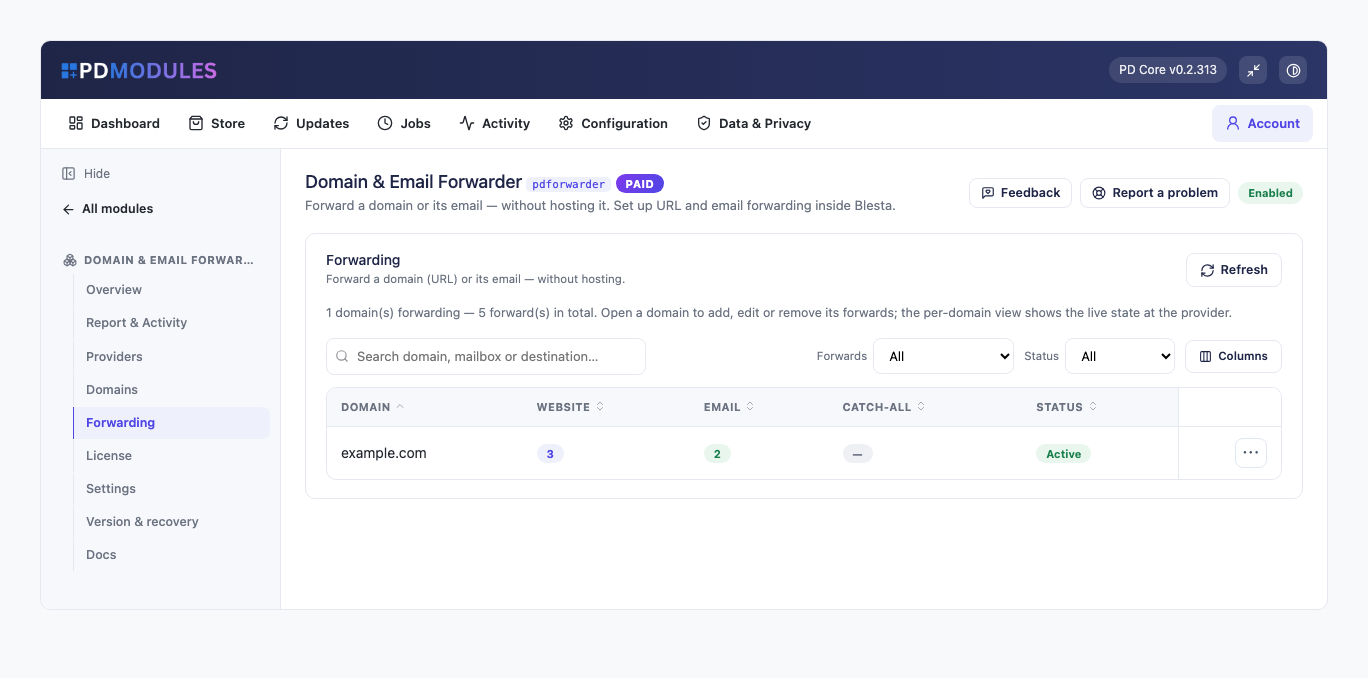
One Forwarding list of every domain with its website forwards, email forwards, catch-all and status, so a support question is answered without opening a DNS panel
Background checks on Blesta's own cron: health hourly, reconcile every six hours, orphans daily, backups hourly
A zone whose domain or service has been cancelled is flagged, and nothing is deleted at the provider unless you decide
Optional emails to customers and to your team, all off by default
A full activity log of provider changes, zone syncs, client bindings and forward changes
Zones stay in place at your provider when a service is terminated, unless you switch that off
Every forward across every domain in one list, website redirects and email routing both
What your customers get
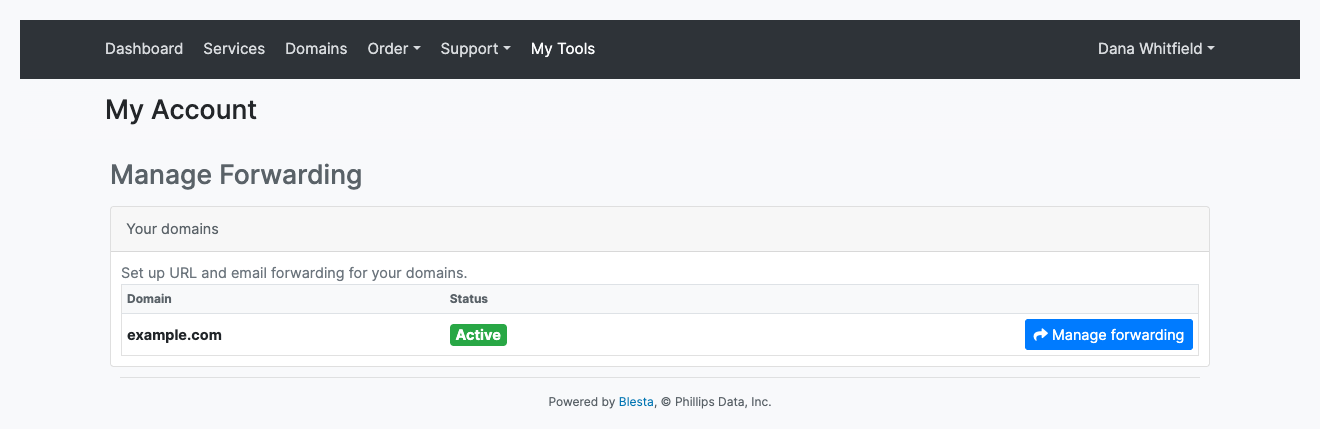
A list of their own domains with a Manage forwarding button on each, reached from My Tools in the client portal menu
Website forwarding with the destination, redirect type and options in one form, and a list of current forwards they can remove
Email forwarding for a mailbox, with a catch-all for the rest
Only their own domains. A customer sees and changes only zones bound to their account, enforced on the server
Clear wording that never names the provider behind it
Email forwarding is on for customers by default. Customer set-up of their own domains is off by default: a domain that is not yet at the provider goes to your support team, unless you choose to add it automatically.
Customers see their own domains and set up forwarding themselves from their account
The pages use Blesta's own client portal look and every string is translatable, with wording overrides that survive updates.
Security built in
Provider credentials are stored encrypted in your Blesta database and never shown back in the form.
Credentials are used only to read and update zones and forwarding in the connected account, and never reach a customer's page.
To rotate a credential, edit the provider, enter the new one, test and save, then revoke the old one.
One product, every feature
PD Domain & Email Forwarder is one paid module with everything included. It activates from your PD Modules subscription with no key to paste, adds its own tables, modifies no Blesta files and uninstalls cleanly.
If your subscription lapses, your DNS records are never touched and the provider keeps serving every zone and forward. Admin management locks first while customers keep their own self-service, and customer management stops later behind a neutral message. Renewing restores everything.
Requirements
Blesta 6 or later on PHP 8.2 or later, with the ionCube Loader
An account with a supported DNS provider, such as Cloudflare or cPanel/WHM
PD Modules, the free control panel every PD module installs into
Questions
Do my customers need hosting for this to work?
No, and that is the point. Forwarding needs DNS, not a web or mail server, so a domain with no hosting behind it can still redirect visitors and forward mail.
What is the difference between a redirect and a masked forward?
A redirect sends the visitor to the destination, and their address bar shows it. A masked forward keeps your customer's domain in the address bar and loads the destination inside a frame. Redirects are better for search engines; masking is what customers usually ask for by name.
Does HTTPS work on a forwarded domain?
Yes. A certificate is needed for the source domain so visitors arriving on https:// do not see a warning, and the module handles that as part of setting the forward up.
Can customers set up their own forwards?
Yes — that is how it is meant to be used. Customers manage their forwards in the client area, so adding one does not become a support ticket for you.
Will forwarded email be treated as spam?
Forwarded mail is re-sent from your infrastructure, so the domain's SPF record needs to permit that. The documentation covers exactly what to publish; get it right and delivery is normal.
Does this work with my existing DNS?
Yes. Forwards are created as ordinary records in the domain's zone, so everything stays visible and editable through whatever you already use — nothing is locked inside this module.
How long before a new forward works?
As long as DNS propagation takes, which is usually minutes but can be longer depending on the previous record's TTL. Until then some visitors reach the new destination and some do not, which is normal rather than a fault.
Can I sell forwarding as a package?
Yes. Attach it to a domain product as a paid configurable option, or include it free to make your registrations more attractive. Both are ordinary Blesta package setups.
What happens if my subscription lapses?
Nothing of yours is touched, and nothing is deleted. The module steps down in stages instead: a 14-day grace period where everything still works and you get a renewal reminder, then admin management locks while your customers carry on being served, and only after that do the customer-facing features stop — behind a neutral "temporarily unavailable, please contact support" message that never mentions licensing to your customer. Anything the module provisioned keeps running in your own account throughout, and your data and settings stay exactly where they are. Renewing restores everything immediately.
What does it cost to run, on top of the subscription?
Only what you already pay your provider. PD Domain & Email Forwarder adds no per-unit fee and takes no cut — it connects to your own account with your own credentials, so the provider bills you directly at your rates, and you set what you charge your customers. From us it is the module subscription and nothing else.
What data leaves my server?
Your customers' data stays in your Blesta. To confirm your licence, the platform sends us four things and nothing else: your licence key, the domain, your server's own IP address and the directory it is installed in — the four values recorded against your licence in your client area. Alongside that we see which module and version you run and whether its licence is healthy, so we can ship compatible updates. We never receive your clients' personal data, your credentials, or the contents of your Blesta. Crash reports are off unless you turn them on, and a diagnostic report is only ever sent when you send one, after showing you a preview you can edit.
Which Blesta and PHP versions does it need?
Blesta 6.0 or later, on PHP 8.1 or later. It installs alongside whatever else you run — it adds its own tables and templates rather than modifying Blesta files, so it does not collide with other vendors' modules or with a customised template. Uninstalling removes its own tables and settings and leaves no orphans behind.
What’s new in 0.1.115
The navigation-link and domain-page settings, which had no effect, no longer appear.
AI assistants now get DNS tool descriptions that match your billing system.
Accounts with many Cloudflare zones now list them reliably.
 Featured