PD DNS Manager — Multi-Provider DNS Zone & Record Management for Blesta
Manage DNS zones and records for any provider — Cloudflare, Route 53, cPanel, PowerDNS and more, in Blesta
★★★★★5.0 · our rating, not customer reviews
Made and supported by Projektif Digital Ltd.
Runs inside PD Modules, the panel
every module installs into.
Domains & DNSBETA
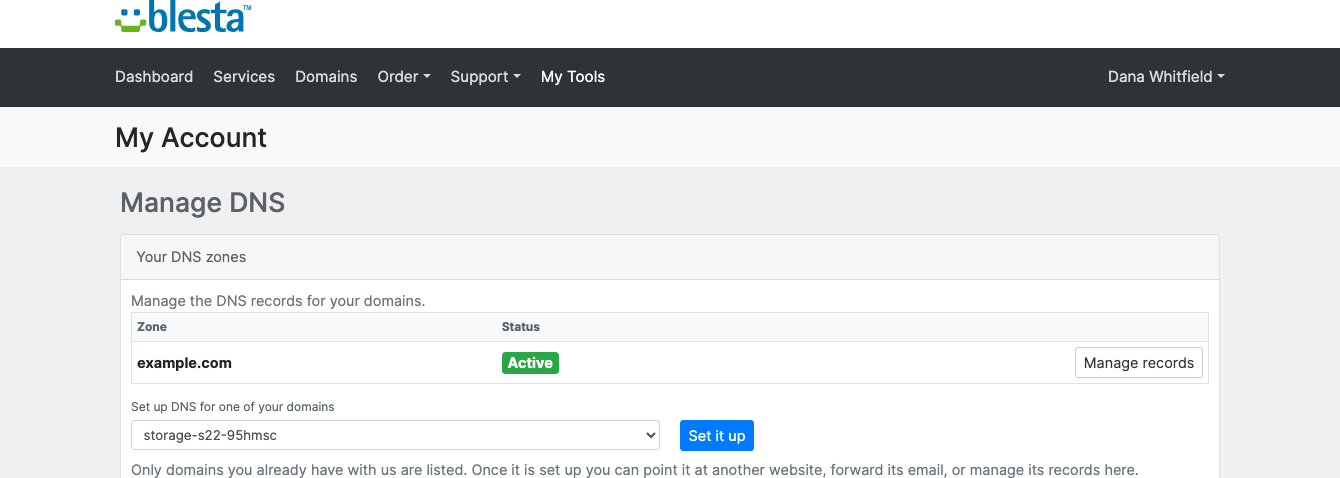
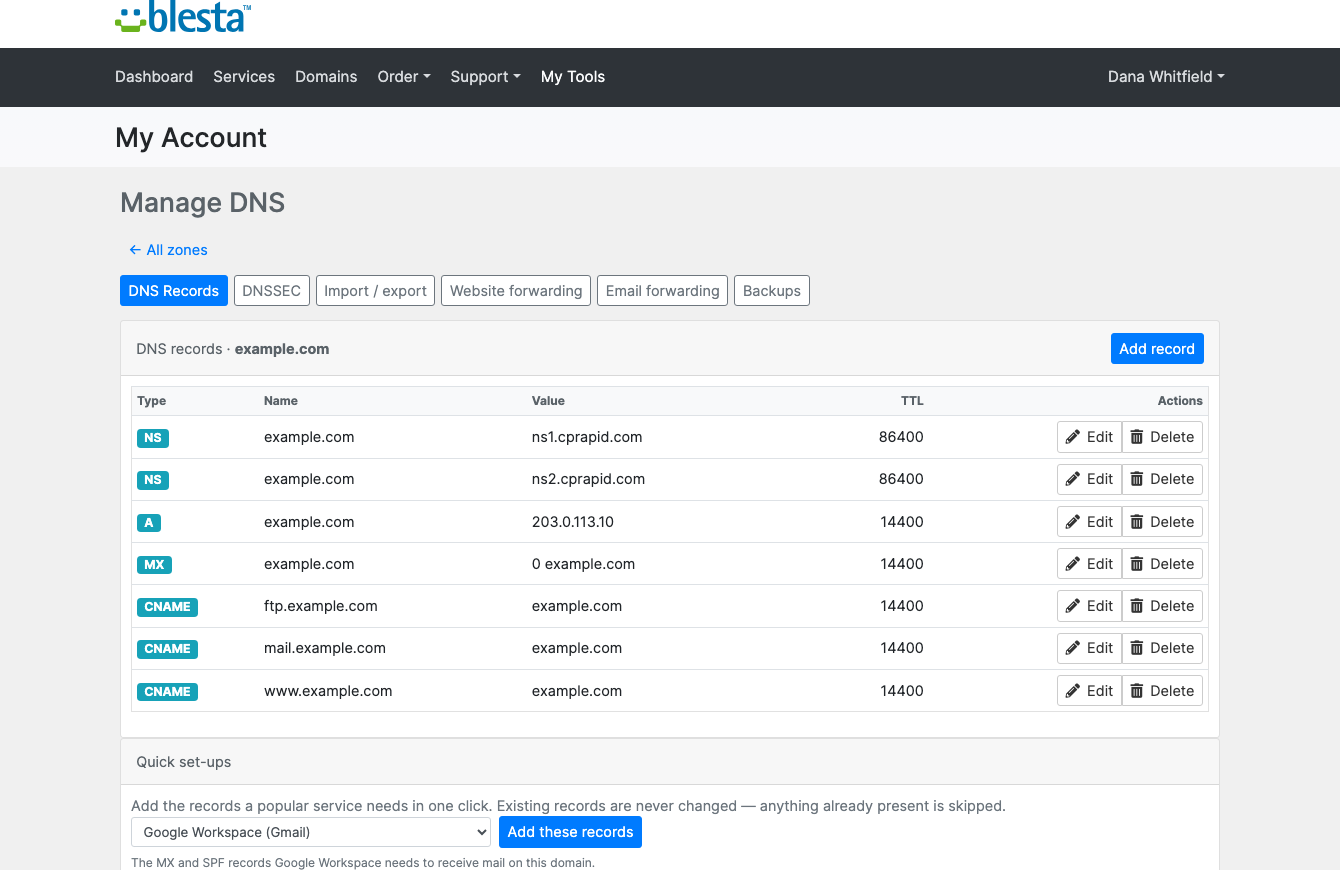
Connect Cloudflare, Route 53, Azure, Google Cloud, cPanel, Plesk, DirectAdmin, PowerDNS or BIND — one module, every backend you already run.Every zone across every connected backend in one list, with the client it belongs to and its health.Records read live from the backend and edited in place — a DNS change never means logging into the provider.Your customers see the zones that are theirs, and nothing else.Your customers manage their own DNS: records, DNSSEC, import/export, website and email forwarding, and backups — with one-click set-up for Google Workspace and the other services they ask you about.1 / 5
PD DNS Manager lets a hosting company run DNS for its customers on whatever DNS service it already uses, or several at once, from one screen in Blesta. Connect Cloudflare, AWS Route 53, cPanel/WHM, Plesk, DirectAdmin, DigitalOcean, Google Cloud DNS, Azure DNS, OVH, Hetzner DNS, Gandi LiveDNS, deSEC, DNSimple, Vultr DNS, PowerDNS or BIND 9. Your staff and your customers get the same zone and record editor on every one of them.
It is built for hosts and registrars whose DNS is spread across more than one provider, or who expect to change provider one day, and who do not want a different tool and a different support answer for each.
Why hosts choose PD DNS Manager
One module for every DNS backend. A DNS module that drives a single provider means one more module, and one more set of screens, for every extra provider you use. PD DNS Manager drives sixteen backends through one interface, and lets you connect more than one account of the same provider.
Change provider without a customer noticing. Mark a provider "Existing domains only" and it keeps serving its zones while new zones go to the next provider that accepts them. To leave a provider, move zones between providers with a dry run first. It shows what will be copied, what is skipped by record type, what has a TTL raised and where DNSSEC needs attention. The source is never changed, every record is verified at the target, and management moves only for zones that verified.
Nothing to import. Zones and records are read live from the provider, so there is no local copy to drift out of date. Track matched zones binds every zone that matches an active Blesta domain or service to its client in one go, and nothing is changed at the provider.
DNS that sets itself up. With auto-provision on, a zone is created at your default provider when a domain, or a service with a domain, is activated, and is bound to the client. If a server refuses at that moment, the domain is queued and retried every 15 minutes at first, then less often, for up to seven days, and the customer is told once, when it works.
A second copy of your DNS. A replication pair mirrors every zone of one provider onto another, record by record, hourly or on demand, creating missing zones as it goes.
Fewer tickets. Customers edit their own records, switch on DNSSEC, import and export zone files, take and restore their own backups and set up Google Workspace in a click, all from My Tools in the client portal.
How it works
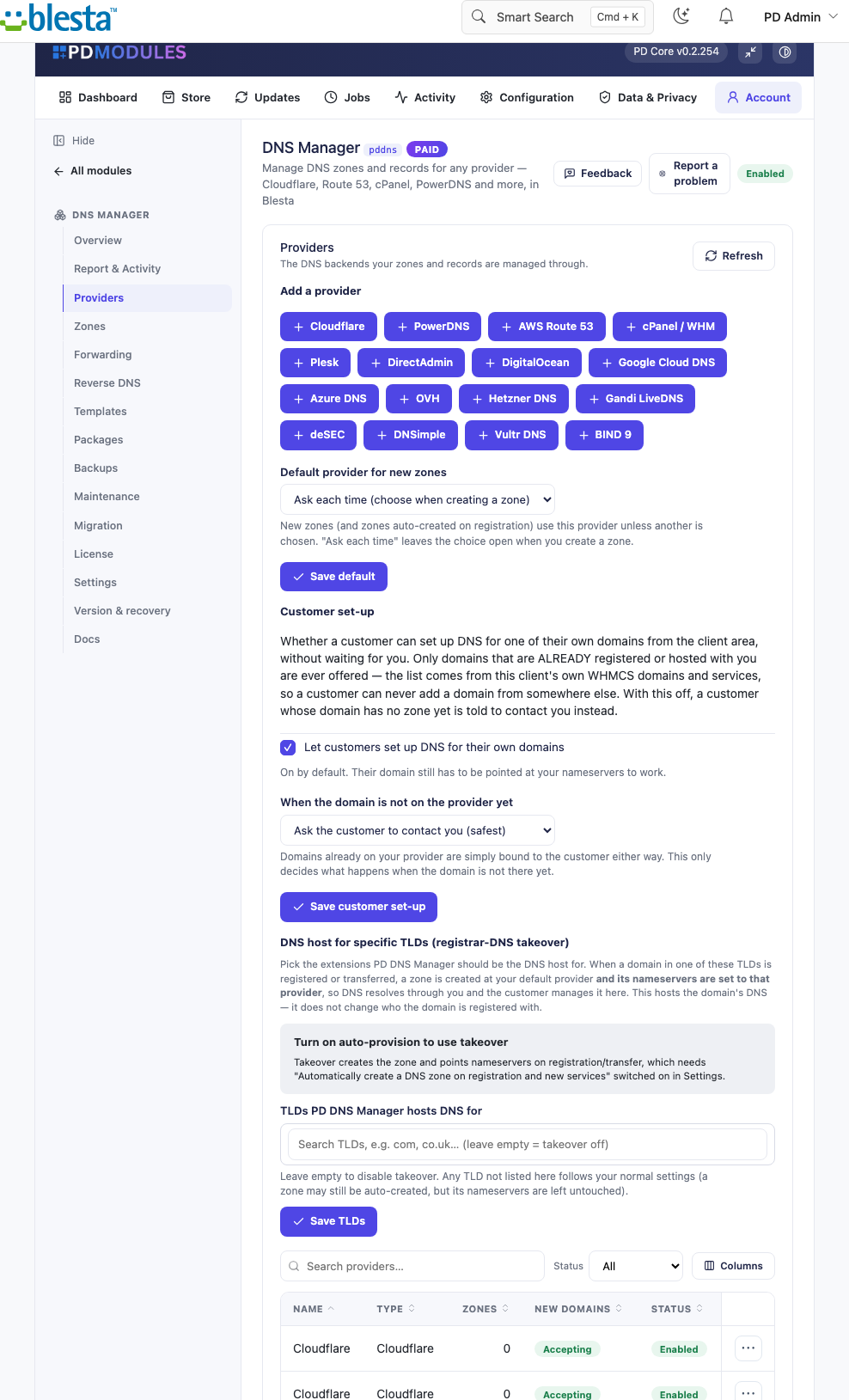
Connect your providers. Choose a backend, enter its credentials and press Test connection, which says whether the module can reach the account and what to fix if it cannot. Pick a default provider for new zones.
Decide how zones appear. Switch on auto-provision, choose the extensions you host DNS for so nameservers are pointed at you on registration or transfer, or create zones by hand.
Set the rules. Create quota packages and link them to your Blesta packages, add record templates and set the content policies customers must stay inside.
Your customers take over. They manage their own zones in the client portal. Every change is logged with who made it.
Your customers manage their own DNS: records, DNSSEC, import and export, website and email forwarding and backups, with one-click set-up for Google Workspace
What you get in Blesta
Providers and zones
Sixteen backends, several at once, each with a Test connection before you save
A default provider for new zones, and an "Existing domains only" setting to retire one gracefully
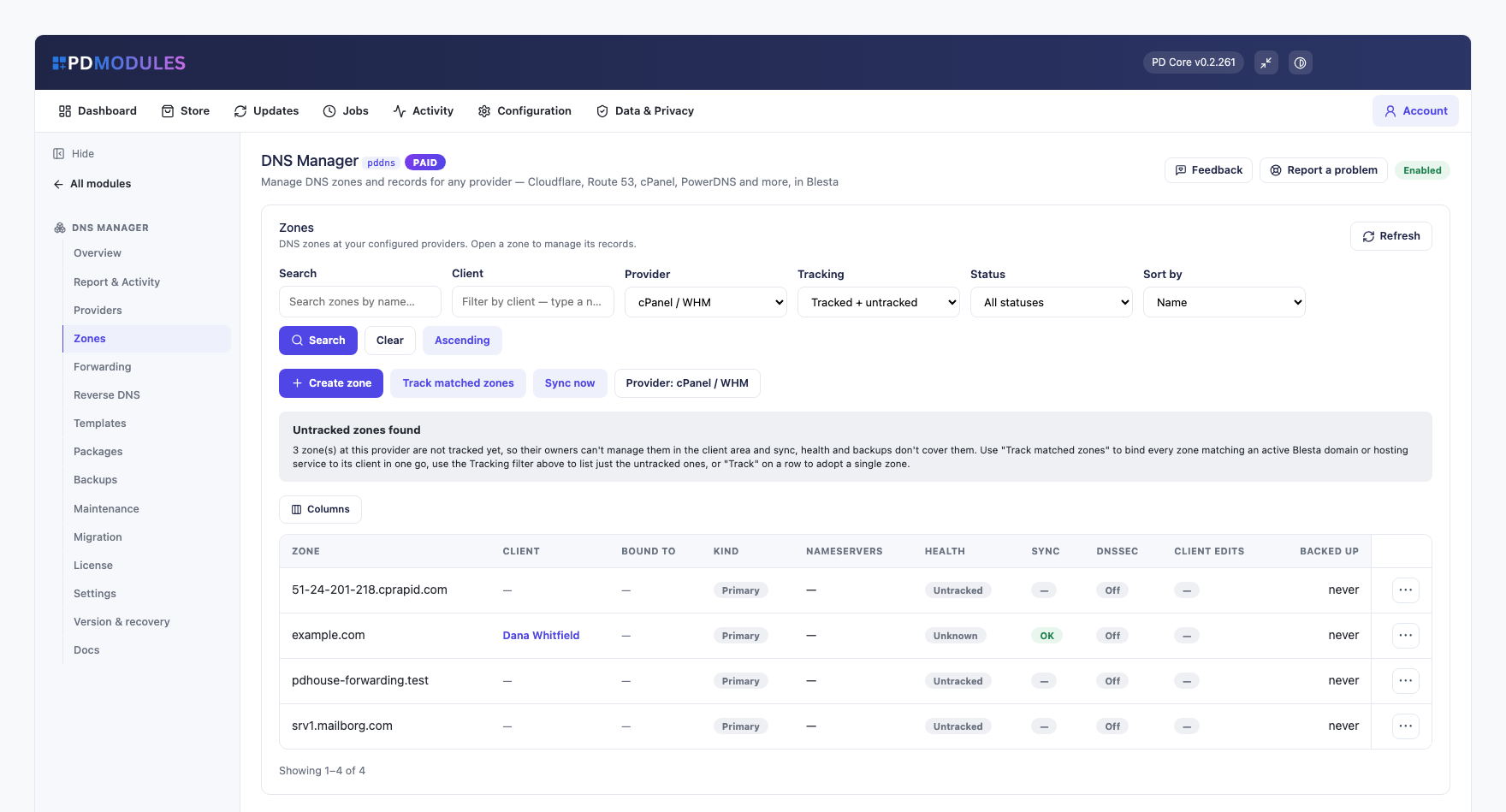
Zones list with search and filters by provider, tracking state, status and client, paged on the server so it stays fast with thousands of zones
Each zone shows its client, nameservers, health, sync and DNSSEC state, whether client edits are locked and when it was last backed up
Create zone, assign a zone to a client with a searchable picker, lock a zone against customer changes, delete a zone only after a confirmation
Untracked zones are flagged; Track matched zones adopts them without touching the provider
If a provider cannot be reached, the Zones screen still shows the zones from the last good read, marked as such
Records
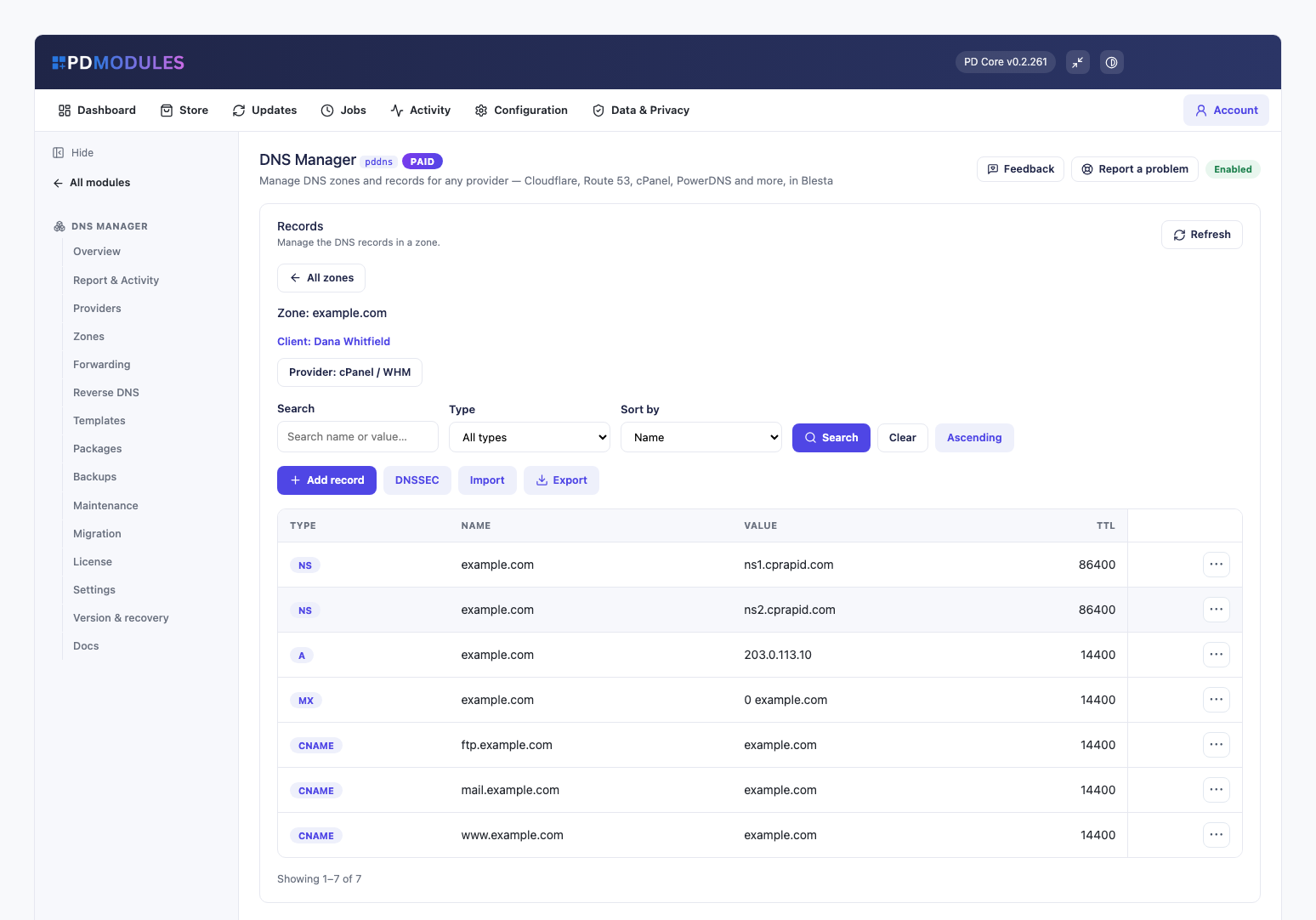
A type-aware editor that shows only the fields a record type needs and checks addresses and hostnames before anything reaches the provider
Records read live and written straight back, with search, type filter and server-side paging that reaches every record of a very large zone
Import a BIND zone file with a preview of how many records will be added; export any zone as a BIND file
DNSSEC per zone with one button, with the DS record shown ready to copy for the registrar
Record templates with merge fields such as {domain}, {ip} and {ns1} to {ns5}, applied from a zone's menu; applying twice is safe
Bulk operations that add, update or delete a record across many zones in the background, with per-zone results
Reverse DNS: add an IP range and map addresses to hostnames, written to the matching reverse zone
Website and email forwarding for domains with no hosting, on providers that support it, with a warning before a forward overrides a host already in real use
Selling and controlling DNS
Quota packages that cap how many zones a customer may have and how many records a zone may hold, with a cap and default TTL per record type, linked to your Blesta packages
Content policies: blocked content patterns, and allow and deny lists for the addresses a customer's A and AAAA records may point at. They apply to customer saves, quick set-ups and imports, never to your own changes
A setting for customer set-up of their own domains: only domains they already have with you are offered, and a domain not yet at the provider goes to your support team unless you choose otherwise
Running it day to day
Scheduled zone backups on by default, every 24 hours, keeping the newest ten per zone, plus on-demand backups of one zone or all of them
Restore a snapshot to make the zone match it exactly, after a safety snapshot; recover a zone that was deleted by mistake
Health, reconcile and orphan checks run on Blesta's own cron. An orphan is only flagged by default and nothing is deleted at your provider unless you choose it
An activity log of every zone and record change with who made it and whether it worked
Optional emails to customers when DNS is set up, changed by your team or removed. All are off by default
A scoped REST API with read or write tokens, limited to the source addresses you choose, rate limited, with every write logged
What your customers get
Their own DNS pages under My Tools, with records, DNSSEC, import and export, forwarding and backups on tabs
The same validating editor you use, limited to the zones that are theirs. Another account's zone cannot be reached, even by guessing an ID
Quick set-ups for Google Workspace, Microsoft 365 or an SPF lockdown, which add only what is missing and never a second SPF record
Self-service backups, downloadable as zone files, with a safety snapshot before any restore
DNSSEC status and DS records to paste at their registrar, on providers that support it
The pages use Blesta's own client portal look and every string is translatable.
Security built in
Provider credentials are stored encrypted in your Blesta database and never shown back in the form.
Credentials never reach a customer's page, and customers never see which provider serves their DNS.
API tokens are shown once and stored only as a hash.
One product, every feature
PD DNS Manager is one paid module with every feature included and no per-zone, per-seat or per-record fee. Your providers bill you directly. It activates from your PD Modules subscription with no key to paste, adds its own tables and modifies no Blesta files, and uninstalls without leaving orphans.
If your subscription lapses, your DNS records are never touched and your providers keep serving every zone. Admin management locks first while customers keep their self-service, and customer management stops later behind a neutral "temporarily unavailable" message. Renewing restores everything.
Requirements
Blesta 6 or later on PHP 8.2 or later, with the ionCube Loader
An account with at least one supported DNS provider
PD Modules, the free control panel every PD module installs into
Questions
Which DNS providers are supported?
Sixteen backends: Cloudflare, AWS Route 53, cPanel/WHM (incl. a DNSONLY/cluster nameserver), Plesk, DirectAdmin, DigitalOcean, Google Cloud DNS, Azure DNS, OVH, Hetzner DNS, Gandi LiveDNS, deSEC, DNSimple, Vultr DNS, PowerDNS, and BIND 9. You can add multiple providers and mix backends across your zones.
Does it store my DNS records in Blesta?
No. Records are fetched live from your DNS provider every time — they are never stored in your Blesta database. Your DNS backend is always the source of truth. PD DNS Manager stores only zone metadata, backups and log entries.
Which providers support DNSSEC?
Cloudflare, PowerDNS, cPanel/WHM, DirectAdmin, Azure DNS and deSEC. On other providers the DNSSEC controls are not shown — they never appear where they can't work.
Can I migrate my existing DNS in?
Yes. Import zones from BIND zone files, from a master server by zone transfer (AXFR), or move zones between your own configured providers with a verified dry run. Every import previews exactly how many zones and records it will create before anything changes, and re-running is safe.
I already have zones at a provider I've just connected — do I need to recreate them?
No. PD DNS Manager finds zones a provider already has and offers to bind every one that matches an active Blesta domain or service to the right client automatically — nothing at the provider is changed.
Can I sell DNS as part of my hosting plans?
Yes. Create quota packages ('5 zones', '25 zones, 200 records each', with optional per-record-type limits and default TTLs) and link them to your Blesta packages, so each plan includes a defined DNS allowance that's enforced automatically as customers create zones and records.
Can customers forward a domain without hosting it?
Yes, on supported providers. Website and email forwarding lets a customer redirect a domain or forward its mail without a hosting account, with checks that warn before overriding a host already in real use.
Can I run a secondary DNS server automatically?
Yes. Multi-server replication continuously mirrors zones from one configured provider to another, keeping a live secondary in sync without any manual copying.
Can I automate DNS changes from scripts or monitoring tools?
Yes, via scoped API tokens (read-only or read/write, IP-restricted and rate-limited) for deploy pipelines, ACME DNS-01 hooks or monitoring.
Will removing a provider delete my DNS records?
No. Removing a provider from PD DNS Manager removes only our tracking of it. Your zones and records at the DNS backend are untouched. The same applies to orphaned zones — records at the provider are never deleted unless you explicitly enable that option in Settings.
Does the client area work on all Blesta templates?
Yes. The client DNS pages render inside Blesta's client portal and follow its theme.
Does it need an extra cron job?
No. Zone backups, health checks, sync monitoring, bulk operations and migrations all run on your existing Blesta's cron — no extra configuration needed.
What happens if my subscription lapses?
The admin management interface locks at expiry. The client Manage DNS area continues to work through the grace period. Your records at the DNS provider are never touched — they keep serving traffic regardless of the subscription state.
What happens if my subscription lapses?
Nothing of yours is touched, and nothing is deleted. The module steps down in stages instead: a 14-day grace period where everything still works and you get a renewal reminder, then admin management locks while your customers carry on being served, and only after that do the customer-facing features stop — behind a neutral "temporarily unavailable, please contact support" message that never mentions licensing to your customer. Anything the module provisioned keeps running in your own account throughout, and your data and settings stay exactly where they are. Renewing restores everything immediately.
What does it cost to run, on top of the subscription?
Only what you already pay your provider. PD DNS Manager adds no per-unit fee and takes no cut — it connects to your own account with your own credentials, so the provider bills you directly at your rates, and you set what you charge your customers. From us it is the module subscription and nothing else.
What’s new in 0.4.142
Turning on email forwarding now asks you to confirm whenever the domain's current mail setup can't be checked, so a domain whose email is hosted elsewhere is never switched over without a warning.