Azure VM Hosting Through WHMCS: Provisioning, Firewalls and Browser Access
Build an Azure VPS offering in WHMCS with PD Azure VM: automated provisioning, customer firewalls, browser access, snapshots and configurable products.
Selling an Azure virtual machine through a hosting business should give the customer more than a resource name and a recurring invoice. They need a service they can find, connect to and manage without learning your internal provider administration.
PD Azure VM turns an Azure subscription into a WHMCS cloud-server offering with customer controls. The module connects product orders to VM provisioning and brings supported power, firewall, SSH, snapshot, storage and diagnostic functions into the service account.
For the host, that means defining and selling the product through WHMCS. For the customer, it means working with their server through the same account they use for the commercial relationship. The module supplies the connection between those two experiences.
Give Azure infrastructure a clear hosting offer
An Azure subscription provides infrastructure choices. A hosting product gives a customer a defined combination of resources, controls and responsibilities. PD Azure VM helps your team put those choices into a product rather than leaving every sale as a bespoke provisioning job.
A hypothetical software agency might want a Linux VM for an application environment. Your package can define the region, server size, operating-system image and disk, then expose the choices you want customers to make at checkout. A customer who does not need those choices can buy a simpler fixed offer.
Your service description should also explain what your business manages. A provisioned server and a fully maintained application are different products. Make the infrastructure controls visible while describing operating-system and application responsibilities accurately.
The module’s current image choices are curated Linux offerings. Build the product around the supported catalogue and installed capabilities rather than assuming every Azure image or feature becomes a WHMCS option.
Connect the subscription once, then configure the product
The host supplies the Azure connection used to provision and manage its services. This involves the subscription and the appropriate Microsoft Entra application credentials and permissions. Customers use their server access route, not your provider administration credentials.
A connection check helps identify setup issues, but it is not a reservation of capacity or proof that every size can be launched in every region. Choose an offering that the subscription, quotas and selected location can actually support.
PD Azure VM provides product settings and configurable-option generation through its Products workflow. Your team can review the resulting choices and prices, decide which dimensions should be customer-selectable and leave others fixed to the product defaults.
Generation is a starting point for a product review. Check the actual assigned option group and checkout, rather than treating a success message as proof of a finished commercial offer. Rebuilding generated options can reset generated prices, so keep that operation separate from simply changing visibility.
Automatic setup also needs an intentional WHMCS policy. Decide when the product should provision in your order and payment workflow, and make that policy part of the product configuration rather than assuming an order status alone creates a VM.
Let customers manage the server they purchased
Once provisioned, the customer’s service experience includes status, server details and supported actions. Power controls let them start, shut down and reboot the server without asking staff to repeat a routine provider-console operation.
A reserved public IP helps maintain a consistent connection reference across stop/start operations. SSH-key access provides the customer route into the supported Linux server, including a generated downloadable key when configured and the customer’s own public keys.
Keep the timing of key changes clear. Added keys are applied when the server is built or reinstalled; adding a public-key entry should not be described as an immediate change to every running server.
Reinstall is likewise distinct from reboot. It creates a fresh operating-system state and requires explicit confirmation because the current disk contents are erased. A useful self-service panel makes powerful actions available with a clear meaning, rather than disguising them as harmless maintenance buttons.
Put firewall choices next to the service
The customer firewall page exposes supported inbound rules with protocol, port or port range, and allowed sources. This makes a common server-management task available in the account context where the customer expects it.
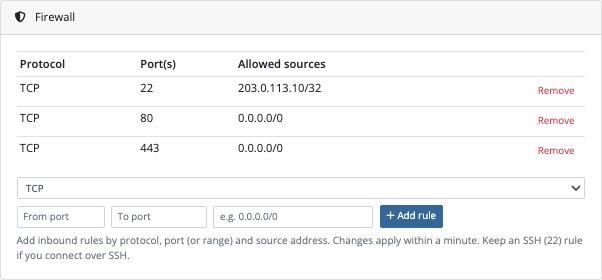
This is a real module screen with demonstration rules, not a recommended network policy. Its value is the interface: the customer can see which rule is being changed and how access is scoped.
Imagine an agency preparing a private application preview. The operator can define the appropriate source and port through the service’s firewall controls, then test the intended access. The customer does not need broad access to your Azure administration merely to manage a rule for their own server.
Application configuration and the guest firewall remain relevant. Opening a provider network rule does not start an application or establish that the operating system accepts the connection. Explain the layers clearly so the customer can use the controls purposefully.
Browser access and boot diagnostics answer different needs
PD Azure VM offers an optional in-browser console for eligible services. When the required module and product controls are enabled and the service has suitable access, the customer can open a terminal without installing a desktop SSH client.
That is useful for the first connection and for occasional work from a different machine. It still depends on the supported console setup and the server’s reachable access route; it is not a bypass around missing credentials or unsuitable network settings.
Boot diagnostics provide another kind of visibility: a console screenshot and read-only serial output. A customer can inspect the server’s boot state without confusing that view with an interactive shell.
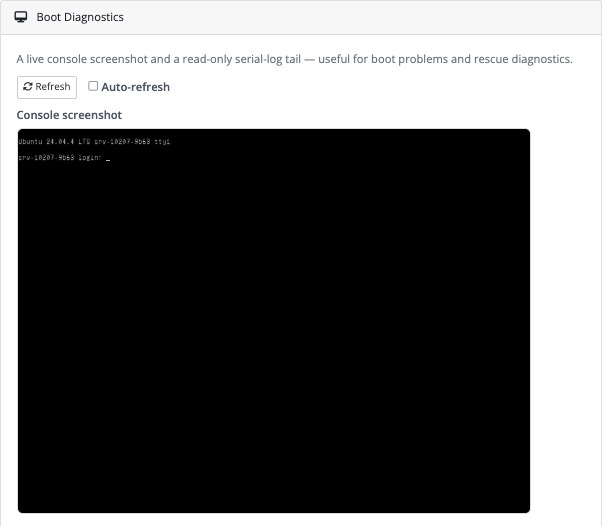
The cropped screenshot shows the visual boot view. The full diagnostic page also supports serial output; the article does not expose any keys or sensitive diagnostic content from it.
For a hosting business, the combination is useful because “I want to work on the server” and “I want to see whether it booted” are different customer requests. A real control panel can give each one an appropriate route.
Build snapshots and storage into the offer deliberately
Snapshot controls let customers create named point-in-time disk copies and use the supported restore or removal workflow. Product allowances make that capability part of the package you sell, rather than an undefined extra.
A hypothetical development-server package could include a specified snapshot allowance for planned maintenance. The customer can see what is available and manage the recovery points through the account. The host should still explain the difference between a snapshot and an independent backup service.
Extra data disks support another customer need: separating application data from the operating-system disk or expanding storage. PD Azure VM provides supported creation, attachment, detachment and removal controls. The guest operating system may still need formatting or mounting before new storage is useful.
Usage graphs bring CPU, network and disk activity into the service experience when enabled. They help customers understand resource behaviour around a workload or maintenance event. They are measurements, not a guarantee that an application is healthy or correctly sized.
| Capability | Example customer purpose | Product decision |
|---|---|---|
| Power controls | Restart a service environment | Which operations customers may perform |
| Firewall | Limit access to an application port | Supported rule scope and customer guidance |
| Browser console | Open a terminal from the account | Required global and product settings |
| Boot diagnostics | Inspect the boot state | Whether the diagnostic view is exposed |
| Snapshots | Keep a maintenance recovery point | Included allowance and recovery expectations |
| Extra disks | Expand or separate application storage | Customer controls and charging policy |
Use WHMCS lifecycle events as part of the product
The module connects supported create, suspend, unsuspend, upgrade and termination operations to the server lifecycle. This is where the integration becomes more than a customer dashboard: staff can manage the commercial service and its infrastructure relationship through a defined workflow.
Review each operation against your offer. A powered-off server can retain billable disks and public-IP resources. A resize may preserve a disk while still requiring guest filesystem work. Termination is a resource-removal operation and needs a deliberate retention and recovery policy.
PD Azure VM groups service resources in its resource-group model. That helps associate the VM and related infrastructure, but the final provider outcome still needs verification. Describe supported lifecycle behaviour without promising that every failure or external change is automatically reconciled.
Start with a package customers can understand
A clear first Azure VPS offer can be stronger than a huge checkout filled with unexplained dimensions. Choose the audience, supported resource profile and customer controls, then review the journey from ordering to connection and routine management.
Explore PD Azure VM for WHMCS for current product details. The setup guides cover connecting the subscription, creating a product and configuring checkout options.
Frequently asked questions
Can I provision Azure virtual machines through WHMCS?
Yes. PD Azure VM connects supported Azure VM provisioning and service operations to WHMCS products. Configure the subscription, permissions, product and automatic-setup policy for the offer.
Can customers manage firewall rules without Azure portal access?
The module provides supported per-server inbound firewall controls in the customer service experience. Customers can manage those rules without being given your broad Azure administration access.
Is the browser console the same as boot diagnostics?
No. The optional browser console provides an interactive terminal for eligible services. Boot diagnostics show a console screenshot and read-only serial output.
Do newly added SSH keys immediately change a running server?
The documented key-management workflow applies added keys when the server is built or reinstalled. Do not treat adding a public-key entry as immediate live key injection.
Can I choose which customer features a product exposes?
Product settings control supported client features such as usage graphs, snapshots, volumes and console access. Some capabilities also require a module-wide setting or appropriate service configuration.
Does stopping the server remove every Azure charge?
No. Retained resources such as disks and reserved public IPs may keep billing. Power state, service cancellation and provider resource removal are separate decisions.
Can customers expand storage?
Supported extra-disk controls allow storage creation and attachment. The guest operating system may still need formatting, mounting or filesystem changes before the new capacity is usable.