Sell Google Cloud VMs Through Blesta with Browser SSH and Customer Controls
Sell Google Compute Engine VMs through Blesta with PD Modules: customer server controls, browser SSH, snapshots, firewalls and native package management.
A cloud server becomes a hosting product when the customer can order it, find it in their account and perform the everyday actions that make it useful. Creating a virtual machine is only one part of that experience.
PD Google Compute Engine connects Google Cloud virtual machines to Blesta packages and customer services. It combines provisioning with a customer control panel for power operations, SSH access, snapshots, firewall rules and other supported server tasks. Your hosting company defines the offer; the customer works through your account experience.
For a Blesta host looking to offer Google Cloud VPS services, the attraction is continuity. The customer does not need a separate provider account merely to manage the service you sell, and your team does not need to build a new customer control panel around every server.
Sell an understandable service, not a list of cloud identifiers
Start with the kind of customer you want to serve. A small agency may need a development server. A technically confident business may want a dedicated application VM. An existing hosting customer may need more control than a shared website plan provides.
These are illustrative uses, not claims that one VM specification suits every workload. PD Google Compute Engine gives the host a way to package an appropriate server and connect it to the billing relationship already managed in Blesta.
A useful package describes the location, machine type, operating-system image, boot disk and included customer controls. Explain who maintains the application and guest operating system as part of your own service offering. A provisioning module does not, by itself, turn an unmanaged VM into application management.
The customer should understand both what they receive and what they can do next. A server with a clear SSH route, power controls and snapshot options is a more usable product than an order confirmation containing an unfamiliar instance reference.
Keep provider access separate from customer access
The host connects its Google Cloud project through a service account with the necessary permissions. Project readiness also depends on enabled services, quotas, the chosen location and the network assumptions of the package.
That provider connection serves a different purpose from the customer’s SSH credentials. Staff configure Google Cloud access; the customer uses the connection details and keys for their own server. Keep those two kinds of access distinct in the offer and in staff instructions.
A successful connection check is a useful setup milestone, but it does not reserve capacity in every zone or establish that every possible operation has the required permission. Validate the particular package you intend to sell, including the location and resource choices it uses.
For the released Blesta workflow, build a reviewed native package around the installed module’s supported settings. Do not assume an automatic configurable-option generator provides a ready-to-sell checkout. Fixed packages can be a clear starting point while you establish the service and its supported choices.
Browser SSH makes the account more useful after provisioning
PD Google Compute Engine includes a browser SSH terminal for eligible services when the host enables the required console capability. That lets a customer open a real terminal from the service experience rather than first installing a desktop SSH client.
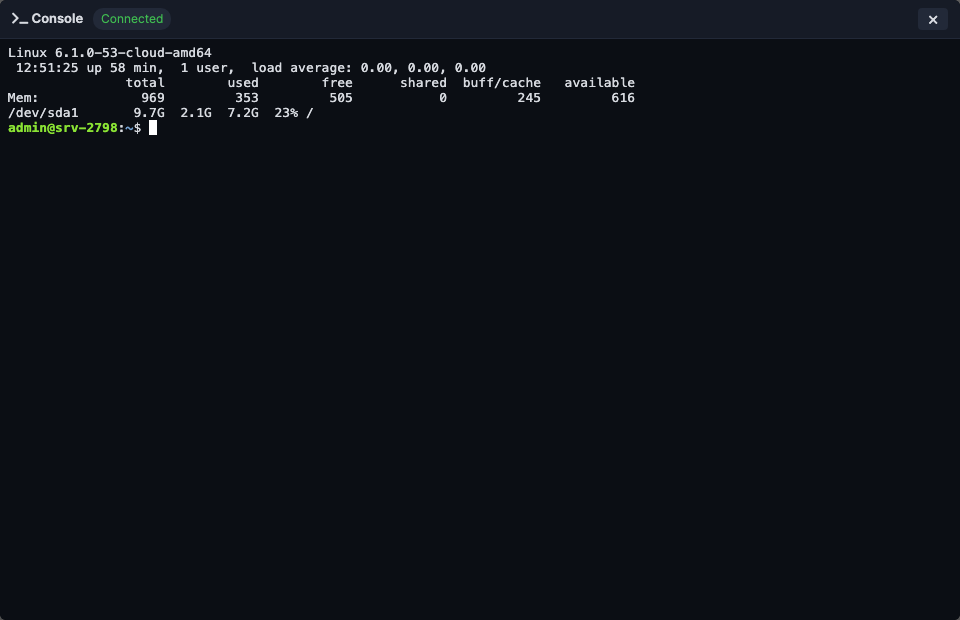
The screenshot is an actual demonstration session. It shows the terminal within the customer experience; no server or provider action was performed for this article.
Consider a hypothetical agency developer who has just ordered a test environment. The first useful action may be connecting to inspect the operating system or begin an application setup. A browser terminal shortens the route from “my service exists” to “I can work on it”.
The terminal still needs a reachable SSH service, suitable credentials and the required network and console configuration. It is not a replacement for guest access permissions or a way around a blocked firewall. Offer it as a supported access route with clear prerequisites, rather than promising it will work for every possible image without configuration.
The module also exposes read-only serial or boot output where supported. Viewing output and opening an interactive SSH terminal are different capabilities, useful for different tasks.
Give customers practical control over their server
The customer control panel includes supported power operations such as start, stop and reboot. It also provides server information and connection details in the context of the purchased service.
That context matters. A customer who manages several services should not have to infer which provider resource belongs to which invoice or package. The service account is the natural place to find the corresponding server controls.
PD Google Compute Engine also supports SSH-key management and server reinstall workflows. Public keys and private keys have different roles: a public key is supplied for access setup, while the customer protects the matching private key. A reinstall is a deliberate rebuild operation, not an everyday restart.
Stopping a VM is likewise different from cancelling the service or eliminating every provider charge. Disks, reserved resources and other retained items may continue to have a cost. Explain the customer’s power controls in terms of server operation rather than presenting Stop as a universal billing switch.
Snapshots make a maintenance workflow easier to explain
A snapshot captures a point-in-time disk state that the customer can use through the supported restore workflow. PD Google Compute Engine exposes snapshot creation, restore and removal, with the package’s allowance shaping what the customer can retain.
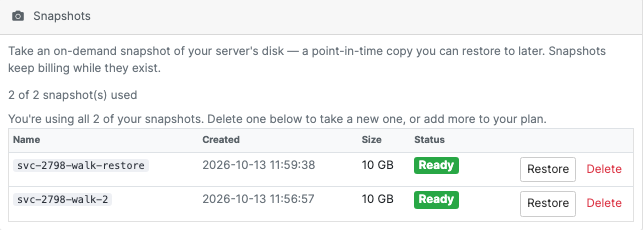
This real product screen demonstrates an allowance and example snapshots. It helps a buyer see how a package setting becomes a visible customer capability.
A hypothetical agency could include an agreed snapshot allowance in a development-server package. Before a planned application change, its developer creates a suitable recovery point and verifies the intended maintenance process. That is a clearer service feature than a vague claim that the server is “backed up”.
Snapshots are not a substitute for an independent backup policy or an application-aware recovery plan. Restore behaviour, application consistency and retained resource costs need to be understood. Market the useful control that exists without promising automatic recovery from every failure.
Firewalls and extra storage extend the service
The per-server firewall interface lets customers manage supported inbound rules by protocol, port and source. This gives the host a way to expose practical network control while keeping it associated with the customer’s VM.
For example, a customer can make a deliberate access decision for an application port rather than asking staff to interpret an informal request. The right source and port still depend on the workload. A broad demonstration rule is not a recommended production policy.
Extra data volumes provide another supported expansion route. Disk capacity, guest attachment and filesystem use are separate steps; adding provider storage does not mean every operating system automatically mounts and grows a filesystem in the desired way.
Usage graphs add context around CPU, network and disk activity. They help the customer investigate how a service is behaving, but a graph is not an application-health verdict or a promise of a particular performance level.
| Product capability | Customer value | Host’s offer should clarify |
|---|---|---|
| Native Blesta package | Familiar ordering and account relationship | Included resources and management responsibilities |
| Browser SSH | Convenient access from the service page | Supported image, access and console prerequisites |
| Snapshots | Visible point-in-time recovery controls | Allowance, restore scope and separate backup policy |
| Firewall rules | Self-service network decisions | Supported rule scope and application requirements |
| Extra volumes | Additional storage for a growing workload | Attachment, guest use and charging |
| Usage graphs | A useful view of resource activity | Measurement scope rather than an uptime promise |
Build the first package around a real customer journey
An effective first Google Cloud offering does not need every possible machine family. Choose a supported location, image and resource profile, then review the customer journey from ordering to the first successful connection.
Check that the package communicates the intended controls, that the provider project can supply the resources and that customer-facing settings match the service you want to deliver. Review upgrade, suspension and cancellation behaviour before selling those lifecycle steps as part of the offer.
This turns a cloud integration into a product a customer can understand. Blesta handles the commercial relationship; PD Google Compute Engine connects the service to the VM and its supported controls; your hosting company defines the experience around them.
Explore PD Google Compute Engine for Blesta for current module details. The task guides cover connecting a Google Cloud project, checking the connection and creating the package.
Frequently asked questions
Can I sell Google Cloud virtual machines through Blesta?
PD Google Compute Engine connects supported Google Cloud VM provisioning and management to native Blesta packages and services. Your provider project, package and permissions must be configured for the offering.
Do customers need my Google Cloud service-account credentials?
No. The host configures the provider connection. Customers use their service controls and server access credentials, which serve a different purpose from the host’s Google Cloud connection.
Does the module include a browser SSH terminal?
Yes, for eligible services with the required console capability enabled and suitable SSH access. The server, network and credentials must support the connection.
Can customers manage snapshots and firewall rules?
The module exposes supported snapshot and per-server firewall controls. Configure the package allowances and explain the scope of the available functions.
Does a snapshot replace a backup service?
No. It provides a point-in-time disk recovery control. Independent backups, application consistency and the full recovery plan remain separate decisions.
Does stopping a VM stop every Google Cloud charge?
No. Retained disks, reserved resources and other provider items may continue to incur charges. Stopping, cancelling and resource removal are different operations.
Should I begin with every available checkout option?
A small, reviewed native package is a useful starting point. Add choices only when the installed Blesta workflow supports them and you have verified that the resulting resources match the offer.