Stop chasing customers for what you need — a guided onboarding checklist that collects it for you
Made and supported by Projektif Digital Ltd.
Runs inside PD Modules, the panel
every module installs into.
Clients & Productivity
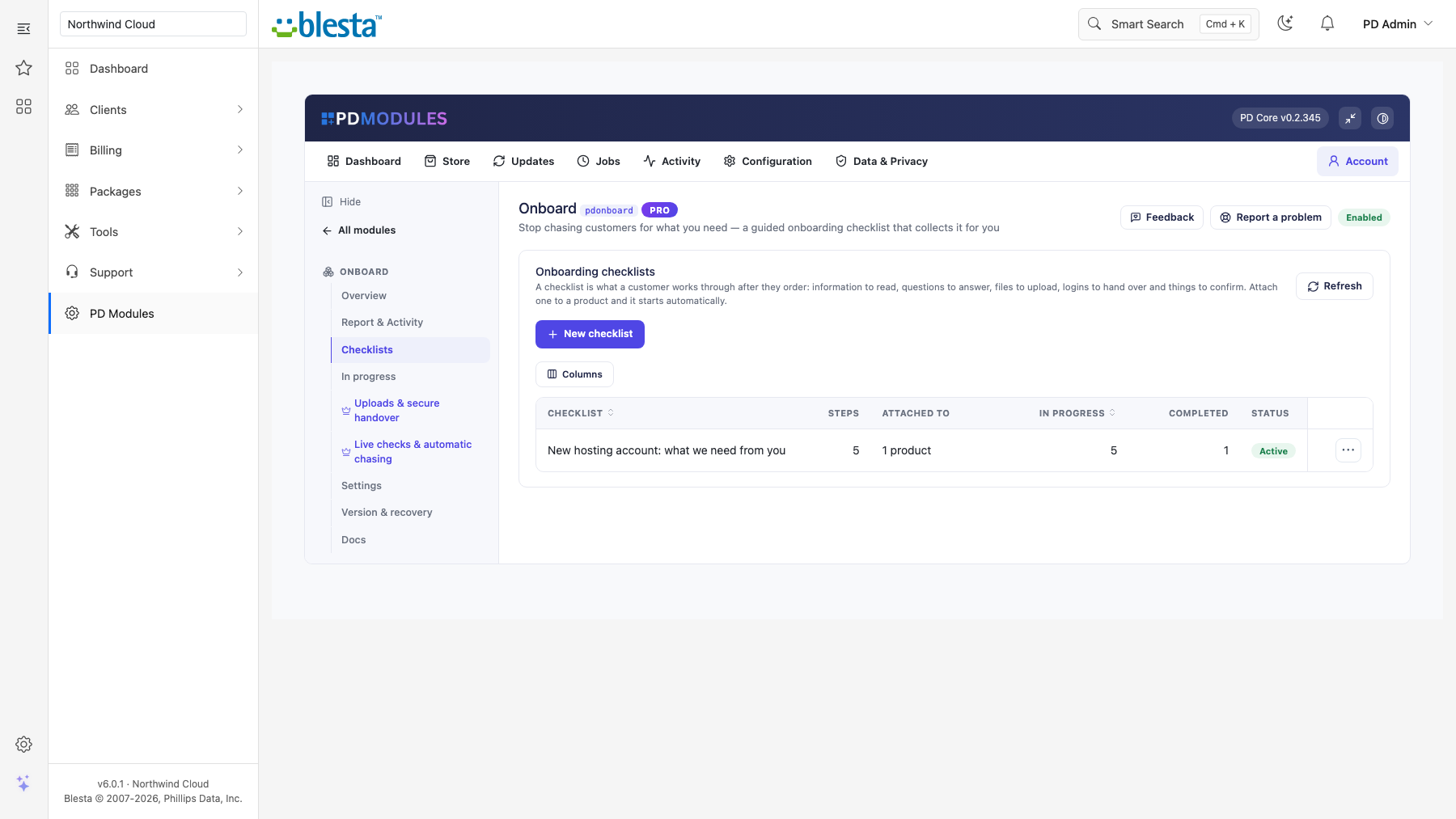
The admin view of Onboard — everything in one place.The admin view of Onboard — everything in one place.The customer-facing side of Onboard, on their own service page.1 / 3
PD Onboard gives a hosting company a guided onboarding checklist that runs itself after every order. Instead of emailing a new customer to ask for their domain, nameserver change, brand assets, a technical contact or a login, you build the checklist once and the customer works through it on a single page in their own account. You see who has finished, who is stuck and for how long.
It is built for hosts and agencies whose work cannot start until the customer has supplied something, and who are tired of writing "just checking in".
Why hosts choose PD Onboard
Stop chasing for what you need. Attach a checklist to chosen packages, to whole package groups, or use it as the fallback when nothing else matches. It starts when the service becomes active (activated after payment, or when provisioned or accepted by staff), or at checkout if you prefer, once per service. Turn automatic start off and every onboarding is started by hand.
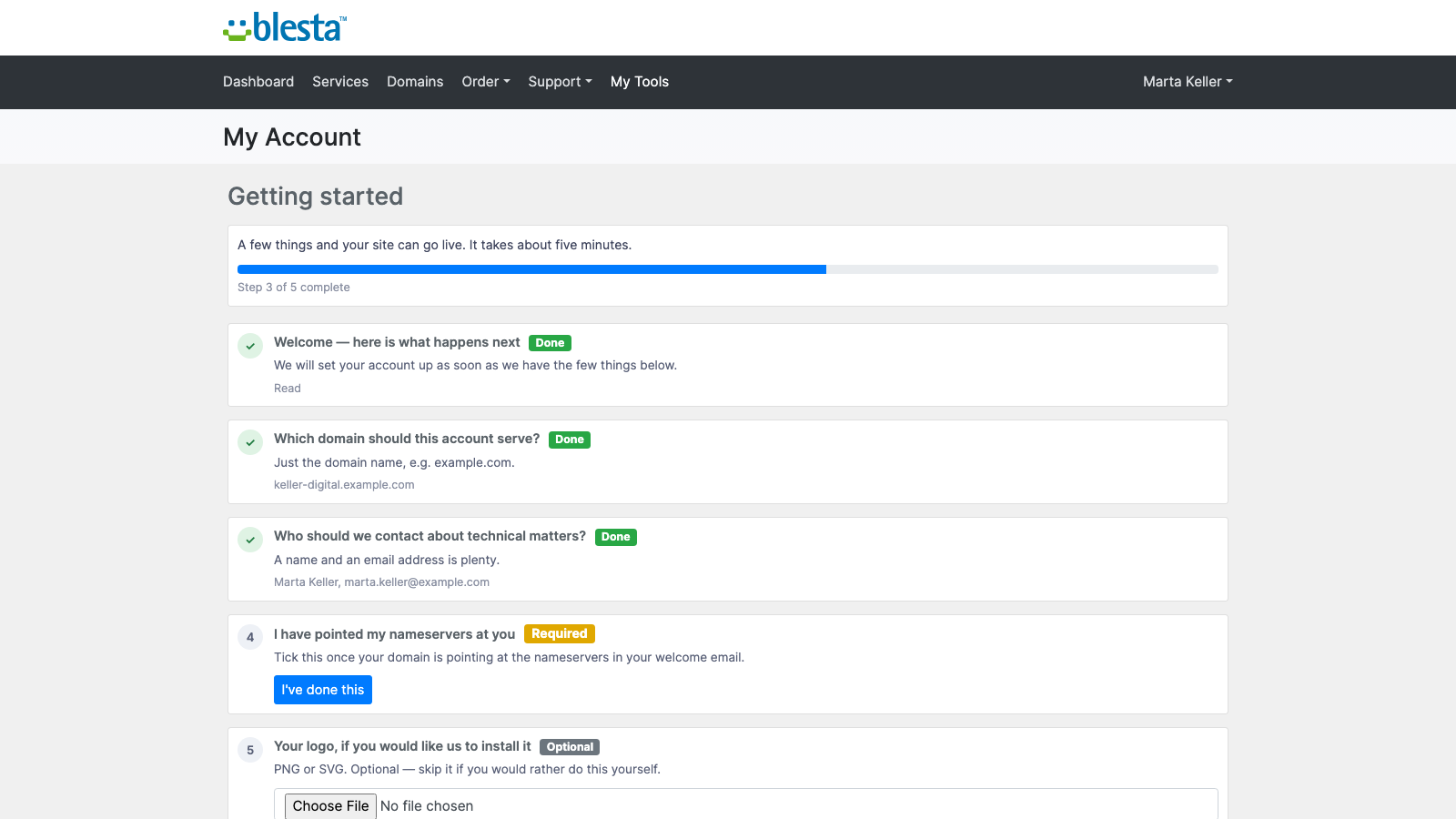
One clear page for the customer. They see a progress bar, every step in order, what they have already supplied, and only the form for the step they are on. Everything saves as they go, so they can close the tab and come back. A Getting started panel on their dashboard shows progress with a Continue button, and a short notice appears while steps are outstanding. Both can be turned off.
Right-sized steps. Information to read, a question to answer, something to confirm, and a task for your team that the customer never sees. Mark each step required or optional; only required steps decide when onboarding is complete, and the checklist closes itself when the last required step is done.
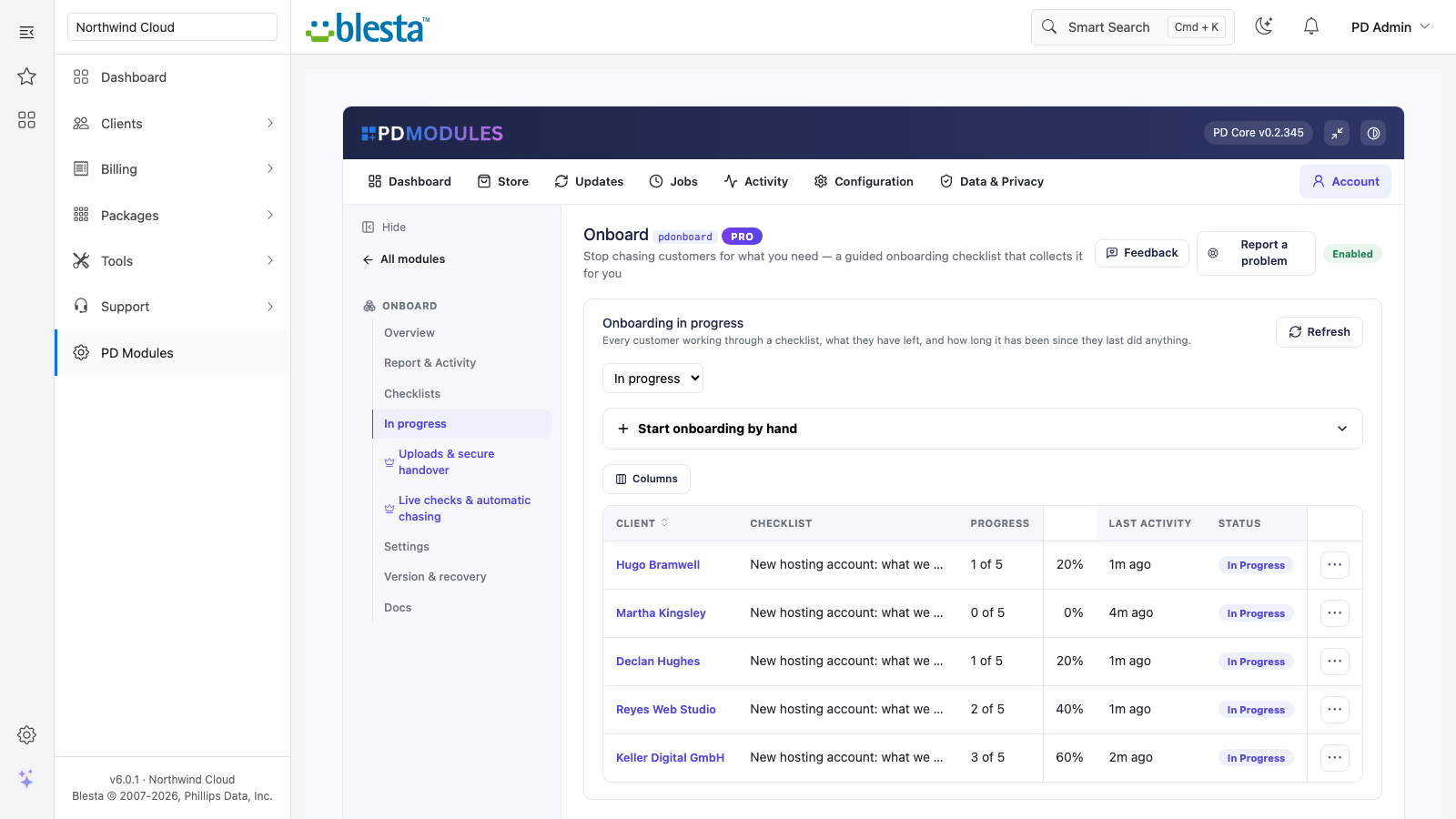
See where every customer is. The In progress list shows each client, checklist, progress, last activity and status. Open one to see exactly what the customer supplied, mark a step done on their behalf when they email you the answer, reopen a step, send a reminder, or cancel, reopen or delete the whole onboarding.
Free to start. The checklist engine, the customer page and the full staff view are in the free module. Pro adds the steps that save the most work: file uploads, logins straight into a vault, live checks, and automatic chasing.
How it works
Build a checklist. Name it, write an opening line, add steps in order, and mark which are required.
Attach it. Choose the packages or package groups it applies to.
A customer orders. When their service becomes active, the checklist appears in their account.
They work through it. Each step is saved as they go, and the page tells them what is still outstanding.
You get what you need. The onboarding closes when the last required step is done, and your wording is shown on the finished checklist.
Build the checklist once and it runs itself on every matching order
What you get in Blesta
Checklists and steps
Unlimited checklists, each with a name, an opening line and your own finishing wording
Targeting by packages, package groups, or a fallback for anything unmatched, with an active/paused switch; a paused checklist starts nothing, and an empty checklist never starts
Questions as short text, long text, a choice from a list, a date, an email address or a web address
"Something to confirm" steps, such as "I have pointed my nameservers"
Duplicate a checklist with all its steps to make a variant for another product; the copy arrives paused so you can edit it first
Running it day to day
Start an onboarding by hand for any client from the In progress page
Staff can download uploads, mark steps done, reopen steps and send reminders
Deleting an onboarding also deletes the files that came with it
Every customer working through a checklist, how far they have got and when they last did anything
What your customers get
One page, one list: every step in order with its status, what they have already given, and a progress bar
Save as they go: they can leave and return without losing answers
Their own emails: the reminder and completion emails are templates you can edit and translate
The customer works through their own list, with progress saved as they go
Free and Pro
PD Onboard is free to install, and Pro is an optional upgrade at £12 a month. Both can sit on the same installation, and a lapsed Pro never takes the free features away.
Free includes: unlimited checklists, information, question, confirmation and staff steps, the customer page, the dashboard panel and notice, the full staff view, editable emails and your own finishing wording.
Pro adds: - File uploads. Customers upload documents and images (never executables), up to 12 MB, kept in a private folder under generated names and downloadable only by your staff or the person who uploaded them. Deleting an onboarding deletes its files - Logins into a vault. A login step writes straight into the encrypted vault of PD Password Manager when it is installed. Without it, the login is kept as ordinary text your staff can read - Live checks. A confirmation step can check real DNS (nameservers or address) or that the website answers before it is accepted - Automatic reminders. Off by default; every N days (3 by default) an email lists exactly what is still outstanding with a link back, and stops the moment the checklist is complete - Stalled alerts. Your team gets one alert when an onboarding has stalled for N days (7 by default) - A completion email, with your optional note, when the last step is done
Without Pro, Pro steps and reminders show an upgrade prompt. If Pro lapses, it keeps working through a 14-day grace period, then falls back to free: onboardings in progress keep working and everything collected stays readable, while uploads, credential capture, live checks and reminders pause.
Security built in
Uploads are limited to documents and images and are never served from your website folder where the server allows a private one
Only your staff and the customer who uploaded a file can download it
Credential steps go to the encrypted vault rather than into an email
Uninstalling removes the module's tables and settings, leaving no orphans; the email templates are kept
Requirements
Blesta 6 or later on PHP 8.2 or later, with the ionCube Loader
PD Modules, the free control panel every PD module installs into
Questions
Does the customer need to log in?
Yes — the onboarding page is tied to their account, so only they can see it and only they can answer. That is what makes the collected information trustworthy. The reminder email links straight there.
What if a customer emails me the answer instead of using the page?
Open their onboarding and use Mark done on that step. It is recorded as completed by staff, so your view of what is outstanding stays accurate.
Which checklist is used when several could match?
The most specific one wins: a checklist targeted at that exact product beats one targeted at its product group, which beats the fallback checklist. If nothing matches, no onboarding is started — better than starting the wrong one.
Are uploaded files safe?
They are stored in PD Modules' own storage folder with generated filenames, a folder the web server is told to refuse (on nginx, add a deny rule for it), restricted to documents and images, capped at 12 MB, and served only through a page that checks whether the person asking is your staff or the customer who uploaded them. A direct URL will not work.
Where do collected passwords go?
Into PD Password Manager's encrypted vault when it is installed — the credential never sits in an inbox. Without PD Password Manager there is no vault, and the login is kept in the onboarding record as ordinary text your staff can read — install it first if logins should be encrypted.
Will the DNS check block a customer whose domain has not propagated yet?
No. A check that cannot run is treated as "we could not verify this, so we took your word for it" and the step completes. Only a check that actively contradicts the customer holds the step open — and then the message says exactly what it found.
Can I change a checklist after customers have started it?
Yes. Adding a step means everyone in progress sees it; removing one stops it being asked for. Progress is recalculated from what has actually been answered, so the numbers never go strange.
What happens if my licence lapses?
Onboarding already in progress keeps working for your customers and everything collected stays readable. Pro features pause and the module continues as the free version.
Does it work with my client theme?
Yes. The dashboard panel is drawn by WHMCS itself so it matches any theme, and the onboarding page is a standalone screen that looks the same everywhere. Both are translatable and overridable, and your overrides survive updates.
What does it cost to run, on top of the subscription?
Nothing metered. The free tier costs nothing, Pro is a flat subscription, and PD Onboard runs inside your WHMCS without connecting to a paid third-party service — so there is no usage bill, no per-message or per-GB charge, and no surprise on top of what you chose to pay.
What data leaves my server?
Your customers' data stays in your WHMCS. To confirm your licence, the platform sends us four things and nothing else: your licence key, the domain, your server's own IP address and the directory it is installed in — the four values recorded against your licence in your client area. Alongside that we see which module and version you run and whether its licence is healthy, so we can ship compatible updates. We never receive your clients' personal data, your credentials, or the contents of your WHMCS. Crash reports are off unless you turn them on, and a diagnostic report is only ever sent when you send one, after showing you a preview you can edit.
Which WHMCS and PHP versions does it need?
WHMCS 9 or later, on PHP 8.2 or later. It installs alongside whatever else you run — it adds its own tables and templates rather than modifying WHMCS files, so it does not collide with other vendors' modules or with a customised theme. Uninstalling removes its own tables and settings and leaves no orphans behind.
How do I get help?
Open a ticket from your client area, or use Get help inside the PD Modules panel, which attaches a diagnostic report — you see a preview of exactly what it contains, and can exclude any part of it, before anything is sent. Support is included with an active subscription; bug reports are welcome whatever your licence state.
What’s new in 0.1.43
You can now start a checklist by hand for chosen clients, from the Onboarding screen.
When PD Onboard Pro is not active, file uploads, login capture and live checks pause, and the customer is told you will collect them another way.
Checking a confirmation against real DNS or the live website is part of Pro, as described.
"Open" on a client's profile now goes to the Onboarding screen.
Uploaded files are now kept in a private folder outside your website's public folder wherever your server allows it, and files already uploaded are moved there automatically. The Report shows where they are kept.
Your team is told once when an onboarding stalls, rather than again every week it stays stalled.
Reminder runs that cannot send are now shown as failed and retried, and the help says plainly where uploads and collected logins are kept.
Sending a reminder works.
Emails to your customers now send, and you can edit and translate them under Settings → Company → Emails.
Links in onboarding emails and the file download now work.
Tables keep long explanations readable on narrower screens.
Links on this module's screens open the right client, service and product pages on every platform.