An AI co-pilot woven into Blesta — for your staff and your customers, on the AI provider you connect
Made and supported by Projektif Digital Ltd.
Runs inside PD Modules, the panel
every module installs into.
AI & Automation
Ask in plain English: it looks up clients, invoices and tickets live and answers from your real dataRules draft a reply or assess an order when a ticket or order arrives; you review and applySee what customers asked the client-area assistant, with conversations that need a person flaggedEvery call logged with model and tokens; you pay your own AI provider, never usConnect your own Amazon Bedrock, OpenAI or Gemini and pick the modelCustomers ask about their own services and invoices right in the client area1 / 6
PD AI Assistant puts an AI co-pilot inside Blesta for your staff and, if you choose, for your customers. Your team can ask plain-English questions about clients, invoices, services, orders and tickets and get answers looked up live from your own data. The assistant drafts ticket replies and reviews new orders, and nothing that changes data happens until a person applies it. Your customers can get an optional assistant on their client dashboard that answers questions about their own account.
It is built for hosts who want AI working on their own business without handing their data to another platform or paying a markup on every question. You connect the AI provider you choose, and you pay that provider directly.
Why hosts choose PD AI Assistant
Your provider, your bill. PD AI Assistant runs on a provider you connect: Amazon Bedrock in your own AWS account, OpenAI, Google Gemini, Anthropic Claude, or any OpenAI-compatible endpoint. There are no credits, allowances, tiers or markup from us. Requests go straight from your server to your provider and nothing routes through us.
Answers from your real data. Ask about a client, an overdue invoice, an open ticket or how the business is doing today, and the assistant looks the data up live instead of guessing.
It proposes, you decide. Anything that changes data is proposed for you to confirm. Each pending action shows what it concerns and the full draft, which you can edit before applying, and the button says what it will do. The only exception is an automation rule you deliberately set to Auto, and every rule starts in Suggest.
Faster first replies. Automations draft a reply when a ticket is opened or a customer answers, and assess a new order, ready for you to review. The ticket AI setting has three modes: Suggest on demand, Off, which sends no ticket content to the AI at all, and Auto, which drafts as tickets arrive for you to review.
Safe with customer content. Unattended rules treat what customers write as data, never as instructions. An option strips obvious secrets such as passwords and keys before anything is sent to the provider.
It knows your business. Answers can draw on your knowledge base articles, and for customers only the ones visible to customers.
How it works
Connect a provider. In Settings, choose Amazon Bedrock, OpenAI, Gemini or Anthropic Claude. For Bedrock, one click creates a dedicated IAM user limited to invoking the model, and only that key is stored. Connect shows which provider and model are active, and switches immediately.
Start asking. Open the Assistant page in PD Modules and ask about your clients, invoices, services, orders and tickets.
Switch on what you want. Set the ticket mode, add automation rules, and decide whether customers get an assistant.
Review and apply. Pending actions wait for you. Usage shows what every call cost in tokens.
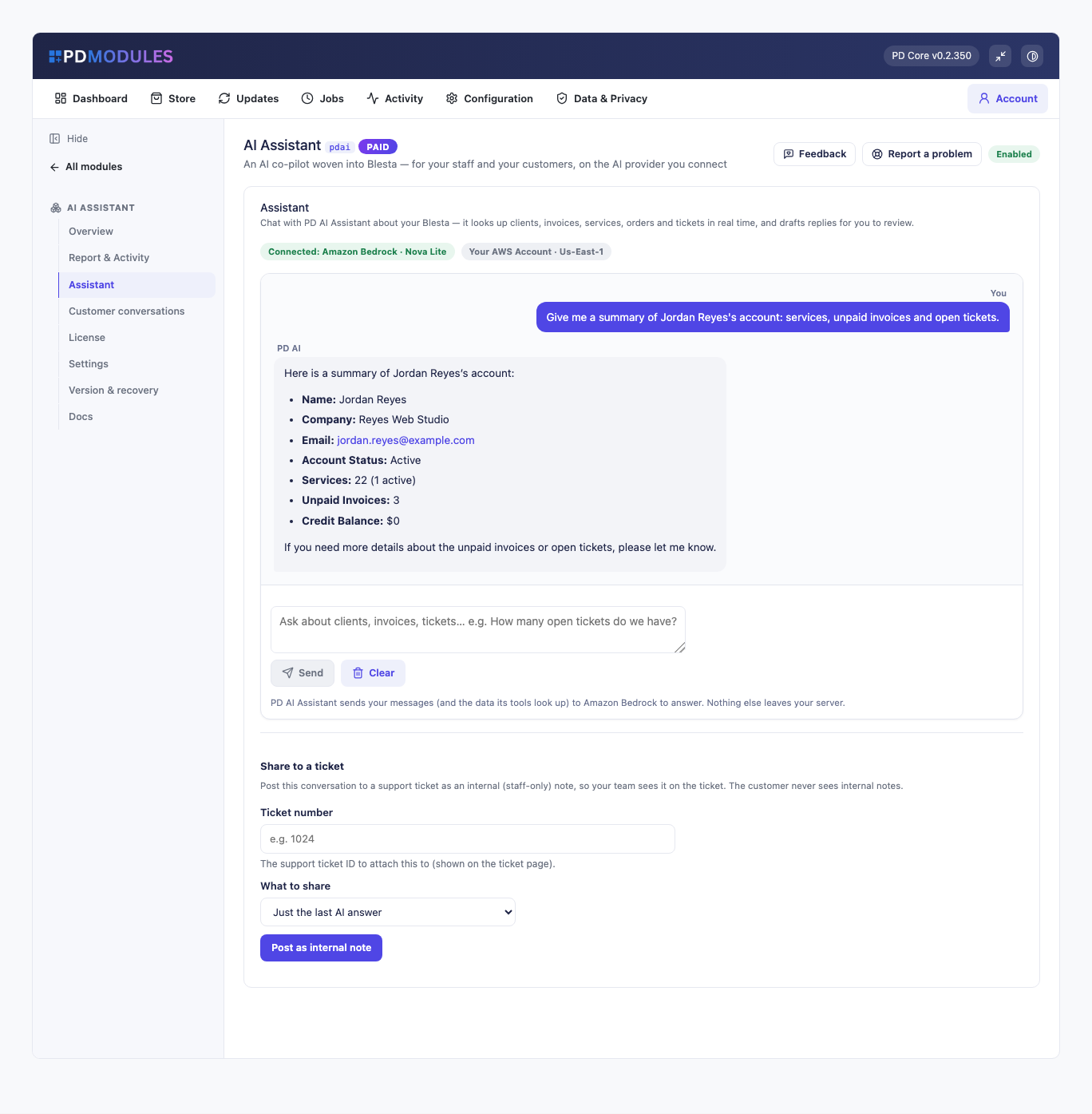
The Assistant page: a plain-English question about a client, answered from live account data
What you get in Blesta
Working with your data
An admin assistant that looks up clients, invoices, services, orders, tickets, overdue totals and a business overview through live tools
Answers drawn from your knowledge base, with customer-visible articles only for customers
A clear message when something is wrong: a bad key, an account without credit, a missing Bedrock permission or model access, or no outbound HTTPS are reported in words that name the cause
Automations and agents
Rules that run on a ticket opened, a customer reply and a new order, in Suggest or Auto mode
Events are never silently lost: while no provider is connected they wait, and a failed rule is retried on the next run
Agents work toward a goal over several steps and report back
Content generation for knowledge base articles, announcements, emails and product copy in your voice
Business-wide memory that applies in every conversation, plus facts about a client when that client is in scope. Every memory can be reviewed and forgotten
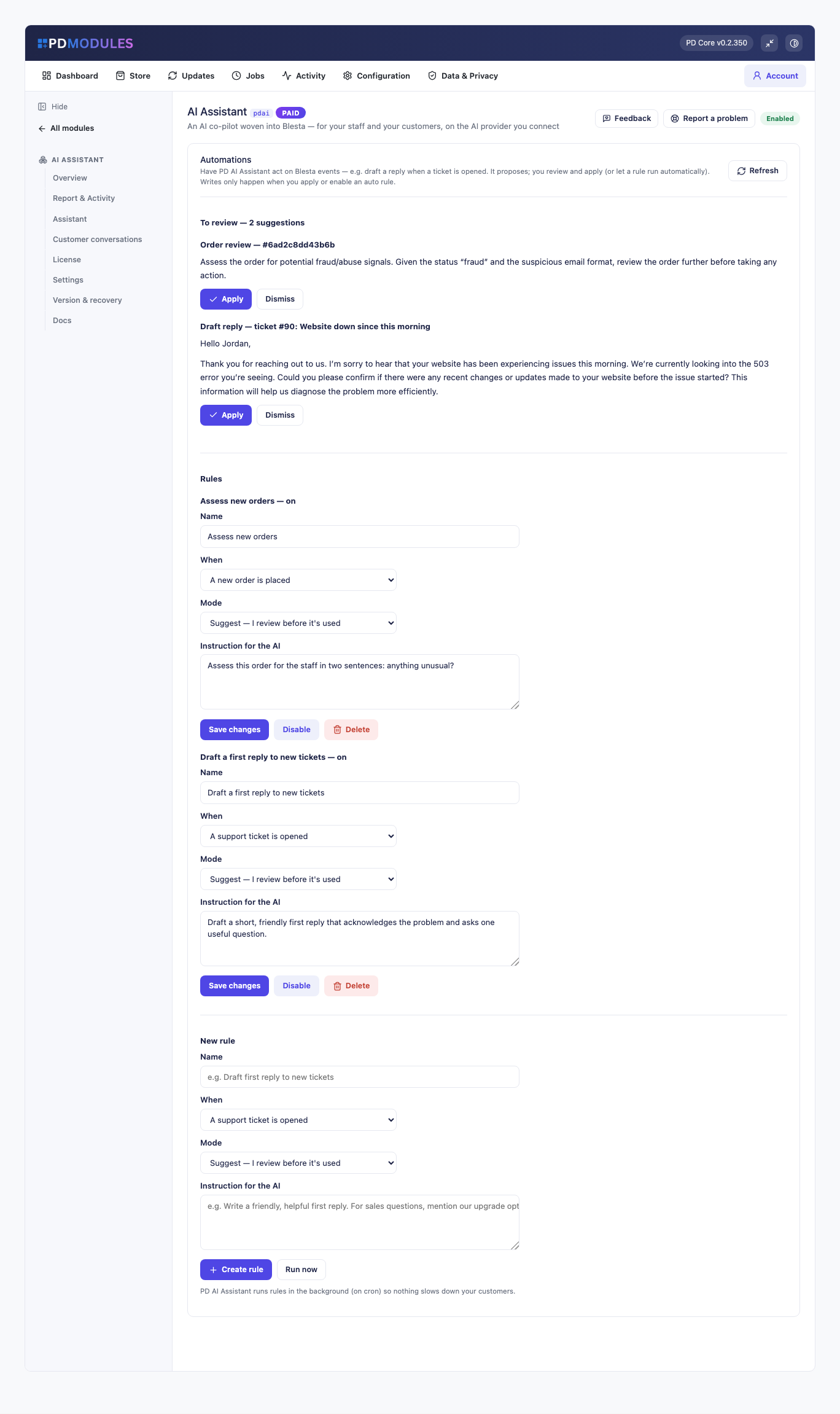
Automations: suggestions waiting for review, with rules that draft first replies and assess new orders
Connecting it to your team and tools
Connectors that notify Slack, Teams or any webhook, with the webhook address stored encrypted
An HTTP API with its own key, shown once and stored hashed, rate-limited, and refused without the key. Actions proposed through the API are queued under Pending actions
With PD MCP Hub installed, the assistant gains the hub's tools under the hub's limits and can propose any action the hub offers, which runs only when an administrator applies it
Choosing and watching your provider
Pick the provider and model from a list, so there is no model name to mistype, and see which one is connected
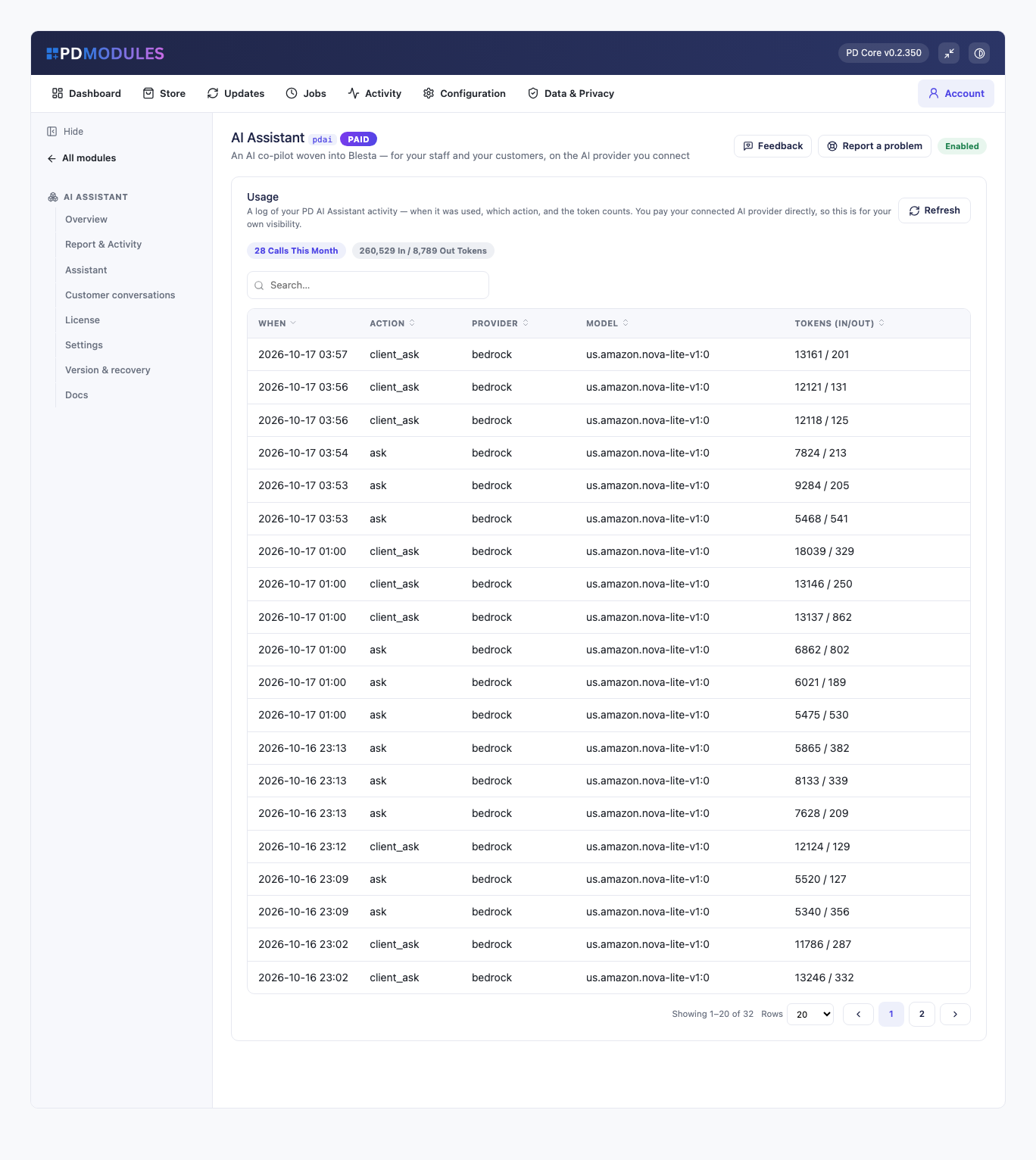
A Usage tab logging when, which action, which provider and model, and the token counts. It is for your information, not a bill
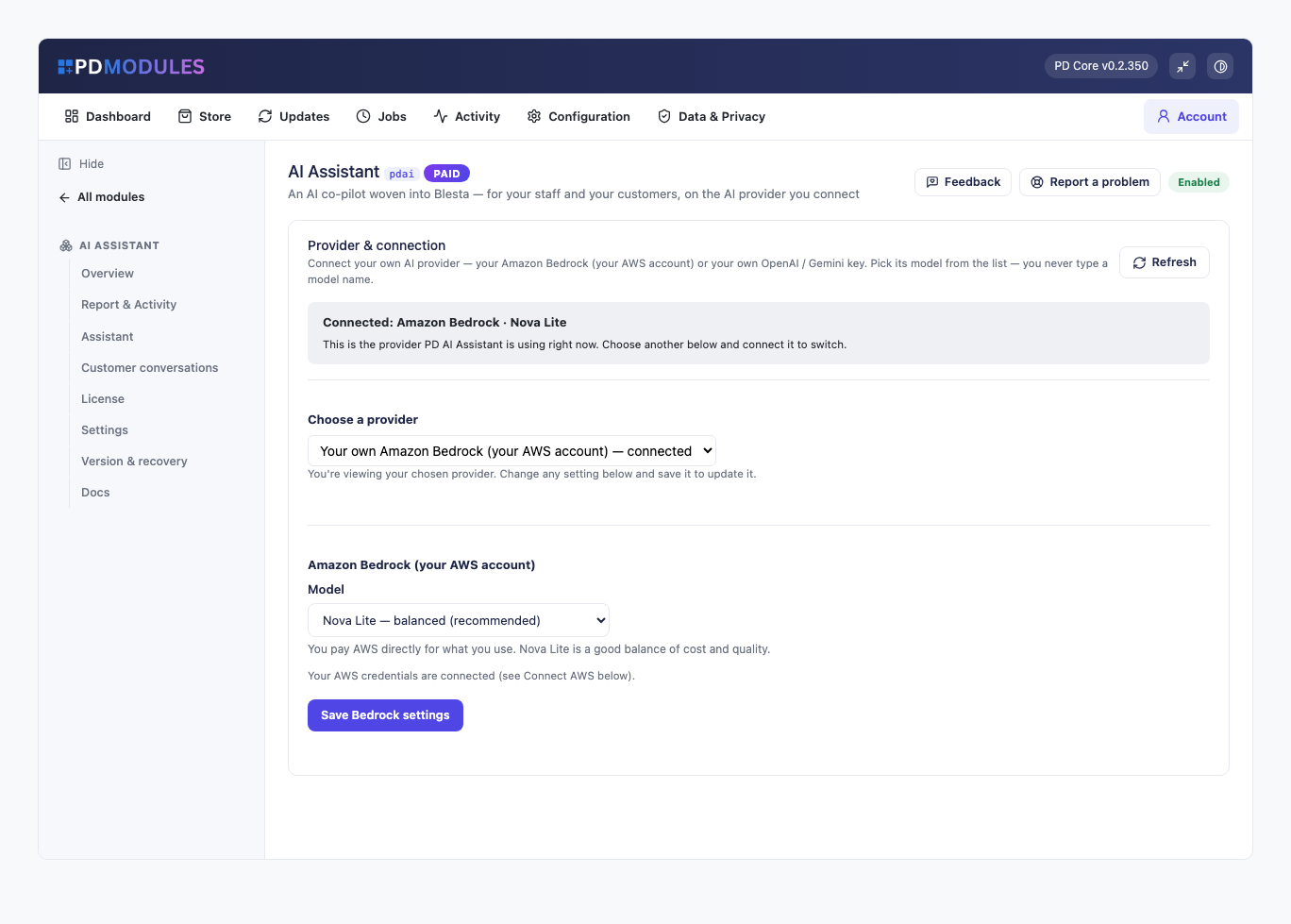
Provider and connection: your own Amazon Bedrock account connected, with the model chosen from a listUsage: every call logged by action, provider, model and token count
What your customers get
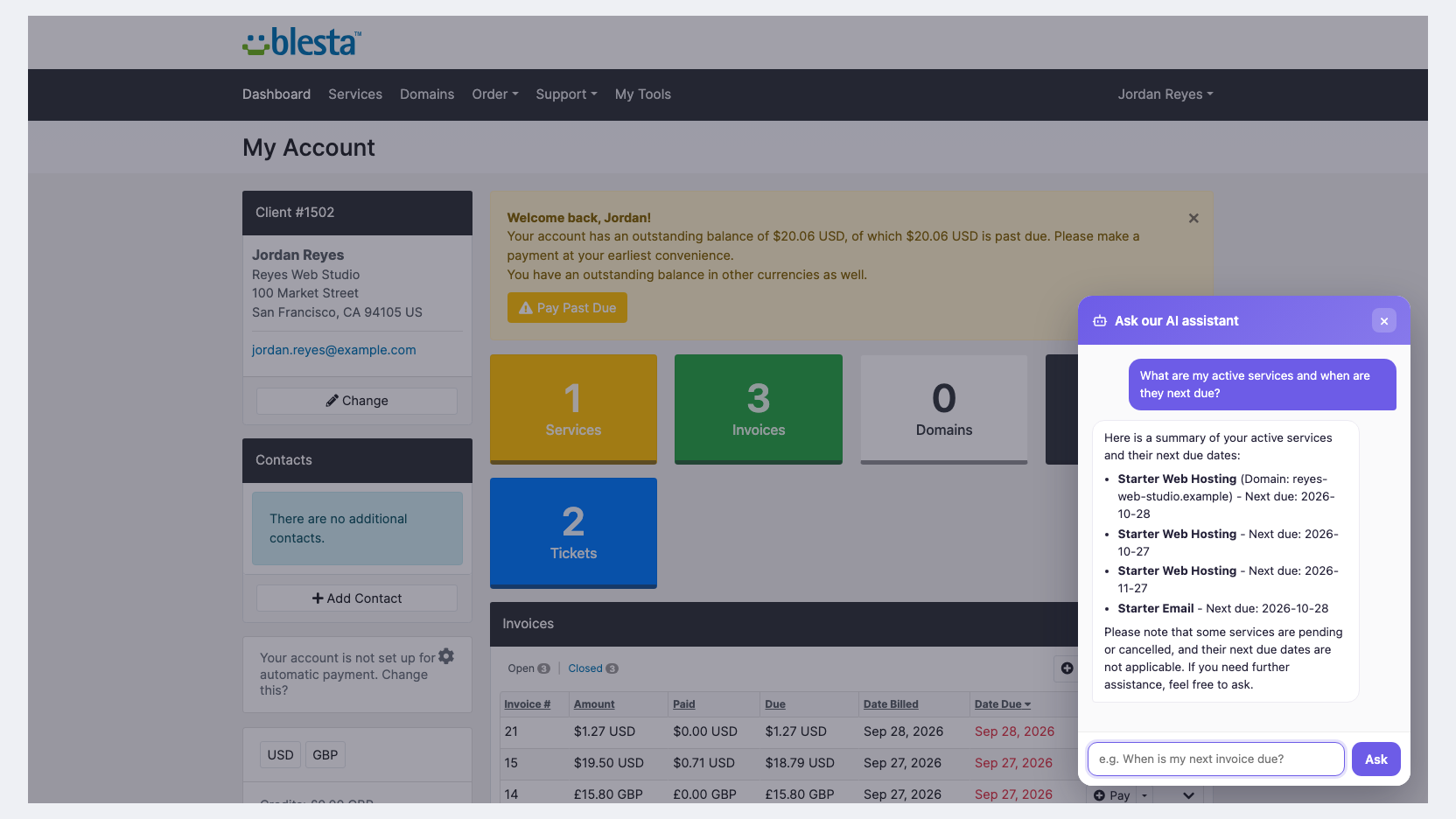
Turn it on and an "Ask our AI assistant" panel appears on the client dashboard.
Answers about their own account only. The assistant sees only the signed-in customer's own services, domains and invoices. It needs their session and a token issued to that session, and it can never show another customer's data
Answers in your words, from your customer-visible knowledge base articles
A route to a person. For anything that needs a human it points the customer to open a support ticket
Conversations you can review. Every customer conversation is recorded for your review by default, and the ones that need a person are flagged
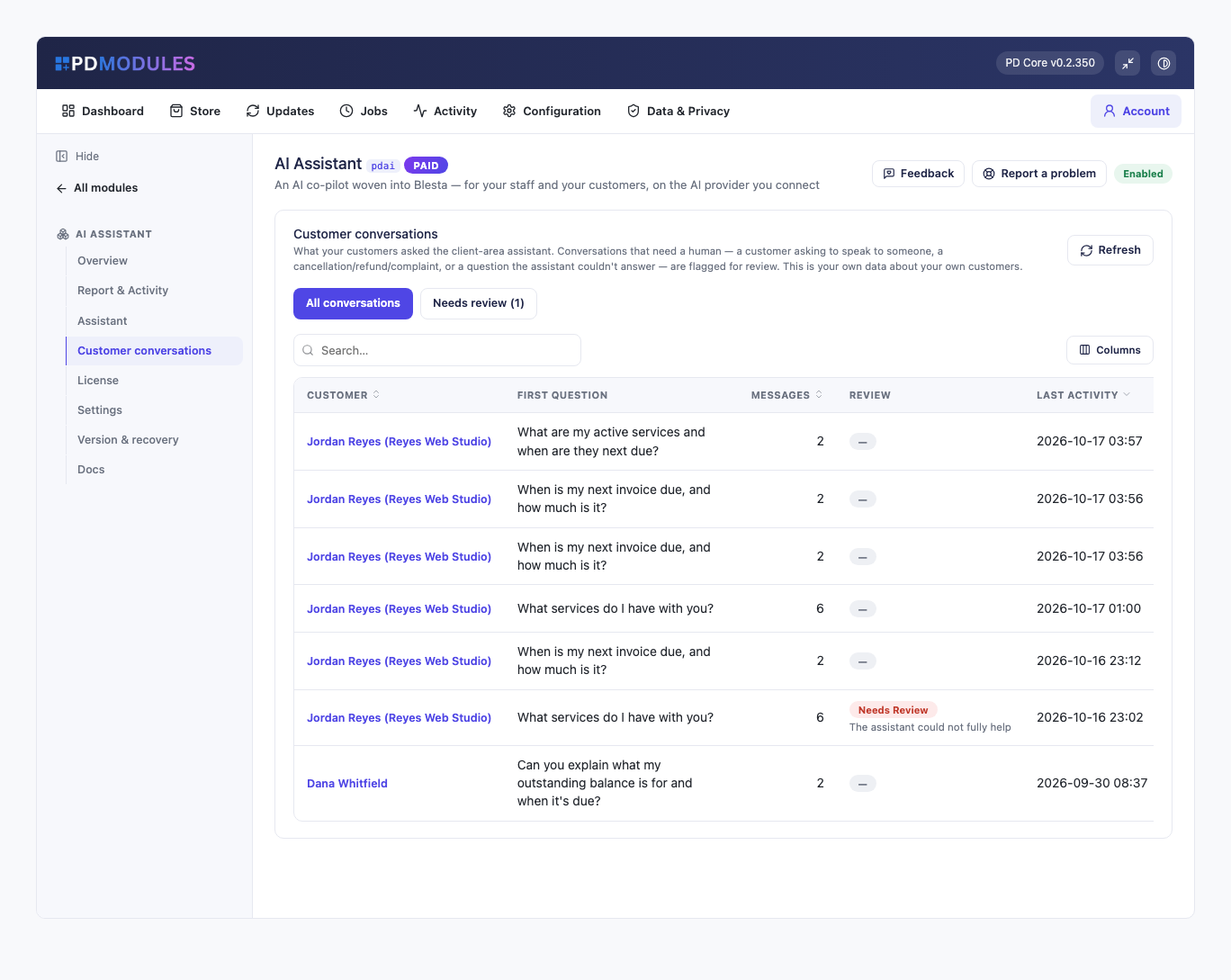
Customer conversations: what customers asked the client-area assistant, with the ones that need a person flagged for review
The customer assistant is off until you switch it on. Its panel renders in Blesta's client portal theme, and its wording can be overridden in a way that survives updates. A privacy note to customers is optional.
Security built in
Every key, whether AWS or one you bring, is stored encrypted with a key unique to your installation and never sent to us
Bedrock runs in your own AWS account in the region you choose
The customer assistant is confined to the signed-in customer's own data, enforced on the server
Requests go from your server straight to the provider you connected
One product, every feature
PD AI Assistant is one paid module with everything included. There are no tiers.
If your subscription ever lapses, your data is kept. After a 14-day grace period the assistant, agents, automations, content, memory, connectors and API lock, even on your own provider key, while your settings, provider and usage stay reachable. The customer assistant keeps answering while a licence is merely expired and stops when suspended, with a neutral "temporarily unavailable" message that never mentions licensing.
Requirements
Blesta 6 or later on PHP 8.2 or later, with the ionCube Loader
An account with an AI provider: Amazon Bedrock, OpenAI, Google Gemini or Anthropic Claude
PD Modules, the free control panel every PD module installs into
Questions
Who is PD AI Assistant for — staff or customers?
Both. For your team it's a floating co-pilot on every admin page (tickets, clients, invoices) that drafts replies and summarises tickets. For your customers it's an optional client-area assistant that answers about their own account only. The two have completely separate data scopes.
Does it just chat, or can it actually do things?
It takes real actions — but always with your confirmation. On a ticket it drafts a reply and you click Apply to drop it into the reply box; it never sends on its own. Every write is previewed first.
How is it 'grounded'? Won't it make things up?
It answers from YOUR knowledge, not just the model's training: it searches your WHMCS Knowledge Base and any documents you upload (stored as a private vector index inside your WHMCS) and cites the source. Ask 'what's our VPS refund window?' and it answers from your policy, not a guess.
Which AI does it use? Do I need an account?
Amazon Bedrock (Nova) by default — it runs in your own AWS account and PD AI Assistant can create a dedicated least-privilege key in one click. Or bring your own OpenAI / Gemini key, or point at a custom OpenAI-compatible proxy. Models are always picked from a dropdown, so there's nothing to mistype.
Is my data safe? What about tickets with passwords in them?
You control it. Choose whether the AI works on tickets at all (Off / Suggest on demand / Auto-draft), and optionally strip secrets before anything is sent. Bedrock and the API providers don't train on your data. Customers can only ever reach their own records — enforced server-side from their session.
Can my support team share the AI's work?
Yes. The co-pilot's conversation on a ticket or client is a shared thread the whole team sees when they open that ticket/client, while your personal chats stay private. You can also share a conversation to a ticket as an internal note.
Can I add my own documents / policies?
Yes — paste text or upload a .txt, .md, .pdf or .docx file in Settings → Knowledge and PD AI Assistant extracts the text, chunks and embeds it. Each source is scoped staff-only or client-visible, so private procedures never reach the customer assistant.
Is it useful straight after install?
Yes — the powerful, safe features are on by default (the co-pilot, ticket summaries, Knowledge-Base grounding, suggest-on-demand on tickets), so you see the value immediately. The customer-facing assistant stays off until you switch it on.
What happens if my subscription lapses?
Nothing of yours is touched, and nothing is deleted. The module steps down in stages instead: a 14-day grace period where everything still works and you get a renewal reminder, then admin management locks while your customers carry on being served, and only after that do the customer-facing features stop — behind a neutral "temporarily unavailable, please contact support" message that never mentions licensing to your customer. Anything the module provisioned keeps running in your own account throughout, and your data and settings stay exactly where they are. Renewing restores everything immediately.
What data leaves my server?
Your customers' data stays in your WHMCS. To confirm your licence, the platform sends us four things and nothing else: your licence key, the domain, your server's own IP address and the directory it is installed in — the four values recorded against your licence in your client area. Alongside that we see which module and version you run and whether its licence is healthy, so we can ship compatible updates. We never receive your clients' personal data, your credentials, or the contents of your WHMCS. Crash reports are off unless you turn them on, and a diagnostic report is only ever sent when you send one, after showing you a preview you can edit.
What’s new in 0.7.73
Gemini now defaults to 3.5 Flash-Lite; OpenAI offers GPT-5.6 Sol and GPT-6 Luna.
Provider errors now say what failed.
Pending actions show what they concern and the customer's message, let you edit drafts, and name what each button does.
With PD MCP Hub, the assistant proposes actions on your other modules for you to approve.
 Featured