PD Notes — Rich Client, Service & Domain Notes with Reminders
Rich client, service & domain notes with reminders
Made and supported by Projektif Digital Ltd.
Runs inside PD Modules, the panel
every module installs into.
Clients & Productivity
Follow-ups due across every client and service, so a renewal chat or a card update never slips through.Every note across your clients, services and domains in one searchable list — coloured, tagged and pinned so nothing gets buried.Reusable note templates for the conversations you have every day — migration checklists, payment chases, maintenance windows — dropped into a new note in one click.The customer-facing side of Notes, on their own service page.1 / 4
PD Notes turns Blesta's single plain notes box into a proper notes system for your support and billing team. Attach rich notes to a client, a service or a domain, pin and colour the important ones, set a due date so a follow-up chases you instead of the other way round, and drop reusable templates into a new note in one click. It is free, with every feature included.
It is built for hosting companies where more than one person talks to the same customer, and where "I'll deal with it later" keeps turning into a lost renewal or an unanswered migration.
Why hosts choose PD Notes
Notes where the context is. Notes attach to a client, a service or a domain, and each client's admin profile shows their notes together with their services' and domains', with Add note pre-filled. A colleague opening the account sees the history straight away.
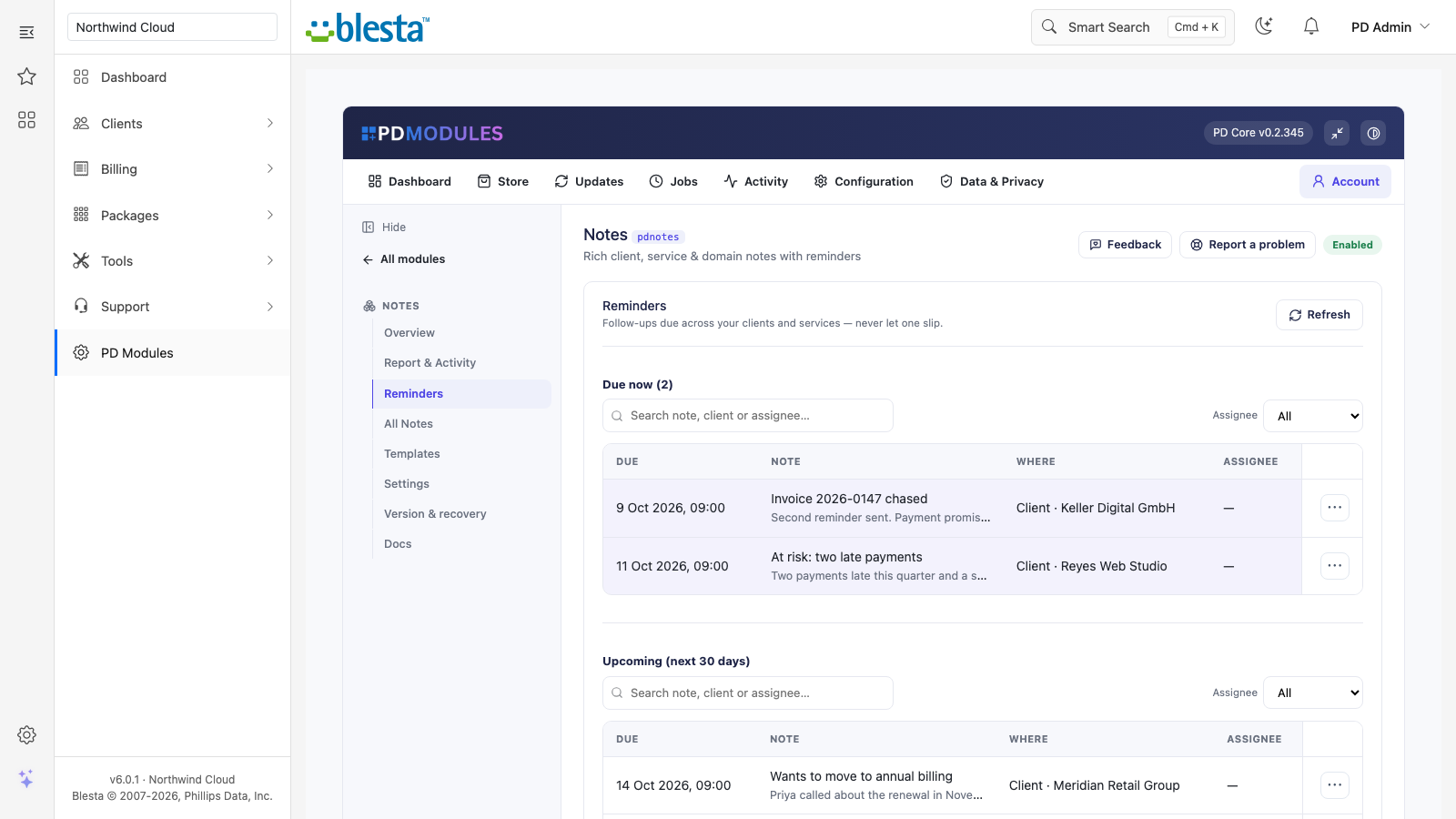
Follow-ups that cannot slip. Give a note a due date and an assignee. The Reminders tab lists everything due, overdue highlighted, and each reminder is emailed once when it falls due, to its assignee, to your fallback addresses or to every active admin if there is no assignee.
Quiet when you want it. Receive each reminder as it falls due, or as one daily digest per person. Turning emails off stops only the emails: the Reminders tab still shows what is due.
Say it once. Note templates pre-fill new notes: an incident follow-up, a renewal chase, an onboarding call.
Safe by default. Notes are staff-only until you decide otherwise. Domain notes are never shown to or emailed to the client. HTML typed into a note is shown as text and never run.
Tell the customer without a ticket. When a note is worth sharing, email it to the client straight from the note, or send a colleague a copy with a short message. The note records when it was last shared, so nobody sends it twice by accident.
Nothing extra to run. Reminders use the cron your Blesta already runs. Nothing is metered, and the module is free and never lapses.
How it works
Install PD Notes from PD Modules. It adds a Notes section to your admin and a PD Notes panel on each client's profile.
Write a note. Choose the client, service or domain, add a title and Markdown body, then pick a colour, tags and, if needed, a due date and assignee.
Let reminders do the chasing. Due items appear on the Reminders tab and arrive by email.
Close the loop. Snooze a reminder for a week, or mark it done to drop it off the dashboard.
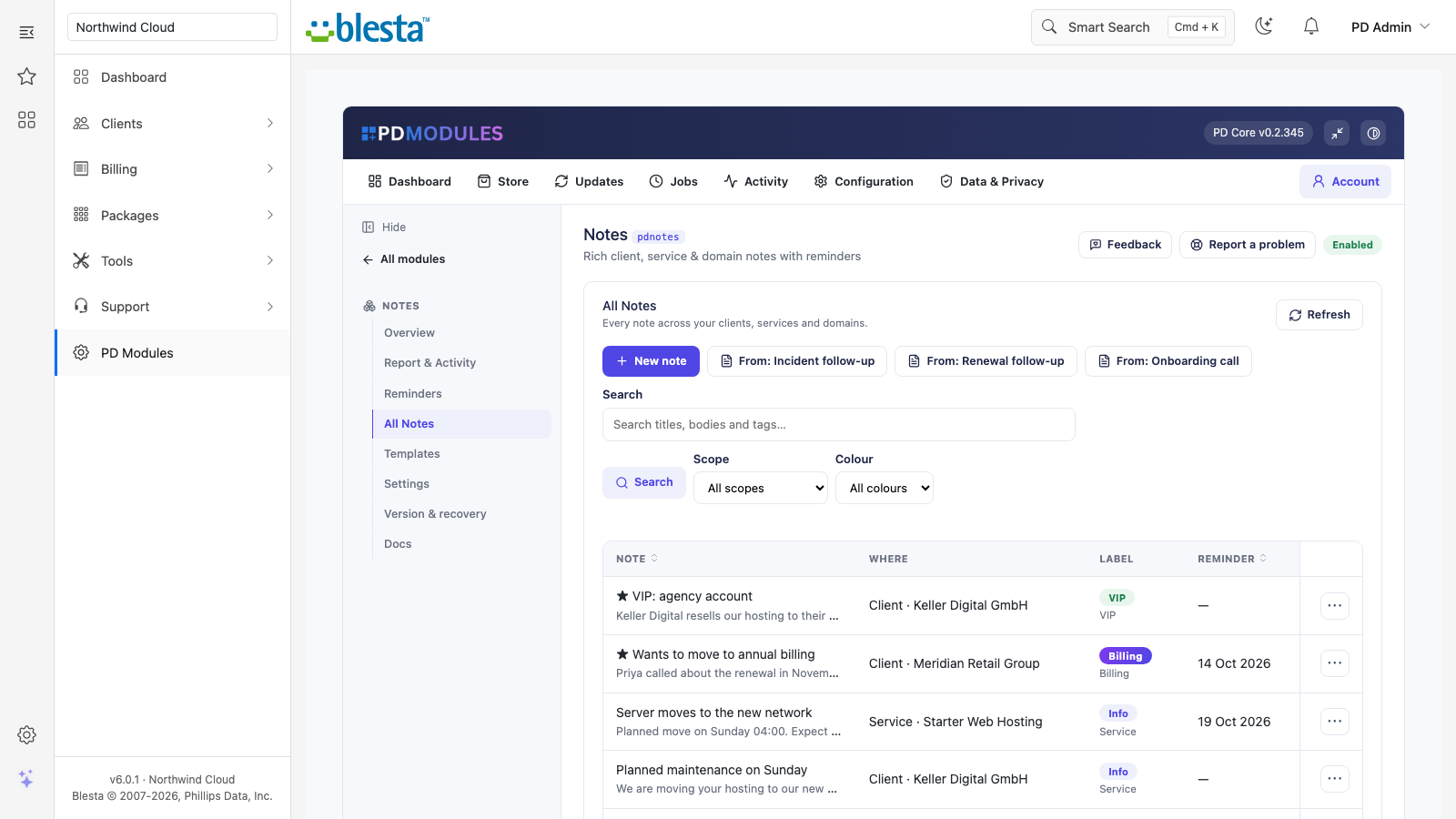
All Notes: every note across clients, services and domains in one searchable list, coloured, starred and labelled
What you get in Blesta
Writing notes
Markdown bodies with headings, lists, bold, italics, code and links, rendered safely
Pin a note to the top, colour it from a fixed palette (General, Info, VIP, Watch, At-risk, Billing) and tag it
An All Notes view to search and filter every note by text, scope, colour or tag
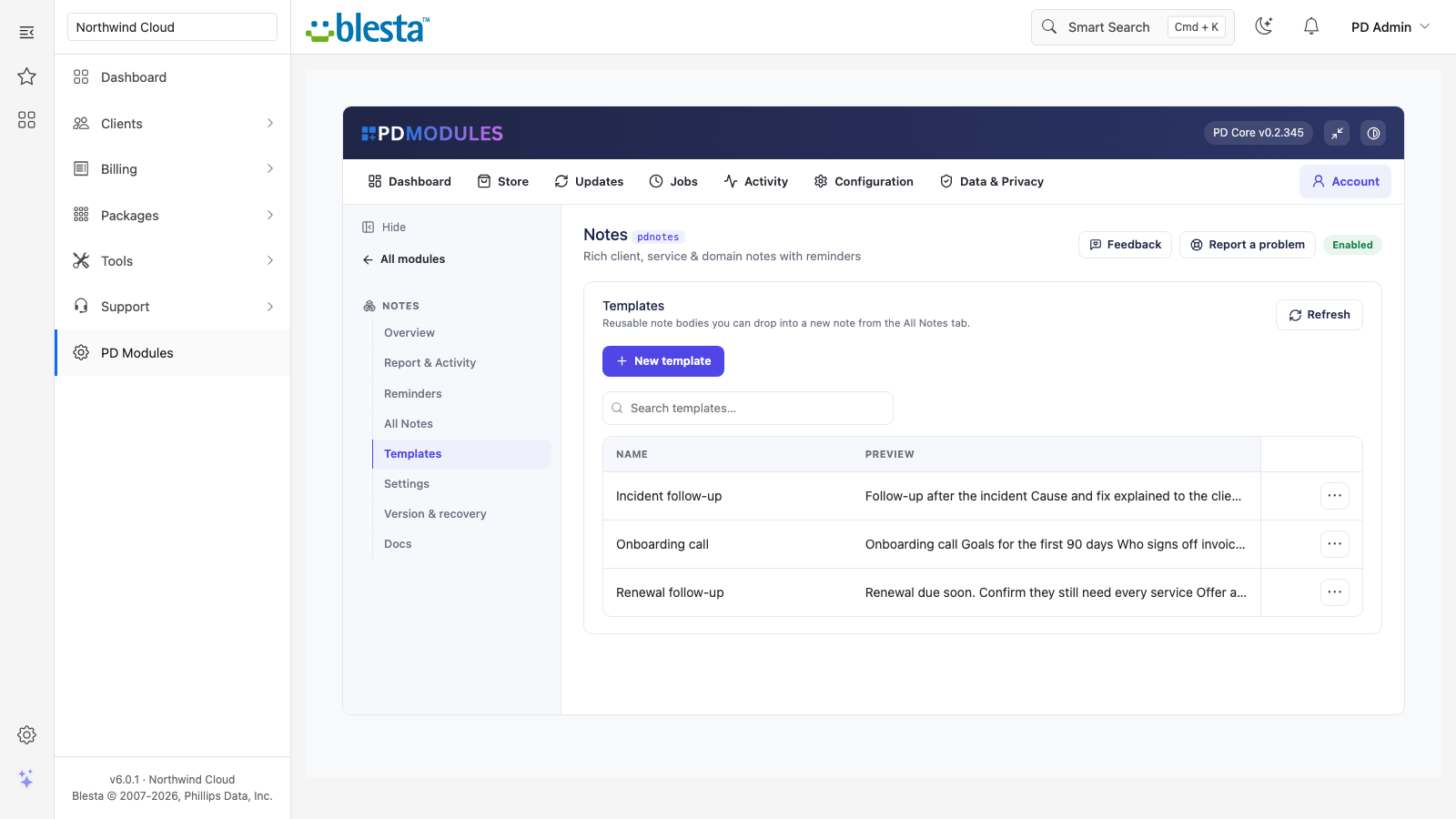
Templates for the messages you write every week, picked from the All Notes tab
Templates: write the message once and drop it into any new note
Reminders
A Reminders tab with everything due now, overdue highlighted, and what is coming
Snooze pushes a reminder back a week and re-arms its email; Done removes it from the dashboard
Changing a reminder's date re-arms it so it emails again on the new date
A reminder with no assignee goes to your fallback addresses, or to all active admins when there are none
Reminder emails need no extra cron: the cron your install already runs sends them
A default lead time pre-fills new reminder dates that many days ahead (0 for none)
A reminder is emailed once: overlapping cron runs cannot send it twice, and a failed send is retried on the next run
Daily digest option, with fallback recipients for reminders that have no assignee
Reminders: what is due now and what is coming, with who owns each follow-up
Sharing a note
Email it to the client: sends the note through an editable "PD Notes Shared Note" email template and makes it visible to them
Email it to a colleague: sends another admin a copy with an optional message
A note shows when it was last shared with the client, so it is not sent twice by accident
Day to day
Notes you do not mark visible stay internal, so the same note can hold both the history your team needs and the one message the customer should see
The assistant tools, with PD MCP Hub, read notes for a client, service or domain
Uninstalling removes the notes tables and settings; the shared-note email template is kept
What your customers get
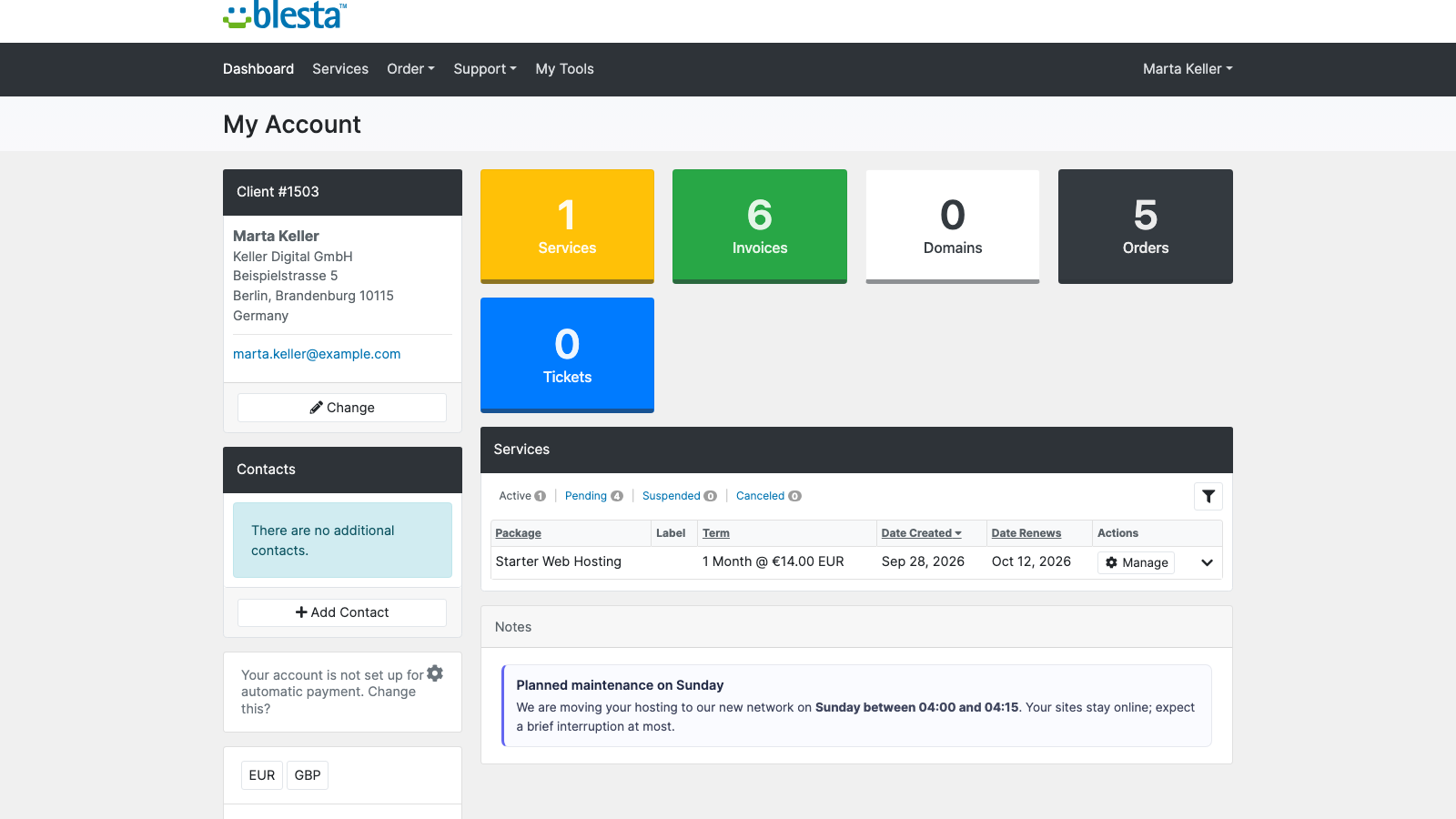
Notes you choose to show them. Notes are staff-only by default and showing notes to clients is off until you enable it. A note marked visible appears read-only, to that client only: client notes and service notes on their home page, with a service note shown under its service
A message they can keep. "Email it to the client" sends the note by email from your own template
While the master switch is off, no note is shown to any client, including notes already marked visible
A note shown to the customer, read-only, in their client area
Free for good
PD Notes is free, includes every feature and never lapses. There is no paid tier and nothing to upgrade to.
Requirements
Blesta 6 or later on PHP 8.2 or later, with the ionCube Loader
PD Modules, the free control panel every PD module installs into
Questions
Is PD Notes really free?
Yes — completely free, with no paid tier. Every feature (notes on clients, services and domains, reminders, email alerts, templates, sharing and the client-visible option) is included, and there is nothing to upgrade to.
What can I attach a note to?
A client, an individual service or product, or a domain. Blesta itself only lets you note a client, so PD Notes covers the service- and domain-level context that has nowhere else to live.
How do reminders work?
Give any note a due date and an assignee. The Reminders tab shows everything overdue and everything due in the next 30 days, and PD Notes can email the assignee (or a fallback shared inbox) when a note falls due — either as each one arrives or bundled into a single daily digest.
Can my clients see my notes?
No, unless you choose to. Every note is staff-only by default. There is a master switch to allow client-visible notes, and even then only a note you explicitly mark as visible appears — read-only — on that client's service page in their portal.
Will it clutter my admin area?
It stays where it helps. PD Notes adds a PD Notes tab to each client's profile listing that client's notes with a quick add button, plus its own Reminders, All Notes and Templates tabs. Both the client-profile tab and client-visible notes can be turned off in the settings.
Does it work with my Blesta version and template?
Yes. PD Notes runs on Blesta 8.x and 9.x with PHP 8.1+, installs and updates in one click through PD Modules, and the optional client-facing note renders natively on the bundled Six and Twenty-One themes.
Does this expire, or turn into a paid version later?
It doesn't. PD Notes is free and stays free — there is no subscription to lapse, no trial clock, and no feature that switches off later. It arrives with your PD Modules licence and keeps working.
What does it cost to run, on top of the subscription?
Nothing at all. PD Notes is free, runs entirely inside your Blesta, and does not connect to a paid third-party service — so there is no usage bill, no per-message or per-GB charge, and no metered anything.
What’s new in 0.3.51
Fixed: a note's preview in the lists now shows what was typed. Text in angle brackets, such as an email address, is no longer left out.
Add note, Edit and Delete on a client's profile panel now save instead of showing a network error.
A service note you show to the client now appears on their client-area home, under that service's name.
Reminder emails that could not be sent now show as a failed run and are retried.
Emails to your customers now send, and you can edit and translate them under Settings → Company → Emails.
Links on this module's screens open the right client, service and product pages on every platform.
 Featured