PD Support PIN — Verify Callers with a Per-Client Support PIN
Verify callers with a per-client Support PIN
★★★★★5.0 · our rating, not customer reviews
Made and supported by Projektif Digital Ltd.
Runs inside PD Modules, the panel
every module installs into.
Clients & ProductivitySecurity & Fraud
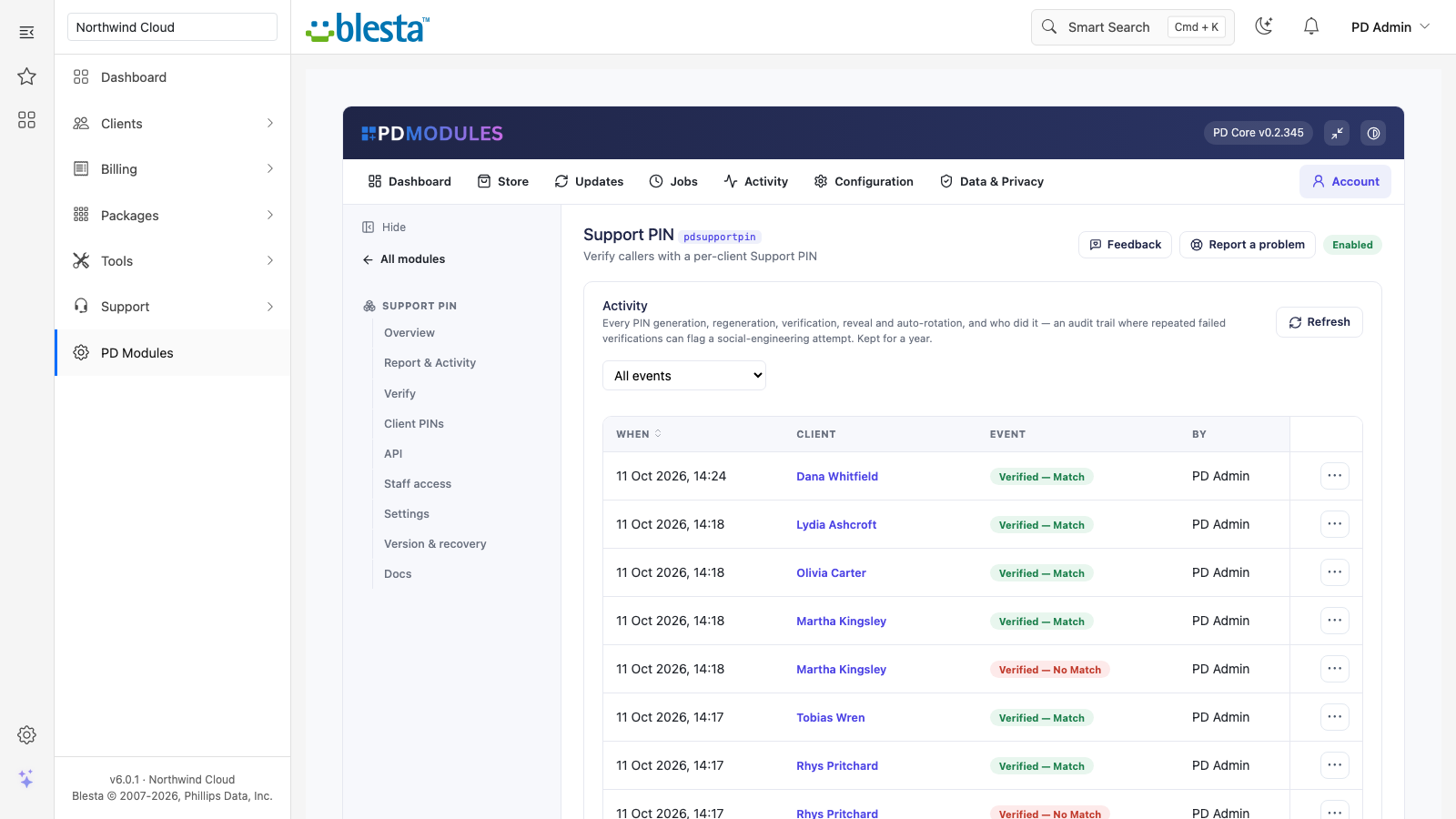
The admin view of Support PIN — everything in one place.The customer-facing side of Support PIN, on their own service page.The admin view of Support PIN — everything in one place.The customer-facing side of Support PIN, on their own service page.The admin view of Support PIN — everything in one place.1 / 5
PD Support PIN gives every client a short personal PIN they can read in their client area and quote when they contact you, so your team can check that the caller really is the account holder before touching their services. Staff type what the caller says and get a match or no-match answer, without ever having to see the stored PIN. It is free, with every feature included.
It is built for hosts whose support team takes phone calls and chat, and who need a quick, consistent way to stop social-engineering attempts such as a stranger asking for a password reset or a domain transfer.
Why hosts choose PD Support PIN
A real check, not a guess. The caller reads out a PIN, staff enter it, and the answer is a match or no match for that client. A PIN only verifies for the client it belongs to, and a wrong or empty PIN never matches.
Staff do not need to see the PIN. The check is blind: the Verify tab confirms a match without displaying the stored PIN, on success or failure. You can give caller checks to staff who should not be able to read a customer's PIN at all.
Every check is on the record. Every verification, match or not, is logged with the client, the time and who checked. Reveals and regenerations are logged too, and the audit log is kept for a year.
PINs you can trust. They are generated from a secure random source, never stored empty if generation fails, and are 6 to 8 characters long, numbers only by default or letters and numbers with look-alike characters left out.
Catches guessing. After several wrong PINs for the same client in a short window, the API answers with a rate limit, and the assistant tool is limited the same way. The report counts matches and no-match attempts over 30 days.
No cost, no catch. PD Support PIN is free with every feature included: no paid tier, no add-on and nothing that switches off when a licence lapses. It calls no paid third-party service.
How it works
Install PD Support PIN from PD Modules. Nothing to configure to start; defaults are sensible.
PINs appear on their own. A client gets a PIN the first time they open their dashboard, or the first time staff open their Summary page. No bulk set-up is needed.
A caller gives their PIN. Staff enter it in the Verify tab, or check it from the client's profile.
You get a clear answer. "Verified, the PIN matches" or "No match", logged in Activity.
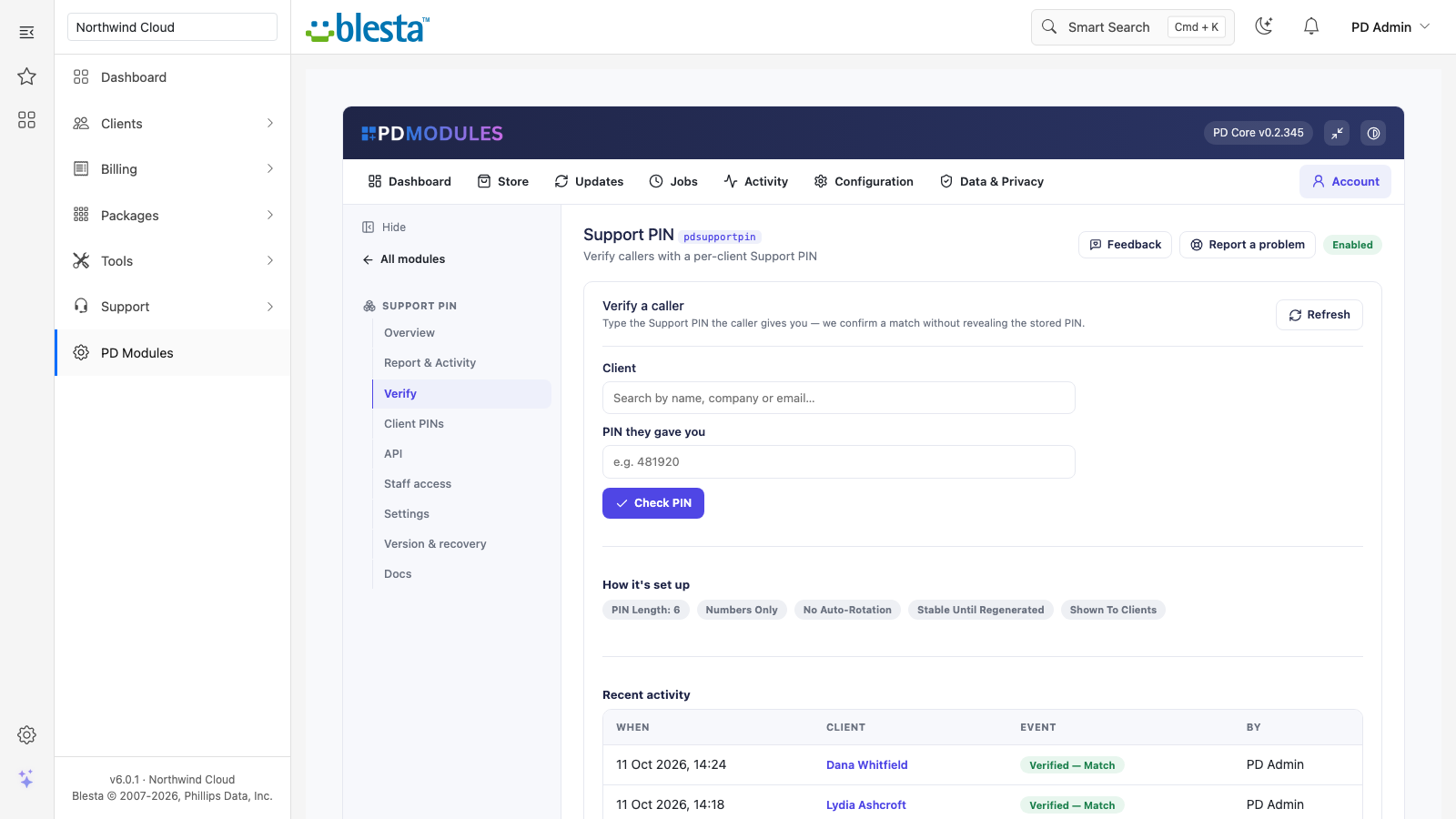
The Verify tab: pick the client, type the PIN the caller gave, and get a match without the stored PIN ever being shown
What you get in Blesta
Checking a caller
A Verify tab with a client picker and a PIN box. It refuses to run without both
Staff can check a PIN from the client's profile
Blind checking makes it safe to give caller checks to staff who should not be able to read a customer's PIN at all
Alphanumeric PINs verify as staff type what they heard, letters in either case
PIN rules you control
Length from 6 to 8, numbers-only or alphanumeric. A new length or alphabet applies to new and regenerated PINs; existing PINs keep theirs until regenerated
By default a PIN never changes on its own. Turn on "Regenerate the PIN after a successful verification" and a successful check rolls the PIN at once, so the same PIN cannot verify twice
Or auto-rotate every client's PIN once it is a set number of days old, on cron, with each rotation logged
"Hide the PIN until clicked" is on by default, so a PIN is not left on screen unless someone clicks to reveal it
Regenerate after a confirmation; the old PIN stops working immediately
Reports and records
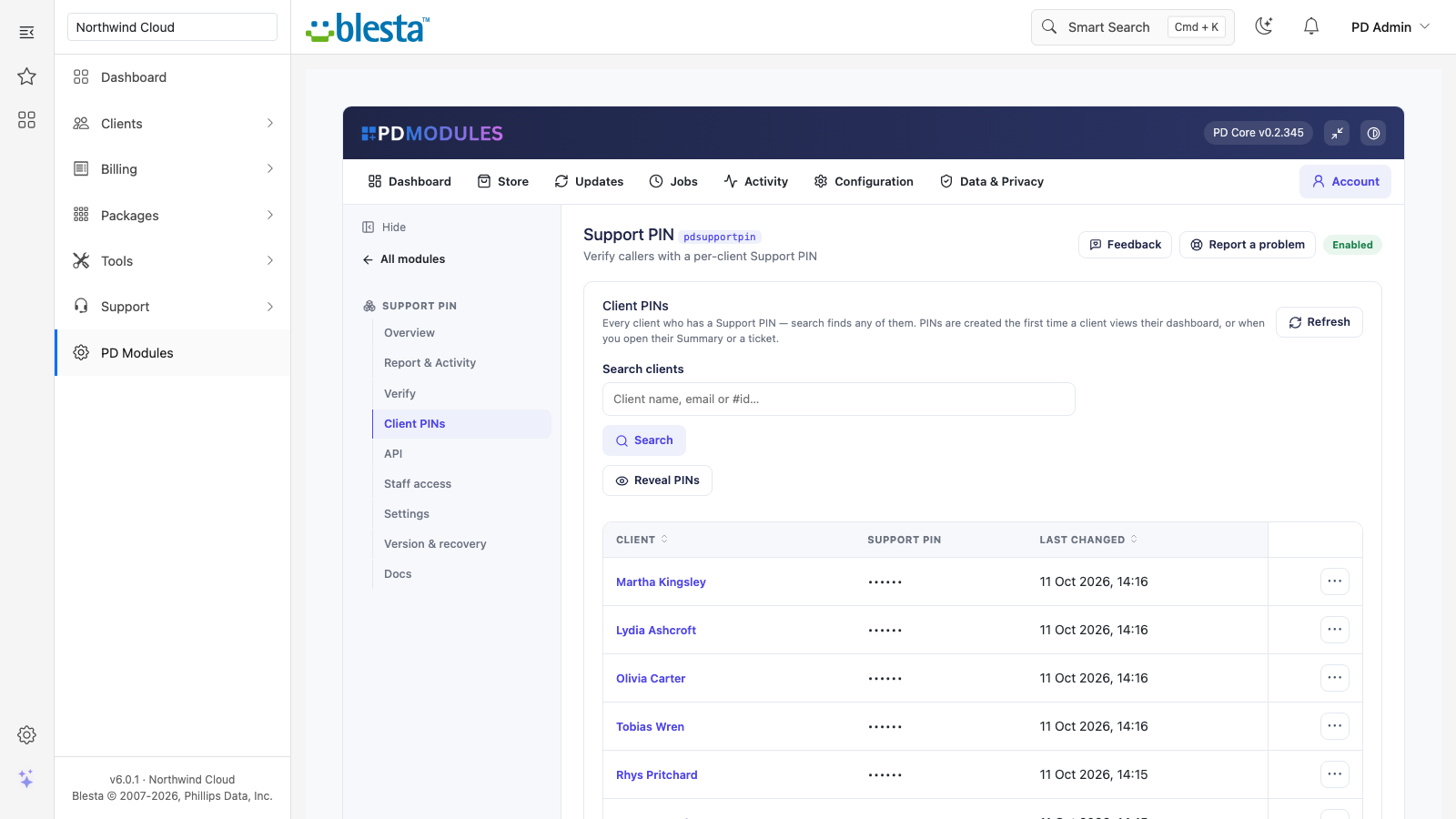
Client PINs lists every client who has a PIN, with last-changed date, search by name or id, sorting, Reveal, Regenerate and Open client
Activity lists every generation, regeneration, verification, rotation and reveal with client, time and who did it, filterable by event
The report shows how many active clients have a PIN, callers matched, no-match attempts in 30 days and the last check
Client PINs: every client's PIN state at a glance, masked until revealedThe audit trail: every verification, match or no match, with who checked and when
Verification API
Check a PIN from your own phone system, helpdesk or tools. Off by default; when on, it answers match true or false and never returns a PIN
The key is shown once when generated, stored only as a hash, and regenerating it stops the old key at once. A key in the URL is refused
Identify the client by client id or by exact email. After 5 wrong PINs for a client in 15 minutes the API answers 429 for that client
With PD MCP Hub, an assistant can ask whether a PIN matches and get only yes or no, and a status tool says whether a client has a PIN and how many failed checks it had in 24 hours, without revealing it
What your customers get
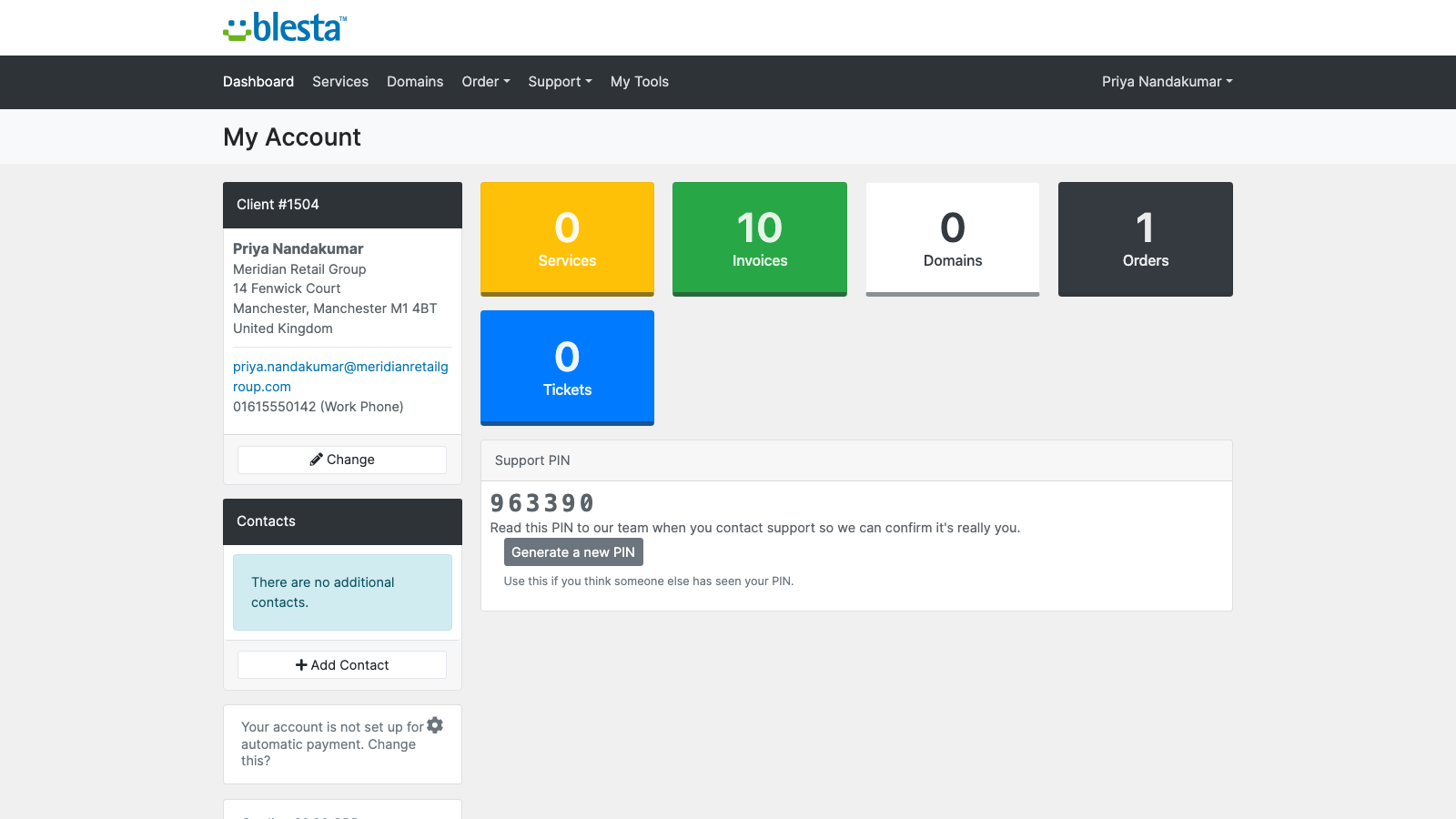
A Support PIN panel on their client-area dashboard with a one-line explanation, on by default and removable
A Generate a new PIN button, if you allow it, so a client who thinks someone else has seen their PIN can roll it themselves. It is shown at once and the old one stops working. Only the signed-in client, from their own dashboard, can do it
Every line can be translated or reworded in an override folder that updates never overwrite
On Blesta there is no sidebar card or Account-menu row, and the PIN is not shown on the admin ticket view; it is on the client profile
The customer's dashboard: their PIN, a one-line explanation of when to quote it, and a button to roll a new one
Security built in
The stored PIN is never shown during a check, and the API and assistant tools can only answer match or no match.
Every reveal by staff is recorded as "Revealed by staff", with who looked.
Verification is exact-email and per-client, so one client's valid PIN never verifies another.
PD Support PIN adds its own tables and templates and modifies no Blesta files. If anything goes wrong, it fails quietly rather than breaking the client area, the admin pages or cron.
Free, complete, clean
PD Support PIN is one free module with everything included. Uninstalling removes all PIN data, the activity log and the module's settings, and a reinstall starts fresh.
Requirements
Blesta 6 or later on PHP 8.2 or later, with the ionCube Loader
PD Modules, the free control panel every PD module installs into
Questions
Is PD Support PIN really free?
Yes — it's completely free and fully featured, with no paid tier, add-ons or upsell. A £0 licence still ties the install to an account so updates and support work, but every feature is included.
How does a client get their PIN?
Each client sees their Support PIN on their client-area dashboard with a short explanation, so they can read it out when they contact you. You can optionally let clients regenerate their own PIN, or keep it staff-managed.
Can staff see the PIN when they shouldn't?
The Verify tool is blind — you type the PIN the caller gives you and get a match / no-match without the stored value ever showing on screen. Where a look-up is available, PINs stay masked until you click to reveal, so they aren't left on display.
Do PINs change on their own?
Not by default — each PIN stays stable so it never changes mid-call. If you want tighter security you can auto-rotate every client's PIN on a schedule, or regenerate it after each successful verification for effectively a one-time PIN.
Can I verify callers from my phone system or help desk?
Yes, optionally. An off-by-default verification API lets your phone/IVR, help desk or internal tools check a caller's PIN over a key-authenticated HTTP endpoint. It's verify-only — it never returns the stored PIN — and repeated wrong guesses are rate-limited.
Does this expire, or turn into a paid version later?
It doesn't. PD Support PIN is free and stays free — there is no subscription to lapse, no trial clock, and no feature that switches off later. It arrives with your PD Modules licence and keeps working.
What does it cost to run, on top of the subscription?
Nothing at all. PD Support PIN is free, runs entirely inside your Blesta, and does not connect to a paid third-party service — so there is no usage bill, no per-message or per-GB charge, and no metered anything.
Which Blesta and PHP versions does it need?
Blesta 6.0 or later, on PHP 8.1 or later. It installs alongside whatever else you run — it adds its own tables and templates rather than modifying Blesta files, so it does not collide with other vendors' modules or with a customised template. Uninstalling removes its own tables and settings and leaves no orphans behind.
What’s new in 0.2.43
The PIN rotation job now says on the Jobs page how many PINs it rotated, or that automatic rotation is off.
Pressing Reveal on a client's Summary page or ticket shows their PIN again.
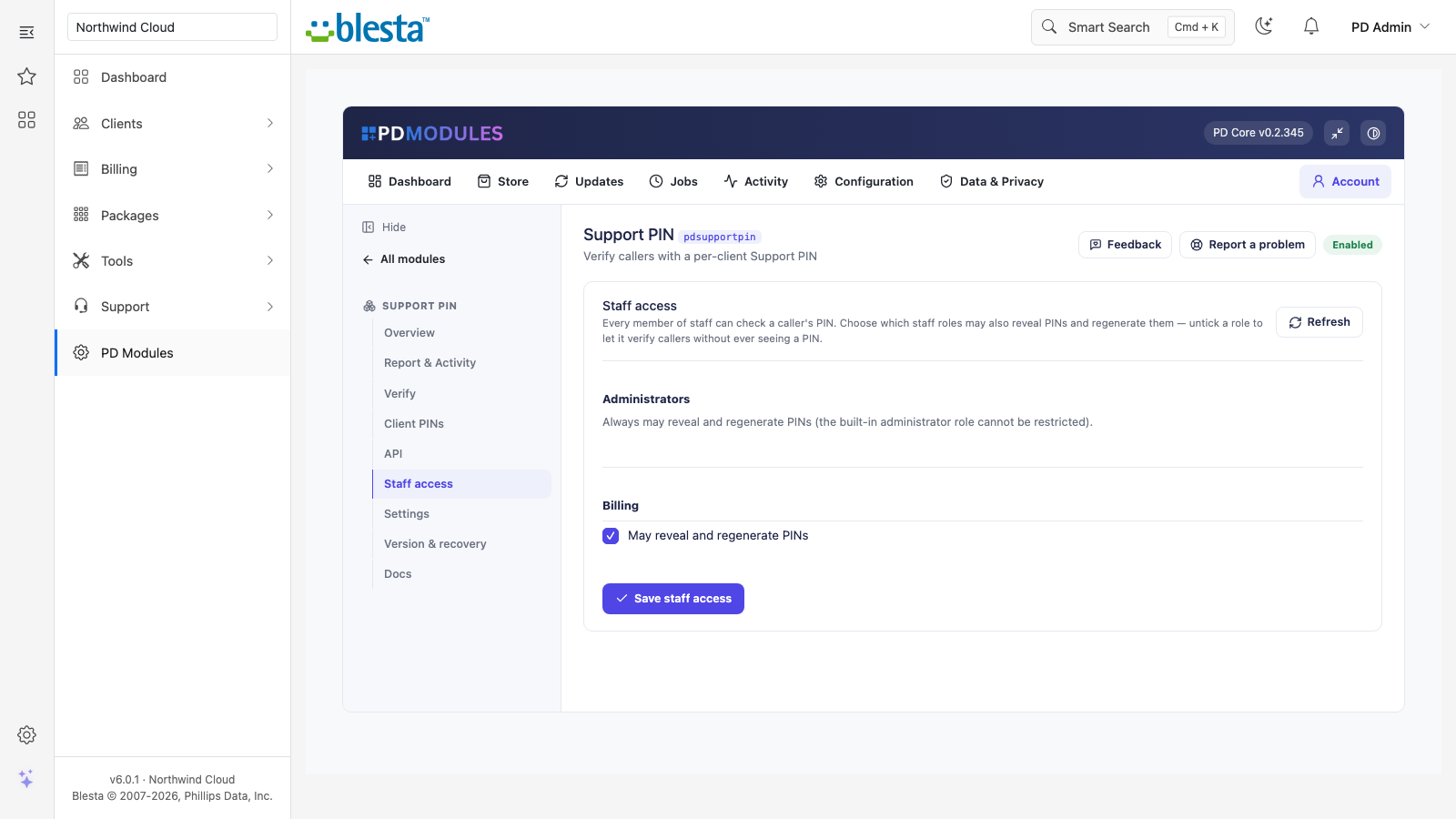
New Staff access tab: choose which staff roles may reveal and regenerate PINs. The rest can still check a caller's PIN but never see one.
Assistant PIN checks are now locked after repeated wrong answers, like the verification API, and follow one-time PIN mode.
Reveal PINs on Client PINs is recorded in Activity, and with masking on a regenerated PIN stays hidden until revealed.
Activity says where each event came from — the client, the verification API, an assistant or the scheduled rotation — and pages back through the whole log.
Letters in an alphanumeric PIN match in either case.
Client PINs search finds any client with a PIN, however many you have.
The report counts PINs held by active clients only.
Verifying by email through the API always finds the client with exactly that address.
A masked PIN on a client's Summary and ticket stays private until you press Reveal, and every reveal is recorded in Activity.
Company names containing "&" display correctly.
The Activity view, with its failed-check filter and who checked, is under Report & Activity again.
After checking a PIN on a ticket or Summary, the check box keeps its size.
The verification API and the customer's "new PIN" button now work, and staff can check a PIN from the client's profile.
The API example now shows where your key goes instead of a value that could not be used.
Links on this module's screens open the right client, service and product pages on every platform.
 Featured