Best Blesta Modules for a Hosting Business: PD Modules Picks by Task
Choose Blesta modules by the work your team needs to improve: onboarding, notes, caller checks, agreements and offers. A task-based PD Modules shortlist.
The best Blesta module to add first is the one that removes a recurring problem your team can name. A host losing track of customer answers needs a different starting point from one introducing promotional offers. This shortlist selects from our own PD Modules range, by business task; it is not a ranking of every supplier.
Use the choices below to build a small, useful toolkit. Pick a problem, identify the person who owns it and decide what a better result would look like before installing another module.
Choose by the work you need to improve
| Your recurring problem | PD Modules pick | What to check first |
|---|---|---|
| Customer setup stalls while answers arrive separately | PD Onboard | Which answers or confirmations actually block progress? |
| The next colleague cannot find the agreed action | PD Notes | Does the context belong to the client, service or domain? |
| Staff need a consistent caller check | PD Support PIN | Where does verification fit in your support process? |
| You need to retain the accepted wording | PD Agreements | Which document and audience need a versioned acceptance? |
| Staff manually explain or apply an offer | PD Discount Manager | Which products and conditions should receive it? |
For collecting the information needed to start: PD Onboard
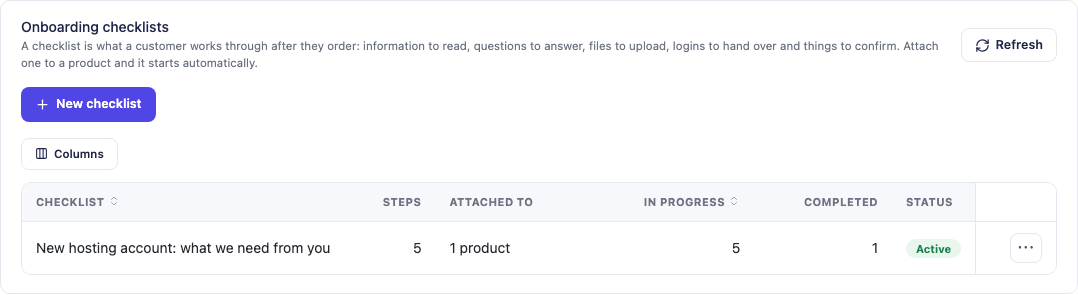
PD Onboard gives customers a guided checklist rather than a loose series of requests. It supports structured steps such as answers and confirmations, with progress visible to staff. Choose it when incomplete setup information delays the start of a service.
Keep the first checklist short: the information that enables the next action, rather than every question you might ask eventually. Assign someone to review completion; a completed checklist still needs to lead to useful work.
For shared context and follow-up: PD Notes
PD Notes is a free choice for client, service and domain notes, reusable templates and reminders. Choose it when people repeat conversations because the context lives with one colleague. A short record of the decision, next action and owner is more useful than a pasted conversation with no conclusion.
Notes and Onboard serve different jobs. Onboard collects what the customer needs to provide; Notes keeps your team’s context and follow-up. Use either alone if that solves the problem.
For a repeatable caller check: PD Support PIN
PD Support PIN is free and gives staff a per-client PIN check during support conversations. Choose it when telephone support needs a consistent verification step. Treat the result as part of your support process, then continue with the relevant account task; it does not replace judgement about the request itself.
For versioned acceptance: PD Agreements
PD Agreements is a paid module for publishing versioned documents and retaining the accepted version with its signature evidence. It fits a team that needs to distinguish today’s document from the wording a customer previously accepted.
Define the audience and the point in the customer journey where acceptance matters. Avoid making a document request the substitute for collecting practical setup information.
For rule-based offers: PD Discount Manager
PD Discount Manager is a paid option for automatic discounts and bundles. Choose it when the offer should follow defined conditions rather than depend on someone remembering a manual adjustment. Rehearse an eligible and an ineligible order so staff understand the boundary of the offer.
Beyond team workflow: modules by service
The picks above improve how your team works. If you are choosing Blesta modules for what you sell or protect, these are the PD Modules for each job. All of them install from the same PD Modules panel.
Cloud servers under your own brand
Each of these provisions a server for every order in your own cloud account. The customer chooses region, plan and operating system at checkout, and their Blesta client area becomes a control panel with power controls, reboot and firewall. The choices are PD DigitalOcean Droplets, PD AWS Lightsail, PD AWS EC2, PD Azure VM and PD Google Compute Engine. PD Cloud Cost & Margin then matches provider charges to the Blesta services that should be paying for them. More in selling DigitalOcean Droplets with Blesta.
DNS self-service for customers
Choose the module for the DNS you run, such as Cloudflare, AWS Route 53, cPanel or PowerDNS. Customers get a “Manage DNS” area for their own domains, and the record editor checks each record before it is saved. With more than one backend, PD DNS Manager covers them together. More in Blesta client DNS self-service.
Crypto payments
PD Crypto Pay takes Bitcoin, Ethereum and stablecoin payments straight to your own wallet, with no payment processor holding the funds and no per-transaction commission. More in crypto payments to your own wallet in Blesta.
Security and fraud
PD Guard audits the Blesta installation, and its free edition adds admin login alerts and failed-login protection. PD Shield blocks fake sign-ups and fraudulent orders before anything is provisioned; its honeypot, email verification hold and disposable-email blocking are free. PD Password Manager hands over credentials with one-time links. More in a Blesta security review with PD Guard.
Monitoring what you host
PD Uptime & Status enrols each service for monitoring as it is provisioned. PD Domain Radar checks domains at the registry for expiry, nameserver changes and lock status. PD Email Deliverability grades SPF, DKIM and DMARC, and PD Site Sentinel checks hosted websites from the outside.
AI for staff and customers
PD AI Assistant looks up clients, invoices and tickets for staff and drafts replies, grounded in your own Knowledge Base. PD MCP Hub (free) gives your team’s AI tools one governed connection to Blesta and your PD modules. More in connecting AI assistants to Blesta.
Start with one measurable improvement
For an onboarding bottleneck, record how often staff chase a missing answer. For handovers, record how often the next person has to ask the previous colleague what happened. Compare the same task after introducing the module. These are practical checks on usefulness, not promised savings.
Install the free PD Modules panel first, then use its Store to add the chosen module. The panel brings module management and Pidi support into one place. Each product page describes current features, Free or Pro scope and requirements. Browse the Blesta catalogue when a different task is your priority.
Frequently asked questions
Do I need every module in this shortlist?
No. Start with the problem that creates the most repeat work, then add another module only when it has a clear owner and purpose.
Which of these modules are free?
PD Notes and PD Support PIN are free. Other modules may be paid or offer optional Pro features; check the linked product page for the edition you need.
Are these independent rankings?
No. These are task-based selections from our own PD Modules range, with reasons to choose each one.
Can I manage them inside Blesta?
Yes. The free PD Modules panel provides the Store and central management for PD modules inside Blesta.
