PD Guard for Blesta: Security Checks, Login Alerts and Ongoing Visibility
Explore PD Guard for Blesta: installation reports and login visibility, with Pro monitoring, file-integrity comparison, TLS inspection and advanced controls.
A billing platform is easy to overlook while the team is busy managing the services it sells. PHP settings change, a certificate approaches expiry or an unfamiliar administrative sign-in deserves a closer look. Useful visibility puts those observations where staff already work.
PD Guard brings security and configuration checks into Blesta, with sign-in information and optional Pro monitoring. The free module includes the health report, administrative login alerts, customer sign-in history and activity. Pro expands that with scheduled checks, file-integrity comparison, malware-pattern review, TLS inspection, access controls and error-monitoring integration.
For a hosting company, the benefit is a more consistent operational routine. Staff can inspect the installation, see explained findings and choose the next task without treating every server question as a disconnected external check.
Turn installation checks into an understandable report
The Report groups supported observations into areas such as PHP, extensions, application settings, database configuration, security and server resources. Each finding has a status and explanation so staff can distinguish a pass from a warning or a check that could not be completed.
That makes the report useful to more than the person who originally configured the server. An administrator can review the relevant setting, understand why it matters and use the linked platform guidance where supplied.
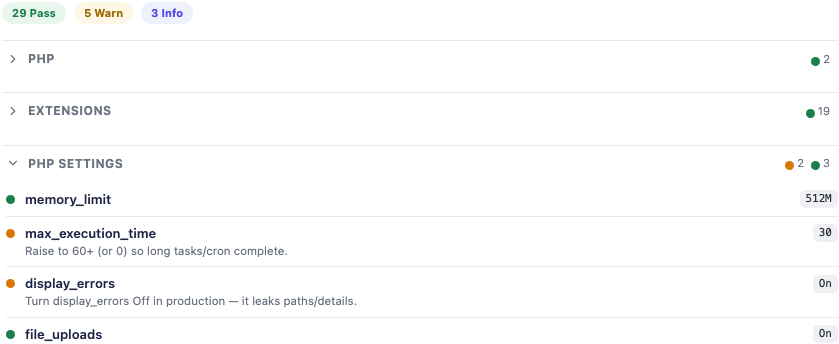
*Actual Blesta product-report crop. Values and statuses are demonstration observations, not a security assessment of PD Hosting or a recommendation to copy those settings. The outer administrator identity and version information are excluded.*
For example, after a planned environment change, a hosting team could review the supported runtime observations and compare them with the intended setup. A warning about a setting becomes a specific configuration task rather than an unexplained claim that the entire installation is insecure.
The Blesta report guide explains the interpretation. A report is a set of supported checks from the environment where they run; it is not a certification that every part of the application has been tested or that an unknown result means a pass.
Keep successful administrative sign-ins visible
Administrative access is important enough to deserve more than an occasional glance at a log. PD Guard can record successful admin sign-ins and send alerts, with an option to focus notifications on an unfamiliar address or location.
That can help a team notice a change in access pattern. A person signing in while travelling, through a different connection or from an unexpected source may warrant a different follow-up from the usual office sign-in.
The observation should remain specific. An unfamiliar IP address is not proof of a new device or an unauthorised person, and an address-derived country is not verified identity. Staff use the alert as context for their normal review.
The Blesta admin-login alert guide covers recipients and notification choices. The module gives the business a supported way to bring those successful-login observations into its working routine.
Let customers recognise their recent sign-in history
PD Guard also supports customer sign-in history, with address-based first-seen, last-seen and count information and optional new-address notifications. That gives the customer another point of reference when reviewing access to their account.
A hosting business can enable the supported history feature and decide how it should fit with its normal account communication. The history is not a complete list of every separate device session, and a notification does not independently establish whether a person was authorised.
The useful distinction is between observation and response. The module supplies recorded context; the customer and staff can then follow the account process suited to the situation. A sign-in history feature is more informative when its labels mean exactly what they record.
The client login-history guide explains the customer-facing workflow without assuming it works like another billing platform’s login tracker.
Add scheduled monitoring with Pro
An attended report answers what the checked environment looks like now. Pro scheduled monitoring makes selected observations part of a recurring background process, with alerts when the monitored status gets worse.
The Monitoring view shows whether monitoring is armed, the configured interval and the latest recorded check. That lets staff connect an alerting policy with the process expected to run it.

*Actual Pro monitoring-status crop. The dates and interval belong to the demonstration configuration. No alert was sent or monitoring setting changed for this article.*
For example, a team could make the scheduled report part of its operational checks and direct eligible alerts to a shared destination. The purpose is to notice a deteriorating condition without manually opening the report every time.
The schedule depends on background processing, and notification transport is separate from the observation itself. A successful recorded run is not proof that every recipient saw a message, nor does every changed value necessarily produce a new alert.
Use the Blesta scheduled-monitoring guide for the actual settings. Start with the observations your team knows how to act on, rather than choosing a schedule merely to make the dashboard look active.
Compare file changes against a reviewed baseline
Pro File Integrity records a baseline of included files and later compares it with the current included state. It can show additions, changes and removals, helping staff notice unexpected drift or review what changed around a planned update.
That is useful because the question is concrete: which included files differ from the reference the team chose? It is different from assuming that every changed file is malicious or that a file matching the baseline is automatically trustworthy.
An appropriate workflow establishes a known, reviewed starting state, inspects unexpected changes and replaces the baseline only when accepting the new included state is intended. Rebaselining accepts the current comparison basis; it does not repair the installation or preserve an independent backup of every file.
The scan has its documented coverage and exclusions. It should not be advertised as examining every file of every size in every directory. Staff can use its findings alongside the normal update and recovery process without inflating them into a complete forensic assessment.
A hypothetical hosting team preparing a maintenance window could keep the pre-change reference, review the expected file differences and decide when the new state should become its baseline. The value is a repeatable comparison, not a promise of automatic remediation.
Review malware-pattern findings as evidence
Pro Malware Scan inspects included files for suspicious patterns and presents findings for staff review. It runs as an attended scan through the module, rather than silently quarantining or repairing application files.
That helps staff narrow an investigation. A pattern match deserves context: the file’s source, the relevant change and the surrounding behaviour. It is not automatically a count of unique infected files, and a scan with no retained findings is not proof that nothing harmful exists anywhere.
The practical product benefit is a place to conduct a supported initial review inside the Blesta module environment. Staff can preserve the evidence and involve the person responsible for the installation when a finding needs a deeper assessment.
Keep that purpose clear in the service process. A detection screen, a baseline comparison and an actual recovery operation solve different problems, even when the same incident makes all three relevant.
Inspect TLS and runtime support status
Pro adds a deeper TLS audit alongside the report’s basic observations. It can inspect the negotiated connection, certificate validation, hostname and expiry information from the route the check uses.
This gives administrators another specific set of facts to review. It does not enumerate every cipher a server might support or recreate every visitor’s route through proxies and networks. The observation is useful when understood from its actual checking perspective.
Version Exposure provides another planning view, including PHP support status from the module’s available information. It is not a live database of every CVE, and a bundled support table should be compared with current upstream information when planning a change.
Those features can help organise routine maintenance. The team gets a visible prompt to review the relevant connection or runtime, while deciding the actual supported upgrade and configuration change through its normal platform process.
Keep advanced access and error tools deliberate
Pro Admin Access Lock provides a supported way to restrict the administrative area by trusted IP or country. The two conditions are alternatives in the configured policy, not a claim that both must match. The client area is a separate scope.
It is a control to configure with a clear access plan. Dynamic staff connections and reverse-proxy address handling matter, so review the actual addresses the application sees before deciding which policy expresses your intended access. This article does not change or weaken any protection.
Pro error monitoring can send supported PHP error information to the host’s own Sentry project. That can help the team observe relevant failures in an existing monitoring process. Choose that destination and the information it receives deliberately; a recorded send attempt is not proof of a visible downstream event.
These are optional additions to the same operational theme: useful information and specific controls inside the module, with the hosting business responsible for the intended policy and response.
Free visibility, with a defined Pro expansion
The free module supplies the report and documented sign-in features. Pro adds scheduled monitoring, file tools, deeper inspection and advanced controls. Those editions should be described explicitly rather than implying that every screenshot represents the free feature set.
The Blesta implementation also has its own boundaries. PD Guard does not provide the failed-login protection workflow on Blesta described for a different platform. Successful-login observations, an optional admin access policy and an external sign-in rate limit are different controls, not interchangeable names for the same feature.
That precision helps buyers assess what they need. A small business can begin with the free report and sign-in visibility, then evaluate the Pro capabilities that suit its operational routine.
Explore PD Guard for Blesta
Explore PD Guard for Blesta if you want installation checks and access observations closer to the team running the business.
Begin with the report, establish which findings need work and choose the relevant login and monitoring settings. Add Pro file, TLS, access or error tools around a process the team understands. The module’s value is the depth of those supported workflows, rather than an impossible promise that one report makes an installation secure forever.
Frequently asked questions
Is PD Guard available for Blesta?
Yes. It offers the Blesta report and supported sign-in visibility, with Pro capabilities for monitoring, file comparison, inspection and advanced controls.
Which features are free?
The documented free feature set includes the report, admin login alerts, customer sign-in history and activity. Pro supplies the additional monitoring and advanced tools described here.
Does an unfamiliar login address prove an account was compromised?
No. It is an observation worth reviewing, not proof of a new device or unauthorised person. Connection changes can also produce a new address.
Can Pro detect unexpected file changes?
File Integrity compares included files with the selected baseline. Coverage and exclusions apply, and a difference needs review rather than automatic classification as malicious.
Does the malware scan repair files automatically?
It presents supported suspicious-pattern findings for review. It is not an automatic quarantine, repair or full-installation clean bill of health.
Does PD Guard’s failed-login protection work on Blesta?
That workflow is not available in the documented Blesta implementation. Do not confuse it with successful-login alerts or the optional Pro admin access policy.
Will scheduled monitoring email every changed value?
No. It follows the documented monitored-state and notification behaviour. Check the actual run and destination rather than assuming that any changed value guarantees a delivered alert.
