Blesta DNS Self-Service: Give Customers Record Control Across Your Providers
Give Blesta customers record editing for their own zones across supported DNS providers. Explore PD DNS Manager templates, policies and staff controls.
A customer needs to verify a domain with a new service. Another wants to point a subdomain at an application, while a third is moving email. If every DNS change becomes a message to the hosting team, a routine record update can turn into a queue of copied values and repeated instructions.
PD DNS Manager gives Blesta customers a DNS management area for their own zones, backed by the providers the hosting business configures. Staff retain provider administration, zone ownership and policy controls; customers get supported record tools inside the portal they already use.
For a hosting company or agency, this connects two useful outcomes: customers can perform appropriate DNS tasks themselves, and staff can manage zones across supported backends through a common module workspace. It is more than a single provider’s record editor placed beside a billing system.
Keep provider administration with the host
Your DNS estate may have grown around several kinds of service. Some zones may live with a cloud DNS API, others on a hosting control panel or a DNS server the business operates.
PD DNS Manager supports documented backends including Cloudflare, AWS Route 53, DigitalOcean, Google Cloud DNS and Azure DNS, alongside hosting-panel and self-hosted routes such as cPanel/WHM, Plesk, DirectAdmin, PowerDNS and BIND. Choose the supported connector that fits the backend you actually use.
The host configures that provider connection. Customers use the module’s service interface rather than receiving a copy of the provider’s administrative credentials. That is an important separation when the provider account also contains other customers’ zones.
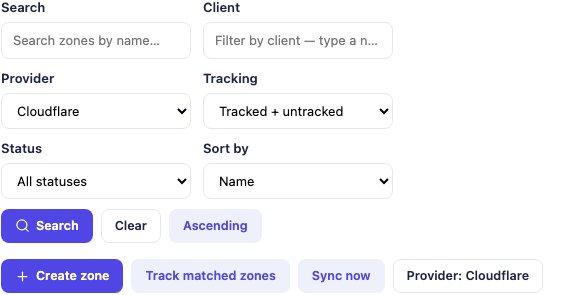
*Actual Blesta administration crop. It illustrates staff provider and zone-selection controls; the populated zone list and outer account/version area are excluded.*
The shared interface does not make all providers identical. A record type, DNSSEC operation or export feature still depends on the backend. The product advantage is a consistent place to work with those supported capabilities, rather than a promise that every provider exposes every feature.
Give customers a familiar place to manage DNS
In Blesta, customers reach the DNS area through My Tools. The module lists zones bound to their account, and opening a zone leads to its records and other available pages.
That is a useful handoff for a provider already using Blesta for the customer relationship. The customer knows where to sign in, and the DNS task stays connected to the relevant account instead of requiring another hosting-panel login for a simple record change.
Ownership and access still need to be correct. A zone existing at the backend is not the same as a zone being deliberately tracked and bound to the intended client. Staff can adopt appropriate existing zones and review the relationship before inviting a customer to use them.
The Blesta zone tracking and access guide covers that work. Treat the provider account and zone identity together, especially where several configured backends can contain a zone with the same name.
Make the record editor match the record type
A website address, a mail-routing record and a verification token need different fields. A type-aware editor helps the customer work with the particular value rather than squeeze everything into a generic form.
PD DNS Manager shows the relevant controls for the chosen record type. An address record has an address value; an MX record includes a target and priority. Available types follow the backend’s support, with record names, values and TTLs visible in the grid.
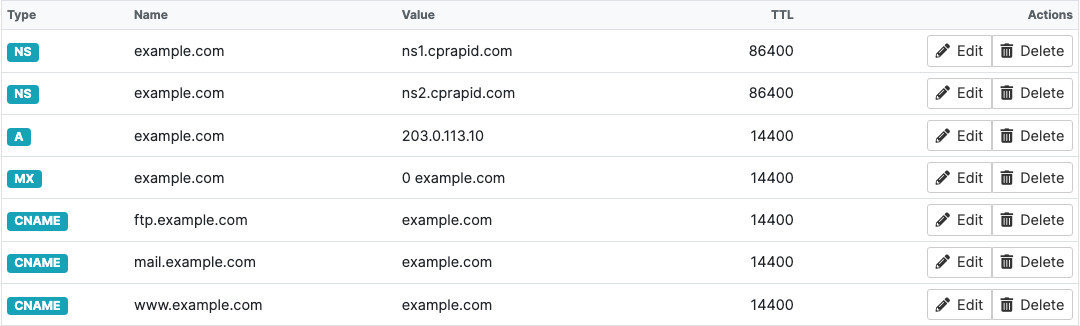
*Actual Blesta customer record-table crop. The reserved example.com names and documentation IP address are sample values, not instructions to copy into a live domain. Provider-returned nameserver values are illustrative.*
The record view reads from the configured DNS backend. It gives the customer a practical view of the zone being managed, rather than asking them to infer its contents from an old welcome email.
Validation can catch supported format and policy problems, but it does not establish that the customer’s chosen destination is the one their application requires. The useful workflow combines a suitable editor with the requesting service’s exact instructions.
Support website, subdomain and verification tasks
Self-service becomes valuable through the tasks it enables. A customer connecting a website may need an address record or CNAME. A customer verifying ownership with an application may need a particular TXT value at a specific name.
PD DNS Manager lets the customer manage the supported records in their own zone, subject to the host’s access choices and policies. They can review what is already present before adding the requested value and avoid treating unrelated records as disposable clutter.
Consider a hypothetical agency customer adding a hosted application on a subdomain. The application supplies its required DNS target. The customer opens their zone in Blesta, enters the supported record and then completes the application’s own verification process.
The module publishes the DNS change at the backend. The application decides when its verification succeeds, and DNS caching affects when other systems observe changes. A saved record is useful evidence of the write, not a promise that every external service sees it instantly.
The website-record guide and TXT verification guide provide the task-level follow-through. This is the kind of routine work a customer can perform without staff copying a token on their behalf.
Give email changes a clearer workflow
Mail setup often involves several record types and values. The module provides record editing and documented Quick set-ups for services such as Google Workspace and Microsoft 365, where made available by the host.
Those presets can help build the supported baseline records, while customers still compare the result with the mail provider’s current tenant-specific instructions. A generic preset should not be presented as proof that a particular account, domain verification or sending configuration is complete.
Existing mail also deserves deliberate treatment. Before applying a different setup, review which service currently receives and sends mail for the domain. An unused-domain SPF lockdown has a different purpose from the policy of a domain that actively sends messages.
The Blesta mail-record guide explains those decisions. The marketing value is a practical route for customers to manage ordinary mail DNS, with a record view and appropriate setup assistance, rather than another blanket instruction to contact support.
Build reusable DNS templates for the service you sell
A host may repeat the same record structure across many new customer zones. PD DNS Manager templates let staff define reusable record sets, with supported merge fields such as the zone’s domain and available nameserver information.
That gives an agency or hosting team a way to make its normal setup more consistent. A template can provide the intended starting records, while the zone-specific values are resolved for the target where available.
For example, a host could create a standard record set for one of its hosting offers and apply it to suitable zones. A different template could support another defined service. These are illustrative configurations, not a claim that the module knows every customer’s desired DNS arrangement automatically.
Review missing merge values and existing records when applying a template. Reusable configuration saves repeated typing, but it should not be advertised as a guarantee that any template is safe for every live zone or that all values can be inferred.
The Blesta DNS template guide covers the practical controls. Good templates express a known service configuration; they do not replace understanding the destination zone.
Retain host controls over customer editing
Self-service works best when the host can express what the product allows. PD DNS Manager includes package quotas and record-related settings, content policies and address allow or deny rules for customer-submitted records.
Those controls let the business define the service more specifically than “customers may change anything anywhere”. A record policy can apply to customer saves and imports, while staff retain the administrative role needed to manage the provider.
A zone lock offers another specific control: staff can temporarily stop client edits while carrying out their own work. That is useful for a planned change or an attended investigation, followed by returning the intended editing access.
Domain-only customers can also have a different record-access level from hosting customers, according to the supported setting. Full editing, read-only access and hiding the record view serve different product arrangements.
A useful rollout checks the actual customer’s view and ownership before enabling a broad offer. The objective is appropriate control for that customer’s zones, not distribution of a provider-wide management account.
Offer the supported zone tools without overstating recovery
Beyond ordinary records, the customer area can expose supported DNSSEC, import/export and snapshot features. Their availability depends on the provider and the host’s settings.
DNSSEC is a good example of a feature with more than one responsible system. The module can expose the backend’s supported signing controls and DS information. The registrar-side DS step is separate, so signing a zone is not the whole chain of configuration by itself.
Snapshots preserve DNS record information for review and supported restore operations. They are not a website or mailbox backup. In the released workflow, restore requires a safety snapshot of the current zone and uses the provider’s import behaviour; do not assume that it always performs an exact replacement or recreates a missing zone.
These distinctions help customers choose the right task and preserve the value of the feature. An export is useful for keeping or moving record information, while a website migration, registration transfer and DNS delegation change remain separate pieces of work.
Scale the staff workflow as the DNS service grows
Customer self-service is one side of the module. Staff also have zone search and provider filters, templates, administrative bulk operations, snapshots and supported migration or replication tools to assess as the estate grows.
For a hosting team, the opportunity is a shared operational view over different configured DNS backends. A provider change or a batch of record updates can be planned through that view instead of requiring unrelated manual inventories.
Evaluate the particular advanced operation before using it. Mirroring records between providers is not automatic public DNS failover, and a successful backend action does not prove the public delegation or an application’s verification has completed.
The main customer offer can remain clear even as staff tooling becomes richer: the customer manages their own supported records in Blesta, while the host manages the backend relationships, service rules and wider DNS operation.
Explore PD DNS Manager for Blesta
If routine website, email and verification records are repeatedly passing through your support queue, explore PD DNS Manager for Blesta.
Start with one supported provider and a correctly bound customer zone. Review the customer record view, the tasks you want to enable and the policies that fit the offer. Then build templates and broader staff workflows around that verified service.
Frequently asked questions
Can customers manage DNS inside Blesta?
Yes. PD DNS Manager provides a customer DNS area through My Tools for zones bound to the signed-in account. The host configures providers and the applicable editing controls.
Does the customer need my DNS provider’s administrator credentials?
No. The customer uses the module’s zone interface. The host maintains the provider connection and should not distribute provider-wide credentials as a way to grant customer record access.
Can it work across several DNS providers?
Yes. The documented connectors cover cloud DNS, hosting panels and self-hosted backends. Specific record types and advanced operations still depend on the provider’s supported capabilities.
Can customers add a TXT record for domain verification?
Yes, where permitted by their zone access and policies. They should use the requesting service’s exact name and value, then complete verification with that service. Saving the record does not guarantee immediate external detection.
Does it help with Google Workspace or Microsoft 365 DNS?
The documented Quick set-ups include those services. Review the generated records against the mail provider’s current account-specific instructions rather than assuming a preset completes every verification or mail task.
Can the host prevent customer edits temporarily?
Yes. A zone lock can stop client edits while staff retain administrative control. Package access settings and customer record policies provide additional controls suited to the service.
Does enabling DNSSEC finish the registrar setup too?
No. Supported backend signing and registrar-side DS publication are separate steps. Use the correct provider and registrar workflow for the domain.
Are DNS snapshots a complete website backup?
No. They preserve DNS records for the supported snapshot and import workflow. They do not contain website files or mail, and the released restore behaviour should not be assumed to perform exact replacement or missing-zone recovery.
