PD Shield — Stop Fake Signups & Order Fraud in Blesta
Stop fake signups & order fraud before they provision
Made and supported by Projektif Digital Ltd.
Runs inside PD Modules, the panel
every module installs into.
Billing & SalesSecurity & Fraud
Block a problem client from placing new orders while their existing services keep renewing normally.Cap how many of a product — or how many services overall — a single client can hold, enforced automatically at checkout.Every order scored 0–100 with each factor shown, so you always know why one was held.Risky orders wait for your decision before anything is set up — approve or reject from one list.See where your thresholds sit against real orders, and what moving them would change, before you do.See fraud protection running in your Blesta at a glance — every gate on, self-check healthy, nothing hidden.1 / 6
PD Shield stops fake signups and fraudulent orders before Blesta provisions anything. Disposable email addresses are refused at signup, too many orders from one IP are held, repeat offenders can be stopped from placing new orders, and per-client purchase limits keep one customer from holding more than you allow. Anything suspicious is held for your review, so you can approve a genuine order and keep the sale. PD Shield Pro adds a transparent 0 to 100 risk score on every order, proxy, VPN and Tor detection, a review queue and reporting.
It is built for hosts who sell instantly provisioned packages such as hosting, VPS and licences, and who are tired of cleaning up after bots, throwaway accounts and cancel-and-reorder trial abuse.
Why hosts choose PD Shield
Stop the fake before it provisions. Checks run when the signup or order is placed, before Blesta sets anything up, so a bad order does not cost you a server or a licence.
Hold, do not lose, the sale. A suspicious order is held for review rather than lost. Once you approve it, the customer pays and it provisions.
You can always see why. Every held order has its reason spelled out, and the Pro score lists each contributing signal beside the outcome.
It cannot break your checkout. A fault inside PD Shield never breaks a customer's checkout or registration, and genuine customers see nothing of it: it adds no client-area pages.
Works beside the tools you already use. PD Shield complements Blesta's own fraud tools and leaves their settings alone.
Honest about Blesta. Blesta's order flow cannot refuse an order at checkout the way some rules would like, so on Blesta the over-limit and blocked cases are placed and held for your review instead of being refused. The docs say so, and so does this page.
How it works
Install PD Shield from PD Modules. The free gates start with sensible defaults.
Choose what happens to a risky order. The default action is hold.
Add the rules you want. Turn on Order Guard, purchase limits, free-email blocking or email-verification holds.
Review and release. Held orders wait for your decision before anything is set up. Approve the genuine ones; reject the rest.
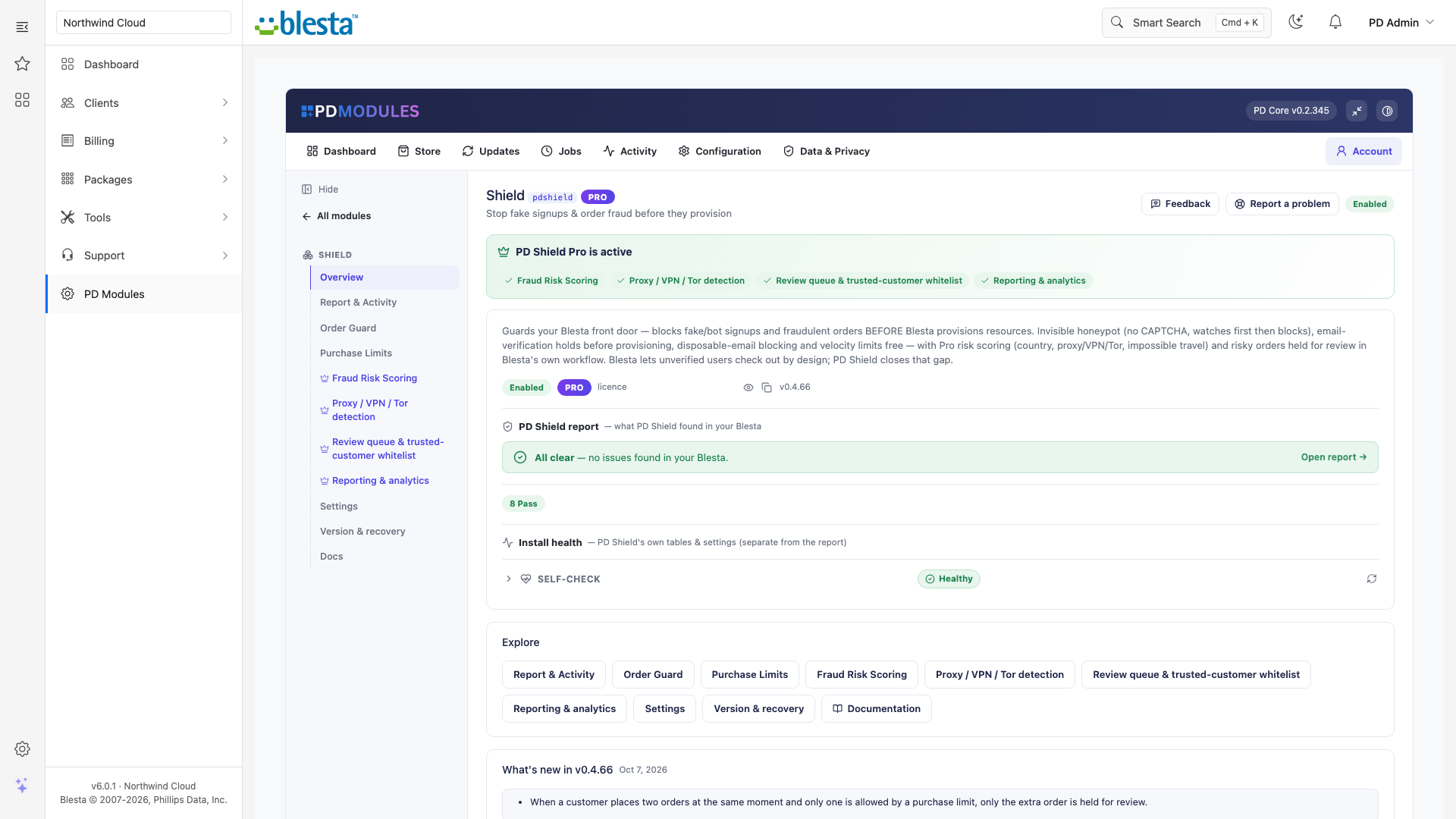
Shield overview: every gate on, the self-check healthy and what is new in the current version
What you get in Blesta
Free front-door gates
Disposable email blocking: on by default. A signup with a throwaway address is refused before the account exists. A built-in list covers the most common throwaway domains and the placeholder domains example.com and test.com
Free-email blocking: off by default. When on, a signup with free webmail such as gmail or outlook is refused
Velocity limit: on by default at 5 orders and signups per IP per 60 minutes. On Blesta it follows every action setting: block, hold (default) or flag. Customers with a paid invoice and a live service are not caught; new signups still are. Forwarded IP headers are trusted only from Cloudflare or ranges you list, so a forged header cannot walk past it
Email-verification hold: off by default. When on, an order from a customer whose email address is not verified is held for review, then released automatically when they verify. It does nothing if verification is off in Blesta itself
Alerts: you are emailed whenever an order is held. Leave the address blank and every active admin is told
A honeypot field is not available on Blesta yet; no hidden field is added to Blesta's order or signup forms
Order Guard and purchase limits
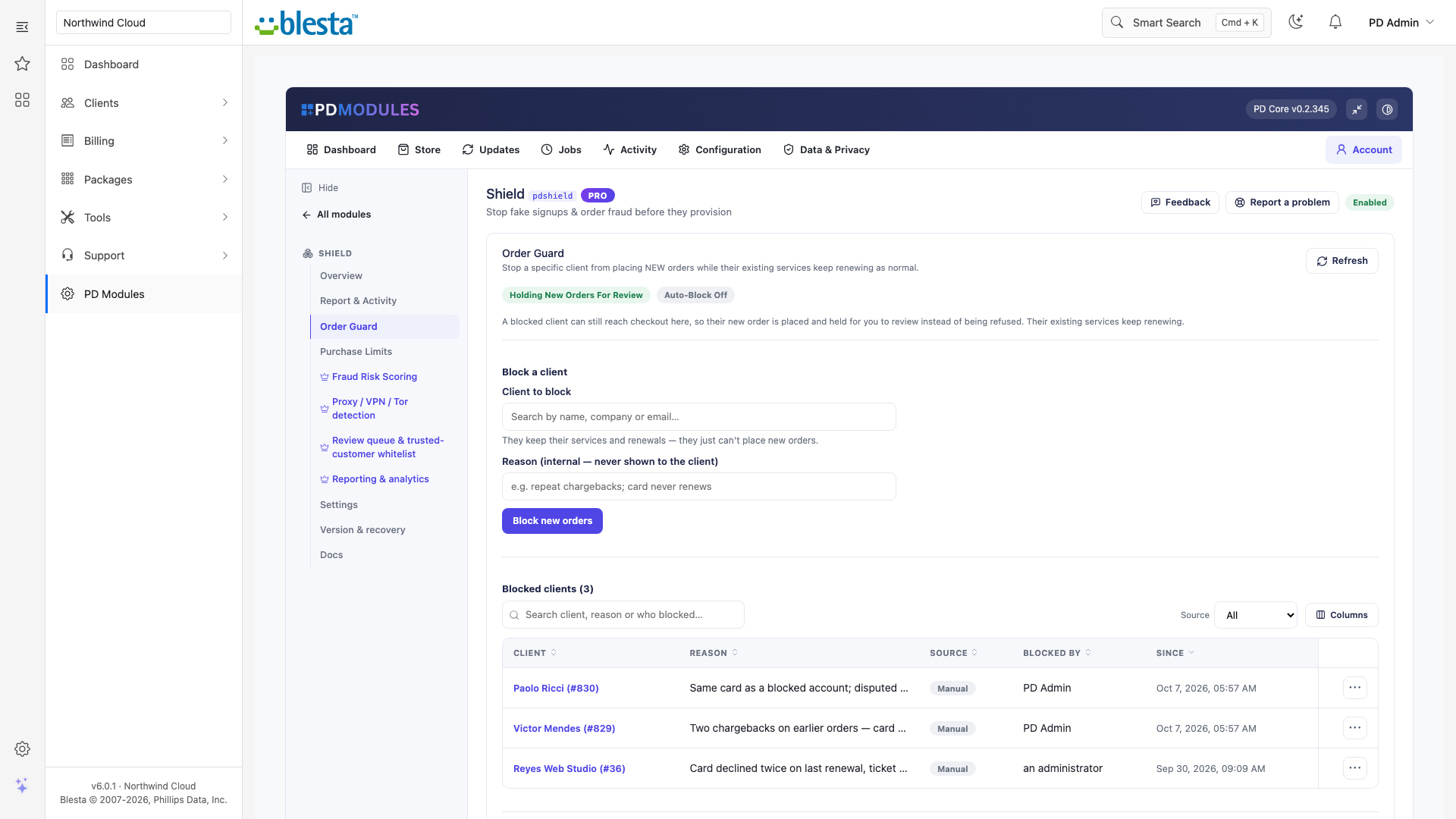
Find a client by name, company or email and block new orders in one click; unblock any time. On Blesta a blocked client's new order is placed and held for review. Their existing services and renewals are never affected, and the reason is internal and never shown
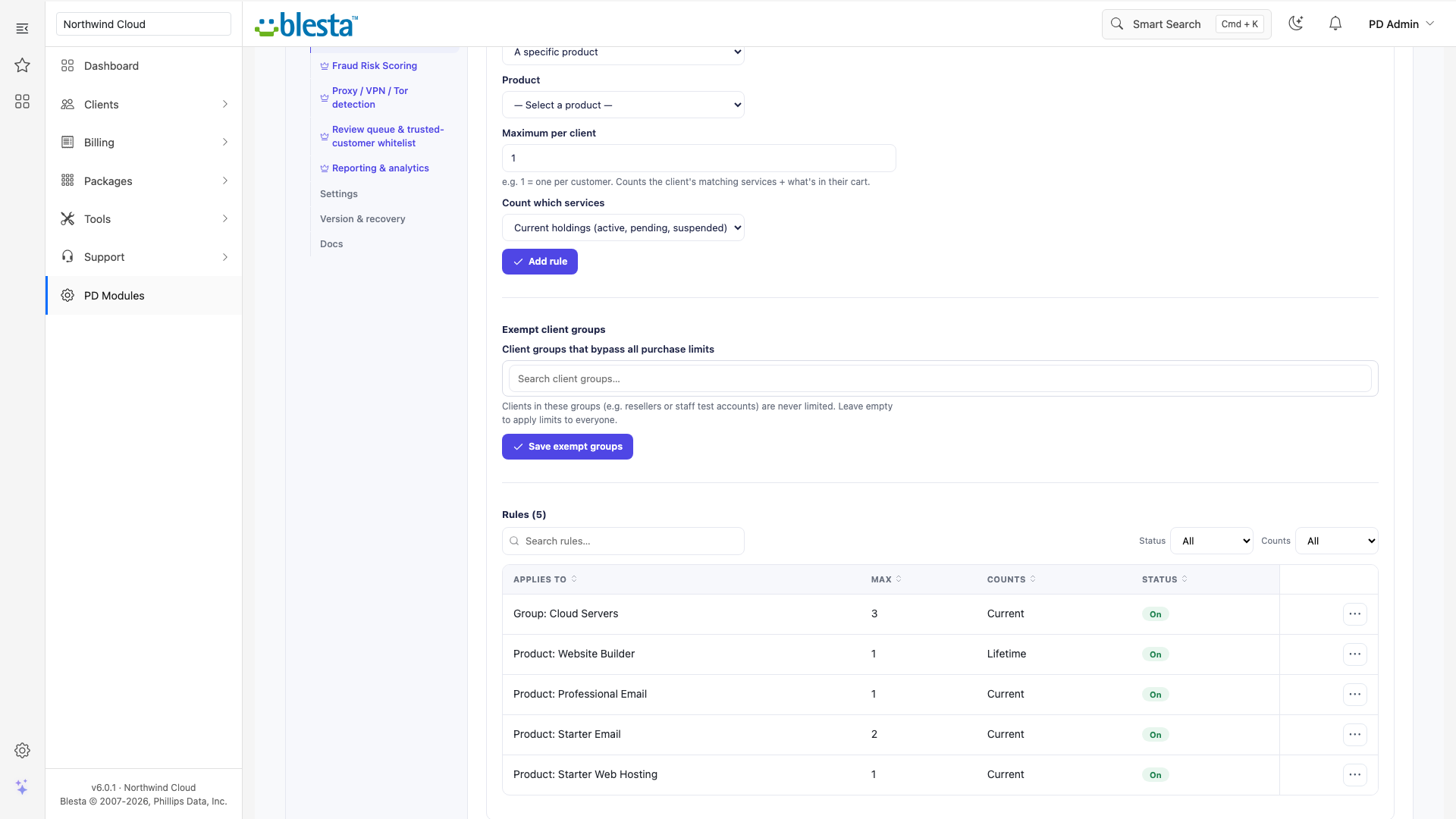
Purchase limits cap a specific product, a whole product group or all services per client, enforced automatically at checkout. On Blesta every over-limit order is held for review, and only an order that actually breaches a rule is held
Exempt client groups, chosen with a searchable picker, bypass every limit
Both are off by default, and their tabs say rules are not enforced until you turn them on
Order Guard: block a problem client from placing new orders while their existing services keep renewing
What the customer is told
A held order sends the customer one short email saying it is being checked, quoting their order number, saying nothing has been charged and that they will hear as soon as the check is done. It never names the check. You can edit and translate it under Settings > Company > Emails
Pro: score, detect, review
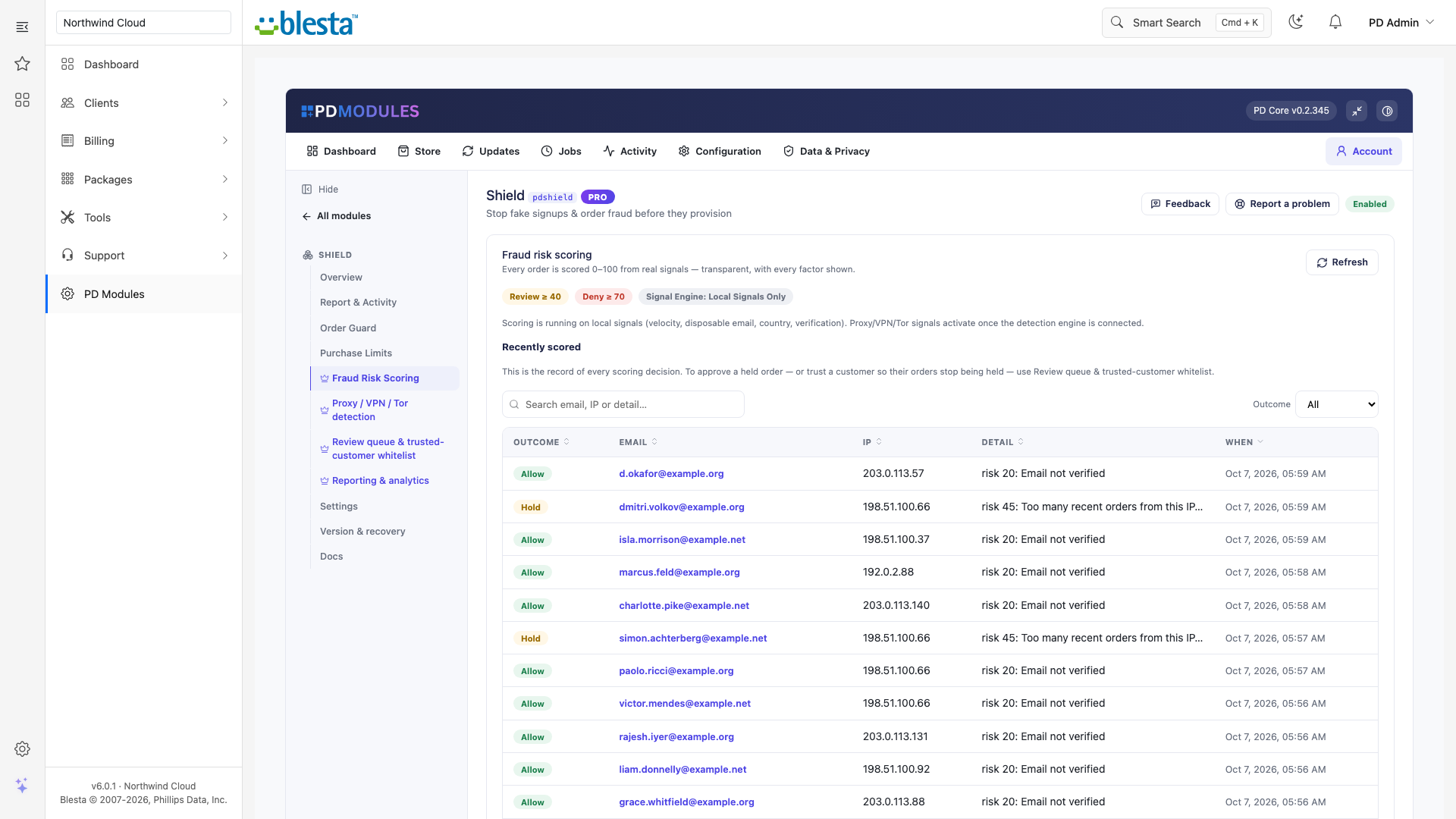
Fraud Risk Scoring: every order gets a 0 to 100 score from weighted signals with each factor shown. At or above the review score (default 40) it is held. At or above the block score (default 70) it is also held for review, since Blesta cannot refuse it at checkout
Signals include: unverified email, velocity, disposable email, high-risk country as a weak signal, and impossible travel when one email appears from a different country within your window
Proxy, VPN and Tor detection: flags Tor exit nodes, datacentre ranges, known VPNs and threat-intelligence blocklists. Only the visitor IP and the email's domain are checked, never the address, and nothing is kept. If detection is unavailable, scoring carries on with local signals and nobody is blocked because of it
Optional provider: connect your own IPQualityScore key if you wish. A wrong key, an exhausted allowance or an outage never blocks an order
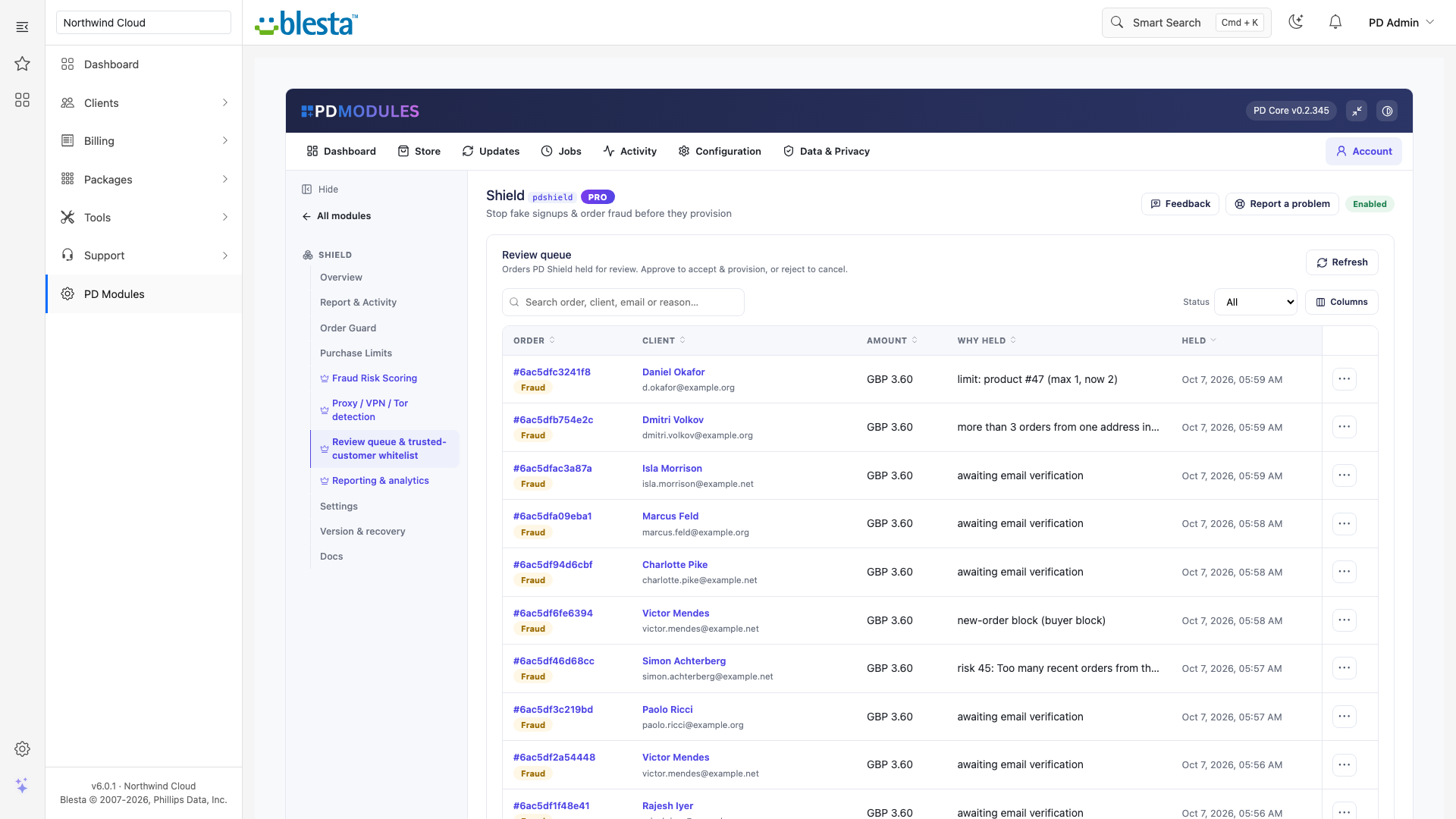
Review queue and trusted customers: see every held order with client, amount, reason and time; approve to provision or reject to cancel. Trusted customers skip scoring
Order Guard auto-block and lifetime purchase limits: automatic blocking after repeated failed payments, and limits that count cancelled services so a promo product cannot be re-ordered past the cap
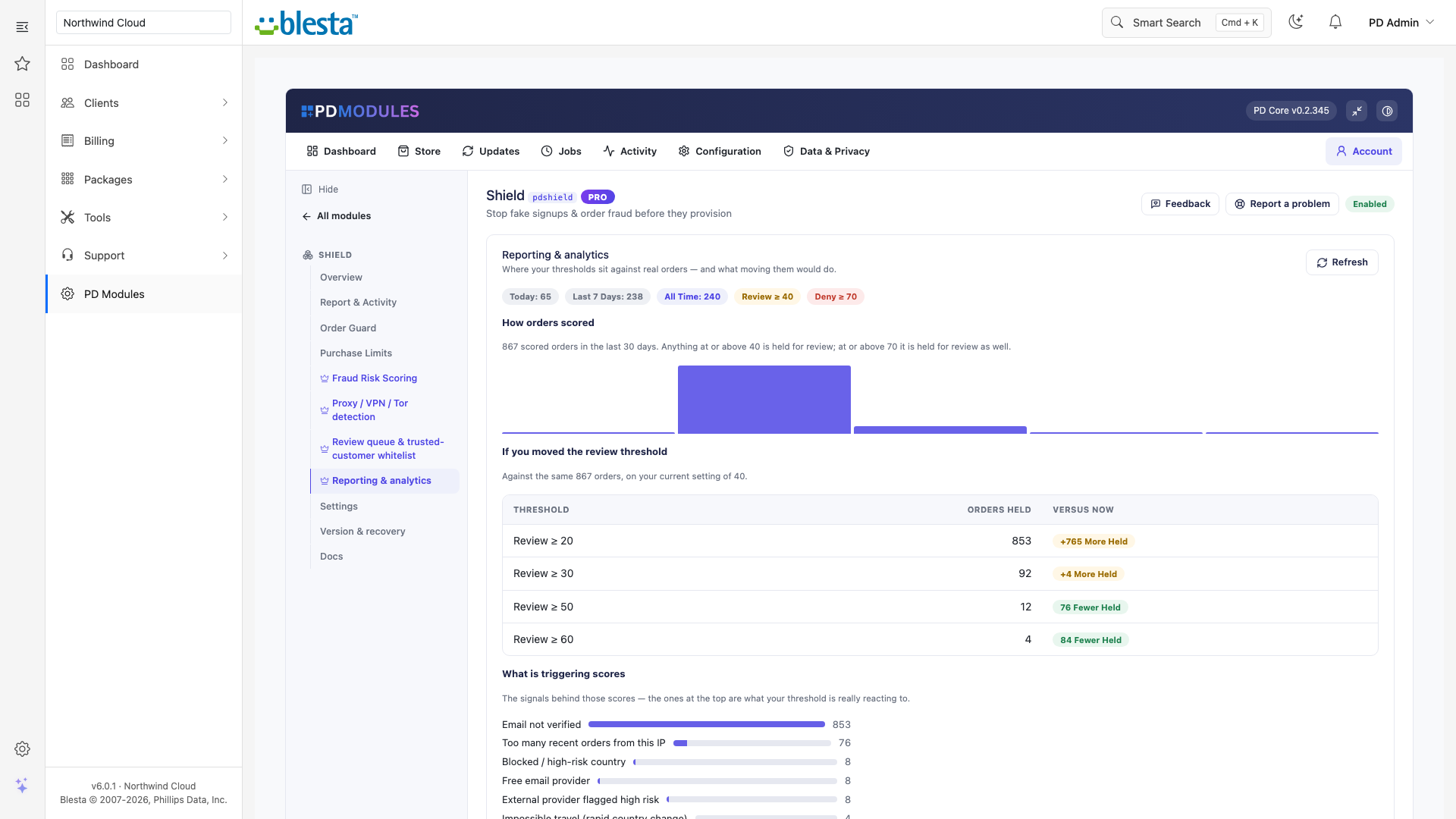
Reporting: blocks and holds over time, by reason, action and country
Every order scored 0 to 100 with the reason beside the outcome: allowed, or held for reviewThe review queue: held orders with client, amount and why they were held, ready to approve or rejectReporting: where your thresholds sit against real orders, and what moving them would change
Security built in
Without Pro, PD Shield sends nothing about your customers anywhere. With Pro scoring, the only data sent is the visitor IP and the email's domain, and you can switch it off in Settings while the rest keeps working.
A provider API key you add is stored encrypted on your own server and sent only to the provider.
Pro scoring has no per-check credits and no metered cost.
Free and Pro
PD Shield is free and never expires. PD Shield Pro is £12 per month, added to the same licence in place with no reinstall. If Pro lapses, a 14-day grace period keeps Pro features working, then PD Shield carries on as the free version. Your settings and data are kept, and re-adding Pro restores everything. Uninstalling removes the module's tables, settings, files and scheduled jobs.
Requirements
Blesta 6 or later on PHP 8.2 or later, with the ionCube Loader
PD Modules, the free control panel every PD module installs into
Questions
Will genuine customers notice PD Shield or have to solve a CAPTCHA?
No. The core protection is an invisible honeypot and background checks — real buyers see nothing and solve nothing. By default, anything suspicious is held for review rather than rejected, so you never lose a genuine sale by mistake.
What's free and what needs Pro?
The honeypot, email verification, disposable-email blocking, velocity limits, Order Guard and Purchase Limits are all free. PD Shield Pro adds transparent 0–100 fraud scoring, proxy/VPN/Tor detection, a review queue with rules, and reporting/analytics.
Does this replace WHMCS's built-in fraud tools like MaxMind?
No — it complements them. PD Shield closes gaps WHMCS leaves open (unverified checkout, no rate limiting, no per-customer purchase limits) and works alongside your existing fraud settings rather than replacing them.
If a client is blocked from ordering, do their existing services stop working?
No. Order Guard only stops a flagged client from placing new orders. Renewals don't go through checkout, so existing services keep billing and running as normal.
What happens if my Pro subscription lapses?
The module reverts to the free front-door protection automatically. Your settings and data are preserved, and nothing breaks — you simply lose the Pro-only scoring, proxy detection, review queue and reporting until you renew.
Do I have to pay per lookup or buy API credits for fraud scoring?
No. Pro's risk scoring uses built-in signals with no metered per-check credits. You can optionally bring your own premium data-provider API key for deeper IP reputation, but that's entirely up to you.
Does this expire, or turn into a paid version later?
The free tier never expires — it arrives with your PD Modules licence and keeps working, with no trial clock and nothing that switches off later. If you add Pro and then let it lapse, only the Pro features step down, in stages: a 14-day grace period where everything still works, then the Pro features lock and the module carries on as the free version. Nothing is deleted, nothing you configured is lost, and adding Pro again restores it immediately.
What does it cost to run, on top of the subscription?
Only what you already pay your provider, plus Pro if you add it. The free tier costs nothing and Pro is a flat subscription — neither takes a cut of your provider usage. PD Shield connects to your own account with your own credentials, so the provider bills you directly at your rates.
What data leaves my server?
Your customers' data stays in your WHMCS. To confirm your licence, the platform sends us four things and nothing else: your licence key, the domain, your server's own IP address and the directory it is installed in — the four values recorded against your licence in your client area. Alongside that we see which module and version you run and whether its licence is healthy, so we can ship compatible updates. We never receive your clients' personal data, your credentials, or the contents of your WHMCS. Crash reports are off unless you turn them on, and a diagnostic report is only ever sent when you send one, after showing you a preview you can edit.
How do I get help?
Open a ticket from your client area, or use Get help inside the PD Modules panel, which attaches a diagnostic report — you see a preview of exactly what it contains, and can exclude any part of it, before anything is sent. Support is included with an active subscription; bug reports are welcome whatever your licence state.
What’s new in 0.4.68
Held orders now explain themselves in plain words: purchase limits name the product, blocked clients read "blocked from new orders", and an order waiting on email verification says it is not a fraud finding.
Reporting labels what it counts, the score chart shows what each band does, and the Overview no longer lists proxy detection as active when it is off.
 Featured