PD Crypto Pay — Non-custodial crypto payments for Blesta
Accept Bitcoin, Ethereum and stablecoins — straight to your own wallet, no middleman, no commission
★★★★★5.0 · our rating, not customer reviews
Made and supported by Projektif Digital Ltd.
Runs inside PD Modules, the panel
every module installs into.
Billing & Sales
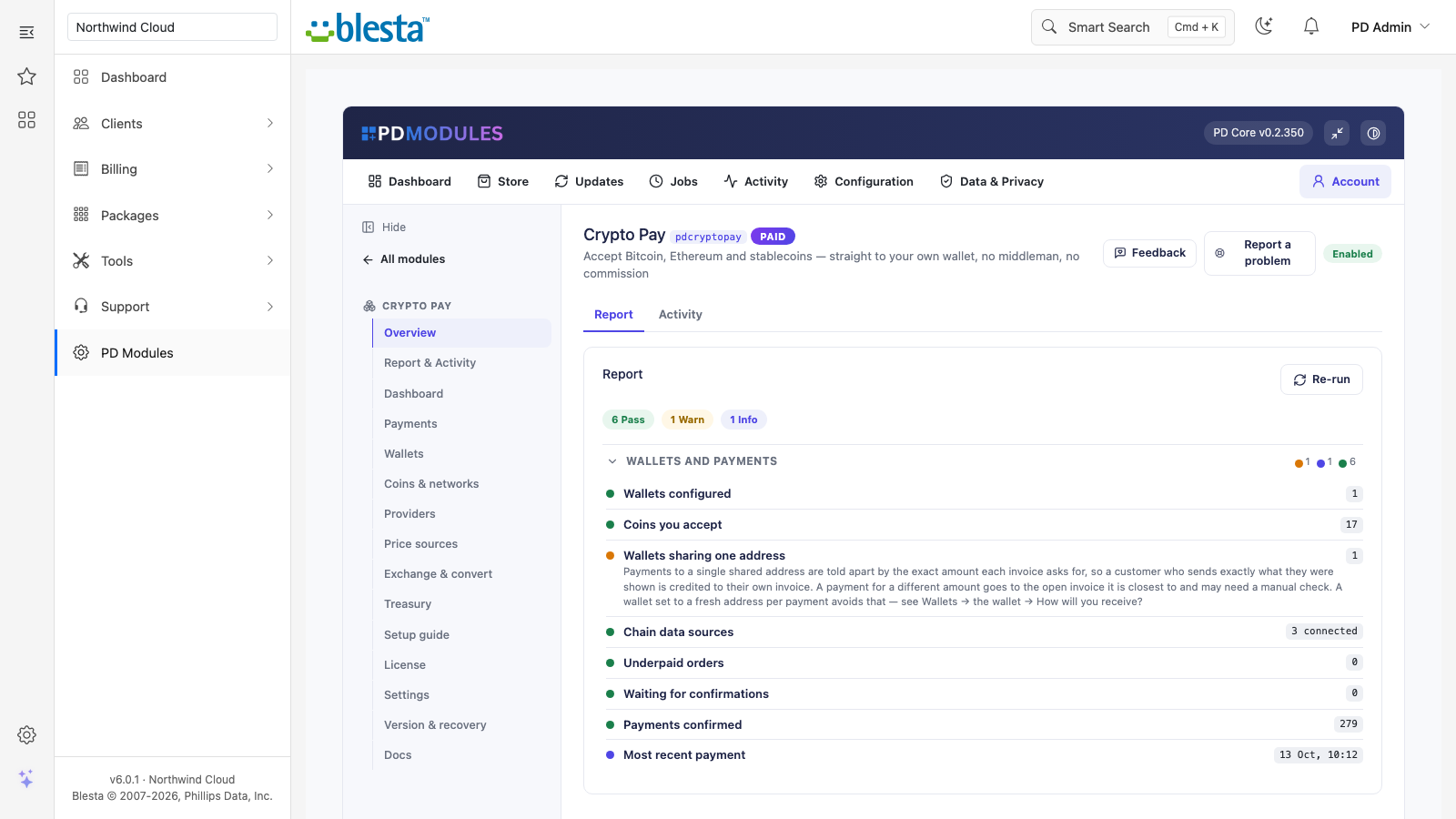
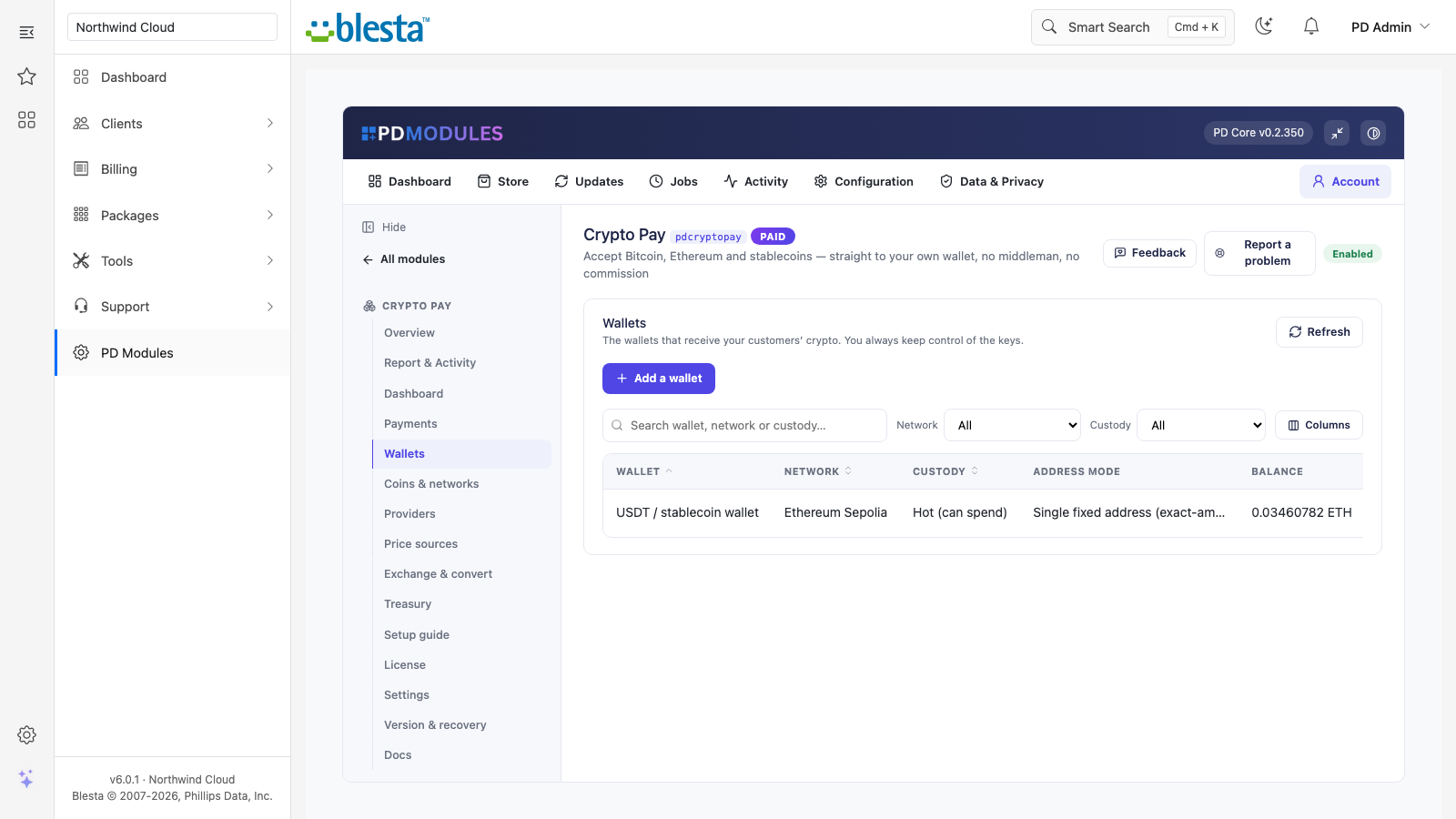
The admin view of Crypto Pay — everything in one place.A report you can act on — and hand to a customer without editing it first.The admin view of Crypto Pay — everything in one place.The admin view of Crypto Pay — everything in one place.The admin view of Crypto Pay — everything in one place.The customer-facing side of Crypto Pay, on their own service page.1 / 6
PD Crypto Pay lets a hosting company accept Bitcoin, Ethereum and stablecoins on Blesta invoices, with the money going straight to wallets you control. There is no payment processor in the middle, no commission and no account to be approved for. It installs as a payment gateway under Settings, Company, Payment Gateways. Your customer picks a coin on the invoice, sends the exact amount, and Blesta records the payment when it confirms.
It is built for hosts who want to take crypto without handing a cut, or custody of their funds, to someone else, and without watching a block explorer to see who has paid.
Why hosts choose PD Crypto Pay
The money goes straight to you. Each customer payment goes to an address you control. The module never receives, holds or forwards the funds, takes no percentage and no per-transaction fee, and needs no processor account, approval or identity check. The only amount added to a quote is your own markup, if you set one.
Pay by the coins customers already hold. Bitcoin, Litecoin, Ethereum, Tron, Polygon, BNB Smart Chain, Base and Arbitrum, plus USDT and USDC, are built in and ready to switch on. Paste a contract address to accept any other ERC-20 or TRC-20 token. Its symbol, name and decimals are read from the blockchain, so you never type them.
Invoices mark themselves paid. When a payment reaches the confirmations you set for that coin, the invoice is paid automatically, even if the customer has closed their browser. They can leave the page, and they are emailed when the payment completes.
Exceptions are handled, not lost. Underpaid, overpaid and late payments each follow a rule you choose. A payment that arrives after its window is held for your review and is never lost. A payment within your tolerance settles the invoice in full.
Refunds recorded in Blesta. A refund is sent back in the same coin it was paid in and can never exceed what was received. A whole-payment refund marks the payment Refunded, and a partial refund is recorded as a negative payment, leaving the invoice paid.
Prices that keep working. Rates come from CoinGecko, Kraken or CoinMarketCap in the order you choose, with your own key for any of them. If one source does not answer, the next is used. Rates are saved every few minutes, so a short outage never stops a customer paying.
Your keys stay yours. A copy of your database alone cannot spend your funds. Hot-wallet keys are encrypted, never sent off your server, and can always be exported.
How it works
Add where money arrives. A guided set-up has four steps: where the money should arrive and whether the module may move funds or only watch them, which coins to accept, an optional blockchain provider, and switching it on at checkout.
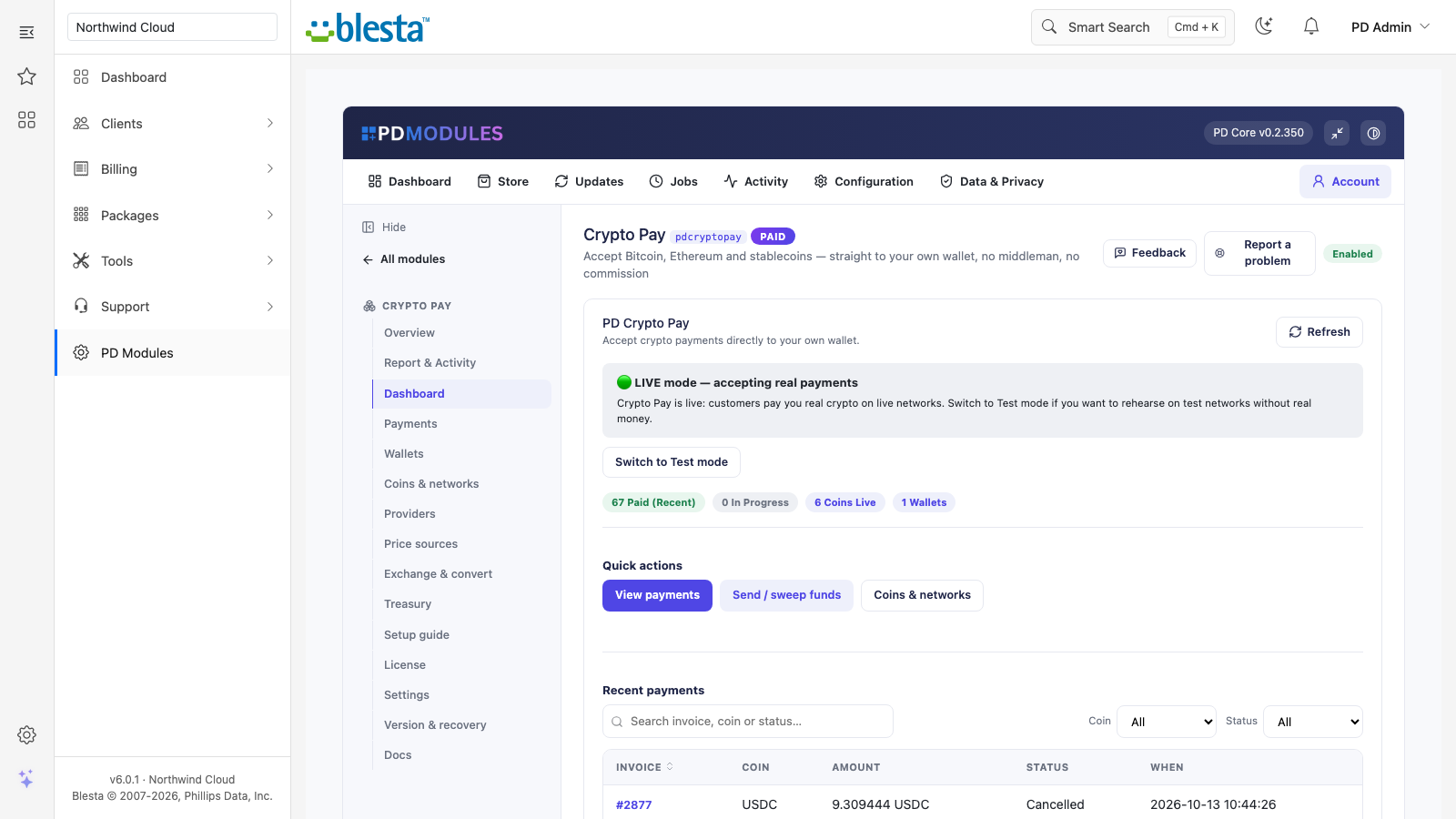
Rehearse in Test mode. Test mode issues quotes only on test networks, so you can try the whole flow without real money. A Live or Test indicator with a one-click switch sits at the top of the Dashboard.
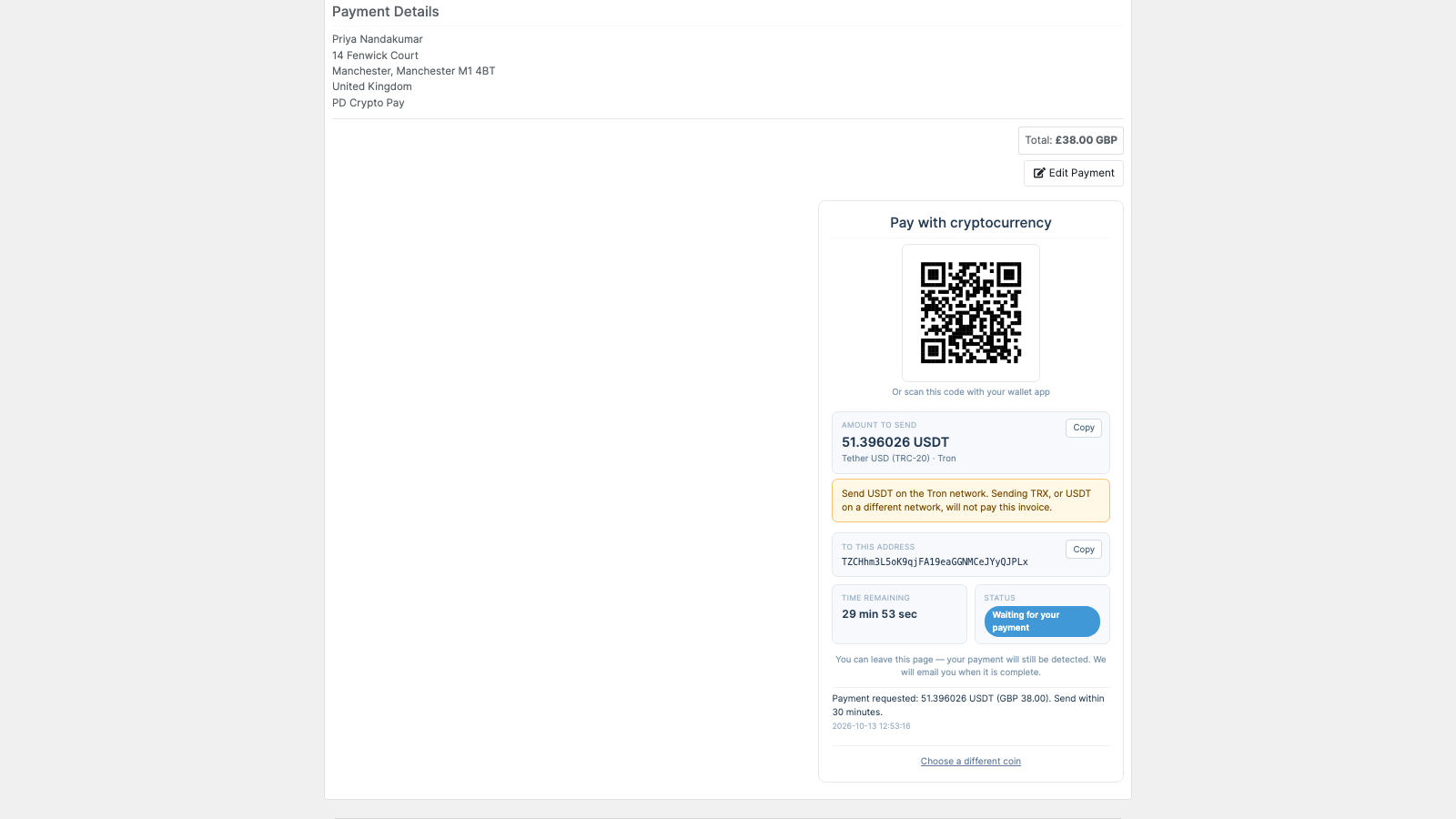
Customers pay on the invoice. They choose a coin and see the exact amount, the address, a QR code, a countdown and a live status.
The invoice settles. The module watches the network and credits the invoice when the payment confirms.
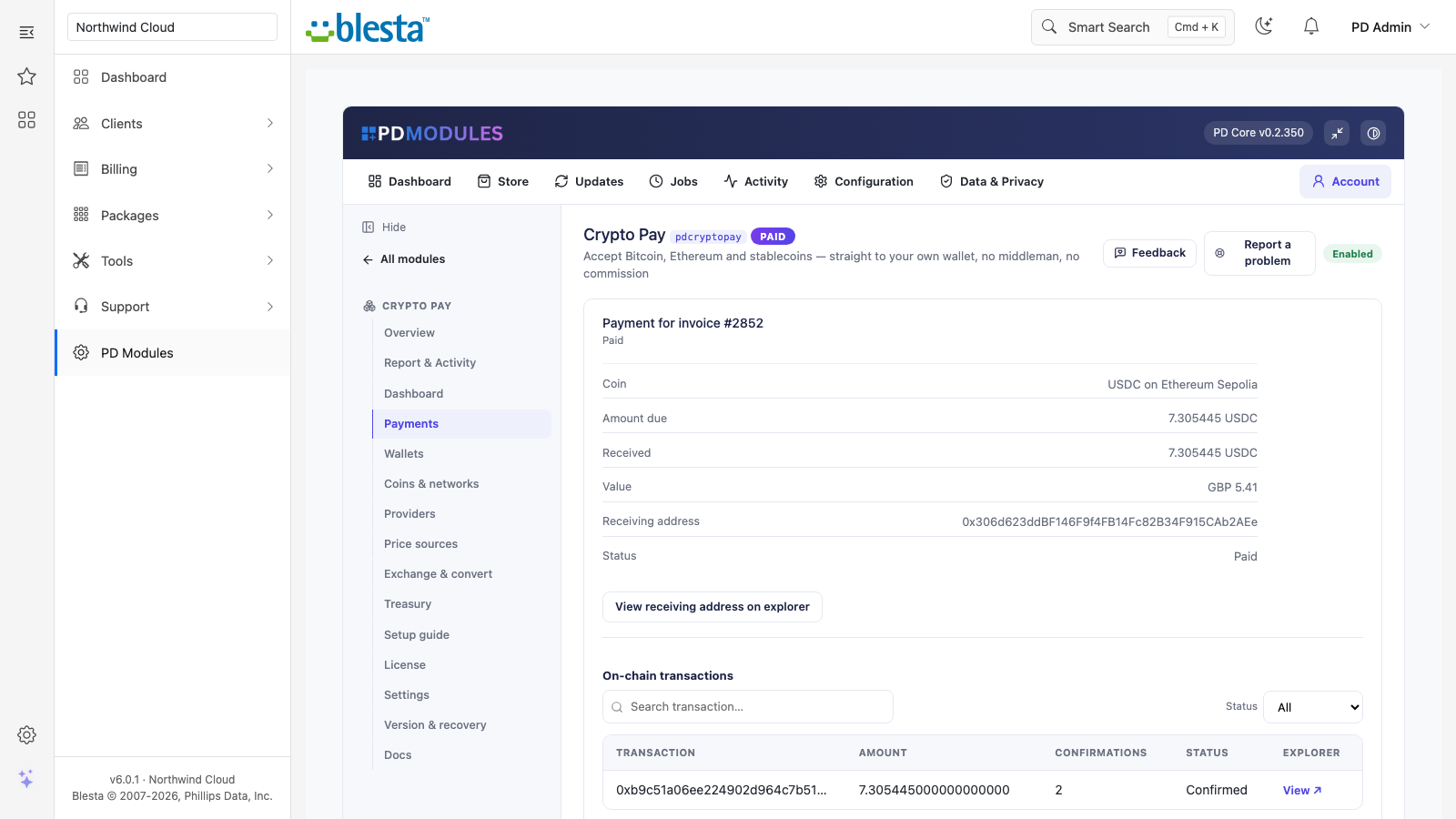
Review and refund. Each payment has a timeline from quote to credit, with a block explorer link for every on-chain transaction.
The Crypto Pay dashboard: Live or Test mode, coins and wallets, and recent payments in one place
What you get in Blesta
Receiving payments
Watch-only wallets, a fresh address for every invoice from your extended public key, a pool of addresses leased one at a time, or a single address for everything. An extended public key can derive receiving addresses but can never spend
For Bitcoin you pick bc1, 3 or 1 addresses, and after pasting a key you see the first address of each type before saving
Only money that arrives after a payment request is created counts towards it, so funds an address already held are never credited to an invoice
Each coin has its own confirmation count, payment window, markup and minimum amount, and you can refuse tiny dust payments
Prices and quotes
The rate is locked for the payment window, so the amount the customer must send does not change while they pay
The amount is quoted to at most eight decimals, short enough to type and not rounded away by wallets
If every source is down, checkout keeps quoting on the last saved rate for the minutes you set, with an extra margin added, then hides the coin
When two sources disagree by more than your limit, the coin is held and returns by itself once they agree
Detection that works out of the box
Built-in public endpoints cover Bitcoin, Litecoin, Tron and the EVM networks, so you can start without a provider account
Add Alchemy or Infura with only the network and API key, or point detection at your own node
"Check the network now" looks again on demand and credits whatever has arrived
If a blockchain cannot be reached, the module says it could not check rather than reporting that nothing arrived
One payment from quote to credit: coin, amounts, receiving address and each on-chain transaction with its confirmations
Spending and refunds
Create a hot wallet on your own server, encrypted, with its key always exportable; hot wallets are Ethereum-family and Tron, and Bitcoin stays watch-only
On a hot wallet a refund is signed and sent in one click, or sealed behind a passphrase that is never stored
On a watch-only wallet the module shows the exact amount and address to send from your own wallet, then you press "I have sent it, record the refund"
Per-transaction and daily spending limits, an approved-addresses list with a 24 to 48 hour delay for new entries, and an optional second administrator to approve any send
On refund you leave the service as it is, suspend it or terminate it
Exchanges and notifications
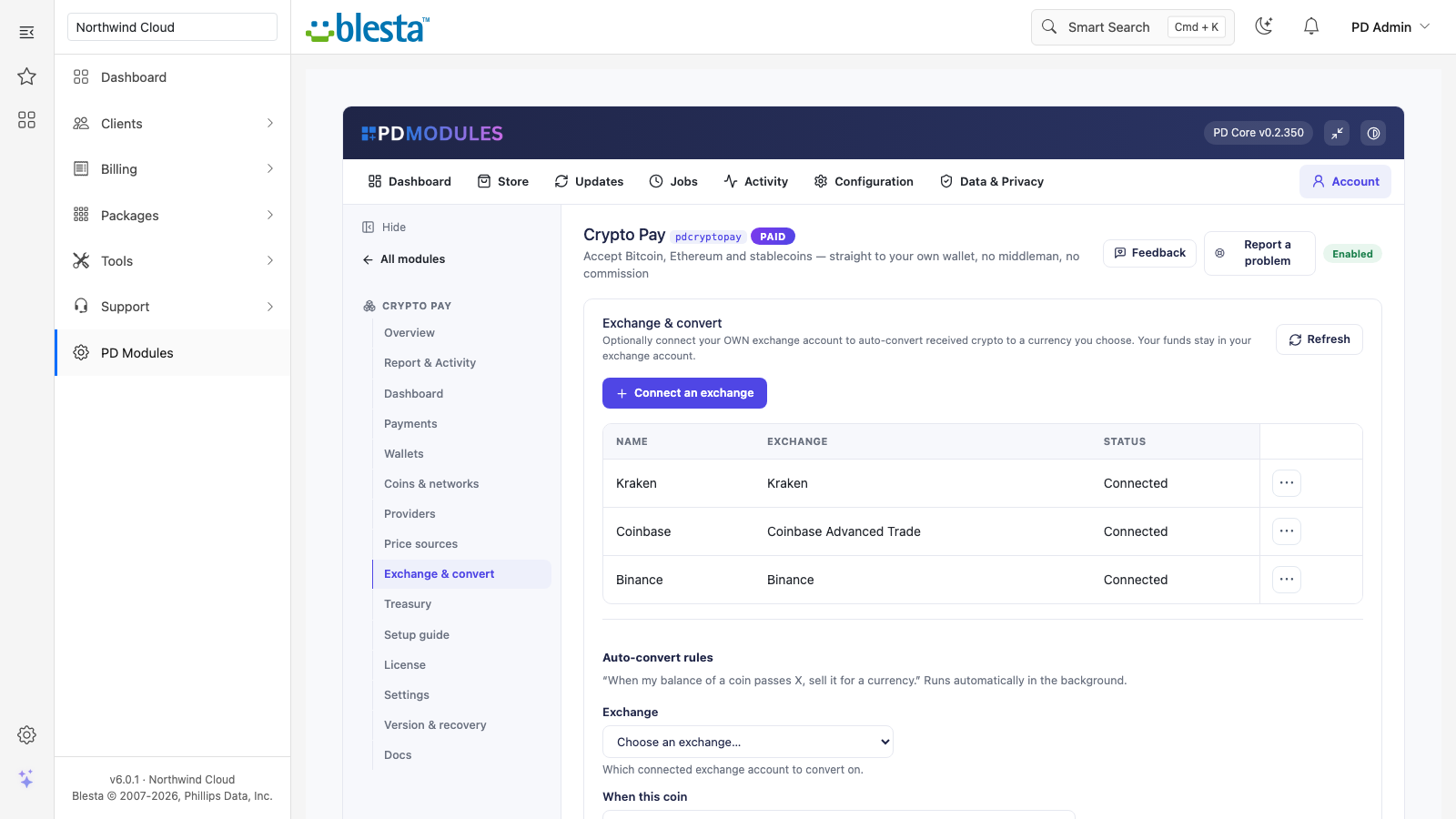
Connect your own Kraken, Binance or Coinbase account and set an auto-convert rule such as "when BTC reaches 0.01, sell to GBP". The module converts and never withdraws, so a trade-only key is enough
Email every administrator on payment events, and optionally email the customer when a payment is first seen and when it is credited. The customer emails can be edited and translated under Settings, Company, Emails
Connect your own exchange accounts and set auto-convert rules; your funds stay in your account
What your customers get
A checkout on the invoice: pick a coin, then see the exact amount, address, QR code, countdown and status that updates as the payment confirms. If a step fails, the reason is shown on screen
A QR code that scans: generated on your own server, so no third party sees the address
A clear warning when paying with a token: the panel names the token and says that sending the network's own coin will not pay the invoice
A different coin when they change their mind: "Choose a different coin" switches without the earlier request getting in the way
Their language: everything the customer reads is translatable, with overrides that survive updates
The customer pays a USDT invoice: exact amount, network warning, address, countdown and live status
Security built in
Wallet keys are never exposed in the client area
Hot-wallet keys are encrypted with your installation's own key, kept outside the module's database, and never leave your server
Your price-source and exchange API keys are stored encrypted, and only a short preview is shown back
Only the signed-in owner of an invoice can open, start or cancel a crypto payment on it
The module sends us only your licence key, domain, server IP and install directory, plus module and version, never customer data
One product, every feature
PD Crypto Pay is one paid module with everything included. There are no add-on tiers and no fees on your payments from us. It installs into PD Modules in one click, updates itself, and adds its own tables without modifying Blesta files.
If your subscription ever lapses, you get 14 days of grace with everything working. After that, admin management locks while customers are still served, and only later does the checkout stop, behind a neutral message. A payment already sent is still credited throughout.
Requirements
Blesta 6 or later on PHP 8.2 or later with the bcmath extension, the ionCube Loader, and a working cron
A wallet you control for each network you accept
PD Modules, the free control panel every PD module installs into
Questions
Do you hold my money at any point?
No, and the module is built so that we cannot. Payments go directly from your customer's wallet to a wallet you control. Nothing routes through us, so there is nothing for us to freeze, delay or lose.
What are the fees?
A flat subscription for the module. We take no percentage and no per-transaction fee, whatever your volume. The only other cost is the network fee the blockchain itself charges, paid by whoever sends the transaction.
Which coins are supported?
Bitcoin, Ethereum, Tron and the major stablecoins are built in. You can add any ERC-20 or TRC-20 token yourself by pasting its contract address — you are not waiting on us to support a coin your customers want.
Do I need to complete KYC or sign up with a processor?
No. There is no processor account, no application and no approval step. You provide wallet addresses you already control and start taking payments.
How are payments matched to invoices?
Give each payment its own fresh address and every incoming transaction belongs to exactly one invoice. The module watches the chain, confirms the transaction and marks the invoice paid — including the awkward cases where someone pays too little or too much. With one address for everything, each invoice asks for a slightly different amount, and a payment is credited to the one invoice whose amount it matches. A payment that is none of the amounts asked for — part of an invoice, or more than it — is credited when only one open invoice could be its owner; when several could, it is credited to none of them, and is listed under Payments (and emailed to you) for you to place.
What happens if a customer underpays?
The payment is recorded against the invoice and the shortfall is shown, rather than the invoice being silently left unpaid. You decide whether to accept it, ask for the difference, or refund it. With one address for everything, that happens when the payment can only be that invoice's (see how payments are matched, above).
Can I refund a crypto payment?
Yes, on chain, from inside WHMCS. You do not need to open a wallet application or copy addresses between windows, which is where refund mistakes usually happen.
Where are my wallet keys stored?
Encrypted at rest on your own WHMCS server. They are never transmitted to us or to anyone else, and they are never exposed in the client area.
What do I need on my server?
PHP 8.2+ with the bcmath extension (standard on most hosting — the module checks for it before it installs) and WHMCS's cron running. Blockchain data is read through public or provider APIs over HTTPS; there is no node to run and nothing else to install on the server.
What happens if my subscription lapses?
Nothing of yours is touched, and nothing is deleted. The module steps down in stages instead: a 14-day grace period where everything still works and you get a renewal reminder, then admin management locks while your customers carry on being served, and only after that does the checkout stop — behind a neutral "Crypto payment is temporarily unavailable" message that never mentions licensing to your customer. A payment a customer has already sent is still found and credited throughout, and your data and settings stay exactly where they are. Renewing restores everything immediately.
What data leaves my server?
Your customers' data stays in your WHMCS. To confirm your licence, the platform sends us four things and nothing else: your licence key, the domain, your server's own IP address and the directory it is installed in — the four values recorded against your licence in your client area. Alongside that we see which module and version you run and whether its licence is healthy, so we can ship compatible updates. We never receive your clients' personal data, your credentials, or the contents of your WHMCS. Crash reports are off unless you turn them on, and a diagnostic report is only ever sent when you send one, after showing you a preview you can edit.
What’s new in 0.1.111
The Dashboard names what is missing before customers can pay in crypto, and counts coins accepting. Crypto in a network's own coin sent to a token invoice (TRX for USDT) is shown to you, never credited. Uninstalling removes the gateway. Auto-conversions show in Activity.
 Featured