WHMCS Client Self-Service: 7 Hosting Tasks Customers Can Handle Without a Ticket
Give WHMCS customers useful DNS, VPS, password, onboarding and uptime controls. See seven self-service tasks with real PD Modules screenshots.
A customer needs to add an email verification record. Another wants to restart their VPS. A third cannot remember where to find the login details you handed over. Each request is reasonable, but none necessarily needs to wait in a support queue.
WHMCS client self-service means giving customers a clear place to complete supported tasks for their own services. It combines useful controls, understandable instructions and the right account permissions. A knowledgebase explains what to do; a service control lets the customer actually do it.
For a hosting business, that distinction matters. A well-written DNS guide is helpful, but the customer still needs somewhere to edit the record. A VPS welcome email is useful, but connection details should remain easy to find after the email has disappeared into an inbox.
PD Modules extends the WHMCS client experience across those everyday jobs. PD DNS Manager, PD AWS Lightsail, PD Password Manager, PD Onboard and PD Uptime & Status cover different parts of the journey. They can be introduced individually, around the services you sell, rather than as one large change to your business.
This guide looks at seven practical tasks to put in customers’ hands, the product capability behind each one and how to introduce self-service without making personal support harder to reach.
Seven WHMCS self-service opportunities at a glance
| Customer wants to… | Relevant PD module | What the hosting business configures |
|---|---|---|
| Add or change a DNS record | PD DNS Manager | The tracked zone, provider connection, ownership and applicable editing policies |
| Find VPS connection details | PD AWS Lightsail | The provisioned service and permitted client features |
| Restart their own VPS | PD AWS Lightsail | Which power controls the product exposes |
| Open a browser SSH session | PD AWS Lightsail | Console availability and the service’s connection requirements |
| Retrieve a deliberately shared password | PD Password Manager | Recipient, delivery mode and expiry; optional Pro client vault access |
| Finish the information needed for setup | PD Onboard | A product-targeted checklist and suitable customer steps |
| Check recent website availability | PD Uptime & Status | Monitoring scope, checks and the customer Availability panel |
These are separate capabilities. Installing one module does not automatically enable the others, and your product settings determine which actions a customer receives.
1. Let customers manage DNS records inside WHMCS
“Please add this TXT record” is a classic small request with an outsized interruption cost. The customer may be connecting an email service, proving domain ownership or pointing a website at a new destination. Someone on your team has to read the request, find the correct zone and enter the supplied values.
With PD DNS Manager for WHMCS, customers can manage their own tracked zones inside the WHMCS client portal. A Manage DNS link can take them from the relevant domain or service directly into that zone, with their usual client-area navigation around it.
The record editor adapts to the record type. An A record needs an address; an MX record also needs priority and a mail-server target. Type-specific fields and validation make the task clearer than asking a customer to interpret one generic input box.
Where you make them available, Quick set-ups can also help with supported email configurations. The provider and your settings determine the available features; DNSSEC, forwarding and export capabilities should not be presented as identical on every backend.
A practical example: an agency customer receives a domain-verification TXT value from its chosen email platform. It opens its own DNS zone, adds that value and returns to the email platform to verify the result. Your team does not need to act as the typist between two systems.
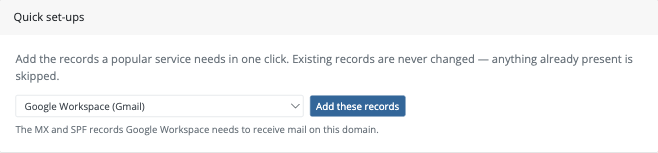
An actual PD DNS Manager customer view. Available shortcuts and editing controls depend on the configuration you provide.
Decide the customer access policy before promoting the feature. PD DNS Manager supports different access levels for domain-only customers, while hosting customers retain the documented editing access. Explain which records belong to the website and which support email, so a simple change does not become an accidental service move.
Explore the PD DNS Manager task guides for the configuration detail behind this customer experience.
2. Make VPS connection details easy to find again
A welcome email is a useful introduction to a VPS, but it is a poor permanent filing system. Customers switch devices, hand work to a colleague or return to the server weeks later. Finding the correct connection information should not depend on searching an old message.
PD AWS Lightsail for WHMCS brings the provisioned instance and supported customer controls into the WHMCS service experience. Connection details sit beside the service the customer is managing, rather than in a separate provider account your team has to navigate for them.
This gives the customer an understandable route: sign in to the client area, open the correct VPS service and review its available connection information. It also helps customers with more than one instance distinguish the development server from the production server.
A practical example: a developer returns to a client’s project after a month. The hosting account holder can locate the relevant VPS information in the service view instead of asking support to resend a welcome message.
Keep the explanation tied to the product being sold. A connection panel is not the same thing as application administration, and a VPS service does not automatically include management of every website or application installed inside it.
3. Give VPS customers the power controls their service allows
A customer who operates its own VPS will sometimes need to start, stop or reboot it. If the hosting product includes customer power management, putting those actions alongside the service is more useful than making every routine request a ticket.
PD AWS Lightsail provides client controls for supported server actions, with product settings deciding what is exposed. That lets you define a different customer experience for different offerings instead of treating every VPS package the same way.
A development VPS may offer its technical owner direct power controls. An offering managed by your team may use a more restricted set of controls as part of its agreed service design. The important point is to make the product’s actual behaviour clear before the customer needs it.
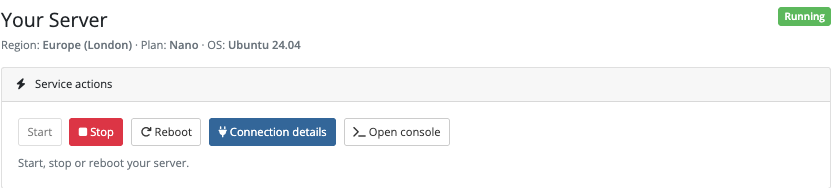
An actual customer service view from PD AWS Lightsail. The controls shown are an example configuration, not a requirement to enable every action on every product.
A reboot is a deliberate service operation, not a universal repair button. Explain its effect in your customer guidance, including the interruption it causes. The benefit is giving authorised customers the intended control of their own VPS, without turning your staff into a relay for the same request.
4. Offer browser SSH for customers who need server access
Connection details solve one problem; opening a working terminal solves another. A customer may know what it needs to do on a server but be using a device without a configured SSH application.
PD AWS Lightsail includes a browser SSH console for eligible services when the required console settings are enabled. The customer can open a terminal from the service experience instead of first arranging a separate local SSH setup.
A practical example: the technical owner of a small application needs to inspect a deployment while away from its normal workstation. A browser terminal offers another access route to the server it already operates.
This remains server administration. The console does not diagnose an application automatically or turn an unmanaged VPS into a managed application service. Introduce it with clear guidance about who the service is for and which tasks the customer is expected to handle.
The hosted console route carries the live session through a relay. It should not be described as a connection in which no data passes through an intermediary. Review the module’s console settings and choose the arrangement appropriate to your offering before making it available.
Read the PD AWS Lightsail guides for the product and customer-control setup.
5. Give customers a deliberate way to retrieve a shared password
A password handover should be a specific action for a specific recipient. Repeatedly copying the same credential into ordinary messages makes it harder to understand where it has ended up and whether the intended person has received it.
PD Password Manager for WHMCS includes an encrypted vault and one-time handover links. A link can be addressed to a particular signed-in WHMCS client, or created as a public link when that delivery mode suits the recipient. An unopened link has an expiry, and a normal one-time handover is consumed when the recipient deliberately reveals the secret.
Choose the delivery mode as part of the handover. A signed-in client handover and a public link have different access expectations; “anyone with this link can open it” is not the same as “only this WHMCS client can open it”.
For a continuing customer credential area, the optional client-area vault is a Pro feature. It lets customers see and copy their own credentials in the portal when you enable it. That is a different workflow from a one-time handover, and it should be explained separately.
The opportunity is a clearer customer handover: where the credential is available, who can retrieve it and whether access is intended to be temporary or ongoing. Do not imply that one-time links provide unlimited retrieval after they have been used.
6. Let new customers complete onboarding without an email chain
Many support conversations are really collection tasks: “What domain are we setting up?”, “Which option did you choose?” or “Have you completed the step we sent yesterday?”
PD Onboard for WHMCS gives the customer a saved checklist rather than a sequence of disconnected requests. You create a reusable checklist, target it to the relevant products or product groups and choose the steps the customer needs to complete.
Information, questions and simple confirmations can form an approachable starting point. The customer sees its progress, supplies answers and can return later without starting again. Staff can see which steps are complete and which still need attention.

An actual PD Onboard customer progress screen. A checklist makes the next action visible to both the customer and the hosting team.
A practical example: a new hosting customer reads the introduction, supplies its intended website address and confirms that it has completed the agreed DNS step. Your staff then complete an internal setup task. Customer and staff responsibilities remain distinct, while progress stays in one place.
File uploads, live confirmation checks and automatic reminder capabilities are Pro features. Add those where they solve a real collection problem; the basic customer journey can start with a short checklist that asks for the right information.
Use onboarding for appropriate project information. This article does not recommend collecting passwords through an ordinary question field or treating checklist completion as proof that credentials have been stored in a password vault.
7. Show customers their monitored website availability
“Is the site down?” is often a request for visibility before it is a request for intervention. A customer may have seen an error on one connection and want to know whether your monitoring has observed an interruption too.
PD Uptime & Status for WHMCS can show an Availability panel on the customer’s service page. It presents the current monitored state, recorded uptime and recent interruptions, giving the customer a place to look before asking your team for the same information.
The module supports website checks, including an optional expected content keyword. Monitoring scope is configurable, and domain-bearing services can be enrolled as they are provisioned. The customer view should be part of the product experience you actually enable, rather than a promise that every historical service has already been enrolled.
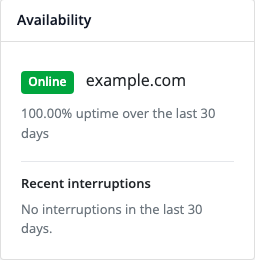
An actual customer Availability panel. The values are demonstration data, not a performance claim about a live customer website.
Explain what the check observes. A successful web response is not proof that every checkout, form or application workflow is working. Recorded uptime reflects the checks that were run, and a new monitor needs history before it can show a meaningful period.
A public status page is a Pro capability. It can complement the signed-in customer panel where you choose to publish selected monitors, but the two should not be confused.
Build a customer journey, not a longer menu
The seven tasks do not need to become seven new links on the first day. Begin with the work that matches your products and the questions customers already ask.
Consider an illustrative hosting agency. Its domain customers need DNS access; its website customers need an onboarding checklist; and its VPS customers need connection information and selected server controls. Those groups should receive the relevant experience, not an identical collection of every available tool.
A useful rollout has four parts:
- Choose one recurring task. Start with a supported operation that has a clear completion point, such as adding a DNS verification record or finding VPS connection details.
- Configure the customer’s route. Check the product features, account ownership and the intended client-area screen. Use your controlled test process to confirm what the customer actually sees.
- Write a short guide around that route. Put the guide near the task. Explain the expected result and where the customer can ask a person when it needs help.
- Measure the result. Compare relevant task requests before and after the change, along with completion quality and customer feedback. Do not treat a hidden support button as a successful reduction in tickets.
WHMCS also has native knowledgebase suggestions that can surface relevant articles while customers compose a ticket. Those suggestions and PD Modules’ service controls serve different needs: one helps the customer understand a task, while the other can let it complete the task.
Good self-service removes unnecessary waiting. It does not remove the option to speak to your hosting team, and it does not assume every customer wants to administer a server or edit DNS itself.
Make your WHMCS client area more useful with PD Modules
A hosting service becomes easier to use when the customer can find the next step, complete the permitted action and understand the result. That is the shared purpose behind these PD Modules capabilities, even though each module solves a different operational problem.
Use PD DNS Manager for customer DNS control, PD AWS Lightsail for an AWS-backed VPS service with customer access, PD Password Manager for deliberate credential handovers, PD Onboard for saved setup tasks and PD Uptime & Status for monitored availability visibility.
Start with the relevant module page and configuration guides. Build around the service you want to deliver, then add the next capability when it improves the customer journey.
Frequently asked questions
What is WHMCS client self-service?
It is the ability for customers to find information and complete permitted tasks through their WHMCS account. Depending on the installed modules and service configuration, that can include DNS changes, VPS controls, onboarding answers, credential retrieval and availability history.
Can self-service reduce support tickets in WHMCS?
It can remove the need to ask staff to perform supported routine tasks or resend information. The effect depends on your customers, products and implementation. Measure the relevant request categories rather than assuming a particular percentage reduction.
Can customers manage DNS without receiving our provider login?
PD DNS Manager lets customers manage their own tracked zones inside the WHMCS portal. Provider connections remain part of the hosting business’s configuration; customers use their permitted zone controls rather than signing into the provider account.
Can a customer reboot an AWS Lightsail VPS from WHMCS?
PD AWS Lightsail provides supported client server actions, subject to the service and the controls enabled for its product. Decide which actions belong in the offering, explain their effects and confirm the customer’s view during setup.
Does browser SSH make a VPS a managed service?
No. It provides an access route to an eligible server. Who maintains the operating system and applications is a separate part of the hosting service you agree with the customer.
Is a customer password vault the same as a one-time handover?
No. A one-time handover is intended for a deliberate reveal with the selected access mode and expiry. PD Password Manager’s optional Pro client vault supports ongoing access to the customer’s own stored credentials when enabled.
Does every customer need every PD module?
No. Select modules around the services you provide and the tasks you want to offer. A domain customer, a managed website customer and a technical VPS customer can need very different client experiences.
What should we introduce first?
Choose one frequent, well-understood request with a supported customer action. Make its route easy to find, link a useful guide, verify the customer permissions and keep personal support available. Expand after you understand how customers use that first capability.
