Blesta Crypto Payments: Bitcoin, Litecoin and Ethereum Paid to Your Wallet
Accept crypto in Blesta without PD Modules holding funds or taking payment commission. Explore BTC, LTC, ETH, stablecoins, own-wallet receiving and exchange options.
PD Crypto Pay lets a Blesta hosting business accept cryptocurrency payments into its own receiving arrangement, without PD Modules holding the funds or charging a percentage of each payment. Customers pay an invoice in an enabled coin; the module watches the selected network, tracks progress and credits the payment through the Blesta workflow.
That gives the operator a choice about how crypto fits the business. Receive Bitcoin or Litecoin into a watch-only wallet arrangement, accept Ethereum and supported tokens, or use an exchange deposit address where that matches your chosen account setup. Optional treasury and exchange tools add further workflows without making them mandatory for every installation.
For a hosting provider evaluating a Blesta crypto payment gateway, the useful question is how payments connect to invoices, where the money goes and what customers see while a transaction confirms. This guide explains those choices and the module’s practical capabilities.
Keep the receiving relationship under your control
PD Crypto Pay is software running with your Blesta installation. It is not a custody account that collects customer funds and later pays your business a settlement. PD Modules does not receive or forward the cryptocurrency on your behalf.
For self-custody, the receiving wallet is one whose keys you control outside a payment processor. An exchange deposit address is another supported route, but it has a different custody arrangement: the funds arrive under your account at that exchange. “My exchange account” and “only I hold the wallet keys” are not the same thing.
That distinction helps a hosting operator choose the intended workflow. You can prioritise receiving to your own wallet, or connect an existing exchange arrangement for the supported conversion features. The module supplies the invoice-payment integration around that decision.
The commercial model is separate from the transaction amount. PD Crypto Pay does not take a per-payment commission. Blockchain network fees and any selected provider or exchange costs still belong to their respective systems. For example, Ethereum’s gas documentation explains the network fee mechanism for Ethereum transactions.
No commission from the module therefore means exactly that. It is not a claim that every blockchain transfer, exchange conversion or later movement of funds is free.
Accept BTC, LTC, ETH and supported stablecoins
The module supports Bitcoin (BTC), Litecoin (LTC), Ethereum (ETH) and Tron, with further Ethereum-compatible networks including Polygon, BNB Smart Chain, Base and Arbitrum. It also supports adding the appropriate token configuration for supported ERC-20 and TRC-20 assets such as USDT and USDC.
The useful product choice is the coin and its network. A token label alone is not enough to tell a customer where to send it. The checkout provides the selected asset, network and quoted amount for that invoice.
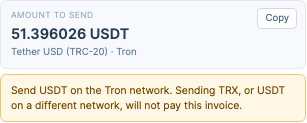
This actual checkout crop demonstrates the amount and network instruction. It excludes the customer details, destination address and QR code. The example amount is historical demonstration content, not an invoice to pay or a price for the module.
For a host whose customers already use crypto, clear network instructions are part of the service experience. The customer can see the intended route instead of assuming that every balance labelled USDT can be sent through any chain.
Your team chooses which assets to enable and the receiving arrangement for each network. Start with the routes the business understands and intends to support, then expand deliberately. A long list of supported assets is useful capability, not an instruction to enable everything immediately.
Give customers an invoice payment journey they can follow
The Blesta invoice workflow shows the selected coin, exact quoted amount, destination and a QR code, with status updates as the module detects and confirms the payment. The timeline connects the request to the transaction’s progress and the eventual invoice credit.
This is important because broadcasting a transaction and crediting an invoice are different stages. A customer needs to understand whether a payment has been seen and is still confirming rather than treating every moment before completion as a failed checkout.
The module also provides an operator-side Details & timeline view for the payment. Staff can inspect the relevant recorded progress instead of beginning with only the customer’s description that a payment was sent.

This genuine view uses a test-network example. The transaction and amount demonstrate the interface and are not evidence of merchant earnings or a live customer payment. The crop excludes receiving-address and account-identity sections.
For the hosting business, that shared visibility makes crypto a more understandable payment option in the existing service relationship. The feature supplies progress information; it does not promise that every network confirms at the same speed or that an unrelated transfer can automatically be assigned to the intended invoice.
Set payment rules for your own billing workflow
PD Crypto Pay lets the operator configure the payment window, confirmation requirements and treatment of short, excess or late payments. Those settings define how the quoted invoice payment is recognised and reviewed.
A quote is held for the configured window. Confirmation counts are set for the enabled coin, and a minimum amount can keep unsuitable small quotes out of that payment option. A stale-rate limit can prevent quoting from an exchange rate that is older than the configured threshold.
The operator can also choose a quote markup and an underpayment tolerance. These are business settings for the amount requested and accepted, not an automatic guarantee against every exchange-rate movement or cost. Understand their relationship before describing the arrangement to customers.
For overpayments, the supported options include adding the surplus to account credit or holding it for review. A payment arriving outside the intended timing can remain visible for the configured follow-up process rather than being treated as though it never existed.
These choices are useful because real payment journeys vary. A hosting business can define how its gateway handles the relevant cases while preserving the invoice and transaction information staff need to interpret them.
Choose the blockchain connection used for detection
Payment detection runs from your installation through the blockchain connections you select. Built-in public endpoints provide a starting route, while supported provider connections include Alchemy and Infura for the relevant networks. An operator can also use an appropriate node it runs itself.
You do not have to run a blockchain node merely to introduce the payment method. The provider choice lets the business select the detection arrangement for the networks it actually accepts, rather than delegating custody of the funds to that provider.
Multiple configured providers for a chain support failover: the module can try the next connection when one is unavailable. That is useful operational resilience, not a guarantee that every network transaction will be visible or confirmed immediately. The receiving wallet, blockchain data connection and optional exchange each have a different role in the payment journey.
Use watch-only receiving when you do not need automated sends
A watch-only wallet arrangement gives the module enough receiving information to observe payments without holding the spending key. For an appropriate Bitcoin wallet, an extended public key can support fresh receiving addresses for invoices. Address pools and a fixed-address mode provide other documented arrangements.
Fresh invoice addresses can make payment attribution more straightforward than having several open invoices use one destination. Pool mode leases an address to the relevant invoice while it is in use, so maintaining available addresses becomes part of that configuration.
The important boundary is that watch-only receiving does not give the module the ability to spend from the wallet. Outgoing movement is performed through the wallet that holds the keys, using the module’s supported record and guidance workflow where applicable.
For a hosting business that primarily wants to accept payments, that may be the appropriate starting scope. You can connect invoices to incoming transfers without enabling every treasury operation or placing a spending key on the billing server.
That is a meaningful form of control. The operator chooses not only which coins to accept, but whether the software should be capable of sending funds at all.
Connect Kraken, Binance or Coinbase for supported conversion workflows
The documented exchange integrations include Kraken, Binance and Coinbase, with the Coinbase connection identified as Advanced Trade in the module interface. They use your own exchange account rather than an exchange account supplied by PD Modules.
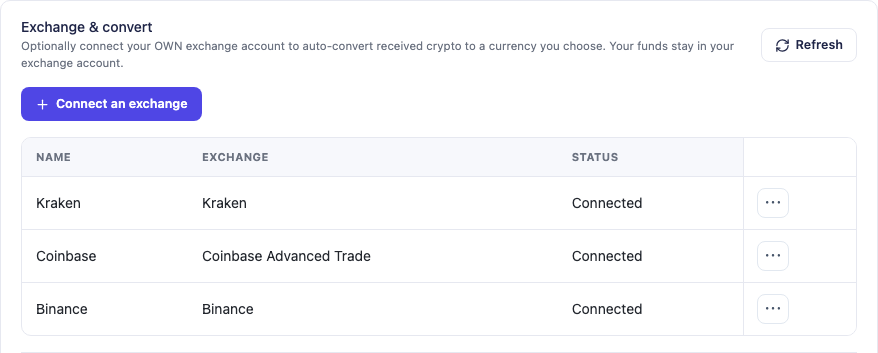
This actual module screen shows demonstration connection entries for the supported exchanges. It illustrates the integration interface, not a recommendation of an exchange, proof of account availability or a guarantee that every asset and market is available to every business.
You can use an appropriate exchange deposit address as a receiving arrangement and configure supported auto-convert rules for the connected account. The rule checks the relevant balance and requests conversion when its configured condition is met, with recorded outcomes and the exchange’s response if it refuses.
The funds remain in the operator’s exchange account. Conversion is not the same as withdrawing money to a bank account, and the module’s documented integration does not withdraw from the exchange. The exchange’s markets, account permissions and own conditions still determine what it can execute.
This offers a specific option for a host that wants a conversion workflow around incoming crypto. It does not turn the module into a universal liquidity service or make the exchange custody arrangement equivalent to a wallet whose keys only the business holds.
Add treasury automation only where it fits
PD Crypto Pay also supports hot-wallet workflows on the documented Ethereum/EVM and Tron networks. A hot wallet stores an encrypted spending key on the operator’s server, enabling supported outgoing operations when the protection mode and safeguards permit them.
The module distinguishes automatic protection from a passphrase-unlocked manual mode. A manual wallet requires the operator to unlock the send; unattended sweeps therefore do not work in that mode. Bitcoin receiving remains a watch-only outgoing arrangement rather than an automatically spending Bitcoin wallet.
For supported automatic wallets, safeguards include per-transaction and daily limits, approved destinations, delays for more permissive changes and optional two-person approval. An auto-sweep can move funds to the configured cold destination when the relevant threshold is reached.
These are strong operating capabilities, but they do not make spending-key exposure disappear. A watch-only setup and a hot wallet have different authority. The module’s safeguards govern sends through the module; they are not a promise that a key used outside it has the same controls.
For a buyer, the useful feature is the ability to select the arrangement deliberately. A straightforward receiving gateway can remain straightforward, while a business with an appropriate operating process can evaluate the additional treasury tools.
Keep refunds connected to the actual crypto operation
A crypto refund is a new transfer, not a reversal performed by the blockchain. The Blesta module provides its supported refund workflow through the payment’s Details & timeline view, with the outcome recorded under Blesta’s transaction rules.
The route depends on the wallet authority. A supported hot wallet can perform the outgoing send subject to its protection and safeguards. With a watch-only arrangement, the operator sends through the wallet holding the keys and records the completed operation through the appropriate workflow.
The intended recipient and network need to be established for that refund. An exchange-originating payment should not be treated as proof that its sending address is the customer’s own receiving wallet. Keep the detailed procedure in the task guide and use the actual intended destination for the operation.
That distinction is useful in a product evaluation: the gateway provides a route to carry out and record supported refunds, while the operator remains responsible for the real transfer decision. No funds are moved by reading this guide or inspecting the module interface.
A practical introduction for a Blesta hosting business
Imagine a hosting provider adding crypto alongside its existing payment methods. This is an illustrative workflow, not a customer case study or a revenue claim.
The business begins with a defined set of supported coin/network pairs and a chosen watch-only or exchange receiving arrangement. It configures the payment window and confirmation behaviour, reviews the customer instructions and uses the available test-network mode to rehearse the relevant journey.
A customer then chooses the gateway on a Blesta invoice, receives the quote and follows the network-specific instructions. The module observes the payment through the selected blockchain connection and updates its status as the required progress is reached. Staff have the payment timeline if the transaction needs interpretation.
Only if the business wants additional capabilities does it evaluate conversion rules or supported treasury automation. That keeps the launch focused on the actual service requirement rather than treating every advanced option as a prerequisite to receiving the first payment.
Explore PD Crypto Pay for Blesta to review the gateway. The knowledge-base guides provide the platform-specific receiving, network, payment and treasury tasks. The central benefit is a Blesta payment workflow whose receiving arrangement and operating choices belong to your business.
Blesta crypto payment FAQ
Can I accept Bitcoin, Litecoin and Ethereum in Blesta?
Yes. PD Crypto Pay supports BTC, LTC and ETH alongside the other documented networks and supported token configurations. Enable the specific coin/network routes your business intends to accept.
Does PD Modules hold or settle my crypto payments?
No. The module connects the invoice workflow to your configured receiving arrangement. PD Modules does not custody or forward the funds and does not make a later settlement payout to you.
Does PD Crypto Pay charge a commission on each invoice?
It does not take a per-transaction commission. Network fees and any chosen external service or exchange charges are separate from the module’s commercial arrangement.
Can I accept USDT or USDC?
Supported token configuration allows the relevant ERC-20 or TRC-20 assets, including USDT or USDC on appropriate supported networks. The customer must follow the selected asset and network shown by the quote.
Can I receive payments into Kraken, Binance or Coinbase?
The module documents an exchange-account receiving route and integrations for those exchanges, with supported conversion rules. That is your own exchange account, with its own custody, permissions and market availability.
Is a watch-only wallet able to send refunds automatically?
No. It does not hold the spending key. The operator sends from the wallet holding the keys and follows the supported recording process; hot-wallet sending is a separate capability on supported networks.
Can every wallet auto-sweep to cold storage?
No. Sweeps require a supported automatically protected hot-wallet arrangement and its safeguards. A passphrase-unlocked manual wallet cannot perform an unattended send, and Bitcoin is not an automatic outgoing hot-wallet route in the documented workflow.
Can I test the Blesta payment journey without real funds?
The module provides test-network mode for the supported rehearsal flow. Use the appropriate test assets and configuration, then deliberately return to the intended live setup when the business is ready.
