PD AI Assistant for Blesta: Staff Knowledge, Tools and Repeatable Workflows
Explore PD AI Assistant for Blesta: live staff lookups, your own Knowledge and Memory, reviewable replies and automation with Bedrock, OpenAI or Gemini.
A staff member answering a hosting question often needs more than a well-written sentence. They need the right account, the relevant service, the current invoice or ticket context, and the company’s own instructions about what to say next.
PD AI Assistant brings an AI workspace into Blesta, connecting staff questions with supported live business lookups, saved knowledge and reviewable actions. It can help staff understand an account, draft a reply or note, and turn selected events into repeatable suggestions. You choose the AI provider: your own Amazon Bedrock account, OpenAI or Google Gemini.
For a hosting company, reseller or agency using Blesta, that is a more useful starting point than repeatedly moving fragments of administration work into an unrelated chat window. The assistant sits within the operational environment, while staff keep responsibility for checking the answer and applying the appropriate business action.
Start with a business question, not a blank prompt
The staff Assistant supports live lookups across clients, invoices, services, orders and tickets. A conversation can begin with an account question, move into a particular invoice or service, and continue with a request for a draft.
That creates room for everyday questions such as “summarise this customer’s account” or “what is overdue?” The model can request relevant supported information instead of relying entirely on figures copied into the initial prompt.
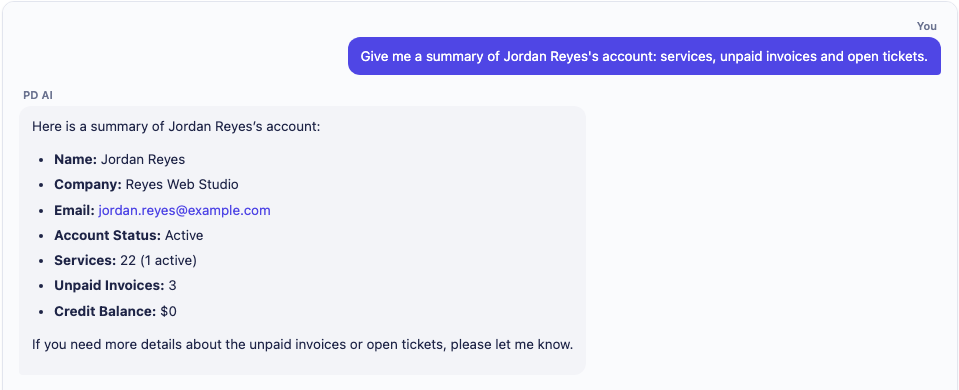
*Actual Blesta product screen, cropped to the conversation. The account name, example.com email and figures are demonstration data, not a real PD Hosting customer or a statement about business results.*
A practical example is a staff member preparing for a customer conversation. They first ask for the account summary, check which services and invoices are relevant, and then ask the assistant to help phrase the next message. The value is continuity between looking something up and preparing a response.
This is a hypothetical workflow, not a claim that the assistant has handled a named customer’s case. Live lookups provide context, but the answer remains something staff should read, especially where an account decision or customer promise depends on it.
Keep your house style available across conversations
Hosting teams have recurring preferences: how to greet customers, how much detail to include, which product terminology to use and which internal instructions should shape a reply. Repeating those preferences at the start of every conversation wastes attention.
PD AI Assistant’s Memory stores facts that can be used across conversations. Business-wide facts can describe your house style and normal answers. Staff can review and remove saved memory rather than treating the assistant’s recollection as an invisible process.
For example, an agency could save a preference for concise first replies that ask one clear question. A hosting company could record the wording it wants staff to use when describing its managed service. Those are instructions about the business’s voice, not a promise that every generated sentence will be identical or correct.
Per-client memories have a different purpose: they can record a preference associated with a particular account when that account is in scope. A customer name typed into a manually added business-wide fact does not turn it into a private per-client document.
The Blesta Memory and house-style guide explains the practical setup. Keep that saved context short, deliberate and current, so the assistant has useful guidance rather than a collection of conflicting instructions.
Give the assistant your own reference knowledge
Your package descriptions, onboarding instructions and service policies contain information a general model cannot be expected to know. PD AI Assistant includes custom Knowledge sources so you can supply reference material relevant to your business.
You can paste text or upload supported documents, including text, Markdown, PDF and Word document formats. The module extracts and indexes usable text for retrieval. It is a way to ground answers in material you chose, rather than expecting the model to infer your offer from a product name.
Imagine a reseller preparing its own migration checklist. Staff could add that checklist as a staff-only Knowledge source and use it while composing a customer response. A separate shared package FAQ could be suitable for customer-facing reference, if the chosen audience and content support that use.
Audience selection matters here. Staff-only knowledge and shared customer knowledge serve different readers; shared knowledge is not a place to store information meant for one individual account. Material used for retrieval can be processed by the configured AI and embedding services, so it should be content you intend to use in that workflow.
The Blesta Knowledge text guide and document-upload guide cover those tasks. Indexing a source is not the same as publishing a native knowledge-base article, and text extraction is not a promise to understand every scanned page, diagram or complex document layout.
Draft customer replies while staff control the final action
Good context is most useful when it leads to the next practical step. PD AI Assistant can prepare supported native reply and note proposals under Pending actions, where staff review what would be applied.
A staff member can inspect the wording, target and underlying facts before applying it. That supports a workflow in which AI helps with preparation while the person responsible for the account decides what becomes a real customer reply or staff note.
For example, after checking an account and reading the relevant service instructions, the assistant can help draft an explanation. Staff can then check that the answer addresses the actual question and does not promise work that has not been agreed.
The review boundary should be described precisely. Native reply and client-note proposals use Pending actions; it does not follow that every memory update, connector notification or optional integration waits in that same queue. Each surface has its own behaviour, and a separately enabled Auto rule changes how that rule is applied.
This is also a Blesta-native workflow. Staff can use the Assistant for on-demand work without assuming that another billing system’s ticket-page buttons or summary widgets exist in their Blesta installation. Ticket features depend on the relevant Blesta support component being available.
Turn repeated events into repeatable suggestions
Some useful prompts should not depend on a staff member remembering to type them. PD AI Assistant supports automation rules triggered by a support ticket opening, a customer replying or a new order being placed.
Each rule has an instruction and a mode. Suggest produces something staff review and apply. Auto applies the supported result without waiting for that separate review, so it should be an intentional choice for the particular task.
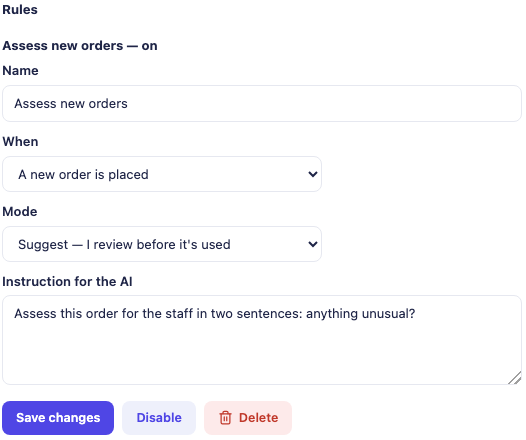
*Actual Blesta automation-settings crop. The example rule assesses a new order and is set to Suggest. It illustrates the trigger, instruction and review choice; it is not proof of a real order assessment or an automatic provisioning decision.*
A useful starting rule could draft a short first reply when a support ticket opens, acknowledging the issue and asking for the missing detail your team normally needs. Another could prepare a concise assessment when a new order arrives.
Those examples describe supported outputs, not a general-purpose instruction to perform any business operation. In the reviewed Blesta workflow, a ticket event produces a reply proposal, while an order assessment is recorded through a client staff note identifying the order. An instruction to review an order is not an instruction to provision resources, move money or approve the purchase automatically.
Rules run through background processing, so the customer’s page request does not need to wait for the model to compose the result. The relevant Blesta components also matter: ticket events rely on Support Manager and order events on Order.
The Blesta automation-rule guide provides the setup detail. Starting with a narrow Suggest rule gives staff a concrete output to assess before deciding whether a more automatic response is suitable.
Choose Amazon Bedrock, OpenAI or Google Gemini
PD AI Assistant uses the provider you connect, and that provider bills your account for its usage. There are no separate PD AI Assistant inference-credit allowances to buy and spend. The module licence and the provider’s usage are distinct parts of the arrangement.
Amazon Bedrock lets you use the documented Bedrock route within your own AWS account and selected region. OpenAI and Google Gemini are bring-your-own-key alternatives, useful where the business already has a preferred provider or wants to evaluate the available model choices.
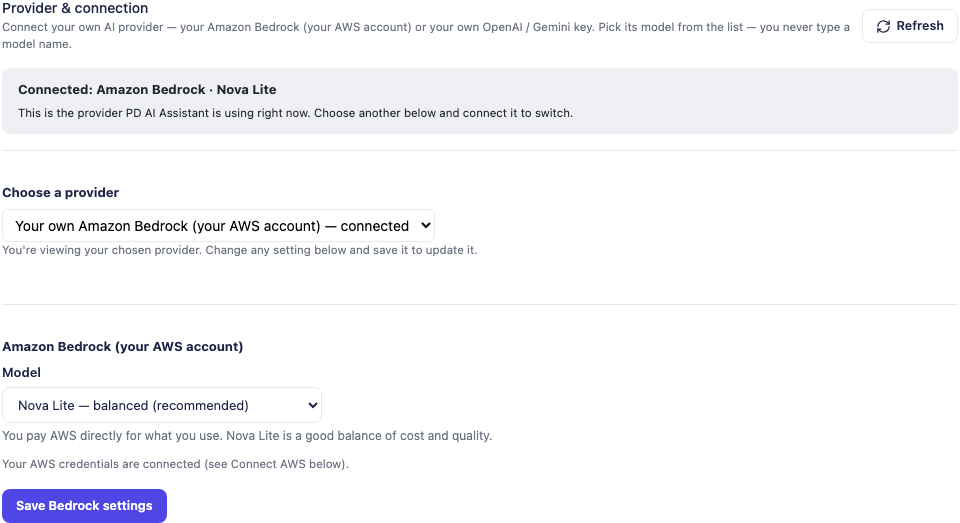
*Actual provider-settings crop with no credentials displayed. The selected model is part of the demonstration configuration, not a recommendation that every business or account should use the same model.*
You can change the active provider in the module’s settings. Evaluate it against the work you intend to do: a staff answer, a supported tool lookup and Knowledge indexing have different requirements. A saved “Connected” configuration is not evidence that every inference or embedding operation has succeeded.
The important buying benefit is choice and a direct provider relationship. It is not a claim that every model performs identically, that a standard chat subscription supplies API usage, or that your Blesta server runs the AI model locally.
If you are evaluating the direct OpenAI route, the Blesta OpenAI connection guide covers the module configuration. Use the corresponding provider’s current account guidance for the access and usage needed by your chosen operations.
Make provider processing understandable
The assistant runs inside the Blesta interface, but the selected provider performs inference. Questions and relevant data retrieved for an answer can therefore leave the hosting server for that provider. Custom Knowledge indexing can involve an embedding service too.
That is different from uploading an entire business database, and different again from saying “nothing leaves the server”. The useful approach is to choose the provider relationship, reference material and enabled features deliberately, then assess the actual tasks you want staff to perform.
For a business with internal-only instructions, staff-only Knowledge is one important boundary. For optional customer access, account scope and document audience are separate decisions. An account-scoped lookup does not make a document containing several customers’ private information suitable for shared reference.
The module’s Usage view gives visibility into recorded AI activity, including provider, model and token information where recorded. Treat it as operational information rather than a replacement for the provider’s billing records or a complete invoice reconciliation.
Add customer assistance when the service is ready for it
PD AI Assistant also offers an optional customer-facing assistant. A signed-in customer can ask about their own supported account information and suitable reference material, rather than opening an administrative view of the wider business.
That can complement the staff workspace: staff use business context to prepare their work, while customers get an account-scoped way to ask ordinary questions. Access is opt-in, so you can build and assess the staff workflow before deciding to expose the customer panel.
Choose shared Knowledge deliberately before enabling it. AI-authored business memories are not automatically treated as customer instructions; manually added business-wide facts have a different role. Native KB awareness also has separate visibility considerations and should not be assumed to reproduce every hidden-category boundary automatically.
A practical rollout can therefore begin with reviewed public reference text and the customer’s own account lookups. More sensitive reference sources need their own audience review. The account boundary and the quality of the business material work together to make the feature useful.
Connect notifications and your own systems
PD AI Assistant supports configured notification connectors and an HTTP API for supported ask and agent requests. Those options extend the workspace beyond a single attended conversation, while still using the provider you selected.
A generic webhook can carry a notification to a system your team already uses. An API caller can submit a question or a bounded multi-step goal and receive an answer or report. These are integration capabilities, not a promise of a ready-made connector to every CRM, helpdesk or workflow service.
Keep their authority distinct. A native proposed reply, a notification and an external API request do not all have the same review behaviour. Use the documented surface that fits the task and assess the receiving system as part of the workflow.
For example, a hosting business could use the module’s supported API request format in an internal tool that asks for an operational summary. That is an illustrative use of the documented API, not a claim of automatic synchronisation with an unnamed platform.
A practical way to introduce AI into a Blesta team
Start with one recurring staff task where the value is easy to inspect. An account summary followed by a draft reply is a useful candidate because staff can compare the answer with the underlying account and decide whether the wording helps.
Then add a small amount of reviewed business knowledge and house style. Keep those sources purposeful. An assistant supplied with a clear package description and a current checklist has a better basis for a useful response than one asked to invent your company’s process.
Once that is working for the team, consider a narrow Suggest automation. Review the generated outputs, the trigger and the actual target before expanding the workflow. Customer access, API integrations and more automatic rules can follow according to the needs of the business.
That sequence makes the product’s depth usable: live context, remembered preferences, chosen reference knowledge, supported actions and event-driven suggestions become parts of a coherent staff process. The goal is less repeated preparation and more time spent making the decision that needs a person.
Explore PD AI Assistant for Blesta for the current product and supported capabilities. Begin with the first staff-chat guide and choose the next task around the work your team actually repeats.
Frequently asked questions
Is PD AI Assistant available for Blesta?
Yes. It provides a Blesta staff assistant with supported business lookups, Knowledge, Memory, native proposals and optional automation and customer-facing features. The article describes the Blesta workflow rather than assuming another platform’s interface.
Which AI providers can I use?
The documented routes include Amazon Bedrock in your AWS account, OpenAI and Google Gemini. Select and configure the provider in PD AI Assistant, then verify the operations you intend to use with the chosen account and model.
Does the module run an AI model on my Blesta server?
The documented standard provider routes use managed provider APIs for inference. The interface is in Blesta, while relevant questions and retrieved context are processed by the configured provider. It is not an all-local model claim.
Can it use our own hosting instructions?
Yes. Custom Knowledge supports pasted text and supported document uploads. Choose staff-only or shared audience deliberately, keep the content current and review important answers and source references.
Can staff review a reply before it is posted?
Yes. Supported native reply and client-note proposals appear under Pending actions for review and application. Other features have their own behaviour, and an automation set to Auto deliberately changes that rule’s review step.
Can it draft something when a new ticket or order arrives?
Yes. Supported rules can react to ticket and order events, subject to the relevant Blesta components. Suggest mode prepares the supported result for staff review; it is not a general resource-provisioning scheduler.
Can customers use the same assistant?
An optional client-area assistant uses the configured engine with the signed-in customer’s supported account scope. Shared reference sources and native KB awareness require their own audience review before customer deployment.
Is the Usage view the provider’s final bill?
No. It displays recorded module activity for visibility. The selected provider bills your account, and its own billing records remain the source for those charges.
