WHMCS Bot and Fraud Protection: Reduce Bad Sign-ups Without Constant CAPTCHAs
Explore PD Shield for WHMCS: background bot checks, email-verification holds, per-client purchase limits, Order Guard and transparent Pro fraud scoring.
A hosting checkout needs to do two things well: let a genuine buyer order easily, and stop unwanted activity before it becomes another provisioned service or unpaid commitment. Putting every visitor through another puzzle is not the only way to approach that problem.
PD Shield is a WHMCS bot and fraud protection module that combines background form checks, sign-up controls and order decisions. Its free protections include a honeypot, disposable-email blocking, velocity limits, an email-verification hold, Order Guard and per-customer Purchase Limits. Pro adds transparent risk scoring, a review queue, trusted customers, network reputation signals and reporting.
The useful distinction is control over the response. Some situations call for a clear refusal at checkout; others deserve a review before provisioning. PD Shield gives hosting operators a way to separate those cases, with reasons behind the decision and no CAPTCHA of its own for customers to solve.
Protect the order journey without adding a CAPTCHA
A honeypot is a hidden form field that ordinary customers do not need to complete. Bots interacting with the form may fill it, producing a signal without asking every buyer to identify pictures or solve a challenge.
PD Shield starts that protection in observation mode. A honeypot hit is recorded, while the order can still proceed. You can then enable Block honeypot hits after reviewing what the form is seeing. This matters because a password manager can occasionally autofill a hidden field too.
That makes the rollout more useful than a switch that refuses every hit immediately. The host can observe its own checkout behaviour before deciding that the signal is reliable enough to block.
The honeypot addresses bots that encounter the page and its script. A script posting directly to a form may never see that field, which is why it sits alongside the other checks rather than being sold as a complete defence by itself.
PD Shield does not add a CAPTCHA. Any other challenges or security controls you already use remain separate decisions; the module is not claiming to remove every check from your website or identify every automated request.
Disposable email and bursts of new orders
Disposable-email blocking checks sign-ups and orders against the module’s bundled throwaway-domain list. Pro can also check orders against a larger, continuously updated list. That gives the host a practical way to reject addresses from identified temporary-mail providers before accepting an order on that basis.
Free webmail is a different category. The optional setting to refuse free-email providers at registration is off by default, because ordinary buyers often use those accounts. Existing customers are not affected by that registration setting. A business that requires company mail can choose it deliberately, rather than confusing “free email” with “disposable email”.
Velocity limits address repeated activity from one source. You set how many sign-ups or orders are allowed from an IP address within a rolling window, and choose the corresponding response. The module counts the two activity types separately and uses the higher count, rather than automatically treating a normal registration followed by an order as two separate attempts.
Customers who have already paid for a live service are excluded from this velocity counting. That supports the commercial aim: control bursts of new activity without applying the same limit to an established paying buyer’s ordinary relationship.
For example, a small hosting business might start with a review response for a burst of new orders, inspect the reasons and tune the window to accommodate shared office connections. This is a hypothetical operating choice, not evidence of a particular reduction in fraud.
Hold, block or flag: choose the response that fits
The Action when a rule matches setting controls the velocity rule. Hold lets the order enter the review workflow before provisioning; Block refuses it; Flag records the signal while allowing it to continue.
That setting does not globally override every protection. Disposable-email rejection, enabled Order Guard blocks and enabled Purchase Limits refuse at checkout. The honeypot has its own blocking switch, while Pro risk scoring uses its configured review and block thresholds.
Understanding those distinctions helps a host build a predictable checkout. A staff member can explain why an order was held for consideration, while a deliberate “one per customer” limit can present an immediate checkout message instead.
A hold also preserves a route for a genuine buyer. Staff can inspect the reason and approve the order instead of treating every suspicious signal as a final accusation. Approval is a business decision based on the available information, not a mathematical guarantee that an order is safe.
Email alerts can notify staff when an order is held, using configured recipients. Pointing that at a monitored team mailbox helps make review part of the working day rather than a queue that nobody remembers to open.
Verify the email before provisioning, without refusing checkout
Email verification has a specific customer-journey problem. A first-time buyer may arrive without an account, so demanding that they verify an address before they can even place the order can become a dead end.
PD Shield can accept the order and hold it while waiting for verification. WHMCS sends and tracks its own verification email; PD Shield reads the verified state. WHMCS email verification must therefore be enabled for this setting to have a useful effect.
The email-verification guide explains the customer journey. The buyer receives the order-under-review message while provisioning is held. Once verification is complete, PD Shield periodically checks the order and can release a hold caused solely by that verification requirement. The order then follows the normal pending, payment and provisioning workflow.
Another review reason is not erased by a verified inbox. If other checks held the order, or staff have already made a review decision, it stays within that decision process. Verifying an email is useful evidence of access to the mailbox, rather than permission to bypass every other control.
For a host selling automatically provisioned resources, that can connect a simple customer action to a meaningful operational boundary: the order is received, but the unverified address does not immediately become a reason to create the service.
Stop selected customers placing new orders with Order Guard
Some purchasing problems involve an existing account rather than an anonymous sign-up. A host may need to stop further new purchases while keeping the customer’s current services and renewals in place.
Order Guard provides that distinction. Staff select the client, record an optional internal reason and block new orders. The reason is not shown to the client. When the feature is enabled, the block is enforced at checkout; it does not cancel their existing services or stop their renewals.
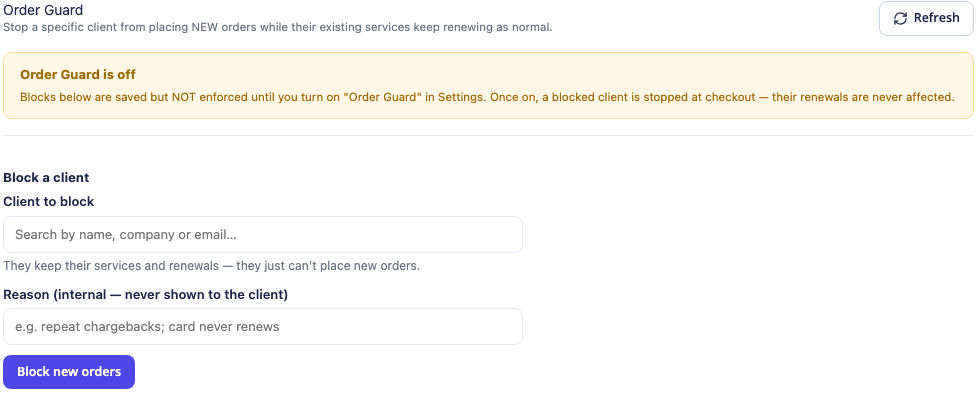
*Actual product screen with an empty demonstration form. The notice explains that saved blocks are not enforced until Order Guard is enabled. No customer record is shown.*
That is more precise than treating account closure as the answer to every purchasing restriction. The host can manage the existing relationship while deciding that it will not accept another new service order from that account.
Manual blocking is included in the free module. Pro adds optional automatic Order Guard blocking after repeated failed automatic payments within the configured window. Its documented counting works per unpaid invoice from WHMCS’s failed-card-payment notification, rather than treating every retry against the same invoice as a new independent failure.
The master switch still matters. Saving an entry and enabling enforcement are separate actions, making it possible to prepare the policy before it starts affecting checkout.
Set a WHMCS purchase limit per customer
A product can have stock available overall while still needing a limit for each buyer. A host might offer one introductory service per account, cap a particular product group or limit the customer’s total number of services.
PD Shield’s Purchase Limits can target a specific product, a product group or all services combined. At checkout, the rule considers the client’s relevant existing holdings together with what is in the cart. Each rule can supply its own customer-facing message.
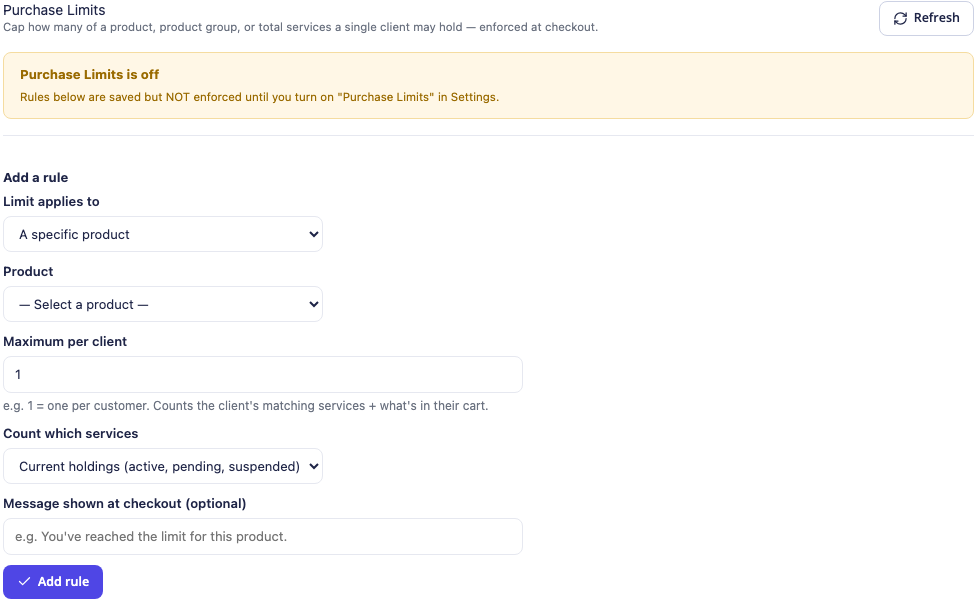
*Actual product form. Current-holdings rules are available in the free module; Pro adds lifetime counting. The feature must be enabled before saved rules affect checkout.*
You can exempt selected client groups, such as resellers with a different purchasing arrangement. That helps a host express the actual commercial offer instead of building a single cap that accidentally applies to every type of account.
The free rule counts current holdings. Pro adds lifetime counting, including cancelled and terminated services, for offers where cancelling and reordering should not reset eligibility. That is useful when designing a host’s own promotional products; it is not a promise of a particular trial or promotion for PD Shield itself.
For example, a provider could apply a current-holdings cap to a specialist service while using lifetime counting for an introductory product. The two rules solve different purchasing questions, even if both display “one per customer” in the offer.
Pro risk scoring makes the reasons visible
PD Shield Pro combines signals into a transparent risk score from 0 to 100. The documented signals include network reputation, disposable email, velocity, country, impossible travel and an optional external provider. You choose one threshold for review and a higher threshold for outright refusal.
The value is the combination and its explanation. A signal such as VPN use is not a statement that a customer is fraudulent. Staff can inspect the score and reasons, rather than being asked to trust an unexplained binary verdict.
Country is deliberately a weak signal in the documented scoring. A configured country signal does not independently cause a hold under the documented approach; it contributes alongside other observations. That is a different policy from simply refusing every buyer from a region.
The Pro review queue puts held orders and their reasons together. Staff can approve or reject them, and a trusted-customer list lets a known-good customer’s orders skip risk scoring. An explicit Order Guard block remains a separate decision, rather than being silently undone by trust-list membership.
Payment state still matters after approval. The documented queue workflow accepts a paid order for provisioning, while an unpaid order returns to its invoice and normal payment process. Staff review does not mean that an unpaid service should go live immediately.
Network signals and optional external reputation
Pro can check proxy, VPN, Tor and throwaway-mail lists through the documented PD Shield detection service. That request uses the visitor’s IP address and email domain, rather than sending the full email address, name or payment details. The setting can be disabled while locally computed scoring continues.
An optional external risk provider is a separate Pro choice, using the host’s own account. The released documentation supports IPQualityScore for additional reputation signals. The module’s core protections do not require that account.
If the optional provider cannot supply a result, the documented behaviour is to continue scoring without its opinion. That separates a provider lookup problem from an instruction to refuse the customer. It also makes it important to review whether the expected signals are actually appearing, rather than assuming every configured integration is contributing.
No external-provider account, lookup allowance or feature claim needs to be bundled into the core sales story. Start with the protections you need, then add the documented signal sources that suit your review process.
Use reporting to tune protection around real buying behaviour
Pro reporting shows blocks and holds over time, outcomes, contributing signals and the distribution of scores. Staff can compare that evidence with the decisions they made and adjust thresholds accordingly.
A useful rollout starts by asking what problem each setting addresses. Honeypot observation can reveal whether autofill is affecting the form. A velocity window can be adjusted for how your buyers share connections. Purchase limits should match the published offer, while staff need a clear route to review held orders.
The honeypot guide and velocity-limit guide provide practical follow-through for those settings.
This is where the module’s marketing value becomes practical: a host can make more specific decisions than “challenge everyone” or “accept everything”. Form checks, buyer restrictions, verification and scoring can be configured as distinct parts of the same order journey.
PD Shield complements the rest of the hosting operation. It is not a promise to eliminate every fraudulent transaction, replace payment-provider checks or protect every URL on the server. Its focus is the WHMCS registration and new-order workflow described here.
Explore PD Shield for WHMCS
If your team is spending time sorting unwanted sign-ups, repeated new orders or unclear purchasing restrictions, explore PD Shield for WHMCS.
The free module covers the core gates, Order Guard and Purchase Limits. Pro expands that into scored decisions, a review queue, reputation signals and reporting. Use the WHMCS module knowledge base and the in-panel documentation for the settings that match your order process.
Frequently asked questions
Does PD Shield add a CAPTCHA to WHMCS?
No. Its honeypot works in the background, with observation and blocking as separate choices. Other protections on your site remain separate; the module does not promise that no customer will ever encounter another system’s challenge.
Can I hold suspicious WHMCS orders instead of blocking them?
Yes. The velocity rule can hold, block or flag, while Pro scoring has separate review and refusal thresholds. Other gates have their own documented behaviour, so the velocity setting is not a global override.
Can I require email verification before provisioning?
Yes. With WHMCS email verification enabled, PD Shield can accept and hold the order until the customer verifies. A verification-only hold can then be released into the normal payment and provisioning workflow; other review reasons remain effective.
Can I block new purchases while allowing renewals?
Yes. Enabled Order Guard blocks selected clients at new-order checkout without cancelling their existing services or stopping renewals. Manual blocks are free; repeated-payment-failure auto-blocking is Pro.
Can I limit a WHMCS product to one per customer?
Yes. Purchase Limits can cap a product, product group or total services per client and consider the cart alongside existing holdings. Pro lifetime counting also includes cancelled and terminated services.
Is every VPN customer automatically fraudulent?
No. Network reputation is a risk signal, not proof of a person’s intent. Pro combines signals into a score with reasons and configurable thresholds, and staff can review an order or trust a known-good customer.
Does PD Shield require a separate fraud-provider account?
No. The core protections work without one. Pro can optionally use a supported external provider through your own account for additional reputation information.
Which PD Shield features require Pro?
Pro adds risk scoring, network-list detection, the review queue and trusted-customer scoring controls, reporting, automatic Order Guard blocking after repeated failed payments and lifetime purchase counting. The free module includes the core form gates, verification hold, manual Order Guard and current-holdings Purchase Limits.
