WHMCS Black Friday Offers: Automatic Discounts, Bundles and Renewal Rules
Build WHMCS Black Friday offers with automatic discounts, audience targeting, billing-cycle rules, recurring terms and shareable bundles using PD Discount Manager.
A Black Friday hosting offer needs to work in the basket, not just look persuasive on a banner. The right customer should receive the right saving, understand what renews later and reach checkout without rebuilding an offer from several instructions.
PD Discount Manager brings automatic discounts, targeted rules, product bundles and recurring-offer control into WHMCS. It lets a hosting company turn a campaign idea into defined checkout behaviour: a saving for a particular annual plan, an offer for existing customers or a bundle reached through one shareable link.
For Black Friday and other seasonal campaigns, that is the useful opportunity. You can sell a carefully defined offer rather than distributing a coupon and hoping it behaves as intended. The module also provides usage reporting so your team can see which rules actually granted discounts.
Automatic WHMCS discounts without a coupon hunt
A promotion code is useful when entering the code is part of the offer. It is less useful when everyone viewing the same eligible product should receive the same reduction automatically.
In PD Discount Manager, a rule with no promo code applies when its conditions match. Give the rule a code when you want code-driven redemption instead. You can use percentage reductions, fixed reductions or free setup, and choose whether the rule affects the recurring price, setup fee or both.
Imagine a host advertising an annual VPS offer. The buyer selects the intended VPS and annual cycle; an automatic rule can apply the configured saving without requiring them to leave checkout to find a code. Another product or an ineligible cycle can keep its ordinary pricing because the eligibility conditions are part of the rule.
That example describes possible configuration, not a real campaign result. The benefit is a clearer path between the offer your marketing describes and the offer the basket calculates.
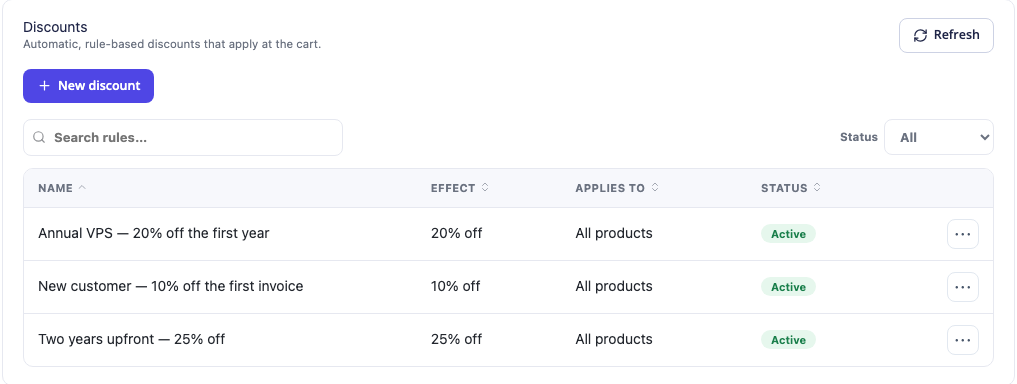
This actual module screen shows example active rules. Their names and percentages illustrate administration, not an offer currently available from PD Hosting. The detailed rule settings determine eligibility; a descriptive name alone does not prove how a rule is targeted.
Target the customer, product and billing cycle together
A large headline discount is a blunt instrument when the campaign is intended for a narrow service line. PD Discount Manager supports conditions that let you define a more useful commercial offer.
You can target a product, product group or addon, then narrow the audience to new clients, particular clients or client groups. Billing-cycle conditions, start/end dates and minimum order values add further precision. First-order conditions and existing-product requirements support acquisition and expansion offers with different purposes.
For example, a hosting company could make an annual website-care offer available to clients who already hold a particular active hosting product. The module’s owned-product condition provides the relationship between those services, while the billing-cycle condition defines the qualifying purchase. That is more specific than giving every person with a customer account the same coupon.
A different campaign might reward established customers using a minimum active-service count. Another might require a particular combination of products in the cart. Each is a distinct business decision that can be expressed through the documented rule conditions.
The audience targeting guide explains the individual settings when you are ready to configure them.
Make renewal terms part of the offer
“Save on hosting” is incomplete until the customer knows which payments receive the saving. A first-invoice offer and an ongoing renewal discount create different service economics and different customer expectations.
PD Discount Manager can apply a rule to the first invoice, every renewal or the first configured number of invoices. The terms sold with the service remain meaningful after the campaign: an every-renewal discount bought during a date-limited offer continues after the offer closes, and a new-client offer does not disappear simply because that buyer is no longer new.
| Campaign objective | Relevant control | What your copy should explain |
|---|---|---|
| Introduce a service with an initial saving | First-invoice application | Which first payment is reduced and what happens afterwards |
| Reward a long-term purchase | Billing-cycle targeting and recurring terms | Which cycle qualifies and how long the saving continues |
| Offer a limited run of discounted invoices | First configured number of invoices | How many payments receive the reduction |
| Reward an existing customer relationship | Owned-product or loyalty condition | What the buyer must already have to qualify |
This makes the module useful for recurring hosting businesses, not only one-off checkout discounts. It gives the operator a way to align the offer with the service being sold.
Use value grids for different products, cycles and domains
A single percentage can work across a campaign. It is not always the right fit when products and billing cycles have different costs or when several domain actions need different terms.
PD Discount Manager includes a value grid for product-by-cycle amounts. For domains, it supports values by TLD, registration year and action. The grid previews the base and discounted price, and a blank cell uses the rule’s default reduction.
A practical Black Friday example is a host offering a larger saving on selected annual products while leaving monthly services outside that offer. Another is a domain campaign restricted to specified extensions and registrations, with renewals treated separately. The product and domain controls let you describe those differences directly rather than applying an identical rule everywhere.
Fixed reductions can also use per-currency amounts on multi-currency installations. Quantity tiers support offers that change as the ordered quantity grows. Those tools are useful when a campaign needs defined amounts or thresholds rather than a broad store-wide percentage.
For implementation detail, see the discount value-grid guide.
Sell a useful bundle through one link
Some offers are easier to understand as a combination of services. A host might package two complementary products that customers otherwise have to locate and add separately.
PD Discount Manager supports a fixed-total bundle or a percentage reduction across its included products. Each bundle has a shareable add-to-basket link that adds the configured combination at the bundle price. You can place that link in the campaign page or other authorised marketing material so the buyer arrives with the intended products already selected.

This real screenshot shows the initial bundle workspace before a bundle is created. It demonstrates where bundles are managed; it is not a completed example campaign or evidence of sales.
The fixed-total behaviour has an important commercial detail: the exact total applies to the configured products, first billing cycles and options in the default currency. If the buyer changes a cycle or uses another currency, the bundle preserves the corresponding percentage saving rather than promising that exact total in every combination.
That distinction belongs in offer planning and checkout testing. It helps a business create an attractive combination without writing campaign copy that promises the wrong price under an alternative selection.
Decide how overlapping discounts should behave
A Black Friday rule may overlap with an existing new-client or loyalty rule. PD Discount Manager’s default behaviour chooses the single matching rule that takes the most off the item; priority resolves a tie. You can enable stacking when combined reductions are intentional.
This gives the operator a clear decision. If a seasonal offer should replace ordinary incentives, use the single-rule behaviour. If a campaign is deliberately designed to combine eligible incentives, review the stacking configuration and resulting basket before advertising it.
Total and per-client usage limits can cap redemption. A date range can close the offer to new buyers automatically. These controls are useful for promotions with defined eligibility and availability, without requiring the team to delete the configuration when the campaign ends.
Read the date and usage-limit guide for the task-level settings.
Three realistic campaign patterns
The following are illustrative offers a hosting business could configure, not offers from PD Hosting or claims of measured customer results.
An annual hosting acquisition offer: target the intended product group and annual cycle, limit eligibility to new clients or the first order as appropriate, set the campaign dates and specify the payment period receiving the saving. Test an eligible basket and an existing-customer or monthly-cycle basket so the boundaries are visible.
An expansion offer for existing customers: require a documented active product relationship and target the additional service being promoted. The message can explain why that service fits the customer’s existing setup rather than offering an unrelated reduction to the whole customer base.
A complementary-product bundle: configure the included products, selected options and bundle terms, then use the generated link on the campaign page. Test the original selection and a changed-cycle selection so the promise matches the bundle’s documented pricing behaviour.
The shared principle is practical marketing: the buyer understands what they receive, and the configured rule or bundle expresses the same offer.
Use reporting and pause controls after launch
The Usage tab records which rules granted discounts and the reductions applied. It provides evidence about module activity, rather than proof that a campaign increased profit or caused a particular sale.
You can pause an individual rule or bundle, or use the Apply discounts master switch, without deleting the setup. Pausing stops new offers while preserving the renewal terms already sold. Deleting a rule or bundle has different consequences for later renewals, so closing a campaign should not be treated as a reason to remove its configuration blindly.
Beyond discount campaigns, the module also includes customer-product trial configuration and an optional early-payment account-credit reward. Those are separate features for a host’s own services; they are not a promise of a trial for PD Discount Manager itself. Keep them aligned with the commercial purpose rather than enabling every feature for one seasonal campaign.
Build the offer around what you want to sell
For a hosting company using WHMCS, PD Discount Manager brings together automatic discounts, audience conditions, billing-cycle and domain targeting, recurring terms, bundles and usage controls. Those capabilities help turn a marketing idea into a defined purchasing journey.
Install the module through PD Modules after connecting your account, then build the rule or bundle that matches your campaign. The first discount-rule guide covers configuration; the product page explains the wider module.
Explore PD Discount Manager for WHMCS and plan your Black Friday offer around the customer, product and renewal terms you intend to serve.
Frequently asked questions
Can WHMCS discounts apply automatically without a promo code?
PD Discount Manager can apply a matching rule automatically when its promo-code field is blank. Give a rule a code when entering that code should be required.
Can we target annual plans without discounting monthly services?
Yes. Use the documented billing-cycle conditions together with the intended product or product group. Validate both eligible and excluded selections before launching the offer.
Does an every-renewal discount end when Black Friday ends?
The campaign end date stops new eligibility; customers keep the renewal terms they bought. Pausing and deleting rules have different effects, so use the appropriate campaign-closing control.
Can we create a hosting product bundle with one checkout link?
Yes. Bundles combine configured products with fixed-total or percentage-saving behaviour and generate a shareable add-to-basket link. Changed cycles or currencies retain the percentage saving rather than necessarily the original fixed total.
Can domain registrations and renewals receive different offers?
Yes. Domain targeting supports TLD, action and registration-period distinctions. Configure the actions that match your advertised terms rather than assuming a registration promotion also covers renewal.
What happens if several discount rules match?
By default the single rule giving the largest reduction wins, with priority breaking ties. Stacking is available when you deliberately want matching rules to combine.
