WHMCS Cloud Cost and Margin: Find Unprofitable Services and Unmapped Resources
Compare cloud resource costs with WHMCS recurring revenue. Find low-margin services and unmatched spend with PD Cloud Cost & Margin for PD cloud provisioning.
A cloud hosting service can be active, billed and quietly earning less than you expected. The underlying instance may have changed, a provider cost may have moved, or a resource may still be running without a matching paying service. A monthly provider total tells you money was spent; it does not by itself show which WHMCS products cover that spend.
PD Cloud Cost & Margin connects measured cloud resource costs to the WHMCS services delivered through the PD cloud module family. It compares those costs with monthly-equivalent recurring revenue, highlights services below your chosen margin floor and shows billed resources without a matching service.
For a cloud reseller, that creates a useful connection between infrastructure delivery and the commercial account. Instead of reviewing the AWS bill and WHMCS income in separate places, your team can investigate the relationship between the two. The module gives you evidence for pricing and resource reviews while leaving the business decision with you.
Why a cloud bill is only half the picture
Your provider organises charges around resources and usage. Your customer understands a VPS, storage product or other hosting service. WHMCS holds the commercial relationship between that service and the customer. To evaluate the resource margin, those views need to meet.
A healthy provider-wide total can conceal variation between products. One service may have a comfortable difference between revenue and resource cost while another costs more to deliver than it charges. Looking only at the combined result makes it harder to identify where a product review is worthwhile.
Unmapped resources create a different question. A disk, snapshot or address may be billing without a matching WHMCS service. It might be left from an earlier service, but it could also be an expected shared or internal resource. Your team needs a way to find and classify it before deciding what to do.
PD Cloud Cost & Margin is designed around those practical questions. It provides an operator-facing view; customers do not see your cost and margin reports in their client area. You can use the information in your own recurring review of the hosting business.
Connect cost reporting to the PD cloud module family
The module is a companion to PD cloud provisioning modules. Its per-service reporting relies on a supported resource-to-service relationship from that ecosystem. It does not guess that an arbitrary provider resource belongs to a customer because the names happen to look similar.
That is an important part of evaluating its fit. If you use PD Lightsail, PD EC2, PD AWS S3 or other supported PD cloud modules, the cost review can connect to the resources delivered by those services. Without that matching context, provider totals are still useful, but you should not expect every manually created resource to appear under a customer with a calculated margin.
For example, a business selling Lightsail VPS products through PD AWS Lightsail has both a provisioning relationship and WHMCS recurring prices to compare. Cloud Cost & Margin adds a cost-review view to that existing service model.
This is a stronger proposition than a dashboard that simply imports a large total. It connects delivery to the product and service that your team can actually review. Unmatched recorded spend can be reviewed separately. Recognised naming patterns support the association, but check unexpected matches rather than treating them as universal proof of resource ownership.
Read AWS costs or import a supported provider export
There are two routes for bringing measured cost data into the module. They can be used together when your hosting business operates across more than one cloud.
| Cost source | How the module receives it | What your team needs |
|---|---|---|
| AWS Cost Explorer | Uses the AWS server credentials already held by the PD AWS setup | Appropriate cost-reading permissions and resource-level detail for resource matching |
| Provider cost export | Imports a per-resource CSV through the Providers view | Recognised resource/cost columns and the intended reporting month |
The export workflow supports billing data from providers such as AWS, Azure, Google Cloud and DigitalOcean when it includes the required per-resource information. The importer reads supported headers and updates recognised resource records. Re-importing is not a complete replacement of every row for that month: previously stored records omitted from a later export can remain. Review the resulting period and rows.
For AWS, permission to provision an instance is different from permission to read cost information. Resource-level granularity also matters: a total by AWS service does not identify the individual resource to match against a WHMCS service. AWS explains resource-level Cost Explorer data and the relevant availability settings in its documentation.
The module’s Providers view makes the available level of data understandable. That lets your team distinguish provider totals from per-resource coverage before interpreting the margin view. You can then use the Cloud Cost & Margin task guides for the exact connection and import steps.
See the services behind the margin
The Margin view compares measured resource cost with recurring service revenue for the reporting period. Revenue is normalised to a monthly figure and converted using the billing-currency rate you configure. An annual recurring amount can therefore be compared on a monthly basis instead of being set against one month’s cost as though the periods were the same.
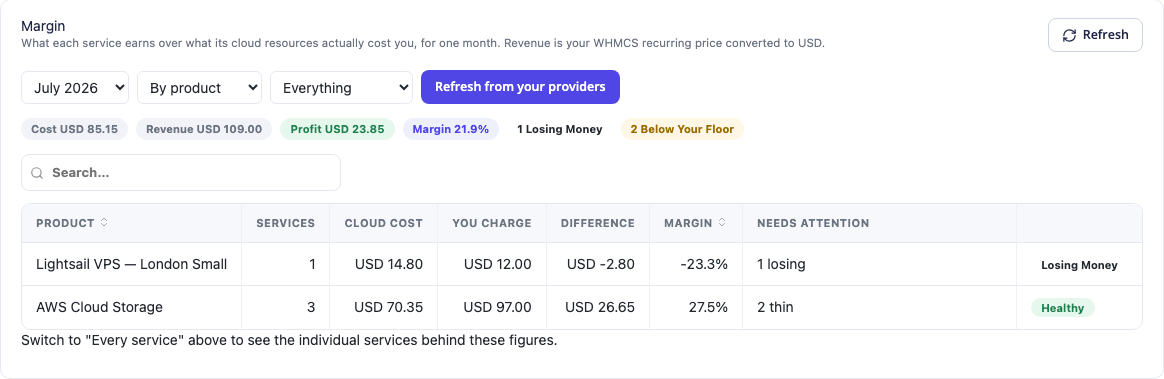
This actual module view shows example products grouped with cost, revenue, difference and margin columns. It also highlights a product losing money and another with services below the configured floor. The amounts are demonstration resource/service figures, not PD module pricing, and do not represent another business’s results.
You can review the product grouping and then move to the individual services behind it. That helps answer a more useful question than “is the cloud bill high?”: which specific offering or service needs attention, and is it a wider product issue or an isolated case?
A low resource margin is evidence to investigate. Your business may choose to change a product’s scope, revisit a price or understand why a resource costs what it does. The module does not automatically decide that every flagged service must be repriced, nor does it change the customer relationship on your behalf.
The report is also not the whole profit and loss account of a hosting company. Support labour, general overheads and charges not attributable to individual resources still matter. It gives your team a defined resource-cost comparison that can feed a broader business decision.
Set the floor that matters to your service
Different hosting offers carry different support and operating work. PD Cloud Cost & Margin lets you set a warning floor rather than treating any positive difference as equally satisfactory. Services below that configured threshold can be highlighted, with loss-making services flagged separately.
This supports a practical review routine. A team can begin with services that cost more than their recurring revenue, then look at those below its chosen floor. That order makes the report actionable without turning every normal resource into an alert.
Currency settings are part of the same discipline. If your cloud costs are in one currency and WHMCS revenue is in another, the conversion rate affects the comparison. The module uses a rate you set; it is not a promise of continuously updated foreign-exchange data.
Keep the reporting period consistent too. A month still in progress is not the same as a completed month, and provider billing data has a reporting delay. The daily refresh is designed around cost data arriving over time, rather than presenting every page load as an instant final bill.
Those settings make the report more meaningful. The team can explain the period, currency and threshold behind a finding instead of treating a coloured badge as a complete financial conclusion.
Find resources without a matching WHMCS service
The Paying for nothing view addresses billed resources that have no matched service. You can choose how long an unmatched resource must be billing before it counts for attention and apply a minimum cost threshold to keep the review focused.
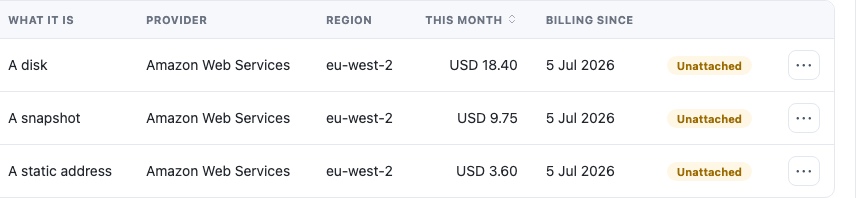
This genuine screen crop shows the resource types and billing columns from an example unmatched-resource list. Resource identifiers are outside the crop. It demonstrates the kind of spend the module brings into view, not a claim that every disk or snapshot shown in such a list is unwanted.
The distinction is important. A shared resource, an internal backup or work still being prepared may legitimately have no customer service attached. You can mark expected resources accordingly, keeping future reviews focused on items whose purpose is unresolved.
The module reads cost data and reports findings. It does not delete cloud resources. Your operator makes the decision with the resource’s actual purpose in view, using the appropriate management tools. Finding an unmatched item is a useful starting point for investigation, not proof that deleting it is safe.
For a growing cloud hosting business, that separate review can catch a category of spending that does not appear when staff only inspect active customer services. It joins the infrastructure question—what is still billing?—to the service question—what is this resource for?
Keep missing data visibly different from good results
A cost report should not make a service look healthy simply because it has no measured cost yet. PD Cloud Cost & Margin uses No cost data yet for that situation rather than calculating a reassuring margin from an assumed zero.
That helps staff interpret the report honestly. A service with measured cost and a positive difference is one result. A service without a matching cost record is a coverage question. They deserve different follow-up, even if a simplistic calculation could make the second look better.
This is useful during the introduction of cost reporting. Your team can review whether the provider data, resource detail and service matching are present before treating the report as complete. The same approach is valuable after changes to a provider export or resource arrangement.
The module also leaves charges that cannot be attributed to a resource outside the per-service picture. Do not expect a sum of service margins to explain every tax, support-plan or other provider-bill item. Compare like-for-like resource information, then include the rest in your broader operating review.
An illustrative monthly cloud-reseller review
Imagine a hosting company selling several AWS-backed VPS and storage products through PD modules. This is an illustrative workflow, not a customer case study or a savings claim.
At the start of its review, the team confirms the reporting month and cost-data coverage. It checks the configured currency conversion and opens the Margin view by product. One product has services below the chosen floor, so staff inspect the individual service records to understand the relationship between recurring price and resource cost.
Next, the team opens Paying for nothing. A resource has no matching service, so its owner establishes whether it is an expected internal resource or something that should be managed differently. Expected items are classified accordingly; resource changes remain deliberate operator actions.
The team can enable optional alerts for supported stored loss or unmatched-resource findings, with the recipient and settings chosen by the business. These can repeat; do not assume a once-per-month or new-only notification policy. The digest complements the review rather than replacing it with a flood of per-resource messages.
The outcome is a clearer list of questions and decisions grounded in measured costs. There is no promised percentage saving. The value is knowing where to look and connecting the provider spend to the WHMCS services your business sells.
Make cost visibility part of the cloud offer’s lifecycle
Provisioning helps a business deliver a service. Customer controls help people use it. Cost reporting helps the operator understand whether the resource arrangement still matches the commercial offer over time.
PD Cloud Cost & Margin adds that review layer to the PD cloud module family. It brings measured costs, recurring revenue and unmatched-resource findings into a working view for the hosting team, without changing prices or deleting infrastructure automatically.
Explore PD Cloud Cost & Margin for WHMCS to evaluate it alongside your existing PD cloud services. The most useful starting point is a reporting period with known resource coverage and a clear business question you want the data to answer.
WHMCS cloud cost and margin FAQ
Can PD Cloud Cost & Margin show which services cost more than they charge?
Yes, when measured resource costs can be matched to the relevant PD-provisioned WHMCS services. It compares those costs with monthly-equivalent recurring revenue and highlights loss-making or below-floor services.
Do I need a PD cloud provisioning module?
For the headline per-service matching capability, yes. Provider totals can still be imported without that relationship, but arbitrary resources are not automatically assigned to customers by guesswork.
Does it support only AWS billing?
AWS has an automated Cost Explorer route. You can also import suitable per-resource cost exports from other providers, including Azure, Google Cloud and DigitalOcean. The available columns and resource detail determine what can be matched.
Does the module delete resources that have no matching service?
No. It reports unmatched resources for the operator to review. Some are legitimate internal or shared resources, which can be marked as expected; resource management remains a separate decision.
Does it automatically change my WHMCS prices?
No. The report gives your team cost and revenue evidence. You decide whether a finding calls for a price review, a different resource arrangement or another business action.
How are different billing cycles and currencies compared?
Recurring service revenue is converted to a monthly figure, then to the configured provider billing currency using the rate you set. Review the rate and reporting period when interpreting results.
Is a service with no cost data counted as highly profitable?
No. It is shown as having no cost data yet rather than being given a margin based on an assumed zero cost. Missing coverage and a measured healthy result are different states.
Do customers see my provider costs?
The module is an operator-facing cost and margin tool. Your customers do not receive those reports in their client area.
