Blesta Password Handovers: An Encrypted Vault and One-Time Client Links
Hand credentials to clients through Blesta with PD Password Manager: encrypted storage, expiring one-time links and an optional Pro client vault.
A hosting handover often ends with a small but important problem: how do you give the customer the credential without leaving another permanent copy in an ordinary email or conversation?
PD Password Manager brings password generation, encrypted vault storage and secret handoff into Blesta. Your team can prepare a credential, organise it against the relevant client and deliver it through a link with a defined recipient mode, expiry and view limit.
For a hosting business or agency, that makes credential delivery a deliberate account workflow. It is easier to explain who should receive the secret, how they should open it and what happens when the link is no longer available.
Give handover a clear place in the customer journey
Imagine a hypothetical agency completing a website project. The client needs the agreed access details, while the agency needs a record of what was handed over and which account it belongs to.
Sending the password as plain text in a long conversation is easy in the moment, but it leaves the secret mixed with project discussion. PD Password Manager offers a different route: create the appropriate handoff and send the link instead of placing the credential directly in the message.
The link still needs careful handling. A public link is usable by whoever possesses it while it remains valid. An addressed client-area handoff requires the intended customer to sign in. Choose the mode based on the recipient and the account relationship, rather than treating every link as equivalent.
This is not a claim that a recipient cannot copy what they read. A one-time handoff controls future retrieval through the link; it cannot recall a secret someone has already saved.
Prepare the secret inside the panel
The generator supports character passwords and word-based passphrases, with format and length choices. Staff can use the result in a vault entry or a supported handoff workflow rather than moving between an unrelated generator and a manual notes file.
A strength estimate is a useful guide to the chosen value, not a certificate that the destination account is secure. The destination service still has its own password requirements and access controls.
The encrypted vault provides a place for supported secret fields and notes, organised with folders and tags. Entries can be attached to a Blesta client so staff can find the relevant item in account context.
Encryption applies to the protected secret fields. Searchable labels and other metadata should still be written with care; describing the vault as encrypted does not mean every title and association is hidden from administrators or every export is encrypted.
For the agency handover example, a clear entry title, the appropriate client association and an understandable label make the record useful to the next staff member without putting the password itself in the title.
Choose the recipient and the lifetime
The Share a secret form turns handover policy into visible choices. Staff supply the secret, choose who can open it, set its lifetime and give the handoff a useful internal label.
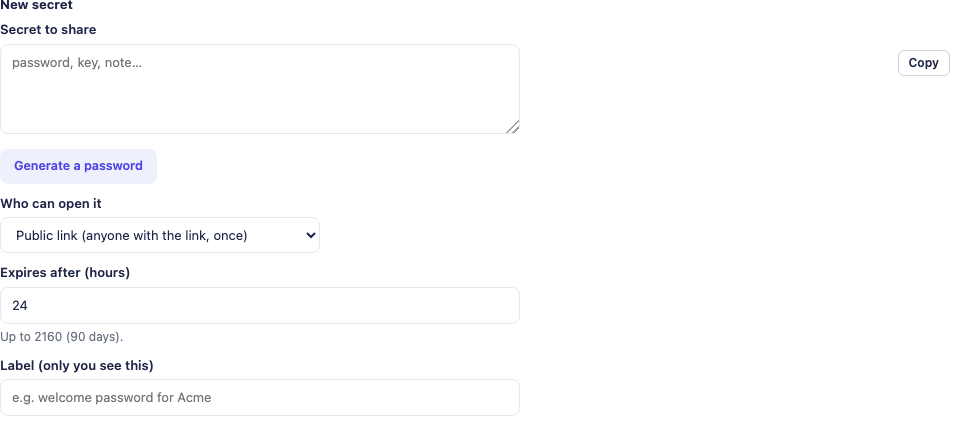
This actual product crop shows the handoff controls with empty demonstration fields. No live secret or usable sharing link appears in the article.
A signed-in client handoff suits an established customer who should retrieve the secret through their account. A public link can suit a recipient who does not yet have an account, provided the team understands possession of the link is the access route.
Set a lifetime that fits the handover. An unnecessarily long-lived link may remain usable long after the recipient was expected to act. An extremely short one may expire before an agreed delivery window. The useful choice follows the actual customer journey.
Ordinary preview requests are distinguished from the deliberate reveal flow, but do not turn that into a promise about every possible bot or intermediary. Verify the link’s recorded state when a recipient says it cannot be opened, rather than repeatedly generating replacements without understanding what happened.
Keep a one-time handoff distinct from a client vault
A one-time link is useful for a particular delivery. A repeatable place for customers to retrieve selected credentials is a different need. The Pro client-area vault addresses that second use case when the global option and entry visibility are configured appropriately.
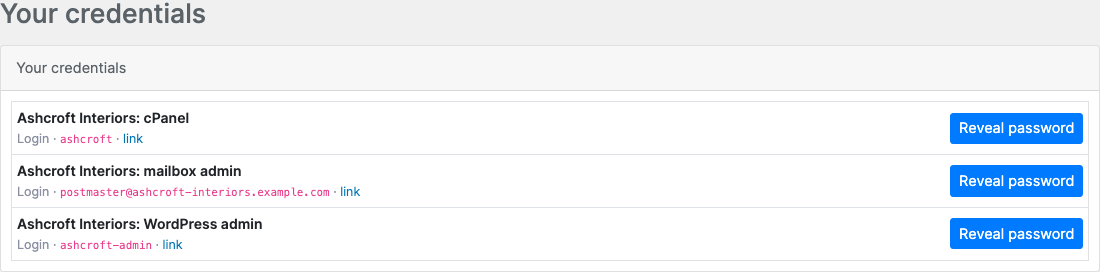
The real customer view shows example entries with passwords hidden until revealed. This is ongoing account access to selected entries, not a single-use handoff link.
A hypothetical hosting company might use a one-time link for a specific initial delivery and a client vault for the entries it has agreed the customer should continue to access. Those are intentional service choices, not a reason to expose every staff entry to every customer.
Check the client association and visibility on the entry. Attaching an entry to a customer is not, by itself, the same as deciding all staff or customer access rules.
Blesta service changes and password delivery are separate
PD Password Manager’s Blesta handoff workflow prepares and delivers the password. It does not apply a new password to a remote service from that screen. Make the service change through the appropriate service-management route, then ensure the handed-over value is the one that actually works.
That platform distinction matters to a support team. “The link was created” and “the service accepts the new credential” are separate outcomes. Check both rather than reporting the account as changed because the delivery step succeeded.
The reverse can matter too: a password change may have happened while a later delivery step failed. Confirm the current state before repeating an operation. A careful handover avoids creating several different “new” passwords while the customer is trying to use the first one.
Pro adds controls for a larger team
Pro staff access separates viewing the vault list, revealing secrets and managing entries by role. Review those settings deliberately: a client association is not a per-entry staff permission boundary, and privileged built-in roles retain their relevant access.
Pro also adds passphrase-protected links, additional link options and Password Health. A separately communicated passphrase can add a distinct step to the recipient’s opening process. Keep it separate from the handoff link if that is the reason you chose the feature.
Password Health can help review weak, reused, ageing or breach-related results within its supported checks. It does not automatically rotate the corresponding external accounts. A failed or unavailable check should not be interpreted as a clean result merely because a summary score looks reassuring.
For a growing team, the combined benefit is organisation: staff can find the right entry, use the appropriate delivery route and review credentials that need attention without treating a conversation archive as a password store.
Build a repeatable handover procedure
A short procedure can connect the module’s features to an everyday service:
- Establish the intended account and recipient.
- Prepare or update the credential through the appropriate service route.
- Store the agreed entry with a useful label and correct association.
- Choose a signed-in or public handoff and a suitable expiry.
- Verify creation and delivery as separate outcomes.
- Explain how the customer opens the handoff and what to do if it expires.
Handle any exported vault CSV as plaintext sensitive information. Exporting for a defined purpose is different from creating a routine attachment for a handover.
Explore PD Password Manager for Blesta for current product details. The guides cover creating a handoff, the Blesta service-password handover and the Pro client vault.
Frequently asked questions
Can I share a password through Blesta without putting it directly in an email?
PD Password Manager creates a handoff link with a recipient mode, expiry and view policy. The message can contain that link rather than the secret itself.
Is a public handoff restricted to a named customer login?
No. Whoever possesses a valid public link can use its reveal route. Choose the addressed client-area mode when the intended Blesta customer should sign in.
Can a one-time link stop the recipient copying the password?
No. It limits retrieval through that link. It cannot remove a copy already made by the recipient.
Does the Blesta handoff screen change the remote service password?
No. The service change is separate. Verify the actual credential change and its delivery as distinct steps.
Can customers keep accessing selected credentials in their account?
The Pro client-area vault provides repeatable access to appropriately associated and visible entries when enabled. That is different from a one-time link.
Does Password Health rotate external passwords automatically?
No. It helps identify supported health findings. The corresponding account change and verification remain separate operations.