WHMCS Website Security Monitoring: See What Customer Sites Expose Publicly
See public website exposures from WHMCS with PD Site Sentinel: readable findings, certificate and mixed-content checks, Pro change watching and client summaries.
A hosting company can keep a server running while a customer’s website still exposes something it should not. A forgotten backup, an expiring certificate or a page loading insecure resources can sit outside the routine view of account status and billing.
PD Site Sentinel gives WHMCS operators an outside view of customer websites. It makes read-only public requests and turns selected exposure, certificate, mixed-content, header and CMS signals into findings your team can review. No agent is installed on the customer’s website and no server login is required for those checks.
The product opportunity is practical: add a visible website-review layer to the hosting relationship, with a central findings view for staff and an optional customer-facing summary. It helps a host notice and explain a problem that a service marked Active would not describe.
See the website as an outside visitor sees it
An internal server check and a public website check answer different questions. Server access can inspect files and processes; an outside request can reveal what the website exposes to someone who has no account on it.
PD Site Sentinel focuses on that external view. It does not sign in to the site, install a plugin or rewrite customer files. This makes it useful when the host wants an additional view across websites without first adding an agent to each application.
Imagine a hypothetical agency hosting several business sites. Each site has a different maintainer, but the agency still wants to notice a public configuration-backup exposure or a certificate approaching expiry. Site Sentinel brings those selected signals into a common WHMCS workflow rather than requiring staff to remember a separate manual review for every account.
That scenario does not imply a complete security assessment. The product’s strength is a defined outside view, with findings that staff can understand and follow through.
Turn public signals into readable findings
The checks include selected exposed-file paths, directory listings, certificate observations, mixed content, security-header presence and published CMS-version hints. Those signals differ in urgency and meaning; a useful workflow should not treat every advisory as a confirmed compromise.
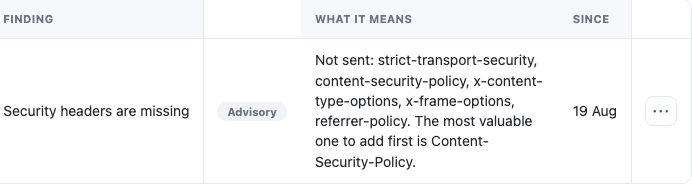
The real product crop shows a readable missing-header advisory. It illustrates how the module describes an observation, rather than exposing a cryptic scan result that staff must translate before discussing it.
A missing header is a configuration topic, not proof of a breach. An advertised CMS version is a hint, not a complete inventory of installed patches. A certificate observation is useful, but it is not a full simulation of every browser trust decision.
That precision makes the findings more useful commercially. Your team can explain what was observed and what needs attention without sending a customer an alarming, unsupported diagnosis.
Review exposed files without pretending to scan everything
Publicly reachable configuration backups, source-control artefacts or archives can matter even when the main website looks normal. Site Sentinel checks a selected list of common exposures and uses response content to help distinguish a plausible file from a generic success-status error page.
For a hosting operator, the useful outcome is a focused review item: verify whether the identified public resource should be available and correct the website or server configuration through the appropriate administration route.
The check is bounded. It does not enumerate every possible filename or inspect files that cannot be read from the outside. A run without a finding should not become a claim that no sensitive file exists anywhere on the server.
Keep the module’s observation separate from remediation. Site Sentinel reports; it does not silently delete the file or change the customer’s application. That leaves the host and site owner in control of the corrective action.
Make certificate and mixed-content maintenance visible
Certificate issues often appear to customers as a website-access problem rather than an infrastructure setting. A host benefits from seeing relevant observations alongside the website they affect, before the conversation becomes a vague “the padlock is wrong” report.
Mixed-content checks look for selected insecure resource references in the fetched page. That can help locate a page that still asks the browser to load an image, script or other resource over HTTP after an HTTPS move.
This is not a rendered crawl of every page and browser interaction. Use the finding to inspect the affected website and verify the result in the relevant visitor journey. A hidden application route or dynamically loaded resource may require separate review.
For a hypothetical WordPress migration service, the module could contribute a useful follow-up check: review the public home page’s certificate and resource observations after the move, then test the site’s important pages directly. It adds a repeatable check without pretending to replace the whole migration acceptance process.
Pro change watching adds continuity
A single scan sees a moment. Pro change watching compares a normalised home-page fingerprint with the preceding baseline, giving the host a way to notice a meaningful text change between checks.
That can help a team maintaining relatively stable business sites. An unexpected content change deserves review, while a known deployment can be understood in context. The module does not know whether a change was authorised simply because it can see the difference.
Nor is a fingerprint a complete visual comparison. It normalises parts of the page and does not establish that every rotating component will be ignored or every malicious alteration detected. Use it as a change signal alongside your knowledge of the website.
For sites whose content changes continually, the operator can make an appropriate per-site decision about change alerts while keeping other supported checks. A useful portfolio workflow recognises that a static brochure site and a live news page behave differently.
Bring the result into the customer account
PD Site Sentinel can expose a website-security summary on the WHMCS service page. That gives the customer a familiar place to see that a check has taken place and whether there is something to review.
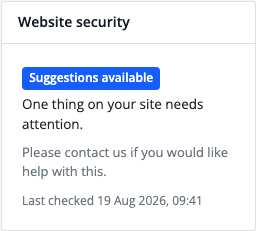
This real product crop illustrates the compact summary, not a full staff diagnostic report. The host decides how to use the customer view as part of its service.
For a hosting business, the benefit is continuity between operational work and customer understanding. A customer does not need to interpret the staff findings table to recognise that their website needs attention. Staff can then provide the appropriate task guidance based on the actual observation.
Check dates and coverage matter. A paused site, an excluded site or an incomplete scan should not be described as freshly checked merely because an old summary remains visible. Make the customer conversation accurate about what was reviewed and when.
Organise a portfolio review rather than chase isolated warnings
Eligible hosting services with a domain can enrol automatically, and the module also supports manual site entries. The Sites and Needs attention views give staff places to manage the list and review findings.
For a first rollout, decide which websites belong in scope and how often staff will review the results. Scheduling, scan allowances and batching affect what has actually been checked. A daily maintenance job is not proof that every website has completed a full scan that day.
| Workflow stage | Useful staff question |
|---|---|
| Enrolment | Is this the website and service we intend to monitor? |
| Coverage | Was the site eligible and successfully checked recently? |
| Triage | What exactly was observed, and how urgent is it? |
| Website change | Which owner or administrator can make the appropriate adjustment? |
| Verification | Does a fresh relevant check and visitor test support the result? |
| Customer view | Does the summary accurately reflect the check and its scope? |
Finding acceptance can help manage known exceptions, but accepting a finding is not a website repair. Likewise, a finding disappearing from a later view does not by itself establish why it disappeared. Review the check state and the relevant website behaviour.
Optional serious-finding notifications can draw attention to selected new critical observations. Treat them as a review aid, not a promise that every event will generate an email or that an attempted notification arrived in the inbox.
Add a useful layer to your hosting service
Site Sentinel is strongest when the host can explain the service in a sentence: we review selected things your website exposes publicly, show the findings clearly and give the appropriate person a way to act on them.
That is a concrete service benefit. It avoids both extremes of ignoring the outside view and claiming that one scanner certifies an entire website as secure.
Explore PD Site Sentinel for WHMCS for current details. The task guides cover automatic site enrolment, reviewing findings and customer summaries.
Frequently asked questions
Does Site Sentinel need an agent on each website?
No. Its outside checks use read-only public requests. They do not require a website login or a file-scanning agent.
Is this the same as scanning server files for malware?
No. It reviews selected publicly visible signals. It cannot inspect private files or establish a complete internal view of the application.
Can it help after a website moves to HTTPS?
Certificate and mixed-content observations can support that review. Test important website pages and interactions separately because the fetched-page checks are bounded.
Does a missing security header prove a website was breached?
No. It is an advisory configuration observation. Review the particular header and the site’s requirements before deciding on a change.
What does Pro change watching add?
It compares a normalised home-page fingerprint over time. The result is a content-change signal, not proof that a change was malicious or authorised.
Can customers see a result in WHMCS?
An optional service-page summary can show the relevant website-security status and check time. It is a compact customer view rather than the full staff report.
Does accepting a finding fix the website?
No. Acceptance records a review decision. The website still needs the appropriate change and subsequent verification if remediation is required.