PostgreSQL Hosting in WHMCS: Lightsail or RDS with PD AWS PostgreSQL
Build PostgreSQL hosting products in WHMCS with PD AWS PostgreSQL: choose Lightsail or RDS, define plans and give customers useful database controls.
An application customer may need PostgreSQL without wanting to build and maintain a database server from the operating system upwards. For a hosting company, that creates a service opportunity alongside website and cloud-server hosting.
PD AWS PostgreSQL connects AWS-backed PostgreSQL databases to WHMCS products and customer accounts. A host can build offerings on Amazon Lightsail databases or Amazon RDS, define the supported plan and location, and give customers a service page with connection information and selected management controls.
The useful distinction is not simply “we sell a database”. It is that the customer can buy an understandable PostgreSQL service from your business and find its operational details in the account they already use.
Put the database service next to the application relationship
A hypothetical agency customer might run an application on a separate server while wanting its PostgreSQL database supplied through the same hosting company. The host can define the database offering in WHMCS rather than making every order a manually assembled provider-console project.
That keeps the product, recurring relationship and database reference connected. It also lets the hosting company explain its own service boundary: what AWS operates, what the module exposes and what the host or application developer remains responsible for.
An AWS-managed database does not mean every query, schema change or application upgrade is managed by the hosting company. Make that distinction part of the offer. A clear infrastructure service is easier to buy and support than an undefined promise to handle everything involving PostgreSQL.
The module provides the provisioning and account integration. Your business supplies the commercial package and the surrounding service.
Two backing services create different offers
PD AWS PostgreSQL supports both Lightsail and RDS. That gives a host two routes within the same focused module, rather than assuming that all PostgreSQL products need the same infrastructure profile.
Lightsail databases offer a bundle-oriented model that can suit a straightforward starting offer. RDS gives a different set of configuration and management choices. Choose based on the actual workload and supported module controls, not a rule that one is always the right answer.
| Product decision | Lightsail-backed offer | RDS-backed offer |
|---|---|---|
| Resource selection | Choose an available database bundle | Choose a supported database plan and configuration |
| Customer explanation | A clearly defined bundled database service | A database offer with the relevant RDS resource choices |
| Network planning | Review the backing service’s access model | Review VPC, access and relevant security-group configuration |
| Future changes | Check the supported path before promising expansion | Verify the particular resize or storage workflow before selling it |
| Cost model | Build the package around the selected bundle | Review the provider resources and usage relevant to the offer |
The table describes product-design questions, not a live price comparison. AWS charges belong to the host’s account, while your WHMCS prices and management service define what the customer buys.
Turn the choice into a WHMCS product
The product settings make the important dimensions explicit: region, backing service, plan, storage and PostgreSQL version where applicable. That helps staff see the resource definition before the product is exposed to customers.
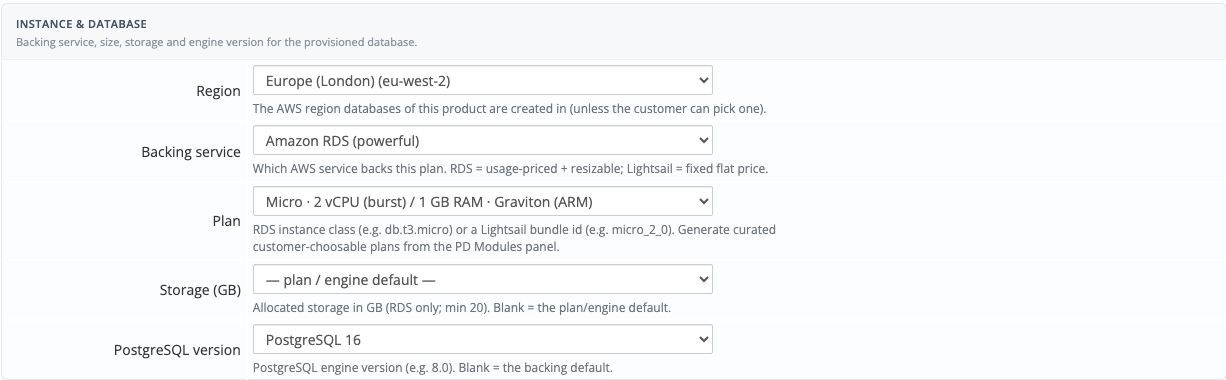
The real module screen shows a sample configuration, not a recommendation that every workload use those values. Current provider availability and the installed module’s supported catalogue determine the choices for your offering.
A host can begin with a fixed product that customers understand, then introduce supported plan choices where useful. Generated choices should be reviewed against the product, provider location and actual checkout. A catalogue entry is not proof that an account has capacity or permission to provision it.
Set an intentional automatic-setup policy in WHMCS. Decide when an order should lead to database creation in your payment and acceptance process, rather than assuming a service marked Active necessarily has a ready database behind it.
Give the customer a usable connection reference
Once the database is ready, the service page provides the relevant connection details. PostgreSQL typically uses port 5432, alongside the hostname, database name and credentials appropriate to the service.
That is valuable because the developer needs a precise connection target, not a general description of the database product. The account becomes a reference point for the service that was purchased.
Access still has several layers. The database must be ready, the network path must be appropriate and the application must use the correct credentials and connection settings. A displayed hostname does not mean every machine on the internet should be allowed to connect.
For an agency application, plan where the application runs before choosing database access settings. Review the required source and network relationship, then verify the application’s connection using the intended route. Do not use broad public exposure as a substitute for understanding that route.
Let customers perform supported everyday actions
The module exposes supported start, stop and reboot controls from the database service. Those are useful when a customer needs to manage its operational state without asking the hosting team to repeat a routine action in the provider console.
A temporary stop is not cancellation. Retained storage and other provider resources can continue to cost money, and AWS applies limits to how long supported database resources remain stopped. Build those facts into the service explanation instead of presenting Stop as a complete cost-off switch.
The customer’s Activity view provides context around module operations. Use it to understand which action was requested and what happened next, alongside the actual database state. A queued or accepted operation is not automatically the same as a fully ready resource.
This is where a service panel adds value beyond provisioning: the customer can see and operate the database in context after the initial order.
Make snapshots a clear customer capability
PD AWS PostgreSQL supports customer manual snapshot creation and removal through the released workflow. A named snapshot gives the customer a visible point-in-time resource to review as part of a maintenance or recovery plan.
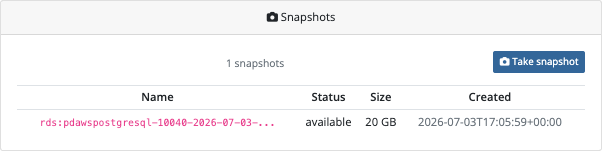
This demonstration screen shows an available snapshot. A newly requested snapshot may take time to reach that state; a completed request message can mean the provider accepted the operation rather than finished building the snapshot.
A hypothetical application team might request a manual snapshot before a planned maintenance window, then confirm it is available before continuing. That is a concrete use of the module’s customer controls, without claiming that a snapshot guarantees application consistency or replaces a separate recovery plan.
Recovery needs more than the existence of a snapshot. The provider restore process, resulting resource and service relationship must be planned and verified. Do not promise an automatic customer restore or S3-export workflow simply because those concepts exist in AWS or appear in older descriptive copy.
The module’s snapshot list also has a defined scope. In particular, an empty manual list is not proof that the provider has no automated backup. Keep customer instructions tied to the resources and controls actually shown.
Use metrics to ask better capacity questions
The usage view can add context around supported database measurements. CPU information, for example, can help a host and customer discuss whether a workload is consistently busy or whether a change coincided with different resource use.
Available series differ with the backing service and installed implementation. Do not interpret an empty graph as zero workload, or promise that every Lightsail metric appears simply because an RDS view has a corresponding chart.
Metrics should support a decision: investigate the application, review a query workload or consider an appropriate resource change. They are not a substitute for application knowledge, nor a live guarantee that the database will meet a particular transaction rate.
A useful service review combines the customer’s expected workload, observed behaviour and the supported product choices. That makes an upgrade conversation about a real need rather than a generic larger-plan recommendation.
Build a focused database product line
PostgreSQL can complement the other services a hosting company already sells. The first offer might be a small application database with a clearly defined region, plan and access model. A second can target a different workload using the appropriate backing service.
Keep the difference meaningful. Explain which customer each offer serves, what controls they receive and what management remains with your team or their developer. PD AWS PostgreSQL supplies the WHMCS integration; a well-defined product turns that capability into an offer buyers can evaluate.
Explore PD AWS PostgreSQL for WHMCS for current product details. The practical guides cover choosing RDS or Lightsail, configuring the offering and taking a manual snapshot.
Frequently asked questions
Can I sell PostgreSQL hosting through WHMCS?
Yes. PD AWS PostgreSQL connects supported AWS PostgreSQL provisioning and customer controls to WHMCS products and services. Configure the provider account and offering for the intended workload.
Does the module support both RDS and Lightsail databases?
Yes. The product’s backing-service setting distinguishes the two. Their resource choices, network model and supported management operations should be reviewed separately.
Do customers need their own AWS account?
The host supplies the AWS connection for the offering. Customers use the purchased database service and its connection details rather than administering the host’s provider account.
Can customers create snapshots?
The released customer workflow supports manual snapshot creation and removal. Confirm the snapshot’s provider state before treating a newly requested snapshot as available.
Does snapshot creation mean an automatic restore is available?
No. Recovery needs a separately verified process. Do not assume that a provider restore capability is exposed as a working customer button in the module.
Does stopping a database stop all charges?
No. Retained resources can continue to incur costs, and temporary database stops have provider constraints. Stopping, cancelling and removing a database are different operations.
Does an empty usage graph mean the database is idle?
No. Check whether the relevant metric is supported and available for that backing service. Missing data should not be presented as a zero measurement.