WHMCS Customer Agreements: Keep the Accepted Version with the Account
Keep accepted document versions with WHMCS accounts. Explore PD Agreements targeting, checkout and login requests, signing methods, re-acceptance and customer copies.
A hosting company may have general terms, a managed-service addendum and a statement of work for a particular project. The useful question is not merely where the latest document lives. It is which customer was asked to accept which wording, when they accepted it and how staff can find that record later.
PD Agreements adds versioned customer agreements and signing workflows to WHMCS. Publish a document, choose the customers or products it applies to, present it at the appropriate point and retain the accepted version with its acceptance record. Customers can retrieve their own signed copies through the client area when enabled.
For a hosting business or agency, that connects the agreement process to the account and service relationship. Staff can work from a recorded version rather than trying to reconstruct a past document from an email attachment or today’s edited terms page.
Keep the wording the customer actually accepted
A live document can change as a business introduces new products or updates a service description. If the only copy is the current text, it becomes harder to explain what an earlier acceptance referred to.
PD Agreements freezes the wording when you publish a version. A later publication creates another version while keeping the earlier text. Each published version records its content fingerprint and publication information, with an optional note explaining the change.
This gives the acceptance a specific reference. A customer who accepted the earlier version remains associated with that version, rather than having the meaning of their acceptance silently replaced when someone edits a page.
Drafts are separate from publication. Your team can work on new wording without immediately changing what customers are shown. That is useful when the person preparing the text and the person introducing it to customers need a clear handover point.
For the business, the benefit is an understandable record: document, version and acceptance belong together. It is a product capability for managing the process, not a promise about the outcome of every disagreement concerning a service.
Ask the customers the document actually concerns
A general agreement may apply to everyone, while a product-specific addendum should reach the relevant buyers. PD Agreements supports targeting products, product groups, add-ons, client groups and individual clients.
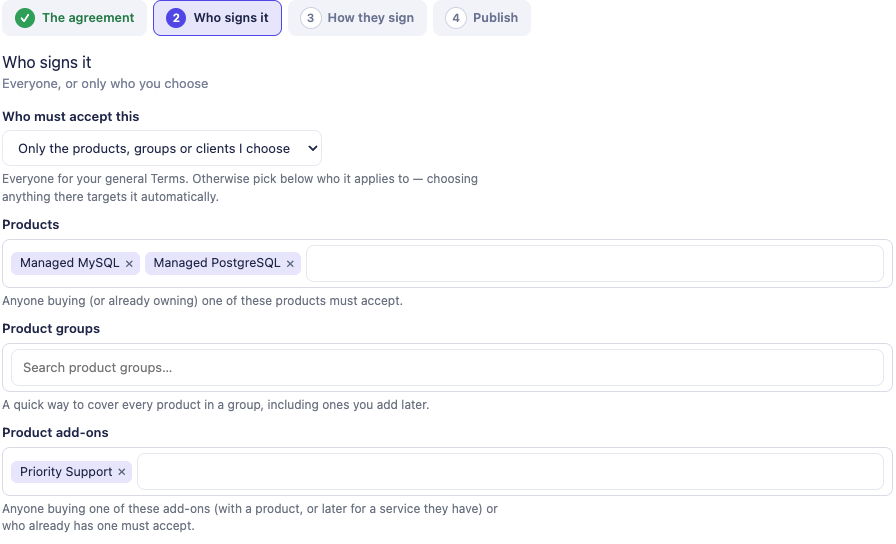
This genuine module view shows product and add-on targeting for a demonstration support addendum. It illustrates the configuration surface; the example selections are not a statement about a real customer’s agreement or a ready-made offer to copy.
The combination setting lets you choose Any of these or All of these across the populated target kinds. Within a kind, one matching item is sufficient. This supports a more specific request such as an addendum for a particular add-on used with one of the chosen hosting products.
Exceptions add another useful distinction. You can exclude customers with specified add-ons, products, product groups or client groups. An exception takes precedence over the positive targeting, including a customer assigned by name, while leaving previously collected acceptance records intact.
That is valuable when the business offers more than one service arrangement. You can introduce the relevant document without repeatedly asking customers whose current service makes it inapplicable. The module evaluates the configured relationship; your team chooses the document and intended audience.
Choose when the signing request belongs in the journey
An agreement at checkout and one shown to an existing customer at their next login serve different purposes. PD Agreements supports both, plus an on-demand option.
| Presentation point | How it fits the customer journey | A practical use |
|---|---|---|
| Checkout | The required agreement must be accepted before the order completes | An agreement associated with a new purchase |
| Next login | The customer is shown the signing request when returning to the portal | Introducing a new published version to existing customers |
| On demand | The document is available without blocking the normal journey | An optional or individually requested document |
Your team also controls what an unsigned customer can still do during a login request. Settings can preserve support and billing access, use a more restrictive route or allow ordinary access while preventing new orders. An optional postponement period adds another way to handle the introduction.
These controls let the business fit the request to the service instead of treating every document as an identical interruption. Define the intended customer experience before publishing, then check the relevant checkout or login journey.
For an individual request, Ask one client to sign assigns a published agreement by name. Removing that named assignment does not delete what the customer already signed, and the normal targeting may still apply. Assignment and acceptance history are separate parts of the workflow.
Offer a clear signing screen
PD Agreements supports a tick box, a typed full name or a drawn signature. The selected method and its associated information form part of the acceptance record. You can also require the customer to scroll through the document before the accept control becomes available.
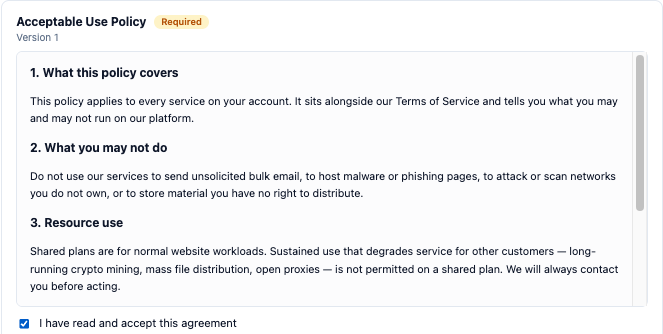
This actual customer-screen crop uses example agreement text. It demonstrates presentation and acknowledgement; it is not PD Hosting’s current terms and should not be copied as a service document. The typed-name field and surrounding customer identity are outside the crop.
The signing screen also includes keyboard access and a typed-name alternative where a drawn-signature request cannot be completed with a pointer. The record reflects the method actually used rather than claiming every customer drew a signature.
That attention to the interaction is useful for a host serving a varied client base. Customers can read the document in the account journey and complete the supported acknowledgement without downloading a form, printing it and emailing it back.
The module records the interaction your business configured. Choose the document and signing approach for the service you deliver, and explain the request in plain customer-facing language.
Bring the acceptance record back to the account
An acceptance includes the document version, content fingerprint, date, method and the relevant account relationship. Additional metadata, such as IP address and browser, follows the module setting. An order number is associated where the acceptance comes through checkout.
The evidence PDF brings the full accepted text and recorded acceptance information together in a downloadable record. A staff member can retrieve the document the customer actually saw instead of sending today’s edited version as though it were the same copy.
Customers can access their own signed copies in the client area when that feature is enabled. That supports a more straightforward service conversation: both sides have a route back to the recorded document rather than asking the customer to find an old attachment.
Staff also see an Agreements row on the client’s profile in the shared PD Modules strip. It identifies signed and outstanding items with routes to the relevant record or signing link. The agreement process therefore remains connected to ordinary account work after the initial request.
This is the practical value behind WHMCS agreement version tracking. The record is not merely that an account clicked something; it is a retrievable relationship between the account, the published wording and the recorded acceptance.
Introduce a revised version deliberately
When you publish revised wording, you can choose whether customers who accepted an earlier version must accept the new one. The module presents the new request at the agreement’s configured point, rather than altering the old acceptance to look as though it covered the new text.
A change note helps the operator understand the publication history. Your customer communication can also explain the relevant change and what the person is being asked to do. A technically versioned document is most useful when the surrounding explanation is understandable.
The Awaiting signature view provides a place to review customers still owing a required next-login signature. Reminders can be sent manually or through a configured schedule. Automatic reminders are an option you enable rather than an assumption that every installation should immediately begin emailing customers.
Revocation, deletion and re-acceptance have their own meanings. A recorded signature can be revoked with a reason while retaining its history. Removing an agreement from the active list stops future requests but retains the documented versions and acceptance records. That separation helps staff manage the current workflow without rewriting its past.
Use agreements for the service, not only general terms
The module supports several document types, including general terms, acceptable-use policies, statements of work and service-specific agreements. The useful opportunity is to associate the right document with the part of the business it describes.
Imagine an agency selling managed hosting and an optional enhanced support add-on. This is an illustrative example, not a customer deployment or a template for the agreement’s wording.
The agency could publish a support addendum and target the relevant add-on with the intended hosting products. It chooses the presentation point and signing method, checks the journey and begins collecting version-specific acceptances. Staff can see outstanding items from the client’s profile and retrieve the accepted version when discussing the service.
A separate project statement of work could be assigned to a named client without turning it into a request for every hosting customer. If the project scope changes, the team publishes another version and deliberately decides how the next acceptance should be requested.
The same module supports both patterns while keeping the audiences distinct. That is useful to a business whose services have grown beyond one generic checkbox at the end of every order.
Fit the process into the wider hosting operation
PD Agreements runs inside WHMCS and is installed through PD Modules. Its developer API and events support documented integration workflows, while the panel supplies the normal administrative route for creating, publishing and reviewing agreements.
For most teams, a sensible starting point is one well-defined document and its intended customer journey. Decide the audience, when it is asked, the signing method and how staff will review outstanding requests. Then check the actual experience before expanding to further documents.
That is a service-design task as well as a module configuration task. The software keeps published wording and acceptances organised; your team decides what the customer is being asked to accept and communicates it accurately.
Explore PD Agreements for WHMCS to evaluate versioned agreements for your account workflows. The knowledge-base guides provide the detailed publication, targeting and customer-request steps.
WHMCS customer agreements FAQ
Can PD Agreements keep the version a customer accepted?
Yes. Publication freezes that wording as a version, and the acceptance is associated with it. Publishing a later version does not silently replace the earlier accepted text.
Can I target an agreement at a product add-on?
Yes. Products, product groups, add-ons, client groups and individual clients are supported targeting kinds. Any-of and all-of combinations plus exceptions let you define the intended audience more precisely.
Can existing customers be asked to accept new wording?
Yes. Use the appropriate next-login or checkout presentation and the re-acceptance choice when publishing a new version. The earlier acceptance remains part of the record.
Which signing methods are available?
The module supports a tick box, typed full name and drawn signature, with a documented typed alternative for a customer who cannot draw. The record identifies the method actually used.
Can customers download their own copies?
Yes, when the customer-download setting is enabled. Staff can also retrieve the evidence PDF containing the accepted text and recorded acceptance information.
Does every signing request block invoice payment?
No. The login-request settings define which pages remain available, including an option that preserves support and billing. Choose the intended access arrangement for the request.
Can I ask only one customer to sign a published document?
Yes. Ask one client to sign creates a named assignment. Removing that assignment does not erase an existing signature, and the agreement’s normal targeting may still reach the customer.
Does creating a draft immediately change what customers see?
No. Draft work stays separate from the published version. Customers continue to receive the last published wording until you publish the next version.
