WHMCS Care Reports: Show the Value of Your Hosting and Website Care Plans
Show hosting and website-care work with branded monthly reports. Combine available monitoring, security, performance, support and renewal information in WHMCS.
A quiet month can be a good month for a hosting customer. The website stayed available, a question was answered and the next renewal is still some distance away. But if the customer only sees a recurring invoice, much of that service can remain invisible.
PD Care Reports creates branded monthly service reports from information already available in your WHMCS environment, with a place for your own account of the work. Availability, security, performance, support and renewal sections appear when their data and required integrations are available. Customers receive a report under your brand and can return to it through the client area.
For a hosting company or website-care agency, the opportunity is a regular, understandable explanation of the service being delivered. The module gathers supported information; your team adds the context that turns it into a useful customer communication.
Make ongoing hosting and care work visible
A website-care plan often includes work customers rarely see directly. Monitoring runs between conversations. Small interventions may be completed without a meeting. The absence of a visible incident does not explain what the service includes.
A report provides a place to show that work in a form the customer can revisit. It can connect measured availability, support activity and upcoming dates with the short explanation your team supplies about what it did and what comes next.
The purpose is communication, not simply a larger collection of numbers. A business owner may not need every technical detail to understand the month. A clear summary and a useful note can make the report easier to discuss than several disconnected screenshots or an invoice description.
This is an opportunity for WHMCS care-plan reporting and monthly website-maintenance reports: bring the service relationship into view. It is not a promise that sending a report guarantees renewal or that every retainer has the same scope.
Bring the available sections together
PD Care Reports produces a report per service and month. The What goes in a report view shows which sections are available on the installation and where their information comes from.
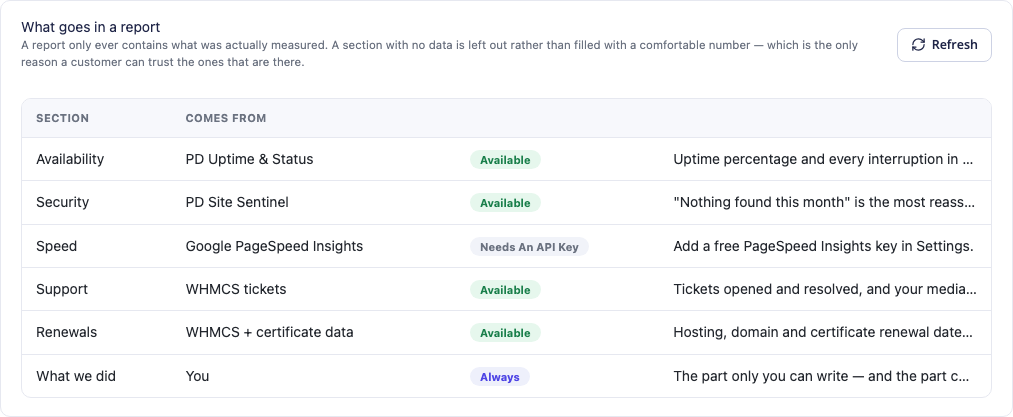
This actual module view shows the sources behind the sections. Availability and security depend on their companion modules, while the speed section needs the relevant PageSpeed connection. It demonstrates the configuration choices rather than asserting that every section exists in every installation.
| Report section | Source or contribution | What it helps explain |
|---|---|---|
| Availability | PD Uptime & Status monitoring | Recorded availability and incidents for the service |
| Security | PD Site Sentinel findings | The relevant external checks and matters needing attention |
| Speed | Google PageSpeed Insights measurement | A periodic performance observation |
| Support | WHMCS support activity | Requests handled and first-response information |
| Renewals | Available service, domain and certificate information | Dates the customer should know about |
| What we did | Your team’s note | The work performed and the next useful action |
Sections without measured information are omitted rather than filled with a reassuring invented number. A service without monitoring data is not presented as having perfect uptime merely because no result was found.
That makes the companion-module relationships commercially useful. The monitoring and security tools can support your operating work, while Care Reports helps present their relevant information to the customer.
Show availability and security in understandable terms
The availability section uses PD Uptime & Status monitors attached to the service. It brings the month’s recorded uptime and interruption information into the report. An incident spanning the boundary of a month contributes the interruption time within that reporting period.
That is more useful than a generic “everything was fine” line without a source. The report gives the customer a view tied to recorded checks, and an operator can discuss an incident with the relevant monthly context.
The security section draws on PD Site Sentinel. It can explain when the site was checked and which relevant findings need attention. It is a summary of the checks available from that module, not an assertion that every possible security risk has been eliminated.
For a care-plan provider, these sections can make the service easier to understand without turning the report into an alarming list of faults. A month with no relevant findings is worth communicating accurately, just as a month with a proposed improvement deserves an explanation.
Your note can add the business context: what was addressed, what needs a separate decision and what the customer should expect next. The module provides evidence; the team explains its relevance to the relationship.
Use performance measurements for a focused conversation
The optional speed section uses a Google PageSpeed Insights measurement for the site. It includes a performance score and supported lab metrics, giving the customer a periodic observation to discuss with the team.
Lab measurements and real-user field measurements are different forms of evidence. Google explains that distinction in its PageSpeed documentation. A monthly simulated measurement should not be presented as the experience of every visitor or a complete field-data assessment of Core Web Vitals.
Used appropriately, the result can support an understandable conversation. A team might explain that a page needs image or theme work, or use a later report to discuss a change it actually performed. The report alone does not carry out those improvements.
This is also a useful way to describe the care service honestly. Separate the measurement from your team’s work and from any result you have not yet established. The customer can then see what was observed, what was done and what decision remains.
The section is optional. If its requirements are not met or a measurement is unavailable, the rest of the report can still be useful. You do not need to advertise performance data that the installation is not collecting.
Include the support work customers may forget
Support activity is another visible part of the service. PD Care Reports can summarise requests opened and resolved for the customer during the month, alongside the median first-response time.
A summary makes it easier to connect the monthly relationship to the interactions that occurred. A customer may remember the last question but forget several earlier conversations the team helped with. The report supplies a reference point for discussing that work.
Interpret the scope accurately: the documented ticket summary is customer-level activity for the month. A report per service does not mean every support conversation has been proved to concern only that single service. Keep the description aligned with the available data.
The response statistic also has a defined meaning. First-response time is not resolution time, and a median is not a promise about every future reply. Use the figure to describe the recorded month rather than turning it into a new service guarantee.
A month with no requests can be communicated plainly as well. The report need not create activity where none exists in order to make the service feel valuable.
Put upcoming dates beside the monthly story
Hosting, domain and certificate dates can provide a useful forward-looking section when the relevant information is available. Customers get another opportunity to understand what is coming up rather than seeing a date only when a renewal notice arrives.
For the operator, this makes the report a bridge between the month just completed and the next conversation. A useful note can connect an upcoming event with the work the business has agreed to deliver.
The report does not replace the account’s renewal, contact or billing process. It adds context to it. Keep the underlying records maintained and use the report to help the customer understand the relevant dates.
This combination makes a monthly report more than a historical dashboard. It can explain the recent service and point to the next action the team wants the customer to consider.
Add the part only your team can write
What we did is the operator’s contribution. Describe the work actually performed and what comes next. A short, specific explanation is more useful than an inflated claim about an improvement no one measured.
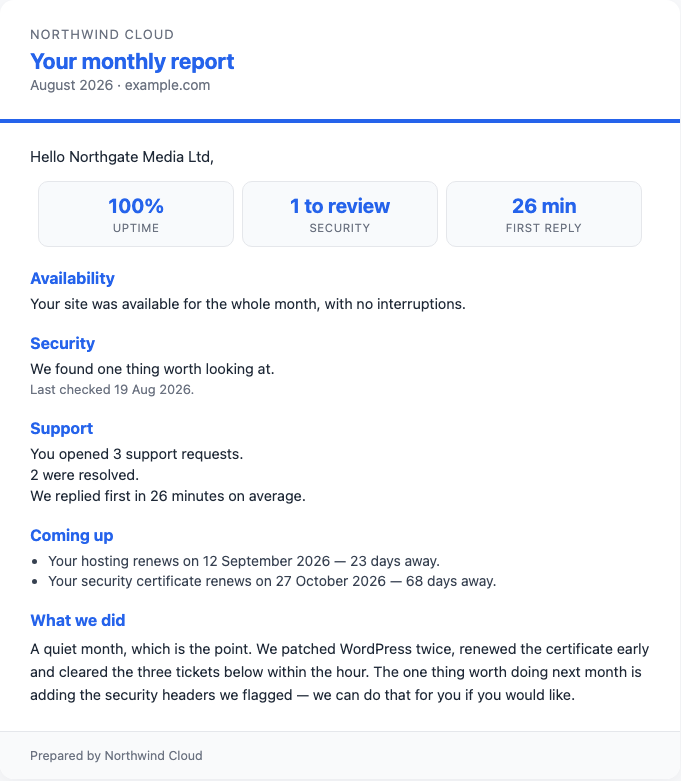
This genuine report capture uses demonstration company names and example.com. Its uptime and response figures are example report data, not PD Hosting service promises, customer results or a guarantee for your own plans.
An illustrative note might explain that the team reviewed the customer’s supplied requirements, completed the agreed maintenance and identified a specific improvement for the following month. Use the details from your own actual service work rather than copying a sample note as though it had happened.
This also clarifies what the module does. It builds reports from supported data and your words. It does not independently patch WordPress, maintain a customer’s application or perform every task your care plan may include. Those remain parts of the service your business delivers.
Keep your brand and delivery routine consistent
Report settings include the name, logo, accent colour, opening paragraph and sign-off. Those controls help the communication look like part of your hosting or care service rather than a detached tool notification.
You can select the relevant care-plan products instead of reporting indiscriminately across the whole catalogue. Generate the reporting month, review a draft, add the note and send it. Draft reports are not visible to customers.
Automatic sending is an opt-in setting. Once the team is satisfied with its sources and report content, it can choose the monthly day and delivery arrangement. Reports cover the previous calendar month. Email can provide a route to the full report, and signed-in customers can return to their own reports in the portal.
An emailed report link uses a token so the recipient can open it without signing in. Treat it as a customer communication intended for the recipient; it can be forwarded. Do not describe that link as requiring account login when it does not.
Sent reports retain the generated information. Regenerating the month affects drafts rather than rewriting a report already delivered underneath the customer. That gives the monthly communication an unchanged reference for later conversations.
An illustrative reporting process for a website-care team
Imagine a hosting agency offering ongoing website care through selected WHMCS products. This is a hypothetical workflow, not a customer retention result.
The agency selects those products, reviews which report sections its installed modules can supply and configures its branding. It generates the previous month’s drafts and reads a sample for a service whose source data the team understands.
The operator adds a note about actual work completed and the next proposed step. The team checks the period and available sections, then sends the report through the intended delivery route. After establishing a useful routine, it can choose whether automatic monthly sending fits the service.
The opportunity is a repeatable customer conversation backed by the information the business already collects. The module saves the team from assembling every report manually while preserving the contribution only the team can supply: explaining the work and its relevance.
Explore PD Care Reports for WHMCS to evaluate it for your hosting retainers and website-care plans. Use the knowledge-base guides for product selection, branding and report-generation tasks.
WHMCS care reports FAQ
Can I send branded monthly hosting reports from WHMCS?
Yes. PD Care Reports generates monthly service reports with your name, logo, colour and wording, using the available supported data and your own note.
Do I need the uptime and security modules?
They supply the availability and security sections. Without them, other available information—such as support activity, renewals and your note—can still be used. The What goes in view shows the sources available on the installation.
Does missing monitoring data become 100% uptime?
No. A section that could not be measured is omitted rather than given an invented result. An empty report without data or a note is not sent merely to fill a monthly slot.
Does the speed section prove every visitor has the same experience?
No. It is a periodic performance measurement with a defined scope. Lab and field data differ, and a simulated observation should not be described as a universal user-experience result.
Will reports send automatically when I install the module?
Automatic sending is off until you choose to enable it. You can generate, review and send drafts manually before deciding whether the automated monthly routine suits the business.
Can I change a report after sending it?
Sent reports are kept unchanged. Regenerating a month affects drafts rather than rewriting what a customer has already received.
Do customers have to sign in to read an emailed report?
The emailed link uses a token and can open without login. Signed-in customers can also access their own reports in the client area. Drafts remain unavailable to customers.
Does the module perform the website maintenance described in the note?
It collects supported report information and includes your note. Your team performs and accurately describes the care-plan work; generating a report is not itself a WordPress update or an application-maintenance operation.
