Sell Managed Databases Through WHMCS with PD DigitalOcean Databases
Sell PostgreSQL, MySQL, MongoDB, Valkey, Kafka and OpenSearch through WHMCS with PD DigitalOcean Databases, customer connection details and trusted-source controls.
A hosting customer building an application may need more than a web server. They may need PostgreSQL for the application database, MySQL for another project, a Valkey cache or a managed search service. Offering those services should not require the hosting business to build a new ordering and customer-management workflow for each engine.
PD DigitalOcean Databases turns supported DigitalOcean managed databases into WHMCS products. One module covers PostgreSQL, MySQL, MongoDB, Valkey, Kafka and OpenSearch, with a product per engine, generated checkout choices and a customer panel for the service. The clusters are provisioned in the host’s own DigitalOcean account.
For a hosting company, reseller or application agency, the opportunity is a database product line that remains connected to the customer relationship in WHMCS. The module handles the supported provisioning and management path, while the provider runs the managed database infrastructure.
Offer six engines through one module
Different applications need different kinds of data service. PD DigitalOcean Databases gives the host a common administrative approach while letting the offer reflect those differences.
| Engine | Example reason a customer might need it | What the host defines |
|---|---|---|
| PostgreSQL | A relational application database | Supported edition, plan, region and version |
| MySQL | An application built around MySQL | Supported edition and suitable cluster choices |
| MongoDB | A document-oriented application | The available managed-cluster configuration |
| Valkey | A Redis-compatible cache workload | A suitable plan and supported availability choices |
| Kafka | An event-streaming workload | Supported managed Kafka plan and region |
| OpenSearch | An application’s search workload | Supported search-cluster choices |
These are illustrative workload categories, not a recommendation that every application should use every engine. The host can choose the subset it wants to sell and create a WHMCS product for each one.
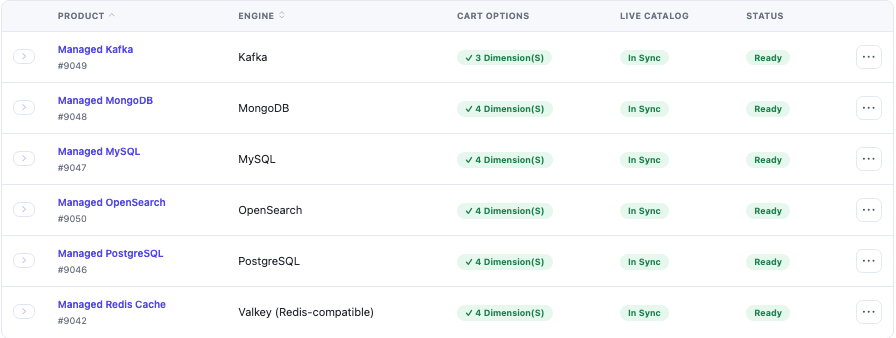
*Actual WHMCS product screen. Product names and identifiers are demonstration data. The screenshot illustrates the engine range and generated-option workflow, not proof that a particular plan is currently available in every account or region.*
That is useful when a business wants to expand its catalogue without adopting a separate provisioning interface for each database type. Staff can recognise the same module workflow while describing the relevant service accurately to buyers.
Make the package choices part of checkout
The product’s module settings establish its defaults. The option-generation workflow can create supported choices for region, plan, engine version and high availability where the engine and edition support it.
That lets a host decide what should be selectable and what should remain a fixed part of the offer. A curated application-database product might use a deliberate default, while another service can expose an appropriate set of sizes or locations to customers.
Generated options still need commercial review. Check the choices, prices and order-form presentation before using them for live sales. Rebuilding a provider-derived option group is not a reason to assume that previous pricing and every customer-visible choice remain unchanged.
Availability is also specific. A catalogue of supported choices is not a guarantee of capacity for every selected account at the time of an order. The WHMCS product guide and checkout-options guide explain the module’s practical setup.
The business benefit is a repeatable way to build the offer: the engine, defaults, customer choices and the account used for provisioning become parts of a defined product, rather than notes a staff member must reconstruct after the sale.
Give the customer a dedicated managed cluster
An eligible provisioning operation creates the customer’s managed cluster in your DigitalOcean account and associates it with the WHMCS service. The customer then uses the service panel to find the relevant state and connection information.
There is a transition between accepting an order and having a database ready for applications. Provisioning can take time, and the customer should connect to the intended cluster once it is ready rather than interpreting an order receipt as a completed database deployment.
Imagine an agency offering a PostgreSQL-backed application package. It can define the supported database product, let the customer choose from the appropriate options and deliver the resulting service through the account relationship the customer already knows.
That example is a possible workflow, not a report of an actual client deployment. It illustrates the link between a commercial product and a provider-managed resource. The application still needs its own connection configuration, schema and data migration as appropriate.
Put engine-specific connection details in the client area
A database handoff becomes much easier when the customer can find the values needed by the chosen engine. PD DigitalOcean Databases presents host, port, username, database and password controls, with copy actions and an engine-specific connection example.
The examples use the relevant TLS settings, and the panel provides a cluster CA-certificate download where needed. A PostgreSQL example and a Kafka connection are not interchangeable, so the guidance follows the engine rather than presenting one universal command for everything.
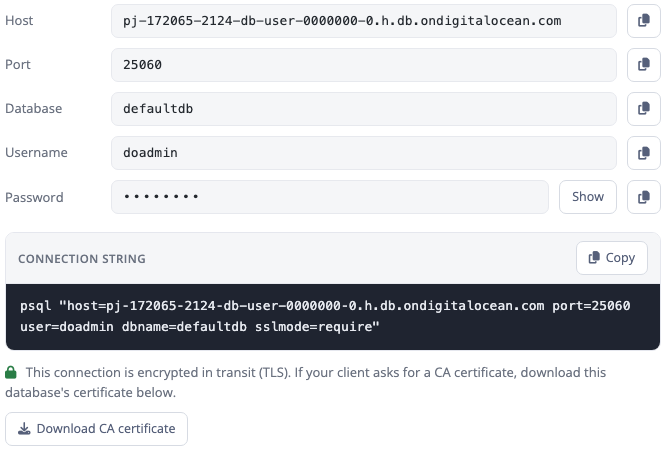
*Actual customer connection dialog using a demonstration endpoint. The password remains masked, and the outer account identity is excluded. This illustrates the service handoff, not a live connection made for this article.*
For the host, that can reduce repetitive explanations about which hostname or port belongs to the service. For the customer, the connection information is next to the database they purchased instead of buried in a one-off message.
The connection and TLS guide supplies the procedural detail. A displayed endpoint is configuration information; the application’s successful connection is the practical confirmation that its settings and access path work together.
Let customers manage trusted application sources
Database access should reflect where the customer’s applications connect from. A new application server or a changed office address can require a trusted-source update without changing the database product itself.
The module’s customer Firewall view supports allowed IPv4 addresses and CIDR ranges through the provider’s trusted-source mechanism. The host can choose whether that customer control is available for the product.
That is a useful self-service feature for a hosting offer. The customer can manage supported address rules for their own database rather than asking staff to repeat every routine change. The trusted-sources guide explains how to review the intended rules and connection.
The supported editor concerns address rules, not every kind of trusted DigitalOcean resource or arbitrary firewall operation. Saving the address list should preserve the addresses still needed by existing applications, and a successful save should be followed by the appropriate application connection check.
A practical example is a customer moving an application to a new server. They can allow the intended source address, verify the application connection and retire the old address when it is no longer required. That is a defined customer task with a clear result, rather than an open-ended cloud-management console.
Offer password regeneration with a clear handoff
The customer panel supports regenerating the database administrator password. That gives the service owner a way to replace the credential used by their applications while keeping the cluster as the same resource.
The application side still matters. A new password requires dependent applications to use the new credential, so plan the handoff around those connections. Regeneration is not a promise that every application updates its stored secret automatically.
Provider processing and credential return can also take time. The useful promise is the supported password-management control, not an assertion that a fresh credential is always ready in seconds or that every displayed value proves an end-to-end login test.
For a managed hosting offer, staff can explain the workflow and responsibility clearly: the panel manages the database credential, while the application configuration is updated by the person responsible for that application.
Choose PostgreSQL and MySQL editions deliberately
The module supports both Standard and Advanced Edition choices for PostgreSQL and MySQL. Edition affects the plan and high-availability options, so it belongs in the product definition rather than being treated as a cosmetic label.
DigitalOcean is changing eligibility for new Standard Edition clusters, including limits on larger plans and standby or read-only nodes. Existing clusters and newly created clusters can be treated differently. Check the provider’s current PostgreSQL limits and MySQL limits when designing the offer.
The module’s edition guide connects those choices to its settings. Avoid presenting high availability as a universal checkbox that every engine, edition and plan can accept.
Kafka is another example of why engine-specific treatment matters: its managed configuration uses its own multi-broker arrangement rather than the same optional standby choice used elsewhere. A coherent product line can still have different supported choices for different engines.
A cluster also keeps the edition it was created with in the module’s workflow. Moving a billing service to a different product is not a supported shortcut for converting the underlying database edition.
Make backup visibility specific to the supported service
For Standard Edition PostgreSQL and MySQL, the module exposes the provider’s automated backup list to the customer. That gives the customer a place to inspect available backup records without requiring a separate routine request to staff.
The module does not display the same backup-list feature for every engine or Advanced Edition. An absent module page is not a statement that the provider has no backup facilities; it describes what this interface supports.
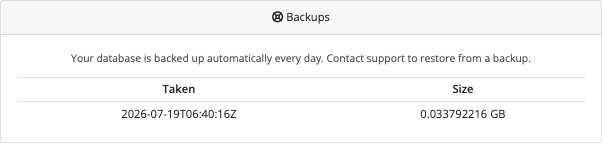
*Actual backup-list crop for a demonstration PostgreSQL service. Backup visibility described here applies to the supported Standard Edition PostgreSQL and MySQL workflow. This image does not demonstrate a restore.*
That distinction helps the host sell accurately. Describe the specific backup visibility included with the chosen service and establish the recovery process separately. A list of backup records and a completed application recovery are different outcomes.
Keep lifecycle operations connected to the service
A database service needs more than its initial create operation. The module supports the relevant service lifecycle, including plan changes where allowed and access controls associated with suspension and restoration.
The documented suspension design saves the customer’s trusted-source configuration and applies a lockdown rule, rather than deleting the cluster as a routine suspension action. Restoring access uses the saved configuration. The provider resource continues to exist during that period, so access suspension should not be sold as stopping its infrastructure charges.
Termination is a different decision: it deletes the managed cluster. Any required export or recovery preparation belongs before that destructive step. The module’s tracking and follow-up process helps manage its resource lifecycle, but no marketing claim needs to promise that deletion can never fail or that every resource in the entire provider account is accounted for automatically.
A well-defined hosting offer makes those differences understandable to staff and customers: an access pause, a supported resize and a permanent service termination are separate operations with separate effects.
Build a broader application-service catalogue
The most interesting use of PD DigitalOcean Databases is the product line it enables. A host can offer supported relational databases, document storage, caching, streaming and search without treating each one as an unrelated manual service request.
The customer sees an ordered service, relevant connection details and the controls the host makes available. Staff work with products, supported checkout choices and resource relationships inside WHMCS. The provider runs the managed database infrastructure in the host’s account.
That division can suit businesses already supplying application hosting or development services. It gives them a way to add a specific managed data service while keeping the application work, provider usage and customer responsibilities explicit.
Explore PD DigitalOcean Databases for WHMCS to assess the current engine range and module capabilities. Choose one intended workload, define the product and verify the full customer handoff before expanding the catalogue.
Frequently asked questions
Which engines does PD DigitalOcean Databases support?
The documented range is PostgreSQL, MySQL, MongoDB, Valkey, Kafka and OpenSearch. PostgreSQL and MySQL include Standard and Advanced Edition choices, subject to supported provider configurations.
Can I sell each engine as a separate WHMCS product?
Yes. Define a product per engine and use the supported defaults and generated options to build the offer. Review the account, choices, pricing and order form before accepting live orders.
Are the databases created in my DigitalOcean account?
Yes. The module uses the host’s configured account to provision the managed cluster associated with the customer service. The customer uses their database credentials rather than the host’s management token.
Can customers update trusted IP addresses themselves?
Yes, when the product allows that control. The supported customer editor manages IPv4 address and CIDR trusted-source rules. Confirm the intended address list and test the application’s connection after changes.
Are connection examples encrypted?
The module’s engine-specific examples use TLS settings and provide the relevant connection details and CA download. The application must use the appropriate settings for its engine and connection requirements.
Does every engine show the same backups page?
No. The module’s automated backup-list feature applies to supported Standard Edition PostgreSQL and MySQL services. Other engines and editions should not be sold as having that same module interface.
Can a customer change the database region or engine after ordering?
The module does not expose an in-place region or engine conversion workflow. Treat the intended change as a separately planned migration rather than simply editing a product default.
Does suspending access stop provider charges?
Do not assume that it does. The suspension design keeps the cluster while restricting access. Termination deletes the resource and is a separate, destructive service-lifecycle decision.
