WHMCS Domain Monitoring: RDAP, Nameserver Changes and Renewal Risk
Review domain expiry, nameserver changes and registry findings in WHMCS. PD Domain Radar adds RDAP monitoring, an external watchlist and staff-focused visibility.
A domain portfolio has more moving parts than a renewal date. Nameservers can change, a transfer can begin, a registry hold can appear, and a customer may rely on a name that was registered somewhere other than your hosting business.
PD Domain Radar brings registry-data monitoring into WHMCS. It checks supported domains through published RDAP services, compares relevant observations and turns them into findings staff can review. A watchlist extends that view to domains outside your managed registration portfolio.
For a hosting company or agency, the value is a more informed account conversation. Staff can see an approaching expiry alongside a local renewal instruction, inspect a nameserver-change finding or follow up an unexpected transfer status from one operational workspace.
This is a staff monitoring tool. It helps the team decide what needs attention without silently changing a customer’s registrations or turning every observation into a customer-facing warning.
Add registry observations to the WHMCS domain record
WHMCS is where the business manages the customer relationship and its domain workflow. PD Domain Radar adds a separate observation: what a supported registry lookup reports about the name at the time it is checked.
The module uses RDAP, a structured way to retrieve registration information. Depending on the response, that can include registrar details, dates, status codes, nameservers and DNSSEC information. It is useful context alongside the local account information, rather than an assumption that every field is available for every extension.
For example, a member of staff reviewing renewal work may want to know whether a domain is approaching its reported expiry and whether WHMCS is locally set not to renew it. Another may want to review whether a reported nameserver change was expected.
Those questions benefit from bringing the observations together. The module is not replacing the registrar’s control over a registration; it is making relevant information easier for the hosting team to review.
The WHMCS portfolio-scan guide explains the setup. Scheduled sweeps synchronise eligible managed domains, rather than requiring the portfolio to remain a one-time manual import frozen at installation.
Turn a list of domains into a list of findings
A raw registration response can contain plenty of data without telling staff which item deserves their time first. PD Domain Radar organises supported observations into findings with a severity, plain-language explanation and first-seen date.
The documented finding types include approaching expiry, expired status, renewal disabled near expiry, nameserver changes, registrar-lock observations, transfer activity, registry holds and optional DNSSEC-change observations. The result is a work list built around conditions worth reviewing.
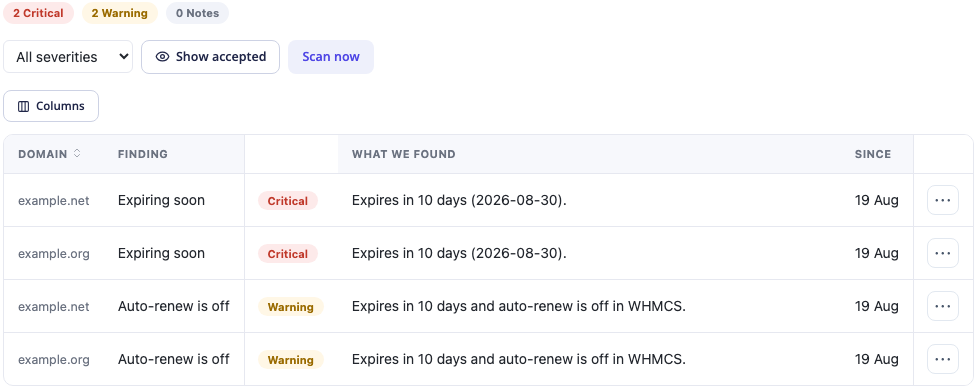
*Actual product screen with reserved example domains and demonstration dates. The findings illustrate the interface; they are not current registration facts about those names or real PD Hosting client records.*
A hosting team can use severity and age to decide where to begin. An urgent expiry and a newly observed transfer deserve a different conversation from a nameserver arrangement the customer deliberately chose months ago.
The strength is the explanation beside the domain. Staff do not need to remember which obscure status value originally prompted the review before deciding what to inspect next.
Monitor domains that customers registered elsewhere
An agency may be responsible for a website while the customer keeps domain registration with another provider. That domain still matters: an expiry or unexpected delegation change can affect the service the agency helps maintain.
PD Domain Radar’s Watchlist lets staff add domains outside the managed WHMCS registration portfolio. They can then be considered in the monitoring workflow without pretending that the hosting company has acquired registrar authority over them.
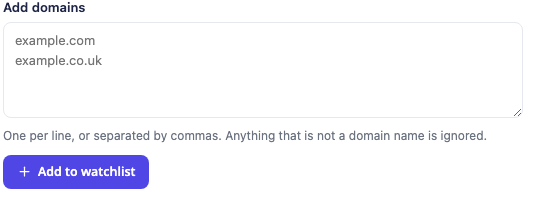
*Actual watchlist form, cropped before the populated list. The reserved example names illustrate input format, not an actual monitoring action performed for this article.*
Consider a hypothetical agency supporting a customer whose main website is hosted with it but whose domain remains elsewhere. Staff can add the relevant name to the watchlist, inspect the available registry observations and use that information in a planned account review.
The watchlist provides visibility, not automatic renewal rights. A locally stored renewal value for an imported name should not be interpreted as proof of the external registrar’s renewal setting. The person responsible for the registration still needs to verify and perform the appropriate registrar-side work.
The watchlist guide covers adding and reviewing those names. This is particularly useful where hosting responsibility and registration responsibility sit with different organisations.
Recognise nameserver changes without treating every change as a fault
A customer may intentionally move DNS to a different provider. Another change may be unexpected. The useful monitoring question is whether the current observation differs from the previous one and whether staff understand why.
PD Domain Radar compares nameserver snapshots. A first observation supplies a baseline; it is not itself evidence that a change has just occurred. Later differences can create a nameserver-change finding.
That gives an account manager or technical colleague a prompt to check the context. Was a migration planned? Did the customer change its DNS arrangement? Does the delegated setup match the work that was agreed?
A separate optional setting can flag domains that appear not to use your nameserver domain. This comparison is distinct from detecting a change over time, and it should not be described as complete verification of every delegated server or its ownership.
The nameserver-change guide explains the practical distinction. DNS monitoring is most useful when the result starts a specific review, rather than assuming an external nameserver is automatically a problem.
Review renewal intent alongside approaching expiry
An approaching registry-reported expiry and a local instruction not to renew are a useful combination to notice. One describes timing; the other describes the business system’s current renewal instruction.
PD Domain Radar can flag that combination. In WHMCS, the supported Turn auto-renew on action changes the local renewal instruction. It does not submit a registrar renewal, confirm a payment or prove that the domain has been extended.
That distinction makes the action clearer, not weaker. Staff can correct an unintended local setting and then verify the normal renewal process through the appropriate account and registrar workflow.
The warning and critical windows are configurable, so the team can decide when an expiry should enter its work list. An early reminder can support a planned conversation with the customer instead of forcing every renewal question into the last few days.
The expiry and renewal guide provides the task detail. No universal grace period or recovery promise is needed to explain the benefit of reviewing the domain before its deadline.
Bring transfer, lock and registry-hold observations into view
Expiry is not the only status worth inspecting. Transfer activity, a missing transfer-prohibition status or a registry hold may require a different kind of follow-up.
PD Domain Radar can surface the supported status observations in its findings. Staff then use the relevant WHMCS domain or registrar workflow to investigate and act, rather than the module silently modifying a registration behind the scenes.
A lock observation needs context. A deliberately unlocked name during an agreed transfer is different from a state nobody expected. The presence or absence of a reported status should be interpreted with the registry’s actual response and the intended work in mind.
Optional DNSSEC-change monitoring similarly compares observed information. It can help staff notice a reported transition, but it is not a complete DNSSEC validation service. Missing data is not proof that the registration or DNS configuration has been independently verified as secure.
The product value is a more useful starting point for those reviews: the domain, the observed condition and the explanation are already connected. Staff still choose the registrar-side operation appropriate to the actual situation.
Accept known conditions to keep attention focused
Not every finding calls for an immediate change. A customer may intentionally use different nameservers, or staff may already know why a registration is temporarily unlocked.
The Accept action lets staff acknowledge an expected condition so it drops out of the default attention list while remaining recorded. That helps the work list stay focused on observations that still need a decision.
Acceptance is not a registrar operation or a repair. It records how the team has treated the finding. If the condition changes, it can require attention again, so staff should still understand the underlying name and the intended configuration.
Use a consistent team approach. Accepting a finding should mean “we reviewed this condition and know why it is present”, rather than “we wanted a quieter dashboard”. That makes the remaining list easier for the next colleague to interpret.
Schedule checks around the portfolio you actually manage
PD Domain Radar’s scheduled sweep works through domains in batches using the WHMCS cron. It is monitoring at the cadence the sweep and portfolio allow, not a continuous stream of instant registry events.
A smaller portfolio and a larger portfolio can therefore have different coverage timing. Review how many domains are represented, which ones have been checked recently and whether the configured batch and schedule fit the team’s needs.
The optional email digest gives staff another route to eligible new findings from scheduled processing. It should complement the dashboard rather than be presented as a guaranteed email for every changed observation. A manual scan does not send that digest through the same notification path.
These are operational choices worth understanding when evaluating a domain-monitoring module. A scheduled observation can still be valuable without claiming that every name is checked every minute or that a message always reaches its recipient immediately.
Know what an unavailable lookup means
Registry services differ in availability and the information they supply. If a domain cannot be checked, the useful interpretation is that a fresh observation is unavailable. It is not evidence that the domain is safe, renewed or unchanged.
Some stored fields may come from an earlier successful lookup or local platform data. A recent attempt time should therefore be considered with the result, rather than treated as proof that every displayed field was freshly confirmed.
Likewise, a finding disappearing after an unavailable result is not proof that the underlying real-world condition was fixed. Keep the actual lookup outcome in the review, especially before making an important registration decision.
The module helps organise observations. Staff judgement about freshness and the intended domain workflow is what turns those observations into useful account management.
Explore PD Domain Radar for WHMCS
If your domain review currently starts and ends with a renewal date, explore PD Domain Radar for WHMCS.
Registry observations, a watchlist, explained findings, acceptance and scheduled sweeps can give the team a broader view of the names its customers depend on. Start with the domains important to your service relationships, review coverage and freshness, and use each finding to guide a specific next check.
Frequently asked questions
What does PD Domain Radar add to WHMCS domain management?
It adds scheduled RDAP observations, explained findings and an external-domain watchlist. Staff can review supported expiry, nameserver, status and related observations alongside the local domain workflow.
Can I monitor a domain registered with another company?
Yes. Add it to the watchlist for available registry observations. That supplies visibility, not authority to renew or modify the registration at the external provider.
Does a nameserver-change finding appear on the first scan?
The first successful snapshot provides the comparison baseline. A change finding depends on a later observation differing from the earlier nameserver snapshot.
Does Turn auto-renew on renew the domain at the registry?
No. In WHMCS it changes the local renewal instruction. The normal payment and registrar renewal process still needs to complete and be verified.
Does accepting a finding fix the domain?
No. It acknowledges a condition and removes it from the default attention list while retaining the record. It does not change the registration or DNS configuration.
Are all domains checked continuously?
No. Scheduled sweeps use cron and work through a bounded portfolio in batches. Coverage and freshness depend on the actual schedule, settings and available lookup responses.
Does an unavailable lookup mean there are no problems?
No. It means a fresh registry observation could not be obtained. Review the lookup outcome and any older stored data before drawing a conclusion about the domain.
