PD DigitalOcean Databases — Sell Managed PostgreSQL, MySQL, MongoDB, Valkey, Kafka and OpenSearch as Native WHMCS Produc
Sell managed PostgreSQL, MySQL, MongoDB, Valkey, Kafka and OpenSearch under your own brand — provisioned, billed and managed in WHMCS
Made and supported by Projektif Digital Ltd.
Runs inside PD Modules, the panel
every module installs into.
Databases
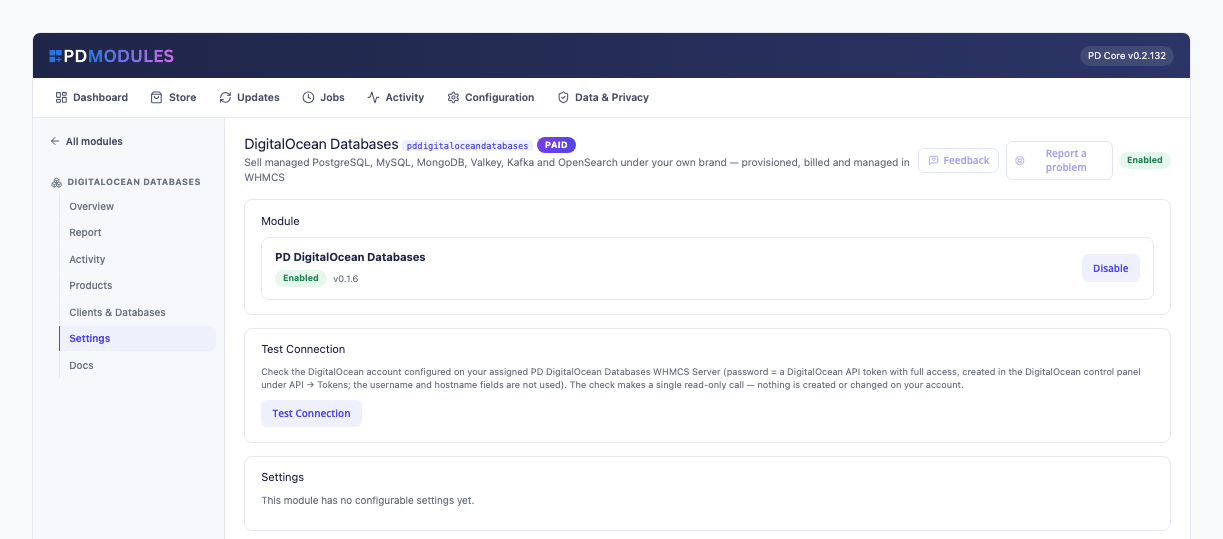
One-click configurable options for all six engines — PostgreSQL, MySQL, MongoDB, Valkey, Kafka and OpenSearch — generated straight from DigitalOcean's live catalog.Connection details your customers can trust — TLS enforced, credentials masked until revealed, with a ready-to-paste connect command in the engine's own syntax.A live health check across licence, DigitalOcean connection and every provisioned cluster — know at a glance that your database line is running clean.Every customer's database across every engine, live state and endpoint, in one table.Customers manage their own trusted-sources firewall — no support ticket needed for a routine IP change.Automated daily backups, visible to the customer — peace of mind without a support ticket.A running history of every action on the database, so customers always know exactly what happened and when.Verify your DigitalOcean connection with a single click — a read-only check that never touches a live cluster.1 / 8
PD DigitalOcean Databases lets a hosting company sell every DigitalOcean managed database as its own product line: PostgreSQL, MySQL, MongoDB, Valkey, Kafka and OpenSearch. Your customer orders in your WHMCS cart, a dedicated cluster is built on your DigitalOcean account, and your customer manages it from your client area: connection details, trusted sources, password reset and activity, under your brand with no DigitalOcean login.
It is the module for hosts who want a full managed-database catalogue from one install. Each product you create is set to one engine, so "Managed PostgreSQL" and "Managed Valkey Cache" are separate things on sale, each with its own price and choices, served by the same module and the same DigitalOcean token. Selling just one engine? The focused edition for it does the same job.
Why hosts choose PD DigitalOcean Databases
Six engines from one install. One module, one licence, one DigitalOcean token and one set of admin screens run all six. Adding an engine later is a new product, not a new module to install and keep updated.
Each engine behaves like itself. Kafka always runs three brokers and shows the SASL_SSL guidance and CA download its clients need. Valkey customers choose their own memory policy. OpenSearch customers get their Dashboards address beside the credentials. Each engine gets its own connect command: psql, mysql, mongosh, redis-cli, kcat or curl.
Every order sets itself up. A paid order creates a dedicated cluster in the region, plan and version the customer chose, with no step by you. Nothing is shared between customers.
Nothing left billing. Cancelling deletes the cluster at DigitalOcean and confirms it is gone, and a retry can never leave a second cluster running unseen.
Customers help themselves. Connection details, a firewall they manage, password regeneration and an activity history sit on the customer's own page, which removes most of the tickets a database product brings.
You keep the margin. You pay DigitalOcean at its own price and set your own sell price, with no per-cluster fee to us. Two engines or more cost less here than as separate single-engine editions.
How it works
Connect your DigitalOcean account. Add your DigitalOcean API token once on a WHMCS server record, using a token with Full Access, then press Test Connection.
Create your product. Make one product per engine you want to sell, for example "Managed PostgreSQL" and "Managed Valkey Cache". On each product's Module Settings, pick the engine, then a default region, plan and name prefix. Switch on automatic setup so a paid order provisions by itself.
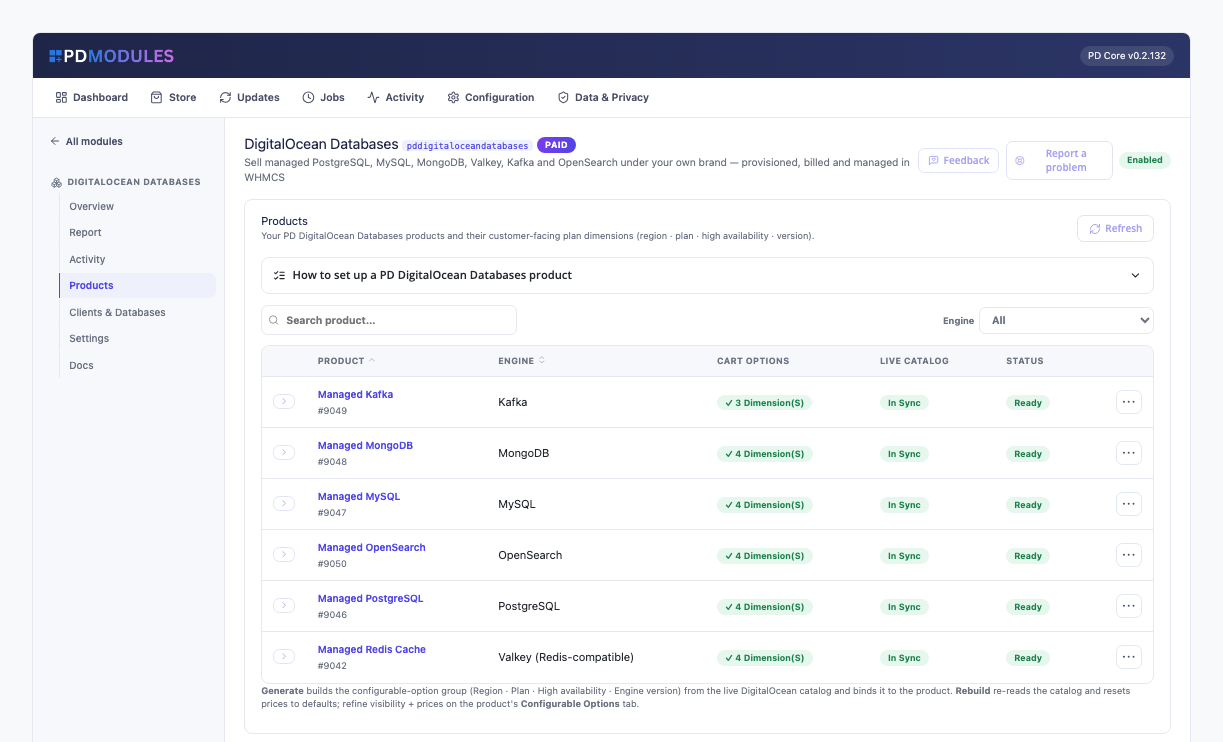
Generate the checkout options. Open the module's Products page and press Generate. It builds the product's Region, Plan, High availability and Engine version options from DigitalOcean's live catalogue, all priced at zero for you to set. Kafka, which always runs three brokers, gets three options instead of four.
Your customer orders. They choose their options and pay. The cluster is built on your DigitalOcean account in the background, and the connection details appear on their own once it is online, usually within a few minutes.
You get paid, they manage it. WHMCS keeps billing as usual, and the customer copies the connect command and sets their own trusted sources.
What you get in WHMCS
Selling and pricing
One product per engine: PostgreSQL and MySQL (each as Standard or Advanced Edition), MongoDB, Valkey, Kafka and OpenSearch
Checkout options generated from DigitalOcean's live catalogue for each engine: Region, Plan, High availability and Engine version
Regions and versions are read live from DigitalOcean
Generated choices start at zero in every currency and you price each one under System Settings → Products/Services → Configurable Options; a sync never changes a price you have set
Choose which choices customers see at checkout; anything hidden uses your product's default and keeps its price
Clusters are named with your own prefix and the service number
Provisioning you can trust
High availability adds nodes for automatic failover: two on PostgreSQL, Valkey and MySQL Standard Edition, three on MySQL Advanced Edition, MongoDB and OpenSearch. Kafka always runs three
Moving a service to a product for another engine is refused with a message, never applied by resizing the old cluster
An order DigitalOcean would refuse is stopped with a clear message before anything is created; Atlanta, Richmond and Kansas City carry only Premium plans
Every cluster is recorded before DigitalOcean is asked to create it, and pressing Create again never builds a second one
A provisioning failure appears in the service's activity with its reason, never left at "Provisioning"
A plan change through WHMCS's own upgrade flow resizes the running cluster in place; host, port and data are kept
Suspend replaces the trusted sources with a rule nothing matches: the cluster keeps running (DigitalOcean still bills it), the data is untouched, and the customer cannot lift the lockdown. Unsuspend restores exactly the sources saved
Terminating deletes the cluster at DigitalOcean with its users, databases and backups, and confirms it is gone. There is no retention period, so tell customers to take their own backup first
Choosing PostgreSQL and MySQL editions
PostgreSQL and MySQL each come as Standard Edition or Advanced Edition, chosen per product as its Engine
Advanced Edition needs no partnership with DigitalOcean and offers dedicated plans from 8 GiB RAM; a database keeps its edition, and a move to the other edition is refused rather than resized
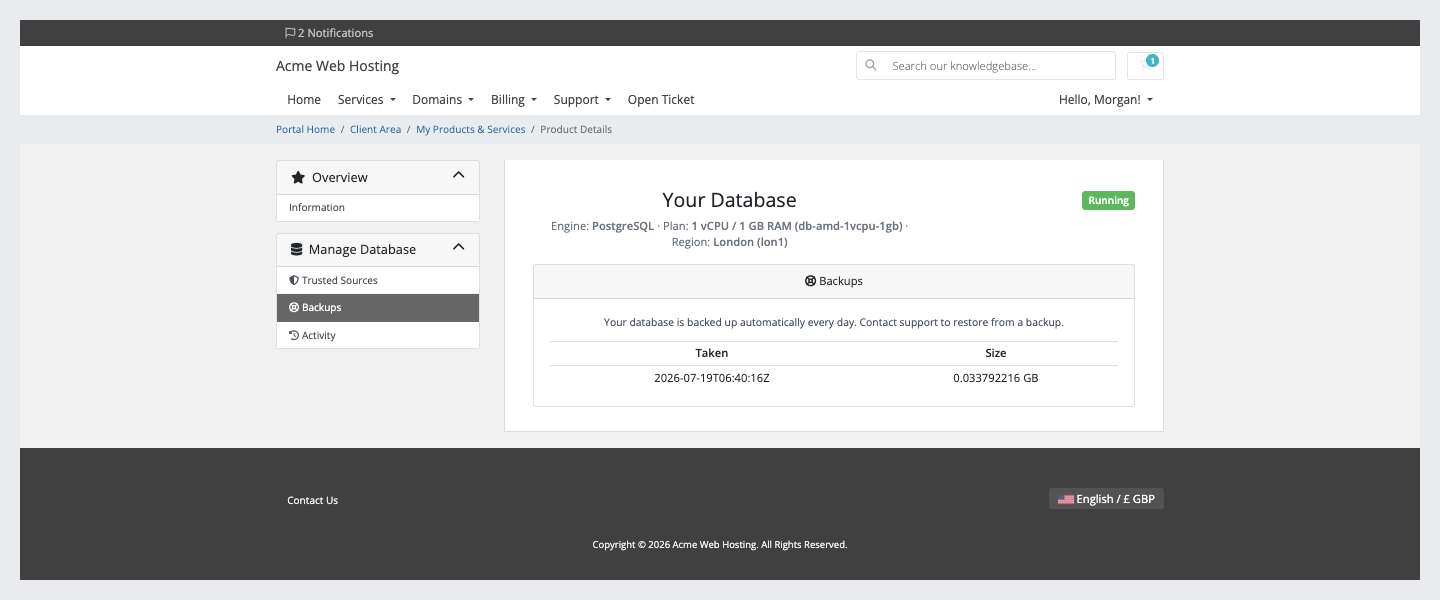
Standard Edition PostgreSQL and MySQL get a Backups page listing DigitalOcean's daily backups; restores are done by you. Other engines show none
Running it day to day
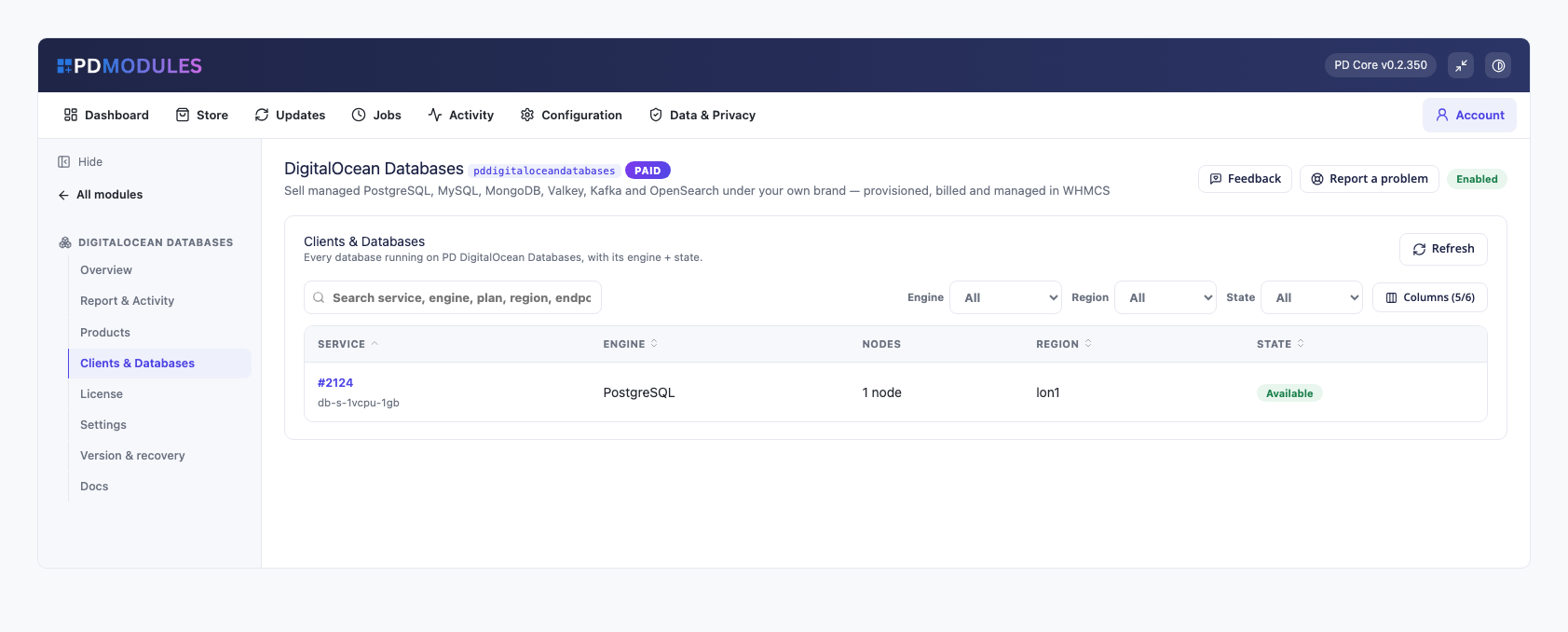
A Clients & Databases panel lists every cluster against the service paying for it, with engine, plan, region, endpoint and state
An Activity panel records every provisioning and lifecycle action with its outcome
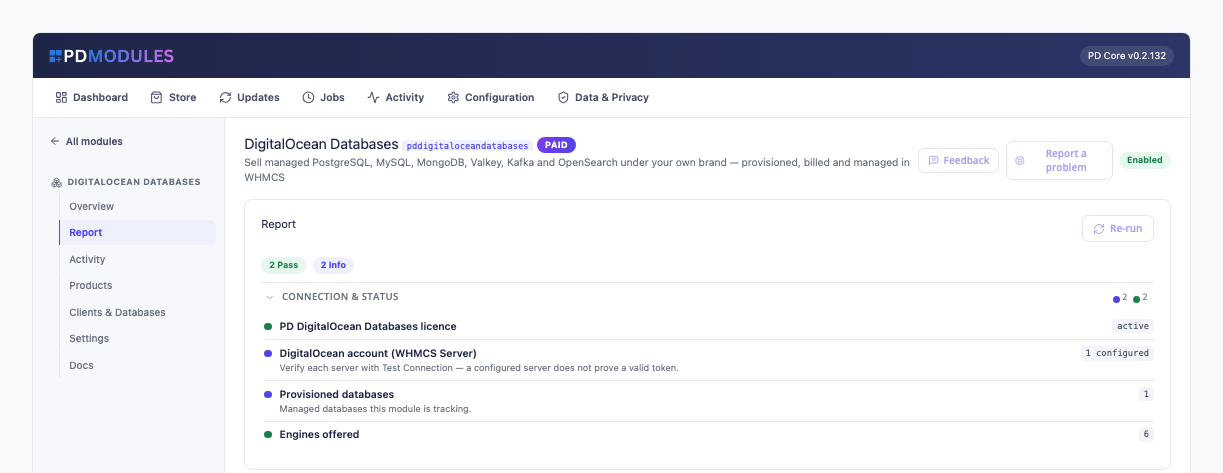
A report shows your licence, whether a DigitalOcean account is connected and how many databases you run
A cluster deleted outside your billing system is flagged to you
Clients & Databases: every cluster against the service paying for it, with engine, nodes, region and state
What your customers get
The client area has Overview, Trusted Sources, Backups (where the engine lists them) and Activity under a Manage Database menu.
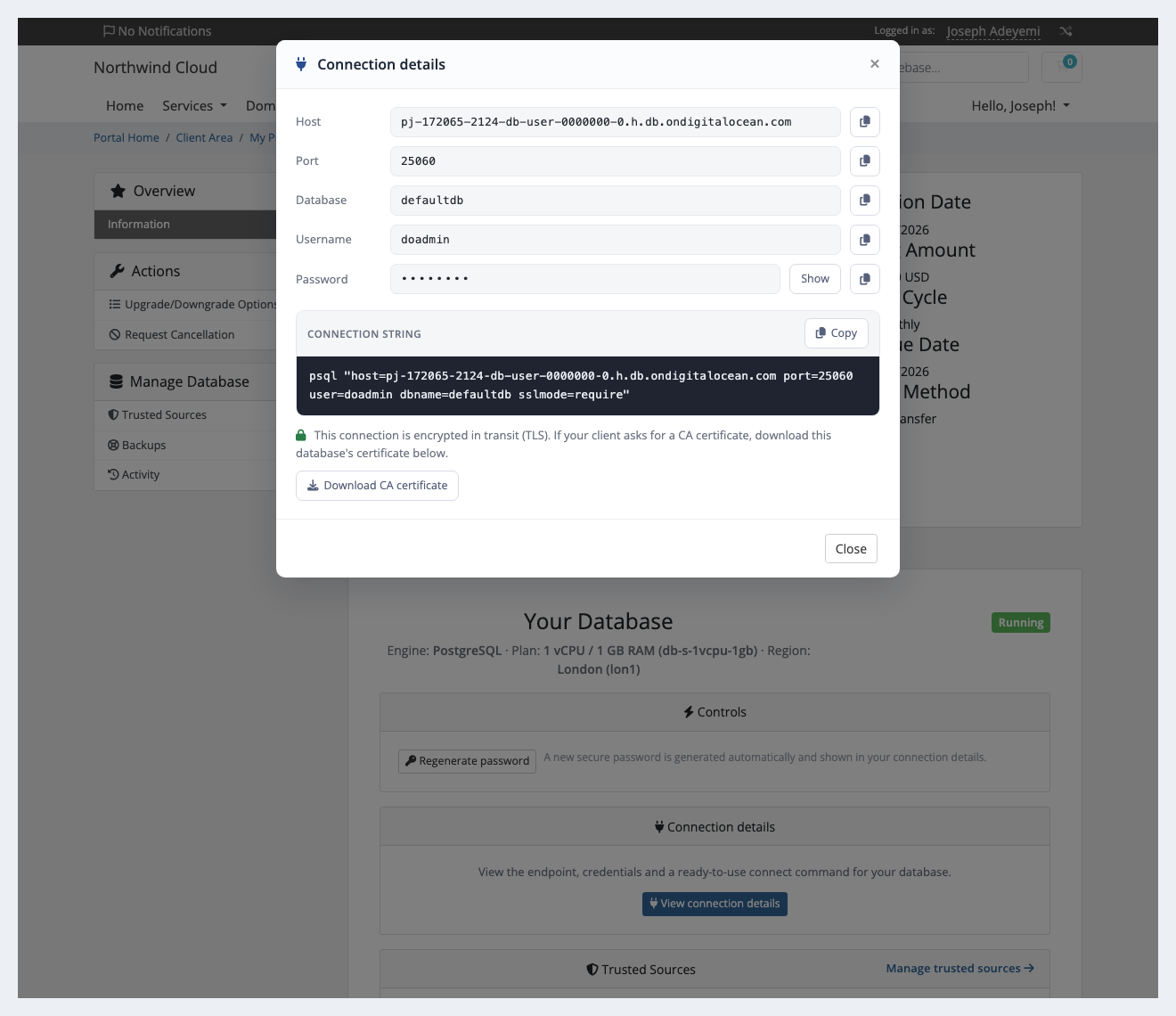
Connection details in one window: host, port, username and password (masked until Show, with Copy beside each), plus a ready-to-use connect command in the engine's own client: psql, mysql, mongosh, redis-cli, kcat or curl
The CA certificate as a download, for clients that ask for one; the connect command already uses TLS
Regenerate password in one click behind an in-page confirmation; the new password appears in the connection details
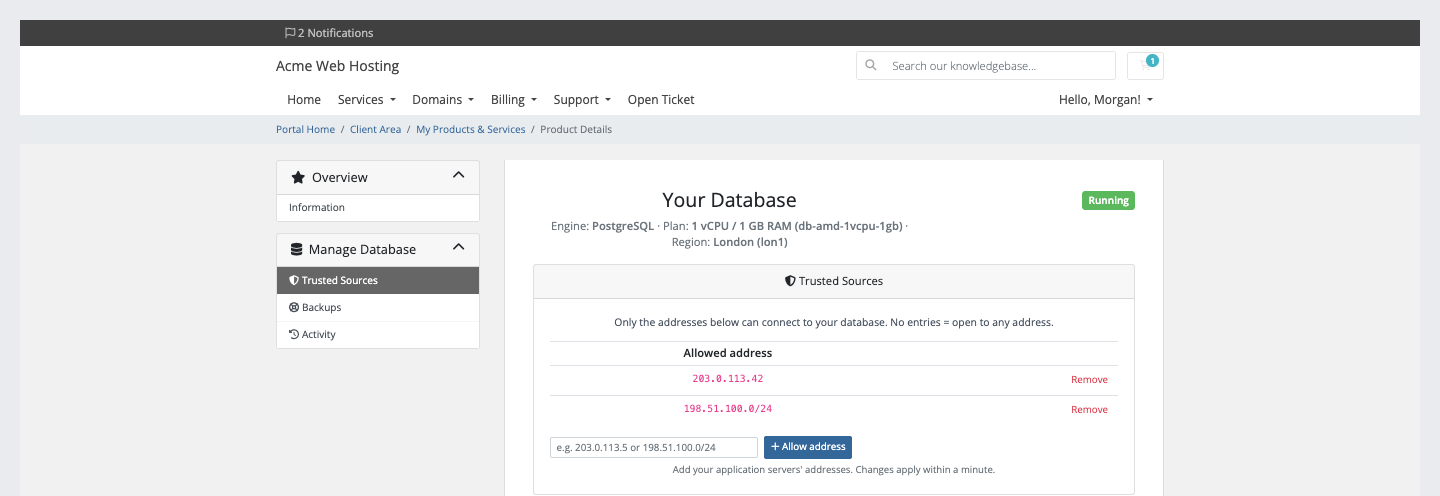
Trusted sources: add and remove the IPv4 addresses and ranges allowed to connect, with bad entries refused and changes applied within a minute
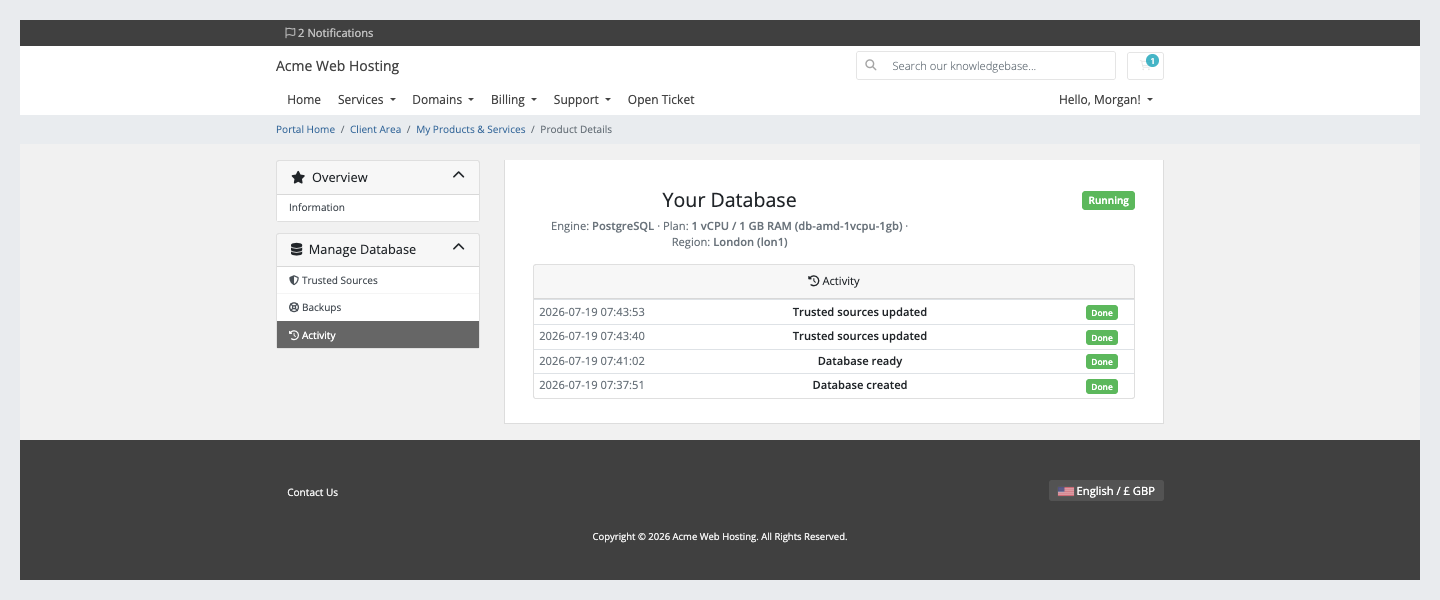
Recent activity: their latest actions, up to 40, each marked done or not
Connection details: masked password with Show and Copy, a ready psql command and the CA certificate downloadTrusted sources: the customer adds and removes the addresses allowed to connect, with no support ticketThe Backups page for a PostgreSQL database, listing the automatic daily backupsActivity: each action on the database, with its result
The firewall, connection details and backups pages are each a switch on the product: turn one off and it is hidden and refused. The client area renders natively on WHMCS's Six, Twenty-One and Nexus themes, and every line of customer text is translatable, with overrides that survive updates.
Security built in
Your DigitalOcean API token is stored encrypted, only ever sent to DigitalOcean, and never shown on a customer page or in a customer message.
Each database password is stored encrypted and shown only to the signed-in owner of that service.
Every customer action needs a signed-in owner of the service and a valid security token.
When something fails at DigitalOcean, the customer sees a neutral message and the reason goes to your activity log.
One product, every feature
PD DigitalOcean Databases is one paid module with all six engines included and no add-on tiers. It installs into PD Modules in one click, updates itself, and uninstalls cleanly, leaving no orphans and modifying no WHMCS files.
If your subscription ever lapses, your customers are not cut off. A running database is never stopped, deleted or altered. New provisioning and admin configuration lock first, customers see a neutral "temporarily unavailable" message with their connection details still visible, and cancellations still complete. Renewing restores everything with nothing lost.
Requirements
WHMCS 9 or later on PHP 8.2 or later, with the ionCube Loader
A DigitalOcean account with billing enabled and an API token with Full Access
WHMCS's automation cron running, which finalises new clusters and confirms cancellations
PD Modules 0.2.322 or later, the free control panel every PD module installs into
Questions
Which database engines does it support?
Six, all built in: PostgreSQL, MySQL, MongoDB, Valkey (Redis-compatible), Kafka and OpenSearch. You choose the engine per product, and you can sell several side by side in the same WHMCS.
Can I still sell large or highly available PostgreSQL and MySQL databases?
Yes, as DigitalOcean's Advanced Edition. From 15 October 2026 for DigitalOcean accounts that have never created a PostgreSQL or MySQL cluster, and from 30 November 2026 for every account, new Standard Edition clusters are limited to plans up to 4 GiB RAM with no standby or read-only nodes; existing clusters are not affected. Choose PostgreSQL — Advanced Edition or MySQL — Advanced Edition as the product's Engine for dedicated plans from 8 GiB RAM and high availability (two nodes for PostgreSQL, three for MySQL). Any DigitalOcean account can create Advanced Edition through DigitalOcean's public API; no partnership is needed. From 30 November 2026 a Standard Edition product stops offering the larger plans and high availability, and an order for them is stopped before anything is created.
Do I need one module per engine?
No. PD DigitalOcean Databases is the single flagship covering all six engines. If you only ever sell one, the focused editions (PD DigitalOcean MySQL, PostgreSQL, MongoDB, Valkey, Kafka, OpenSearch) offer the same engine for that one database.
Can customers upgrade their plan later?
Yes — through WHMCS's Upgrade/Downgrade flow. The cluster is resized in place and the data is preserved.
How do customers secure their database?
Every connect command we show uses TLS, and customers manage a trusted-sources firewall from their client area — once they add an address, only the addresses they add can connect (with none listed, any address can).
What happens when a service is cancelled?
Terminating deletes the cluster and cleans up every associated resource on DigitalOcean — zero orphans. Take a backup first if you need to retain data.
Do I need my own DigitalOcean account?
Yes. You resell on your own DigitalOcean account, at your own margin. Your API token is stored encrypted on your WHMCS server and is never shown to a customer.
Does a lapsed PD Modules licence break my customers' services?
No. A licence lapse withdraws the management layer in stages but never stops, deletes or alters a running customer resource. Your customers keep serving throughout.
What does it cost to run, on top of the subscription?
Only what you already pay your provider. PD DigitalOcean Databases adds no per-unit fee and takes no cut — it connects to your own account with your own credentials, so the provider bills you directly at your rates, and you set what you charge your customers. From us it is the module subscription and nothing else.
What’s new in 0.1.89
A database whose setup did not complete now tells your customer so on their service page, instead of saying it is still being set up. Pages for a database being resized or removed now say that too.
A plan that DigitalOcean does not offer in the chosen region is now stopped at checkout, before payment, with a message naming the plan and the region. Pairs DigitalOcean refuses are remembered for 90 days.
Cancelling an order that was never built no longer leaves a failed database in your list of databases.
Syncing generated options now names DigitalOcean in its confirmation.