WHMCS Password Manager: A Vault and One-Time Links for Client Handovers
Generate, store and hand over credentials inside WHMCS. Explore PD Password Manager’s encrypted vault, one-time links, service password handover and Pro features.
A hosting team may need to hand a customer a new service password, retain an application login for agreed maintenance or share a credential with a colleague. Those are ordinary operational tasks. The awkward part is what happens when the password becomes permanent text in an email or support conversation.
PD Password Manager brings an encrypted vault, password generation and one-time secret handover into WHMCS. Staff can organise credentials around client work, create a new password where it is needed and deliver a link that reveals the secret once. Pro adds capabilities including passphrase protection, Password Health, role-based staff controls and an optional client-area vault.
For a hosting business or agency, the opportunity is a more deliberate credential workflow inside the system staff already use. This guide explains the practical benefits, the handover choices and where the companion features fit.
Treat creating, keeping and handing over a password as separate jobs
A password generator answers “what password should we use?” A vault answers “where should we keep the credential?” A handover tool answers “how should the intended person receive it?” One operation does not automatically solve the other two.
PD Password Manager connects those jobs without making them identical. Generate a character password or passphrase, store a credential in the vault when the team needs ongoing access, and create a one-time link when someone needs to receive a secret. A one-time handover does not need to become a permanent message containing the password.
Consider an illustrative support workflow. A customer needs a fresh service password. The operator can generate it, apply the change where the server module supports the operation and send a link for the customer to reveal. The actual credential is not written into the explanatory email.
Another job might require staff to keep an agreed application login for recurring maintenance. That belongs in an organised vault entry associated with the client, rather than relying on whichever colleague still has the original message.
The distinction makes the module useful across several hosting tasks. Your team can choose the appropriate operation instead of treating every secret as text to paste somewhere.
Generate passwords where the work happens
The built-in generator runs on your server and supports character passwords and word-based passphrases. Character options include readability-oriented styles, while the strength meter helps staff assess the generated result. The documented workflow can continue into vault storage or sharing rather than ending at a copy button.
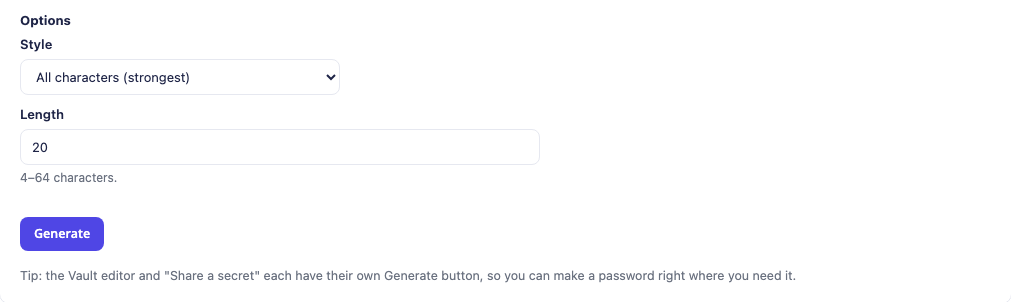
This genuine module crop shows the generator’s style and length controls. The generated-password area is outside the crop. It demonstrates the working interface without publishing a credential value or an outer panel version.
A generator close to the task is convenient when several people handle service administration. Staff do not need to open an unrelated website simply to create a password, then move it between tools before deciding how to deliver it.
Passphrases offer another format for situations where the intended person will need to work with a memorable sequence of words. Choose the format for the job, then use the appropriate storage or handover route. A strength indication is useful feedback; it does not replace understanding where the credential will be used and who needs it.
Keep client-related credentials in an organised vault
The encrypted vault stores entries such as logins, keys and secure notes. Folders and tags help organise them, and entries can be attached to a WHMCS client. That makes a credential part of the relevant account context instead of a separate note whose owner is unclear.
Attaching an entry to the client is especially useful for support and maintenance teams. A staff member working on the account can find the associated entry through the client profile, subject to the available permissions. Revealing a stored secret is recorded in the module’s Activity log.
The documented vault design encrypts secret fields at rest with a server-side key. A database copy by itself does not contain everything needed to decrypt those fields. That is a specific storage design, not a promise that running a vault removes the need to protect the hosting installation or authorised access to it.
Think about the entry title as well as its contents. A useful title explains the system and purpose; a client association explains whose work it supports. Folders and tags then help the team retrieve the right item without using a support thread as a filing system.
The vault also supports export through an authorised, recorded operation. That gives the operator a route to retain the intended information when planning a move, without treating module removal as a backup strategy.
Choose a handover route for the recipient
PD Password Manager’s free one-time links support two delivery modes. You choose the route according to who should receive the secret and whether they already have a WHMCS account.
| Delivery mode | Who can open it | A useful situation |
|---|---|---|
| Client-area login | The addressed, signed-in WHMCS client | Handing a customer a service credential through their existing account |
| Public link | Whoever holds the link, within its configured availability | Sharing with someone who does not yet have a client account |
The distinction is part of the workflow. A public link is useful when account login is not appropriate, but possession of the link matters. Client-area delivery adds the account relationship when the recipient is already your customer.
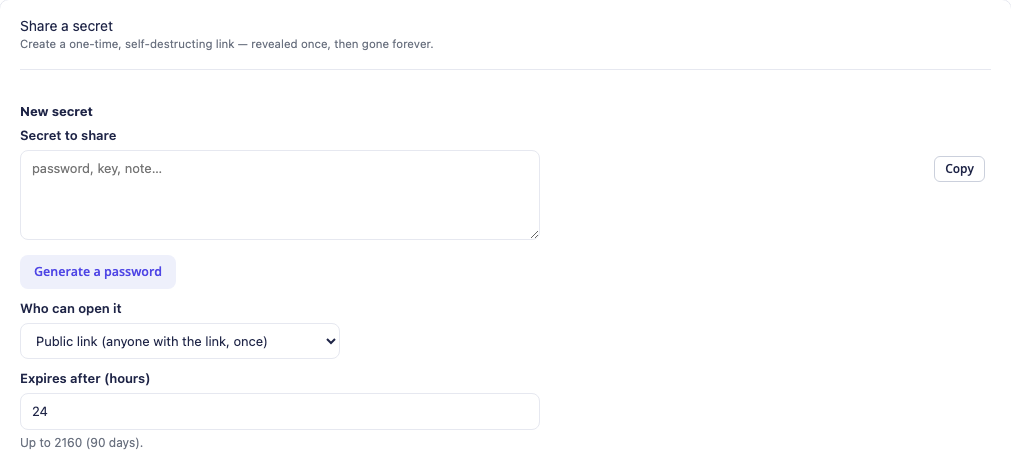
This real form crop shows the basic handover choices with no secret entered and no live link created. The article’s later Pro section explains the extra protection and link options available beyond these basics.
A one-time secret is revealed deliberately and then removed from the handover. Link-preview fetches do not consume the view simply by loading a preview. You can also set an expiry so an unopened link does not remain available indefinitely.
This changes what remains in a conversation. Your email can explain the purpose and provide the handover route without containing the password itself. The recipient can still retain what they reveal, so one-time delivery should be understood as a handover feature rather than a claim that nobody can ever copy a credential.
Reset a service password and hand it over in one workflow
The Reset & hand off tab connects password creation with a customer’s service. Pick the client and service, use a generated password or supply the intended new one, and choose whether to apply it through the supported server-module operation.
That final distinction matters: generating or sharing a string does not, by itself, change a service password. The optional server action is what applies the new credential where the connected module supports it. PD Password Manager then provides a one-time handover route for the recipient.
The documented workflow supports emailing the client the link. The message carries the route to reveal the secret rather than placing the new password directly in the email body. Staff can explain what has changed and how to use it in the same customer-facing communication.
For a hosting support team, this is a practical combination. The operator works with a known client and service, deliberately performs the relevant password action and completes the handover. It is more coherent than generating a password in one place, changing a service in another and pasting the result into an ongoing ticket.
The exact server capability still belongs to the service’s module. Evaluate the workflow with the types of service your business uses, rather than assuming every external system accepts the same password-change operation.
Add Pro capabilities for protection, access and ongoing review
The free edition provides the generator, encrypted vault and one-time links in both delivery modes. Pro extends the workflow for businesses that need more control around sharing and staff access.
Passphrase-protected links
Pro can protect a link with a passphrase shared separately. The documented design includes the passphrase in the protection of the stored secret rather than retaining a saved copy of the passphrase. You can also require passphrases for public links as part of the module settings.
This creates a useful option when a public link alone is not the handover arrangement you want. The recipient needs the link and the separately communicated passphrase. Choose the second communication route deliberately so the two pieces are not simply placed together in the same message.
Password Health and breach checking
The Pro Password Health dashboard identifies weak, reused and ageing vault passwords and supports checks against known breaches. Its HaveIBeenPwned integration uses a hash-prefix method: the password itself and its full hash are not sent as the lookup.
That makes the vault useful after a credential has been stored. Your team can review a set of findings and decide which access arrangements need attention, rather than assuming everything in the vault remains appropriate indefinitely. Rotation reminders add another route to keep that review visible.
A health finding is information for the operator. It does not automatically change credentials in every connected application or guarantee that all possible exposures have been detected.
Staff roles and an optional client-area vault
Pro staff access settings distinguish viewing the vault list, revealing secrets and managing entries. That lets a business separate access according to the work its administrators perform instead of treating every vault operation as one permission.
The Pro client-area vault is a separate, opt-in capability. Enable it and mark the intended entries visible to the client so customers can see and copy their own credentials through their portal. Installing the module does not mean every staff vault entry is automatically published to clients.
Pro also offers longer-lived links, multiple views and notification when a secret is opened. Use these as explicit choices for a particular handover, while retaining one-time delivery where that is the intended behaviour.
Connect onboarding to the credential workflow
A hosting agency often needs to receive access as well as send it. A customer may be supplying a login for agreed website maintenance or migration preparation. A normal intake question is not the same as a dedicated credential handover.
PD Onboard for WHMCS can structure project questions, staff tasks and progress around the handover. Keep secret collection separate from ordinary checklist answers, using a dedicated route whose storage and access behaviour your team has verified. A completed intake step is not, by itself, proof that a credential was stored in the vault.
The modules can serve distinct parts of the same service process: onboarding records the required project context and next actions; Password Manager stores deliberately created credential entries and supports outgoing handoffs. Do not infer that an automatic vault entry was created merely because onboarding progressed.
This is an illustrative agency workflow, not a claim that the modules automatically decide what access to request or perform a website migration. Your team still defines the service, chooses the required access and does the agreed work. The modules provide a more structured way to handle the information around it.
Make credential handling part of the service experience
Clients notice whether a hosting business has a clear process for access. A handover that explains what the credential is for, where to reveal it and how it relates to their service is easier to follow than a password dropped into a long conversation.
PD Password Manager gives WHMCS operators the tools to build that process: generate, organise, protect and hand over, with Pro options where the business needs more control. The benefit is a repeatable workflow that sits beside the customer and service context your team already uses.
Explore PD Password Manager for WHMCS to review the module and use the knowledge base for the detailed vault, sharing and configuration tasks. Start with a specific credential journey your team wants to improve, then choose the capabilities that fit it.
WHMCS password manager FAQ
Is there a free password manager for WHMCS?
PD Password Manager provides a free password generator, encrypted vault and one-time secret links in client-login and public delivery modes. Pro adds capabilities such as passphrase protection, Password Health and additional access controls.
Can I share a password without putting it in an email?
Yes. Create a one-time secret link and send the route to reveal it rather than the credential itself. Choose client-area delivery for the addressed signed-in client, or public-link delivery when that is appropriate to the recipient.
Can a link-preview bot use up the one-time secret?
A preview fetch does not consume the secret. The recipient deliberately selects Reveal to open it. Link expiry and the configured view limit still apply.
Can the module change a service password as well as share it?
Reset & hand off can optionally apply the new password through a supported server-module operation, then provide the handover link. Creating a link alone is not the same as changing the service’s credential.
Which features need Pro?
Pro includes passphrase-protected links, Password Health and breach checks, staff access control, an optional client-area vault, longer-lived and multi-view links, notify-on-view and rotation reminders. The generator, vault and basic one-time handover are free.
Does breach checking send the password to an external service?
The documented HaveIBeenPwned method sends a short hash prefix, not the password or its full hash. Treat the result as a health signal for your review, not a guarantee that every possible credential exposure is known.
Can customers see every vault entry after I install it?
No. The client-area vault is a Pro opt-in feature, and entries must be marked visible to the relevant client. Staff vault storage and customer visibility are separate choices.
Does one-time delivery stop the recipient copying the password?
No. The link controls the handover and removes the secret from that route after the configured reveal. A recipient who sees a credential can retain it; access to the underlying account should still match the job it is intended for.
