WHMCS DNS Manager: Multi-Provider DNS and Client Self-Service in One Place
Manage DNS across cloud, control-panel and self-hosted backends in WHMCS. Give clients record tools, quick setups and backups with PD DNS Manager.
A customer wants to connect Microsoft 365, publish a verification record or point a new website at its hosting service. Your team knows where the DNS lives, but the customer only sees an account in WHMCS. Without a connected management experience, a straightforward change becomes another request for staff to translate and carry out.
PD DNS Manager brings multi-provider DNS management into WHMCS and gives customers a dedicated DNS area in their client portal. Your operators can work across supported cloud, control-panel and self-hosted DNS backends, while customers manage the zones assigned to their account through a consistent interface.
That creates value on both sides of a hosting service. Staff keep provider choice and operational controls; customers get useful record-management tools where they already manage their domains and hosting. Templates, snapshots, bulk operations and automation extend the module beyond a basic record editor.
Bring your DNS backends into one working interface
Hosting businesses do not all run DNS in the same place. You may use a cloud API for some zones, a control-panel nameserver for others and a self-hosted platform for a specialist service. A growing portfolio can therefore create a growing set of provider screens for staff to understand.
PD DNS Manager connects supported backends to a shared administrative experience. Cloud choices include Cloudflare, AWS Route 53, DigitalOcean, Google Cloud DNS and Azure DNS. Control-panel options include cPanel/WHM, Plesk and DirectAdmin, while PowerDNS and BIND 9 support self-hosted arrangements. The module supports further backends listed in its provider catalogue.
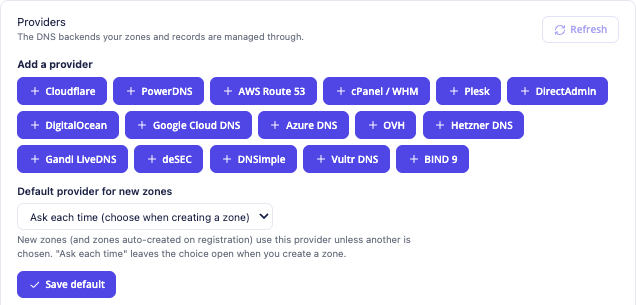
This genuine module view shows the backend choices available in the provider interface. It does not imply that every backend implements every DNS feature identically. Select the provider that fits your existing environment, then use the supported capabilities of that connection.
You can configure multiple providers and keep different zones on different backends. The records view reads current records from the zone’s provider; the provider remains the live source of DNS data. The module also stores management metadata and snapshot backups for its own features.
For a hosting operator, the advantage is a common way to work without giving up the infrastructure choice already made. Your service can present a coherent customer experience even when the backend arrangement varies across the portfolio.
Give customers a DNS workspace inside WHMCS
The customer-facing Manage DNS area groups the tools around the zones assigned to that account. Depending on the provider and enabled capabilities, it includes records, DNSSEC, import/export, forwarding and backups. Customers do not need access to WHMCS administration or your provider credentials to use their zone tools.
This is particularly useful for a host serving businesses that manage their own email or applications. The customer can add the required record as part of its normal service relationship rather than needing a separate provider login for routine DNS work.
An illustrative customer might be connecting a website-verification service and updating its mail configuration. The hosting operator provides the zone through PD DNS Manager; the customer works in its client area using the relevant record fields. The provider still publishes the DNS, while the management experience stays with the hosting business.
The account boundary matters too. The module limits customers to the zones assigned to them. Staff can also lock a zone against client edits when they need to carry out coordinated work, while retaining administrative access. That makes self-service an operator-controlled part of the offer rather than an all-or-nothing choice.
Use an editor that understands the record type
A DNS record is not just a name and an arbitrary value. An MX record needs a priority and target; SRV records have additional fields; address records require the appropriate address format. A type-aware editor makes those differences visible.

This actual editor crop shows the fields for an MX record. The values belong to the demonstration screen and are not instructions to copy into another domain. The outer account and panel information are excluded so the image focuses on the editing task.
PD DNS Manager supplies type-specific fields and validation for supported records. Common types include A, AAAA, CNAME, MX and TXT, with further types available where the backend can store them. The editor adapts the available choices to the provider rather than promising that every backend accepts every type.
That is useful to both operators and customers. The interface can ask for the information appropriate to the record instead of leaving the user to work out a provider-specific syntax. Search and filtering help find the intended record when a zone has more than a few entries.
For a marketing demonstration, this is a feature worth showing: the customer is doing real DNS work through the hosting service, not merely submitting a form for somebody else to process later.
Make common setups repeatable
Many customer DNS requests follow familiar patterns. A new hosting zone may need a standard set of records, while a business email setup may need several related entries. PD DNS Manager supplies reusable record templates and quick setups to support those repeatable tasks.
Templates can contain merge fields that resolve for the zone receiving them. This allows one maintained template to serve several customer domains instead of storing a separate copy for every name. The module also provides quick setups for Google Workspace, Microsoft 365 and an SPF no-mail policy.
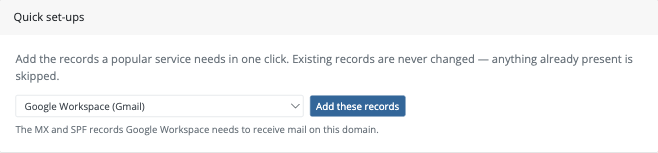
This genuine client-area crop shows the quick-setup selector. It demonstrates the route to apply a supported preset; it is not evidence that the email service has been provisioned or that a particular customer’s mailbox is working.
The commercial benefit is consistency. Your team can maintain a repeatable configuration and give customers a clearer starting point for common tasks. For exact values and the current requirements of the service being connected, use the relevant task guide rather than treating a screenshot as a universal DNS recipe.
Templates deserve their own operational planning: which records belong in the base hosting offer, which are service-specific and which values should resolve for each zone? Keeping that decision deliberate makes repeatable setup useful without overwriting the distinctions between customers.
Connect existing zones to the right customer
Introducing a DNS manager should not require recreating a portfolio simply because the zones already exist. PD DNS Manager identifies untracked zones at a connected provider and can track those matching active WHMCS domains or hosting services. Staff can also assign a zone to a client when a direct match is not available.
Tracking and provisioning are different operations. Tracking brings an existing zone into the module’s management relationship; it does not need to replace the records at the backend. Automatic tracking can maintain that relationship during later syncs where the matching rules apply.
The zone view links the provider, client and relevant WHMCS domain or service. That helps staff move from a DNS question to the commercial account it concerns. A team member can establish which customer and service own the zone instead of maintaining a parallel spreadsheet of provider relationships.
Optional auto-provisioning supports zone creation through relevant WHMCS events. Nameserver updates are a separate part of the configured registrar workflow, with provider and registrar capabilities to consider. Do not assume that creating a zone automatically delegates every registered domain to it.
Design DNS access around your products
Customer self-service should fit the service you sell. PD DNS Manager supports per-product DNS quota packages, record limits and default TTL choices, alongside settings for domain-only customer editing.
A host can choose how a domain-only customer uses the record tools, while its hosting customers retain the appropriate workflow for their service. Content policies can restrict customer-submitted values or address ranges where the operator needs those rules. Administrative work and customer edits have different authority.
This gives the operator a way to package DNS as a defined service rather than an unbounded edit screen. Your product can explain the included zones and record capabilities, and your configuration can reflect that offer.
Provider-dependent features remain part of the decision. DNSSEC controls, import/export and forwarding appear where supported by the connected backend and configuration. Some forwarding arrangements need a control-panel account relationship as well as a plain zone. Explain the capabilities of your own service rather than advertising the whole provider catalogue as though every combination were identical.
The practical benefit is a DNS experience that can grow with the hosting business: customer controls, product boundaries and operator policy all belong to the same management environment.
Go beyond one-zone-at-a-time maintenance
The module includes tools for staff managing a larger portfolio. Their roles are different, so it helps to understand the business task each one serves.
| Capability | What it contributes |
|---|---|
| Scheduled and on-demand snapshots | A point-in-time copy of zone records for the supported restore/download workflow |
| Bulk record operations | Queued changes across selected zones with per-zone results |
| Zone health and reconciliation | Visibility into provider presence and the linked WHMCS relationship |
| Provider-to-provider replication | Scheduled record mirroring from a configured source to a target |
| Scoped API access | Permitted DNS reads or writes from an authorised external automation |
Snapshots can help with planned changes as well as recovery. A restore brings records back to the selected snapshot state, so its timestamp and scope matter. It is not a claim that DNS changes have no consequences or that the entire domain service is backed up by one zone file.
Bulk operations let staff define a change and target zones, then review results as the queued job runs. This is useful when the same intended change belongs across part of a portfolio, without manually opening each zone.
Replication mirrors records between configured providers on its schedule. It is a management capability, not automatic proof that your public delegation or failover design is complete. Scoped API tokens provide another route for supported automation, with read/write choices and the documented restrictions. These features make the module relevant to an operator’s wider DNS workflow, not only to customer record edits.
An example multi-provider hosting workflow
Imagine a hosting business using a control-panel DNS backend for one part of its portfolio and a cloud DNS provider for another. This is an illustrative scenario, not a deployment testimonial.
The operator connects the two providers, identifies existing customer zones and assigns the intended account relationships. It defines which product choices and customer features belong in the offer, then introduces the client-area DNS workspace to those customers.
A business customer can use its own zone tools for supported record changes and quick setups. Staff can find the same zone from the administrative portfolio, inspect the linked service and carry out permitted maintenance. Snapshots and selected bulk tasks support the operator’s wider routine.
The result is a service model in which infrastructure diversity does not require a different customer experience for every backend. The hosting business keeps the provider connections and policies; customers get a practical route to manage their DNS through WHMCS.
Explore PD DNS Manager for WHMCS to review the module. The DNS knowledge-base guides provide the provider-specific and task-level steps once you have chosen the workflow for your own service.
WHMCS DNS Manager FAQ
Can WHMCS customers manage DNS without a provider login?
PD DNS Manager gives customers an account-scoped Manage DNS area in the WHMCS client portal. The hosting operator holds the provider connection; customers use the supported tools for their assigned zones.
Can I use Cloudflare, Route 53 and a control-panel backend together?
Yes. Multiple supported providers can be configured, with zones assigned to the intended backend. Features vary by provider, so evaluate the capabilities needed for your own offer.
Do I have to recreate existing zones?
No. The module can track existing zones at a connected provider and bind matched zones to active WHMCS domains or services. Staff can also assign an appropriate client relationship manually.
Does PD DNS Manager replace my authoritative DNS provider?
No. The connected provider continues to publish live DNS records. The module supplies management, customer access, metadata and additional features such as zone snapshots.
Can customers use presets for business email?
The module includes quick setups for supported Google Workspace and Microsoft 365 DNS records, plus an SPF no-mail preset. Applying records is different from creating the external email account or proving mailbox delivery.
Is every advanced feature available on every backend?
No. Record types, DNSSEC, forwarding and import/export depend on the provider and configuration. The interface exposes supported capabilities; your service description should match the backend you use.
Can staff automate record changes across zones?
Yes. Bulk operations support queued changes over selected zones, and scoped API tokens support permitted external DNS automation. Review the intended operation and scope rather than treating portfolio access as one unrestricted action.
Does the module include zone backups?
Yes. Scheduled and on-demand snapshots support the documented restore and download workflows. A snapshot represents the records at a specific point in time; choose the appropriate scope and timestamp when using it.
