PD AI Assistant for WHMCS: Live Account Context, Agents and Business Tools
Explore PD AI Assistant for WHMCS: live account context, action drafts, agents, knowledge, memory and automations using your own Bedrock, OpenAI or Gemini connection.
A hosting support team does more than write replies. Staff look up services, work out which account a question concerns, check previous conversations, explain the service being delivered and keep the next person informed. Useful AI assistance needs to connect with that work.
PD AI Assistant brings an AI co-pilot into WHMCS with live account context, goal-driven agents, event-based automations, knowledge sources and memory. It runs on the AI provider you connect: your own Amazon Bedrock, OpenAI or Google Gemini connection, with a documented custom OpenAI-compatible endpoint option.
For a hosting business, the opportunity is an assistant that can help investigate, prepare and organise real work inside the billing panel. This article shows the main capabilities, how they fit together and several practical workflows you could evaluate with your team.
A WHMCS AI assistant with live business context
A general answer about an unpaid invoice is different from an explanation grounded in the invoice your team is discussing. PD AI Assistant can look up WHMCS clients, services, domains, invoices, orders and tickets to answer account-specific staff questions.
The released documentation gives examples such as a whole-business overview, overdue invoices, a client summary, a particular invoice or a service’s current status. When PD Shield is installed, the assistant can use its reason for a held order as part of the explanation.
That makes the staff conversation more useful than asking someone to collect several screenshots before every question. An operator can ask about the relevant account, follow up in the same conversation and use the returned facts to decide what needs attention.
Imagine a support lead starting a shift with a question about a particular service. The useful output is not a generic list of possible hosting problems; it is a summary of the account and service information the assistant can actually retrieve. The staff member can then distinguish what the records establish from what still needs checking.
These are illustrative uses, not promises that AI conclusions are automatically correct or that every operational task is supported. The value begins with relevant context available inside the system where staff already work.
Draft the action as well as the explanation
An assistant becomes more useful when an operator can turn an answer into an appropriate next action. PD AI Assistant can prepare actions such as a ticket reply or a staff note and place them under Pending actions.
The operator reviews the prepared action and applies it from the panel. That supports a workflow in which the assistant does useful preparation while the staff member owns the final wording and decision. Deliberately enabled automatic rules are a separate operating mode, rather than the default assumption for every draft.
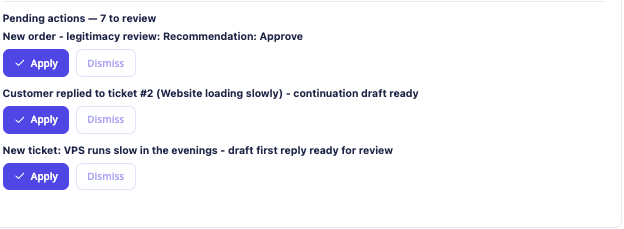
This real capture shows example proposed actions awaiting review. The task names are demonstration data, not customer cases or evidence of a measured productivity improvement.
For a support team, this can join the investigation and drafting stages. The assistant retrieves relevant information, prepares the reply or note and gives the operator something concrete to review. That is a more complete use case than an AI writing box detached from the account being served.
Give an agent a goal that needs several steps
Some staff requests are naturally multi-step. Finding the relevant account, reading the associated records and preparing a useful summary or draft is a small workflow rather than a single lookup.
PD AI Assistant includes Agents for that kind of goal. The documented examples include finding the most overdue account and drafting a reminder, reviewing a new order and summarising open tickets with proposed replies. The agent uses the connected provider, performs supported lookups and reports its run in the Agents area.
Proposed actions appear in Pending actions for the operator to apply. That distinction helps a team evaluate a goal-driven assistant without confusing “worked through a task” with “automatically sent every resulting message”.
An illustrative brief could be: “Review this new order, summarise the relevant account information and prepare a note explaining what our team should examine.” The goal tells the agent what result the operator needs. The staff member can assess the report alongside the records and any draft action.
This is a useful WHMCS AI agent capability for recurring information work, not a promise that a model can run every part of the business unaided.
Connect your own AI provider
PD AI Assistant uses the provider you configure under Settings → Provider & connection. Its released guidance covers Amazon Bedrock, your own OpenAI key or your own Google Gemini key. The OpenAI route also documents a custom OpenAI-compatible endpoint option.
| Provider route | What the hosting business supplies | How it fits the workflow |
|---|---|---|
| Amazon Bedrock | Its own configured AWS/Bedrock connection | The in-panel assistant runs through the chosen supported engine |
| OpenAI | Its own provider key and supported model selection | Staff use the assistant without copying the account work into a separate interface |
| Google Gemini | Its own provider key and supported model selection | Another documented provider choice for the same assistant experience |
| Custom OpenAI-compatible endpoint | A compatible configured endpoint and appropriate model | A documented alternative that needs compatibility checks for the intended features |
The provider bills for usage directly. The module’s Usage view is informational; it is not a separate allowance or a substitute for the provider’s own billing.
Provider choice and useful task design belong together. Evaluate the quality of the account answers, proposed actions and document-grounded responses your team actually needs, rather than choosing only by a model name. A working connection is the start of the evaluation, not proof that every kind of task will be handled well.
Give answers the knowledge your business actually uses
A hosting business has information that is not present in a generic model: product explanations, onboarding instructions, support procedures and approved service wording. PD AI Assistant’s Knowledge settings let you add your own documents by pasting text or uploading supported text and document formats.
The module extracts and indexes that material so answers can reference the sources. Source visibility distinguishes staff material from documents intended to support customer-facing answers.
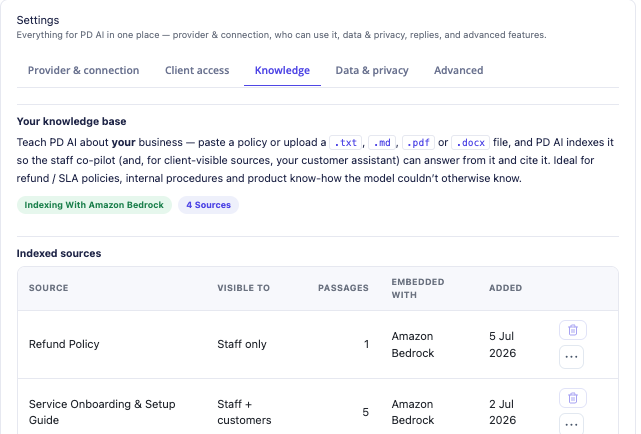
This actual screen shows example knowledge-source entries and their audience settings. The document names illustrate organisation; the article does not reproduce their contents or present them as PD Hosting customer policies.
Consider an illustrative agency with several hosting and website-care packages. Its staff assistant needs the approved onboarding guide and product explanation to prepare a consistent answer. Adding those sources gives the assistant relevant business material to use alongside the account information, rather than relying on a model’s general guess about what the agency includes.
The outcome to assess is specific: did the answer use the correct source and explain the actual service? A confident paragraph that invents an inclusion is not a successful answer. The Knowledge source controls give the team a place to maintain the material the assistant should rely on.
Use memory for continuity, with reviewable facts
Repeating the same house style and operating context in every conversation makes assistance cumbersome. PD AI Assistant provides business-wide and per-client memory to carry useful facts across conversations.
Business-wide facts can describe house style, common answers and policies. Per-client facts apply when that client is in scope. The Memory area lets staff review and forget stored items rather than treating the assistant’s memory as an invisible permanent record.
The documentation also distinguishes manually supplied business facts from facts learned by the AI. For the client-area assistant, only manually added business-wide memory is used; automatically learned facts do not become instructions for what customers are told.
For a practical staff workflow, a concise manual note about the preferred writing style can reduce repeated briefing. A specific client’s communication preference can help a staff draft when that client is the subject. Those are continuity features, not a reason to accept an unreviewed memory as business truth.
Bring recurring work to events with automations
The assistant can also respond to supported WHMCS events through Automations. The released triggers include a new support ticket, a customer reply and a new order. A rule combines a trigger, an instruction and a mode.
In Suggest mode, it prepares work for review. Auto mode applies the rule’s result automatically when deliberately enabled. Rules run in the background on cron, keeping the work separate from the customer’s page request.
A hosting team might use a suggest-mode rule to prepare the first response to a new ticket, using approved knowledge and the relevant context. Another might prepare an order review for staff. These are different jobs and deserve different instructions, even when they use the same provider connection.
This article introduces the capability; a later focused automation article covers rule design and evaluation in more detail. The important product benefit is that a recurring event can begin the assistance workflow, rather than requiring an operator to start the same conversation manually each time.
Keep the team informed through connectors
PD AI Assistant supports notification connectors for Slack, Microsoft Teams and a generic webhook. An assistant or agent can send a notification to a configured connector, such as alerting a team that an order review needs attention.
These are notification connections. They should not be described as an automatic import of every Slack conversation or a full two-way CRM integration. The documented purpose is to put an appropriate update into the tool the team already watches.
The module also has an HTTP API for supported assistant work from your own systems. That is another way to connect the capability to an existing operating workflow, without implying that every external application already has a ready-made integration.
Extend the toolkit with PD MCP Hub
PD AI Assistant supplies the in-panel assistant experience. PD MCP Hub provides a separate way to expose supported WHMCS tools, contributions from installed PD modules and approved attached MCP servers.
Enabling the assistant bridge in MCP Hub makes those capabilities available to the co-pilot under the hub’s limits, while the assistant’s own tools retain priority. This can expand the toolkit relevant to a staff task without requiring the operator to move the conversation into a different application.
For example, a task that needs an approved external tool can use the bridge when that tool is actually supplied by an attached server and allowed for the connection. That is different from an ordinary notification webhook and should be evaluated as its own supported integration route.
Explore PD MCP Hub for WHMCS for the tool-hub capability, including connections from external MCP clients such as Codex.
Three practical ways to evaluate the assistant
These are hypothetical team workflows, not customer stories or promises of measured savings.
A support shift handover: ask for the relevant account and ticket context, then prepare a concise note for the next operator. Check the note against the retrieved records and the information the next person actually needs.
A service explanation: supply the approved product/onboarding knowledge, identify the relevant client or service and ask for a draft answer. Assess whether it explains the correct package without inventing inclusions or borrowing another client’s context.
An order-review workflow: give an agent a defined review goal or configure the supported order event in Suggest mode. Inspect its report and proposed note, then decide which recurring review is useful enough to keep.
Each example links a product capability to an observable result. That makes evaluation more concrete than asking whether the assistant “sounds intelligent”.
Add AI assistance where your team already works
PD AI Assistant brings together live context, action drafts, agents, knowledge, memory and event-based workflows inside WHMCS. Provider choice and notification/API options let a hosting company fit that assistance around the tools it already operates.
Install it through PD Modules after connecting the account that holds your licence, configure the provider and give the team an actual task to assess. The optional client-area assistant is a separate surface that can be enabled for customers; this article focuses on staff use rather than treating both audiences as one.
Explore PD AI Assistant for WHMCS and use the module guide for the setup workflow.
Frequently asked questions
Which AI providers can PD AI Assistant use?
Its released guidance covers your own Amazon Bedrock, OpenAI and Google Gemini connections, plus a custom OpenAI-compatible endpoint option. Check the provider and model options supported for your intended workflow.
Can the assistant read actual WHMCS account information?
Yes. Its supported lookups include clients, services, invoices, orders and tickets, so staff can ask account-specific questions rather than supplying all context manually.
Does an agent automatically send its proposed ticket replies?
Agents can prepare action drafts for Pending actions. Staff review and apply them. A deliberately enabled Auto automation rule is a separate behaviour and should not be confused with the ordinary review workflow.
Can we add our own hosting knowledge and documents?
Yes. Knowledge settings support pasted text and supported document uploads, with source indexing and audience visibility. Keep the sources current and check that answers use the appropriate material.
How is memory different from a knowledge document?
Knowledge supplies maintained source material. Memory carries reviewable business-wide or per-client facts across conversations. They serve different purposes and should not be treated as interchangeable stores of approved information.
Can it notify Slack or Microsoft Teams?
Yes, through configured incoming-webhook connectors. Those notifications do not imply full two-way access to the messaging platform’s history or administration.
Can it use tools from PD MCP Hub?
Yes. Enable the assistant bridge in MCP Hub. The hub’s tools remain subject to its limits, and PD AI Assistant’s own tools retain priority.
