Sell AWS Lightsail VPS Hosting Through WHMCS with Customer Self-Service
Sell AWS Lightsail VPS hosting through WHMCS with automated provisioning, configurable plans, pricing analysis, browser SSH and customer server controls.
PD AWS Lightsail is a WHMCS provisioning module for selling Amazon Lightsail instances through your own hosting business. Customers order a VPS from your WHMCS store, the module creates it in your AWS account, and they manage the server from their client area. Your team keeps the billing relationship, product design and customer experience.
That connection matters beyond saving a few clicks during setup. A VPS offer needs a complete journey: choosing resources, paying, receiving access, managing the machine and moving to a larger plan. PD Lightsail connects those stages so your business can sell AWS-backed VPS hosting with an experience built around its own customers.
For a hosting company expanding its cloud range, or an agency bringing development servers into its recurring services, this is a practical way to turn AWS Lightsail into a WHMCS product. Here is what the module adds and how its capabilities can shape a useful hosting offer.
From an AWS instance to a VPS service you can sell
Buying infrastructure and selling hosting are different jobs. AWS supplies the Lightsail instance; your hosting company decides which customers it serves, what the product includes and how to deliver ongoing help. WHMCS handles the commercial account and billing, while PD Lightsail connects that account to the server lifecycle.
The instance runs in the AWS account you connect as the operator. Customers do not need access to your AWS console to restart their VPS, find connection details or use the management tools you enable. They return to the same client area where they manage their hosting service.
Consider an illustrative agency offering development VPS hosting to its website clients. It could choose a small selection of Linux plans in London, keep the operating-system image consistent and let customers select an appropriate resource tier. Another host could sell several regions with more choice in the cart. Both use the same module, but the operator controls the offer.
This also leaves room for your own expertise. You might sell a self-managed VPS, an application setup service or an ongoing management package. The module supplies provisioning and server controls; your product description explains the additional work your team delivers. Customers can then understand both the infrastructure and the service they are buying.
Build the checkout from real Lightsail choices
A cloud hosting product should connect the customer’s selection to the resource that is actually created. PD Lightsail reads Lightsail plans and operating-system images from AWS and can generate WHMCS Configurable Options for supported dimensions, including region, plan, operating system, extra storage and static IP.
You decide which choices belong in checkout. A fixed product can keep region and image in its Module Settings, while a more flexible offer exposes selected dimensions to customers. This gives you useful commercial control: a simple entry-level VPS need not present every available AWS choice, while a developer product can make meaningful options visible.
The module separates the platform, region, image and instance plan. Linux and Windows choices are filtered appropriately, and IPv6-only networking is a distinct product decision. This helps your team build an offer that matches the customer’s connectivity and software requirements rather than treating all plans as interchangeable.
For example, a London-focused Linux VPS product could keep its location fixed and offer a choice of resource tiers. An application-specific product could also fix the blueprint, giving customers a consistent starting point. You can explain the value of the selection in the product description without asking the buyer to understand your AWS account configuration.
Use the Lightsail WHMCS task guides for the detailed account and product setup. The important marketing point is that the checkout can describe a real service choice, and the module carries that choice into provisioning.
Price AWS-backed hosting with provider costs in view
Resource automation is useful only if your team can make sensible commercial decisions around it. PD Lightsail includes Price Analysis, showing the underlying AWS plan cost alongside a suggested customer price calculated from your chosen target margin.
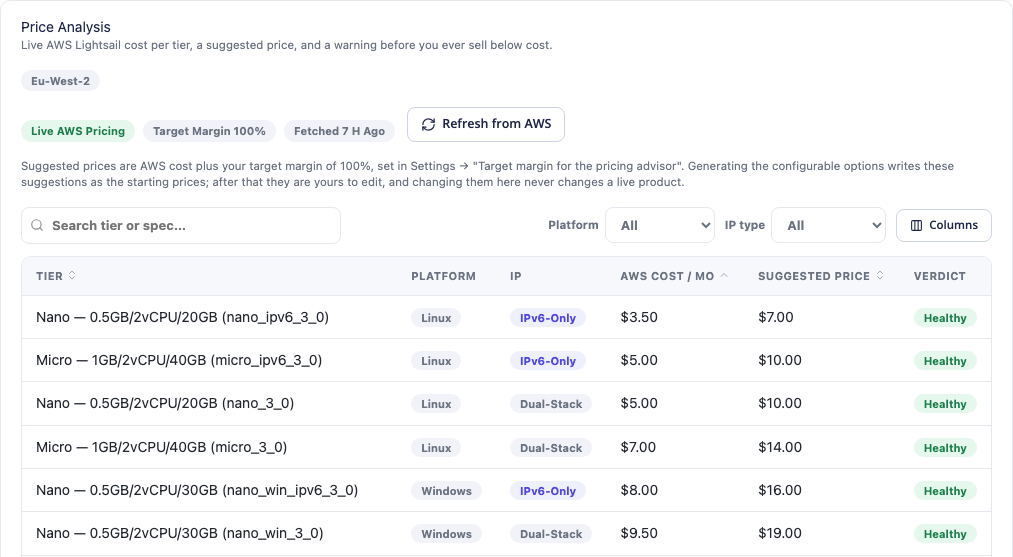
This genuine module view shows the relationship between AWS costs and suggested selling prices. The displayed amounts are examples from the capture, not a current quotation or a price for the PD module. The platform and IP-type filters help compare the relevant resource variants.
A pricing adviser gives your team a practical starting point when building configurable options. It also makes it easier to revisit a plan deliberately instead of copying a figure into WHMCS and losing sight of its source. The screen explains that editing the adviser does not itself change a live product price: the operator remains in control of what customers pay.
Your hosting price can include more than the AWS instance. Support, application maintenance, backups and your own operating work may all affect the service you sell. Use the resource comparison to understand one part of the cost, then set WHMCS pricing for the complete offer.
That distinction is useful when positioning an AWS Lightsail reseller service. The customer buys a defined hosting product with billing and support from your business; they are not simply being shown an AWS cost table with your logo above it.
Join provisioning to the WHMCS service lifecycle
PD Lightsail connects instance creation to the WHMCS product workflow. When your configured setup conditions are met, it provisions the instance in the selected AWS region. Your normal WHMCS automation policies determine when setup should run in relation to payment or order handling.
The lifecycle mapping continues after the first order:
| WHMCS module operation | Lightsail resource action | What this enables for the hosting business |
|---|---|---|
| Create | Provision the instance | Turn the ordered VPS product into a server resource |
| Suspend | Stop the instance | Apply the service suspension through the billing platform |
| Unsuspend | Start the instance | Restore the server lifecycle after the appropriate billing event |
| Terminate | Delete the instance | Complete the resource removal associated with service termination |
Those actions make WHMCS a working part of delivery, rather than a separate record that staff must manually match to AWS. Administrators also have a service view with the instance specification, addresses, state, usage and relevant actions.
A stopped instance and a deleted instance have different meanings, so customer communications should match the operation your business performs. A suspension is not a promise that every AWS charge ends, and termination is not a way to pause a server. Clear product and billing policies help customers understand that lifecycle without turning each routine action into a support conversation.
Give customers useful VPS controls inside WHMCS
The customer experience continues well beyond an activation email. PD Lightsail supplies service actions and management views that help customers use their own VPS without handing them your provider account.
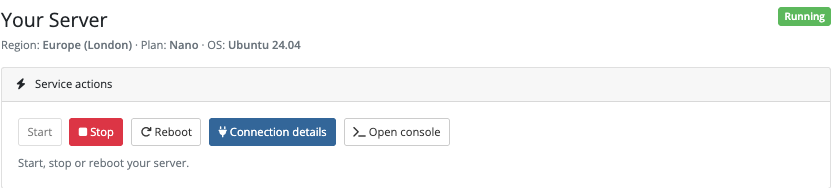
This actual client-area capture shows the server state and the available action buttons. Start is disabled while the server is running; the page makes the current state visible alongside the actions. The crop deliberately focuses on the controls rather than unrelated billing details.
The documented customer capabilities include:
- Power actions: start, stop and reboot the instance from the client area.
- Connection details: find the relevant SSH information, or RDP details for a Windows service.
- Snapshots: create and manage supported snapshots, with automatic backups where enabled.
- Firewall: manage instance ports, protocols and allowed source ranges.
- Usage graphs: view CPU and network activity.
- Activity: see recorded server operations and their status.
- Browser console: open an in-browser SSH terminal when the console is enabled and the service meets its requirements.
You control the available features per product. This lets your offer and customer interface agree: a product can expose the tools its intended users need while keeping other choices fixed. A developer who needs to adjust a firewall or reboot after an update can do that through the hosting service they already recognise.
The benefit is a more complete service experience. Routine controls are available where the customer expects them, and your staff can spend their attention on the work that actually requires their expertise. The module does not promise a measured reduction in tickets; it gives you the functions that make customer self-service possible.
Browser SSH is a feature worth explaining
A browser terminal is particularly useful when a customer wants quick command-line access without preparing a local SSH application. With the console enabled for an eligible running service, the customer can open a terminal from their service page and work on the server through the browser.
PD Lightsail uses short-lived, single-use session authorisation and checks service ownership. The server’s SSH key is not delivered to the customer’s browser. The hosted relay option means your team can offer the terminal without deploying a separate relay of its own; alternative relay arrangements are documented for operators who need them.
There is a clear distinction between that convenience and a claim that no data passes through the console infrastructure. A hosted relay carries the live terminal session. The documented design keeps the key out of browser storage and does not record session contents, but it is not a zero-knowledge terminal. Choose and configure the console arrangement appropriate to your service.
For the customer, the practical benefit is straightforward: the VPS controls include a route to the command line, alongside connection details for a normal SSH client. For your business, the browser console is a visible part of the hosting experience you can demonstrate before purchase.
Make growth and everyday management part of the product
A useful VPS service needs an answer to “what happens when this plan becomes too small?” PD Lightsail supports moving to a larger plan through the WHMCS upgrade workflow. The documented process takes a snapshot, creates the larger instance and swaps the service to it to preserve server data.
Explain that as a server migration to larger resources, rather than promising an instantaneous or interruption-free change. Customers can understand the upgrade path while your team sets sensible expectations about the operation. The result is an offer with a defined route beyond the initial resource tier.
Snapshots and automatic backups provide another opportunity to describe real customer value. Decide whether automatic snapshots belong in a product and which snapshot controls customers may use. Connect that choice to the service you advertise, rather than leaving buyers to discover it after ordering.
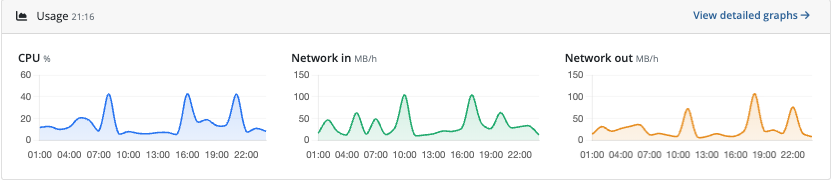
This real client-area view shows the resource graphs available to customers. It helps illustrate that the service includes ongoing visibility, not only a one-time provisioning event. Graphs are a way to understand activity; they do not automatically diagnose the customer’s application or choose an upgrade for them.
Optional bandwidth metering is also available per product and is off by default. If transfer allowance forms part of your offer, you can connect usage reporting to the relevant WHMCS behaviour. If it does not, you can leave that option off and keep the product simpler.
A practical Lightsail hosting offer
Imagine a hosting business introducing a Linux VPS range for small development teams. This is an illustrative example, not a customer deployment or a performance result.
The business could start with a defined region, a supported Linux image and a small set of resource tiers. Its staff use Price Analysis to understand AWS costs, then set selling prices that reflect the hosting service and the work included. Configurable Options expose the resource choices that customers can meaningfully compare.
After an order meets the WHMCS setup conditions, PD Lightsail creates the instance. The customer opens the service page, sees its state, uses connection details or the enabled browser console, and manages power and firewall settings. Usage graphs and snapshots become part of using the service rather than separate reasons to ask staff for provider-console access.
As the customer’s needs grow, the larger-plan workflow provides a route to more resources. Your business continues to own the commercial relationship, choose the support scope and manage the AWS account. The module connects those decisions into a deliverable VPS product.
That is the opportunity behind reselling AWS Lightsail through WHMCS: combine AWS infrastructure with your own billing, service design and customer experience. Explore PD AWS Lightsail for WHMCS to review the module, then use the configuration and customer-control guides for the next steps.
AWS Lightsail WHMCS FAQ
Is there a WHMCS module for AWS Lightsail provisioning?
Yes. PD AWS Lightsail connects WHMCS products to Lightsail instance provisioning and lifecycle operations, with customer management controls in the WHMCS client area.
Do the instances run in my AWS account?
Yes. The documented operator workflow connects your AWS account through a WHMCS Server record. Instances are created using that account; your customers use the WHMCS service interface rather than your AWS administration console.
Can customers choose a Lightsail plan and region at checkout?
Yes. You can generate supported Configurable Options and choose which dimensions to expose. You can also keep a region, image or other setting fixed in the product when that creates a clearer offer.
Can I set my own VPS selling prices?
Yes. Your WHMCS product and option prices define what customers pay. Price Analysis shows provider costs and suggested prices using your target margin, helping your team make those decisions without automatically repricing existing products.
Does the client area include SSH access?
It includes connection details for normal SSH access and an optional browser SSH console for eligible services when configured and enabled. Windows services use the relevant RDP connection details. The browser terminal does not require the customer to receive the server key in their browser.
Can customers manage firewalls and snapshots themselves?
Yes, where those product features are enabled. PD Lightsail provides customer firewall and snapshot controls alongside power actions, usage graphs and activity. You decide which controls belong in each product.
Can a customer upgrade to a larger Lightsail plan?
The documented WHMCS upgrade flow supports moving to a larger plan using a snapshot and replacement-instance process that preserves server data. Treat it as a planned resource change, rather than promising zero interruption.
Does the module make every VPS a fully managed service?
The module provides provisioning, lifecycle integration and server-management tools. Your hosting business decides whether its offer also includes operating-system maintenance, application support or other managed services, and describes that scope to customers.
