Resell AWS EC2 Through WHMCS: Pricing, Provisioning and Customer Controls
Resell AWS EC2 through WHMCS with configurable server choices, pricing analysis, automated provisioning, browser SSH and customer management tools.
PD EC2 lets a hosting business sell Amazon EC2 servers as its own WHMCS products, with provisioning and customer management connected to the service lifecycle. Instances run in your AWS account. Customers order through your store and use their client area for the server controls you offer.
That makes EC2 relevant to more than a backend provisioning step. The module includes live catalogue choices, generated checkout options, a pricing adviser, customer power controls, storage tools, backups and an optional browser console. Your team can build a cloud product around those capabilities while keeping its own billing relationship and service promise.
For a host or agency expanding into AWS-backed VPS services, the opportunity is a more complete route from product design to everyday customer use. Here is how the main capabilities fit together.
Turn flexible EC2 resources into an understandable offer
EC2 gives an operator choices around instance types, images, regions and storage. A hosting customer needs those choices presented as a service they can understand and buy.
PD EC2 uses product defaults for region, instance type, image and root-disk size. Supported Configurable Options can expose region, instance type, operating system, additional storage and automatic-backup retention. You decide which dimensions belong in the cart and which stay fixed.
An illustrative hosting company could build a Linux VPS range with a small set of instance sizes and a consistent image family. An agency could create a product for a defined application environment, with location and image fixed while customers choose an appropriate resource tier. These are hypothetical product designs, not customer deployments or performance results.
A curated offer is easier to explain than an unfiltered infrastructure catalogue. The module supplies the supported choices and provisioning connection; your business chooses the audience, the service scope and the support work included.
This leaves room for a self-managed product or for an additional managed-service arrangement your team actually delivers. Provisioning an instance is not, by itself, application maintenance. Describe those parts separately so the customer knows what the hosting service includes.
Keep your product choices connected to AWS
PD EC2 reads instance types and image information from AWS. An image can be selected as a family resolved for the chosen region at launch, allowing the product to follow the intended image family instead of relying only on a manually copied image identifier.
The module also identifies retired catalogue choices and supports a non-destructive sync of the generated options. The documented behaviour hides retired choices rather than deleting the selection already associated with an existing customer, and preserves the operator’s prices.
That distinction matters to a reseller. Maintaining the choices for new orders should not casually rewrite the commercial arrangement or selection of every service already sold. Your team can review the catalogue changes and decide how to present the current offer.
This is useful when a business expands beyond one fixed VPS size. The available resources, the generated checkout and the installed service are related, but they have different purposes. The module brings them into one workflow while keeping those distinctions visible.
Use Price Analysis before setting your selling prices
The Price Analysis screen compares AWS On-Demand instance costs with a suggested customer price using the target margin configured by the operator. It gives the team a way to review the resource component of its offer before setting or revisiting the selling prices.
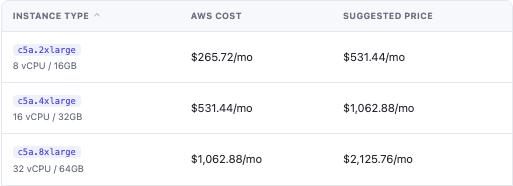
This genuine module crop shows example instance types and cost suggestions. The figures are historical demonstration values, not a current AWS quotation or a PD module price. The adviser uses the relevant Linux On-Demand reference in the configured region; do not treat it as a complete cost for every operating-system and resource combination.
Your selling price still needs to reflect the service the business delivers. Attached storage, transfer, other provider charges and the operating work your team includes may affect the complete offer. A resource-price comparison is useful input, not a guarantee that a package earns a particular profit.
Generating Configurable Options can use the pricing-adviser context for the supported choices. Later operator pricing remains under WHMCS’s option settings, with the documented catalogue sync preserving those prices.
For a hosting business, the advantage is a more informed product-design process. Staff can discuss the resource cost and the customer price together rather than keeping the AWS view separate from the packages they sell.
Join order delivery to the WHMCS lifecycle
The module maps WHMCS resource operations to EC2 actions. Creation launches the instance, suspension stops it, unsuspension starts it and termination removes the service’s managed infrastructure through the teardown workflow.
A configured service can include an Elastic IP, security group and SSH key alongside the instance. This connects more of the usable server setup to the order rather than treating the virtual machine as the only resource involved.
| Service operation | Practical resource effect |
|---|---|
| Create | Launch the configured EC2 server and associated setup |
| Suspend | Stop the instance while retaining the intended resource state |
| Unsuspend | Start the instance again |
| Terminate | Remove the managed server and associated resources through the module’s workflow |
Your normal WHMCS setup and billing policies determine when those operations should run. The module supplies the infrastructure integration; the business remains responsible for the policies and the customer communication around them.
Stopping a server is also different from ending all AWS charges. AWS’s instance lifecycle documentation explains that resources such as EBS volumes and Elastic IP addresses can still incur costs independently of the instance’s running state. That distinction belongs in the operator’s resource model, particularly when using suspension or schedules.
The module’s teardown covers the resources it manages for the service. Avoid presenting it as an unlimited promise that every resource elsewhere in the AWS account has stopped billing.
Make the client area useful after provisioning
A customer wants to use the server after the order completes. PD EC2 provides a management interface with status, connection details and the available controls, rather than leaving the customer with only a service name and an invoice.

This actual customer-interface crop shows the power and connection actions. The disabled Start action reflects the running server in the example. Networking values and unrelated account information are outside the crop.
Customers can use the enabled power tools and view connection information appropriate to the service. Linux services use SSH access with the relevant image login user and key. Windows offerings use the documented RDP-ready arrangement, with the operator supplying the required Administrator credentials through its service process.
An Elastic IP provides a stable public address across the supported stop/start lifecycle. That is useful when the customer connects other services to the machine and wants the same intended address after a normal power operation.
These are concrete features to include in a product demonstration. A buyer can see where ordinary server work happens and what the hosting company makes available in the client area.
Offer a browser console for running Linux services
The optional in-browser SSH console gives an eligible running Linux service a terminal route through the client area. The operator enables the feature deliberately; it is off by default.
For a customer who wants quick command-line access, that can be more convenient than preparing a local SSH application first. The documented connection uses short-lived, single-use session authorisation and keeps the server’s SSH key out of the browser.
The benefit is practical access, not a claim that every server task becomes automatic. A customer still needs the appropriate knowledge to administer the machine and the application it runs. Your service can explain both the console convenience and the support scope around it.
A browser terminal is particularly useful to demonstrate alongside the normal connection details. It gives the VPS interface a direct route to useful work, while customers who prefer a local SSH client can continue to use that route.
Include storage, firewall and usage tools in the offer
Where enabled, customers can add extra storage, grow an existing disk and remove a disk they no longer need. A larger provider volume may still require the customer to extend the filesystem inside the server before the operating system uses all of the new capacity.
Firewall controls provide supported inbound-rule management by protocol, port and source. Your offer can give suitable customers a way to manage the network access their applications need without providing your AWS administration account.
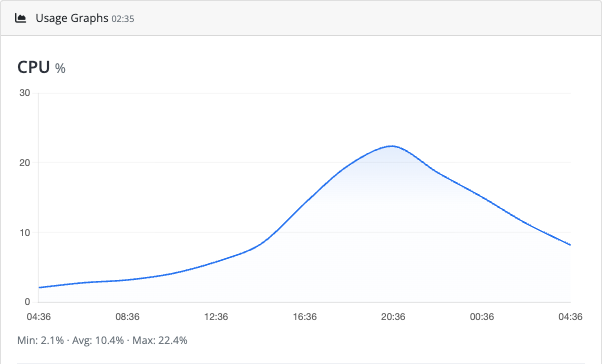
This real client-area crop shows the CPU usage chart. Its values demonstrate the graph interface, not a benchmark or a measured customer workload. Network graphs provide the related resource-activity views where enabled.
Together, the features help turn the service into something customers can operate day to day. They can inspect activity, make supported changes and return to the hosting portal for the next task.
Your product should still make the intended controls clear. A fixed application service may expose a different set of options from a developer-oriented server. Choose the settings that match the offer rather than advertising every interface function as mandatory for every buyer.
Plan schedules, backups and growth around the service
Optional start/stop schedules can help customers operate eligible instances around a defined daily pattern. The module runs the scheduled work through the WHMCS background process when enabled. A schedule is an operating choice for a suitable workload, not a promise that a stopped service remains available to its users.
Backups provide a further management capability, with the documented backup view and supported automatic-retention choices. Explain the backup scope and the available operation in the product guidance rather than using “backup” as an undefined assurance.
A customer needing larger resources can use the supported upgrade flow. The documented larger-instance resize keeps the disk and its data while changing the server size. Treat that as a planned change, with the appropriate service expectations, rather than promising every resize is instantaneous or interruption-free.
Optional transfer metering can record monthly outbound data-transfer usage into WHMCS for the native usage and overage arrangement. It is off by default and is relevant when the hosting product actually sells a transfer allowance. Fixed disk allocation is a different measurement and is not made into a usage meter by that switch.
These choices give an EC2 reseller more than an initial launch button. They support a product whose resource controls, growth path and operating pattern can be designed as part of the service.
An illustrative AWS-backed VPS range
Imagine a hosting business launching a Linux server range through WHMCS. This is an illustrative workflow, not a customer testimonial or a forecast of its results.
The team selects the intended regions and image families, exposes a curated resource choice and reviews Price Analysis before setting its prices. It configures the customer controls and explains which work is self-managed and which additional services the business delivers.
When an order meets the normal setup conditions, PD EC2 launches the server and the managed resource setup. The customer receives the service in its client area, where it can use power tools, connection details, the enabled browser console and the relevant management views.
Later, the customer can follow the supported resource-change path, and the operator can use the service lifecycle rather than maintaining a disconnected list of AWS machines. Your AWS account remains the infrastructure relationship; your hosting business remains the provider the customer buys from.
Explore PD EC2 for WHMCS to evaluate the integration. If fixed-size Lightsail plans better match the intended range, PD AWS Lightsail is a separate option to consider. The EC2 knowledge-base guides provide the detailed account, product and customer-control tasks.
AWS EC2 WHMCS FAQ
Can I resell AWS EC2 servers through WHMCS?
Yes. PD EC2 connects WHMCS products and their supported options to EC2 provisioning in your AWS account, with service lifecycle operations and customer management tools.
Can customers choose instance type, region and operating system?
You can generate supported Configurable Options and choose which dimensions to show. Other choices remain fixed to the product defaults, allowing a curated rather than unrestricted checkout.
Does Price Analysis include every AWS cost?
No. It provides an On-Demand instance-price reference and suggestions at the configured margin. Evaluate storage, transfer, operating-system and other costs relevant to the complete offer separately.
Can customers open a browser SSH console?
Yes, for eligible running Linux services when the operator enables the optional console. It uses the documented session controls and keeps the server’s SSH key out of the browser.
Does stopping an EC2 instance stop every related charge?
No. Resources such as EBS storage and Elastic IP addresses can still incur charges independently. Suspension, scheduling and termination serve different purposes.
Can customers manage storage and firewall rules?
The documented client tools include supported storage and firewall operations where enabled. Explain the controls included with the product and the separate operating-system step that may follow growing a disk.
Can I bill for data-transfer usage through WHMCS?
Optional transfer metering records outbound usage for WHMCS’s native usage and overage arrangement. It is off by default; enable it when it matches the product’s transfer model.
Is EC2 the same product model as Lightsail?
No. EC2 uses instance types, image choices and associated EC2 resources; Lightsail provides its own bundled plan model. Choose the module that matches the range your business wants to deliver.
