Accept Crypto Payments in WHMCS: From Customer Wallet to Paid Invoice
Accept Bitcoin, Litecoin, Ethereum and USDT in WHMCS, with direct-to-wallet payments, no PD transaction commission and optional exchange auto-conversion.
A customer wants to pay a hosting invoice in cryptocurrency. You can give them a wallet address, but the work does not end when funds arrive. Your team still needs to identify the invoice, check the amount, wait for the required confirmations and update the billing record.
PD Crypto Pay brings that workflow into WHMCS while payments go directly to your chosen receiving wallet. PD takes no custody of your funds and charges no per-transaction commission. You choose where payments arrive, which coins to accept and how the module handles them.
This guide follows the journey from a customer’s invoice to a confirmed payment, using our WHMCS video tutorial and real product screens. It also explains the choices that matter before you enable crypto at checkout.
Why a wallet address is only the beginning
Imagine a customer sends a payment and opens a ticket saying, “I’ve paid, but my invoice still shows unpaid.” Staff need more than a screenshot from the customer’s wallet. They need to establish which invoice the payment belongs to, whether the right amount arrived on the right network, and whether it has enough confirmations to count as complete.
Now add a second customer paying at roughly the same time, a withdrawal that arrives slightly short, or a transaction that appears after its quote has expired. Those are separate situations, and each needs a clear outcome in your billing system.
PD Crypto Pay connects the payment request, incoming transaction and invoice record. It provides a payment history and timeline so staff can inspect what happened rather than reconstruct the journey from messages and block-explorer tabs.
The practical benefit is a consistent process: customers can see their payment progress, and staff have the corresponding record inside WHMCS.
Direct to your wallet, with no PD transaction commission
PD Crypto Pay is a payment gateway module running inside your WHMCS installation. It is not a custodial payment-processing service that collects customer funds and later releases a payout to your business.
With a self-custody receiving wallet, the payment path is straightforward:
Customer’s wallet → your receiving wallet
The module watches for the payment and applies the matching, confirmed amount to the WHMCS invoice. Funds do not pass through a PD wallet, and there is no separate payout from PD to wait for. Network confirmation still takes time; direct receipt does not mean every payment is immediately complete.
We take no percentage of the payment and no per-transaction fee. That is different from saying cryptocurrency transactions have no costs: network fees still apply, and optional services you choose can have their own charges. There is no PD commission deducted from each payment.
Control also means choosing how much authority you give the module. You can receive into a wallet whose spending keys remain outside WHMCS, or deliberately configure a wallet that lets the module send funds. Those choices serve different workflows.
Watch the WHMCS payment journey
Our PD Crypto Pay video tutorial walks through wallet configuration, coins and networks, payment rules, checkout and the resulting invoice record.
The demonstration uses Ethereum Sepolia test coins, which have no monetary value. It lets you see the workflow without presenting a test payment as a live customer transaction.
For a particular part of the process, jump to adding a wallet at 1:42, the payment rules at 5:57, or the customer checkout at 7:39.
Accept Bitcoin, Litecoin, Ethereum and stablecoins in WHMCS
If you are looking for a WHMCS Bitcoin payment gateway, begin with how BTC payments will reach your wallet and be matched to an invoice. PD Crypto Pay supports Bitcoin (BTC), Litecoin (LTC) and Ethereum (ETH), alongside supported stablecoins such as USDT and USDC.
You choose which coins to offer; customers select from the ones you enable. There is no need to turn on every supported network to add a useful payment option to your hosting invoices.
The supported networks also include Tron, Polygon, BNB Smart Chain, Base and Arbitrum. For additional tokens, the Add a token workflow lets you select a supported network and supply an ERC-20 or TRC-20 token contract address. The module reads the token details, so you can configure the token you intend to offer without waiting for a separate gateway module. It still needs the correct receiving wallet and a usable price source.
For Bitcoin and Litecoin receiving, fresh-address support helps separate invoice payments. Ethereum and other account-based networks use different receiving arrangements, including your own address pool or a fixed address. Check the wallet mode for the network you intend to accept.
For USDT or USDC payments, select the intended supported network as well as the token. An Ethereum token payment and a token with the same name on Tron are different payment routes. The address and network shown on the invoice must match the route the customer uses.
A sensible starting point is one coin and one receiving workflow, followed by a test of the full invoice journey. Add more coins once staff understand how payments and exceptions are recorded. The video demonstrates an Ethereum Sepolia test payment; it is not a demonstration of every currently supported coin.
What your customer sees on the invoice
The customer opens their WHMCS invoice and chooses the cryptocurrency payment option. They select from the coins you have enabled, then receive a payment request showing the amount and destination for that network.
The checkout includes:
- The exact cryptocurrency amount to send.
- The receiving address and a QR code for a compatible wallet app.
- The selected network.
- The time remaining in the payment window.
- A status that changes as the payment progresses.
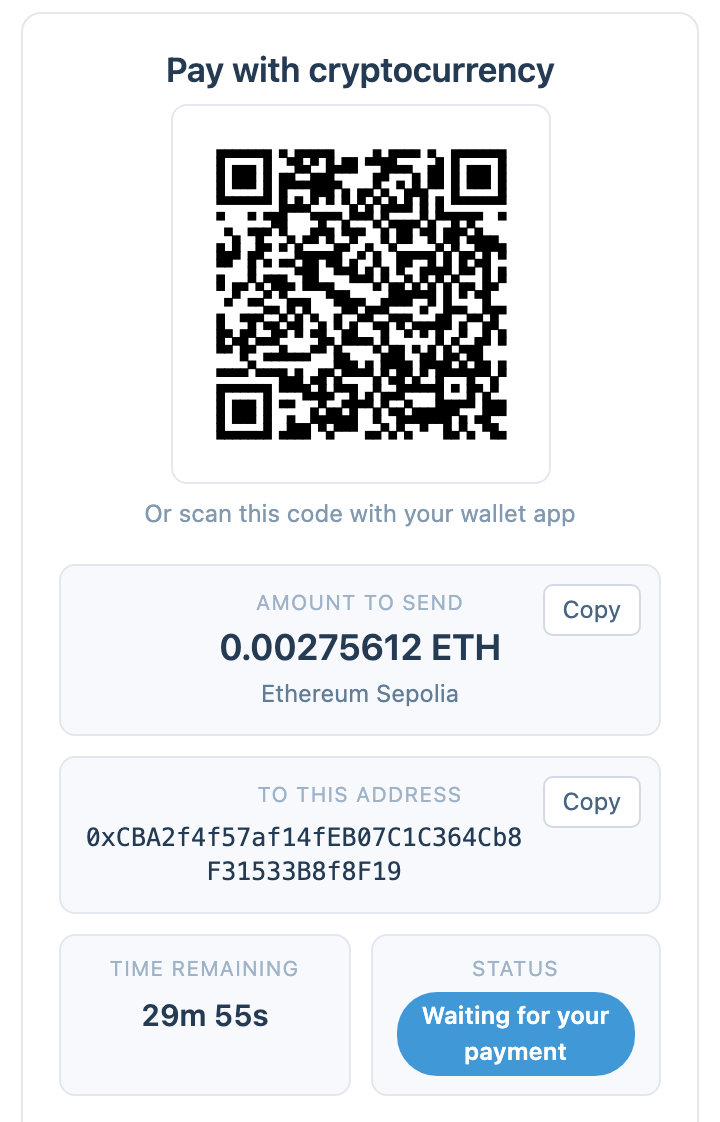
The tutorial’s test-network payment screen. The amount, address and network belong to this demonstration.
The customer remains in the invoice checkout rather than being redirected to a separate payment processor’s website. The instructions give them a specific payment request to follow, including the network—not just a general invitation to send crypto somewhere.
That network detail matters. A token name alone is not enough to identify how a payment should be sent. The customer needs to use the network displayed on the payment request.
How the payment becomes a paid invoice
The journey has several distinct stages. First, the module quotes the cryptocurrency amount. It then detects an incoming payment, checks its confirmation progress and credits the matching invoice when the conditions are met.
You control the confirmation requirement for each coin. A transaction being visible on a blockchain is not the same as the invoice being ready to mark Paid. Keeping those stages separate gives both the customer and your team a clearer explanation of a payment that is still processing.
In the normal matched-and-confirmed flow, the invoice update happens automatically. Staff can open the payment’s Details & timeline to inspect the amount requested, amount received and events leading to the credit.
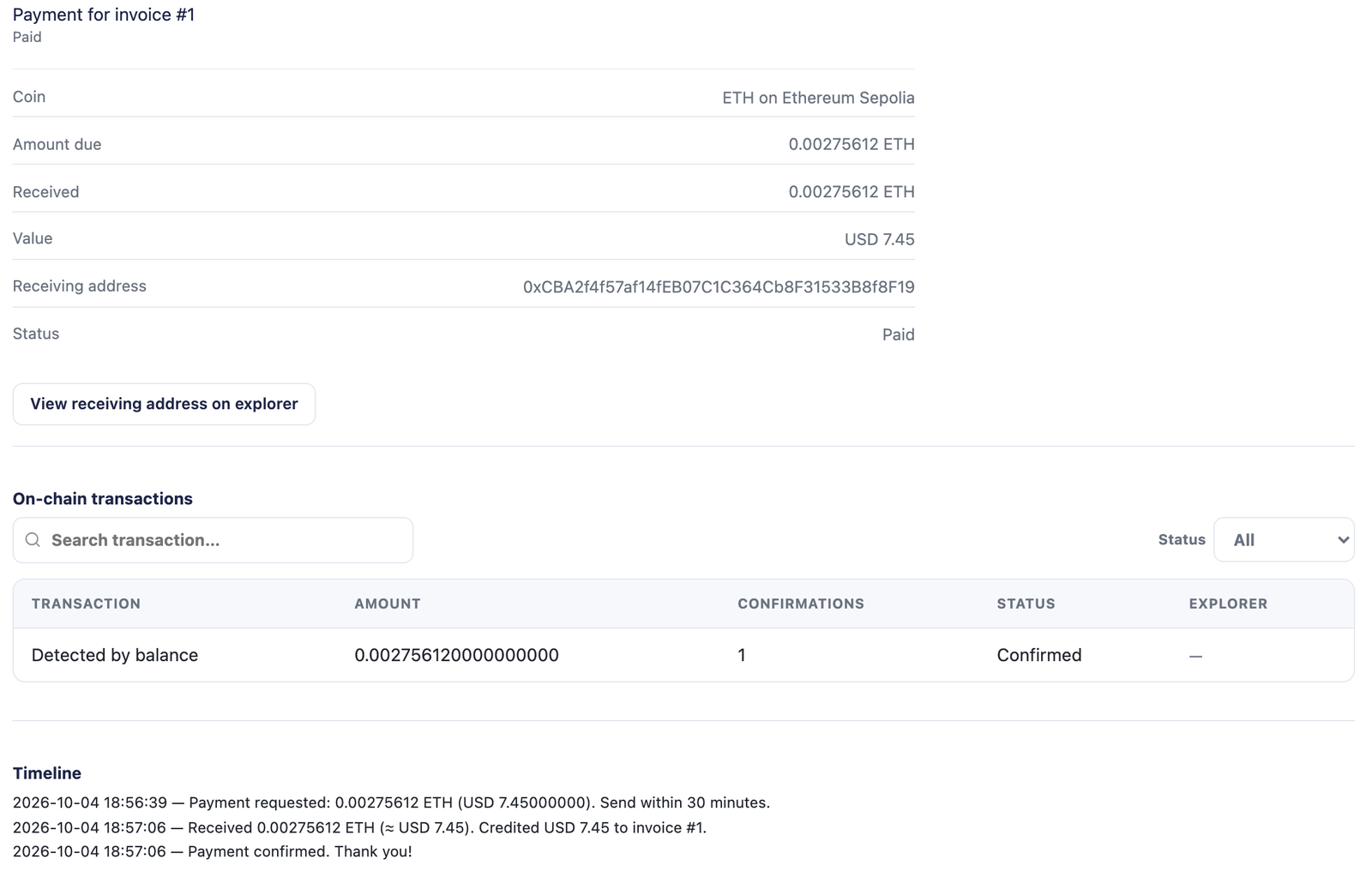
The same demonstration payment recorded against its invoice. This shows the workflow, not a promised confirmation time.
Address choice also affects matching. Where supported, a fresh receiving address for each payment makes the intended invoice easier to identify. A pool of your own addresses is another option. A single shared address uses the quoted amount to distinguish payment requests; an unexpected amount can need manual allocation when several invoices could match.
That is why the receiving setup deserves attention before taking multiple payments at once. Do not assume every wallet mode gives each invoice a new address.
Scheduled checks matter too. Payment detection, price refreshes and any enabled conversion or sweep rules are background work, driven by your configured cron. The PD Modules Jobs page lets staff review that work. Running checks more frequently can shorten the wait until the module notices a confirmed payment; it does not make the blockchain confirm the transaction faster.
Choose the control you want over your wallet
Your receiving address and your spending authority are different things. PD Crypto Pay supports workflows where it watches incoming funds and workflows where it can also send them.
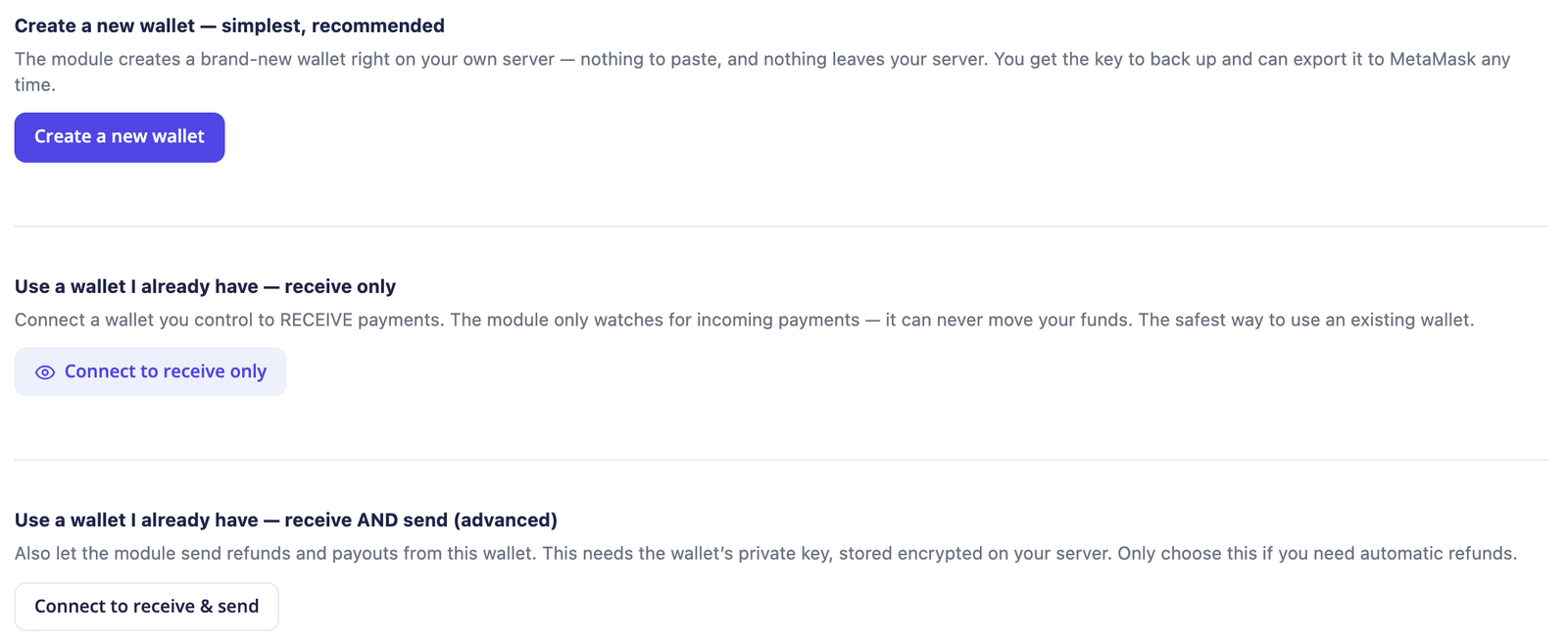
Wallet choices shown in the tutorial. Choose according to the authority you want the module to have.
Receive-only: keep spending keys outside WHMCS
A watch-only wallet lets the module detect incoming payments without giving it the authority to spend from that wallet. For a supported Bitcoin receiving setup, an extended public key allows receiving addresses to be derived without supplying the private spending key.
Other setups use a receiving address or a list of addresses you provide. The appropriate option depends on the network and wallet. You do not need to give the module a recovery phrase to set up a receive-only wallet.
This suits an operator who wants invoice payment detection in WHMCS while keeping outgoing payments in their own wallet application or hardware-wallet workflow.
Hot wallet: deliberately allow outgoing transactions
A hot wallet keeps a spending key encrypted on your own server and can let the module send funds. Depending on the supported network and configuration, that enables refunds and automatic movement to a cold-storage address.
The module offers spending safeguards, including limits, approved destinations and optional second-person approval. Key protection also affects automation: a manually protected wallet needs its spending passphrase for a send, so it cannot perform an unattended sweep.
Bitcoin remains watch-only for sending in this module. Do not choose a wallet on the assumption that every supported receiving network also supports automatic outgoing transactions.
An exchange destination is a separate choice
You can also choose to receive into your own supported exchange account and use optional conversion tools. In that arrangement, the exchange holds the deposited funds under its own account arrangements. PD still does not take custody, but an exchange deposit is not the same as holding funds in a self-custody wallet.
For the most direct expression of “my wallet, my spending keys”, choose the self-custody receiving workflow that fits your network.
Receive into Binance, Kraken or Coinbase and optionally auto-convert
PD Crypto Pay supports an exchange-receiving workflow using your own Kraken, Binance or Coinbase account. You add a deposit address from that account as the receiving destination for the appropriate network. This gives operators who already use an exchange another way to receive invoice payments.
Receiving and conversion are separate steps. To receive, configure the wallet with the correct exchange deposit address. To automate conversion, connect the supported exchange under Exchange & convert and configure a rule for the balance and currency you want to convert.
For example, you can configure a rule to convert BTC to GBP after the exchange balance reaches your chosen threshold. The exchange must support the relevant market and accept the order. The module records conversions and refused attempts so staff can inspect the outcome.
The conversion connection uses trading permission; withdrawal permission is not required. It does not give PD custody of your funds, and the module does not withdraw them from the exchange account.
This is an exchange deposit and optional trading workflow. It should not be confused with a separate branded checkout service. Your customer still follows the PD Crypto Pay invoice instructions, and the exchange you choose holds the deposited funds under its own account arrangements.
Set payment rules that fit your business
Adding a gateway is only part of the decision. Your staff should understand what the payment settings mean before customers start using it.
Payment window. The quoted rate is locked for the configured window. The customer sees how long remains. Decide how long an unpaid quote should stay usable and how long the module should continue watching after expiry.
Confirmations. Set the requirement for each coin. This determines when a detected transaction can count as complete; it is not a fixed delivery-time promise.
Underpayment tolerance. Decide whether a small shortfall should be accepted or the customer should be asked for the difference. Choose this deliberately rather than discovering the behaviour when the first short payment arrives.
Overpayments. Choose whether the surplus becomes customer account credit or is held for staff review. Your team should know where that extra value appears before answering a refund request.
Quote markup. You can set a markup on the cryptocurrency quote. That is your configured quoting rule; it is separate from a commission paid to PD.
Providers and price sources. Blockchain providers supply transaction information; price sources supply exchange rates. They perform different jobs. Review both, and check the settings that govern stale rates or disagreement between sources.
These settings turn “we accept crypto” into a payment process staff can explain and operate.
Understand price sources, blockchain providers and exchanges
These three connections have different roles. Knowing the difference helps you choose the access you need without confusing a price lookup with custody of a payment.
Price sources provide the exchange rate. PD Crypto Pay supports CoinGecko, Kraken and CoinMarketCap for pricing. You choose the order in which enabled sources are tried, with fallback when one does not answer. Kraken can supply prices without connecting your private trading account. That price-source role is separate from Kraken’s optional exchange-conversion role.
Blockchain providers supply transaction information. Built-in public endpoints let the module check for payments without requiring you to run a node. You can also configure providers such as Alchemy or Infura for supported Ethereum-family networks, or TronGrid for Tron. A second configured provider gives the module another source to try if the first cannot answer. These services help it observe the payment; they are not a PD settlement account holding it.
Exchange connections enable optional conversion. This is where your own Binance, Kraken or Coinbase account and trading permissions come in. It is not required when you simply want to receive and retain crypto in a wallet you control.
Your rate settings also determine what happens when pricing data is unavailable or sources disagree. You can limit how long a saved rate remains usable and hold a coin when the difference between sources exceeds your configured threshold. Failover gives the module alternatives; it does not promise an uninterrupted quote under every provider outage.
Handle exceptions with a visible record
A short payment should not be treated as though the customer sent nothing. An expired quote should not be confused with proof that no transaction exists. The payment record gives staff a place to investigate those differences.
The module can continue watching after a quote expires for the period you configure. A payment first detected after expiry can require review. Check the timing and recorded status before deciding how to handle it.
For a short payment, review the amount received and your tolerance setting. If the receiving setup leaves the intended invoice ambiguous, establish the correct invoice before recording the payment there. For an overpayment, check whether the surplus was already added to account credit.
Refunds depend on wallet authority. With a watch-only wallet, the module shows what to send from your own wallet; you then record the completed refund. A supported hot-wallet setup can send the refund through the module, subject to its protection and safeguards.
In either case, confirm the refund destination with the customer. Do not assume a transaction’s apparent sending address is the right address for a return payment, particularly when the original payment came from an exchange.
Let your team’s AI assistant check payment status
If your team uses PD MCP Hub, PD Crypto Pay adds a payment-status check for an invoice. A permitted assistant can report the payment state, amount and currency, together with confirmations so far and the required count.
That particular check only reads: it does not settle an invoice, take a payment or issue a refund. Other tools available through MCP Hub have their own permissions. This gives a connected assistant a specific payment record to look up when staff ask about progress, without granting spending authority through this check.
Prepare your first setup
Start with one receiving workflow your team understands, then expand the accepted coins and automation as needed.
- Install the PD Modules panel and connect the account that holds your licence. Using your licence key is the alternative activation method.
- Install PD Crypto Pay and choose where payments should arrive. Decide whether the module needs receive-only access or spending authority.
- Enable the intended coins and networks, then review the provider and price-source configuration.
- Set the payment window, confirmation requirements and exception handling. Check that the normal WHMCS cron is running for scheduled work.
- Rehearse the supported flow in Test mode. Check the customer instructions, payment record and invoice result before changing to live operation.
Use the WHMCS Crypto Pay KB guide for an introductory setup reference. Your team’s first test should establish that the receiving setup, network, matching and invoice update work together as intended.
Frequently asked questions
Does PD Crypto Pay hold my money?
No. Customer payments go to the receiving wallet or destination you configure. PD does not collect the funds and later issue a payout. If you choose a self-custody wallet, its spending keys remain under your control; if you choose an exchange deposit, that exchange holds the funds in your account.
Does PD take a commission on each crypto payment?
No. PD takes no percentage and charges no per-transaction fee for payments handled by the module. Network fees and costs associated with optional services you choose are separate from PD commission.
Can I receive payments without giving WHMCS my private key?
Yes. Use a watch-only receiving setup. The module can detect payments without being able to spend from that wallet. Whether you use an extended public key, address pool or fixed address depends on the network and wallet you choose.
Can customers pay a WHMCS invoice in Bitcoin or USDT?
Yes, when you enable the appropriate supported coin and network. PD Crypto Pay supports Bitcoin, Ethereum and stablecoins including USDT. The customer’s payment must use the network shown at checkout; the same token name on another network is not interchangeable.
Can I accept Litecoin payments in WHMCS?
Yes. Litecoin (LTC) is built into PD Crypto Pay, including fresh-address receiving support. Enable the coin, configure the appropriate receiving wallet and check the payment workflow. The existing video uses Ethereum Sepolia rather than Litecoin.
Can I connect Binance, Kraken or Coinbase to WHMCS?
PD Crypto Pay supports those exchanges for its exchange-receiving and optional auto-conversion workflow. Use an appropriate deposit address to receive, and connect the exchange API with trading permission if you want conversion rules. This does not mean the module integrates every checkout product offered by those companies.
Does WHMCS mark the invoice Paid automatically?
In the normal flow, the module matches the incoming payment and credits the invoice once the required confirmations and payment conditions are met. Underpayments, late payments or ambiguous matches can need further action according to your settings and receiving mode.
Does every invoice get its own address?
Not in every configuration. Fresh-address receiving, an address pool and one shared address are distinct choices. Check what your network and wallet support rather than assuming the same address behaviour across them all.
Can I refund a payment from inside WHMCS?
You can start the crypto refund from the payment record. With a watch-only wallet, send it from the wallet that holds the spending keys and then record it. A supported hot wallet can send through the module subject to its safeguards. A crypto refund is a new outgoing transaction, not a reversal of the original blockchain payment.
Do I need to run a blockchain node?
No. The module can use built-in public endpoints or providers you configure. Your WHMCS server still needs working scheduled tasks and access to the relevant blockchain and price services.
Can I rehearse the process before accepting real payments?
Yes. Test mode uses supported test networks and test coins. The video demonstrates that process. Test-network results help you understand the workflow; live coins, receiving destinations and provider settings still need to be configured correctly for live operation.
Bring crypto payments into your existing invoice workflow
For a hosting business, the useful outcome is a traceable payment process: a customer knows what to send, staff can inspect its progress, and WHMCS records the matching confirmed payment.
PD Crypto Pay combines that invoice workflow with direct receipt and no PD transaction commission. You choose the destination, the wallet authority and the payment rules.
Explore PD Crypto Pay for WHMCS to see the module and decide which receiving workflow fits your business.
