PowerDNS for Blesta: Bring Zone Management and DNS Self-Service into Billing
Connect PowerDNS to Blesta with client DNS editing, account-linked zones, package allowances, DNSSEC information, snapshots and scoped API automation.
PD PowerDNS connects your PowerDNS server to Blesta, giving staff zone-management tools and customers a DNS workspace in their client portal. Your business keeps the DNS infrastructure it operates while making the service easier to use through the billing platform.
For a host already running PowerDNS, that can close an important gap. Customers need to add email records, connect applications and manage the domains attached to their services. They should not need your provider credentials, and staff should not have to translate every routine record change into a separate backend task.
The module brings those workflows together with type-aware editing, account-linked zones, DNSSEC information, snapshots and automation access. This guide explains how those capabilities can support a customer-facing DNS service in Blesta.
Keep PowerDNS as the infrastructure behind the service
PowerDNS remains the live source of DNS records. PD PowerDNS connects to its API and reads current records for management; it does not replace the authoritative server with a copy of DNS running inside Blesta.
That distinction matters when evaluating the module. You bring the PowerDNS server and its operating arrangement. The module supplies the Blesta integration, account relationships and interfaces around it. It is not an installer for an entire authoritative DNS infrastructure.
A business that already maintains PowerDNS can therefore make that service accessible through a familiar customer account. Staff work from the billing relationship, while the DNS backend continues performing its own role.
This creates a clear division of responsibility: operate the server, define the hosting or DNS product, then use the module to connect customer management to the appropriate zones. It gives the operator a route to offer self-service without building that portal integration from scratch.
Give customers a practical Manage DNS area
Blesta customers reach the DNS workspace through My Tools in the client portal. They see the zones bound to their account, with record management and the relevant zone tabs inside the service experience.
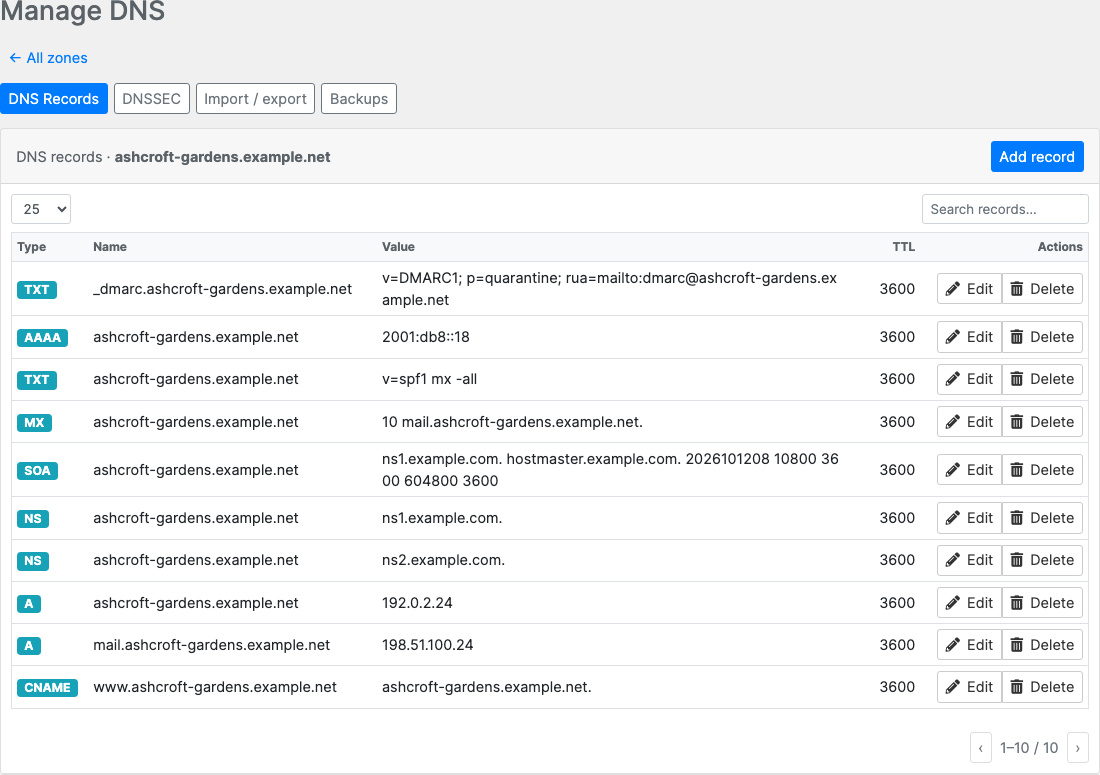
This genuine client-area capture uses example domains and documentation addresses. It shows the record list and available actions without exposing a real customer’s account or provider credentials. The outer customer identity and navigation are excluded from the crop.
The practical tasks are familiar: add a TXT verification record, change the destination for a website or manage the mail records supplied by an email service. PD PowerDNS provides the supported editing tools rather than making the customer submit every change as a request for staff to enter elsewhere.
That can make DNS a more visible part of your hosting offer. Customers can see how to use it after purchase, and your team can demonstrate the interface before they buy. The portal is an operational feature, not merely a page displaying whether a zone exists.
Account isolation is part of the workflow. Zones need the appropriate Blesta client relationship before they appear to that customer. An unassigned backend zone is not automatically made visible to every account.
Link zones to the customer and service they belong to
Administrative zone management keeps the DNS resource connected to the account. Staff can create a zone, manage records and assign an existing zone to a client, optionally associating the relevant domain or service.
That association is valuable when several staff members handle customer questions. They can establish which account owns the zone and work from the service relationship, rather than relying on a separate list of domain names and contact notes.
Optional auto-provisioning can create a zone through the relevant domain or service events when configured with the intended provider. This is a defined part of the setup, not a promise that connecting the API instantly creates DNS for every historic account.
For a host introducing the module to an existing portfolio, assignment and creation are therefore different jobs. Existing zones can be brought into the appropriate customer relationship; new services can use the configured provisioning workflow.
The resulting service is easier to explain: the customer manages the zones belonging to their account, and the operator retains the administrative tools and backend access.
Use record fields that fit the task
The type-aware editor supplies the fields appropriate to the chosen record. An address record needs the relevant address format; an MX record includes priority and target; other supported types have their own fields and validation.
This makes the interface useful for the varied requests a hosting business receives. Website connections, mail services and verification records do not all need the same inputs. A type-aware screen can ask for those inputs directly instead of expecting every customer to understand a backend-specific text format.
Common types include A, AAAA, CNAME, MX, TXT and NS, with additional supported types available through the module. Search and type filtering help staff or customers find the record they intend to manage.
The available operation still changes real DNS at the PowerDNS server. Your product guidance should explain the intended task and use the current values supplied by the service the customer is connecting. A sample screenshot is a demonstration of the interface, not a DNS recipe for another domain.
For task-level instructions, use the PowerDNS and DNS knowledge-base guides. The blog’s purpose is to show how the management capability fits a useful Blesta service.
Package DNS as a defined offer
A hosting business may include DNS with another service or sell a package with a specific allowance. PD PowerDNS includes quota-package controls linked to Blesta packages, letting the operator define zone and record allowances.
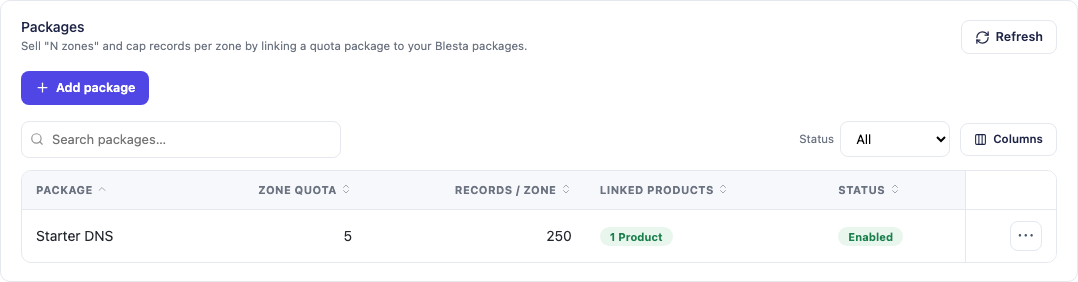
This actual module view shows a demonstration Starter DNS package with its configured allowances. Those counts are examples from the capture, not a required product size or a limit imposed on every hosting business.
The useful commercial question is what the offer includes. A defined zone allowance gives the buyer something clear to compare, while record limits and the relevant controls help the configuration reflect the service being sold.
Reusable record templates add another operational advantage. The module supports templates for repeatable setups, including per-zone merge fields where configured. Your team can maintain a standard pattern while retaining the values and account relationship that belong to each zone.
Together, packaging and templates make the integration useful beyond the first customer who asks to edit a record. They support a repeatable service that the operator can introduce, explain and manage through Blesta.
Bring DNSSEC information into the account workflow
PD PowerDNS exposes the server’s supported per-zone DNSSEC controls and presents DS information for the registrar. Customers can see the zone’s DNSSEC status and the relevant information through the client interface.
The important distinction is between signing the zone at PowerDNS and publishing the corresponding DS record through the registrar. Those are connected steps in the DNSSEC arrangement; the presence of a button inside Blesta does not mean the registrar relationship has been changed automatically.
For the hosting team, having the information in the management view makes the task easier to explain and coordinate. The operator can use the server’s signing capability and provide the values needed at the next stage without asking the customer to access an administrative backend.
Keep the exact operational sequence in the relevant task guide and follow the arrangement for the domain’s registrar. The marketing benefit is an integrated route to the supported DNSSEC work, not a claim that the module controls every part of the DNS hierarchy.
Keep a route to snapshots and zone exports
PD PowerDNS supports scheduled and on-demand BIND-format snapshots of zones, with the associated backup tools in the panel. It also supplies a zone-file export route, useful when the operator needs a portable representation of the records.
A snapshot describes the zone at a point in time. That makes it relevant before planned record work as well as when reviewing a previous configuration. Its usefulness depends on the chosen copy and the operation being performed, so do not present it as a guarantee that all DNS changes are consequence-free.
Export serves a related but distinct job. A BIND-format file can support archiving or a planned migration through the appropriate workflow. A file export alone does not move the registrar or change public nameserver delegation.
These capabilities help the hosting company explain a complete DNS-management offer: record editing, account context and a way to retain or move the intended zone information. They are practical features a buyer can evaluate rather than vague assurances about “full control”.
Add automation without giving every tool the same authority
The module includes scoped REST API access for supported DNS management. Operators can create read or write tokens for the relevant automation, with the documented address and rate restrictions. The installation’s API-access view supplies its actual endpoint.
That can support a read-only monitoring task, a deployment workflow or another authorised tool that needs a defined DNS operation. The API follows the relevant zone locks, content policies and managed-record protections rather than being described as an unrestricted bypass around the interface.
The operator still chooses the task and scope. A tool reading records and one publishing a change do not need identical access. This lets DNS fit into the wider hosting workflow while keeping the permission choice connected to the work.
The blog does not need to publish a server-specific URL or a token to explain the capability. Use the task guides and the values shown by your own installation when configuring it.
Choose the focused module or a multi-provider workspace
PD PowerDNS is the focused option for a PowerDNS-backed service. PD DNS Manager is the broader multi-provider product when the business wants to manage other supported DNS backends through the same workspace.
These are alternative choices for the intended installation, rather than modules to run together against the same DNS management settings. Evaluate the provider range you need now and the direction of the service before choosing the appropriate product.
An illustrative host already operating PowerDNS might use the focused module to introduce client-area record management and defined DNS packages. A business planning to operate several different backends could evaluate PD DNS Manager for Blesta instead.
In either case, the opportunity is to connect the DNS service to the customer account instead of making it a disconnected system. Explore PD PowerDNS for Blesta to review the focused integration and the workflows it can support for your hosting business.
PowerDNS for Blesta FAQ
Does PD PowerDNS install a PowerDNS server for me?
No. It connects your existing PowerDNS API to Blesta and provides administrative and customer management workflows. Your DNS server remains the infrastructure publishing the records.
Can customers edit DNS inside the Blesta portal?
Yes. They reach the DNS workspace through My Tools and see the zones bound to their account, with supported record-management actions and relevant zone tabs.
Can I connect an existing zone to a customer?
Yes. Staff can assign the appropriate client relationship to an existing zone, optionally linking the domain or service. A zone without an owner is not automatically shown to customers.
Does the module support DNS packages and allowances?
Yes. Quota packages can be linked to Blesta packages to define the intended zone and record allowances. Choose values that match the offer your business intends to sell.
Does enabling DNSSEC publish the registrar’s DS record automatically?
The module exposes PowerDNS signing and DS information. The registrar’s DS publication is a separate part of the arrangement and should follow the relevant task workflow.
Can I download the zone records?
The module supports a BIND zone-file export route and point-in-time snapshots. An exported zone is not, by itself, a registrar or nameserver-delegation change.
Can external tools automate supported DNS work?
Yes. Scoped API tokens support authorised reads or writes with the documented controls. Use the endpoint shown by the installation and grant the access needed for the task.
Is PD PowerDNS the same as PD DNS Manager?
No. PD PowerDNS focuses on PowerDNS. PD DNS Manager is the multi-provider option. They are alternative DNS-management choices for the installation, not a combination to enable together against shared settings.
