Sell DigitalOcean Droplets Through Blesta with SSH, Firewalls and Self-Service
Sell DigitalOcean VPS hosting through Blesta with generated checkout options, provider-cost pricing tools, browser SSH, firewalls, snapshots and client self-service.
PD DigitalOcean Droplets turns your DigitalOcean account into cloud VPS packages sold, provisioned and managed through Blesta. Customers choose the service you offer, Blesta activates it through the configured workflow, and the module creates their server with a client-area control panel for everyday management.
For a hosting business, the value goes beyond creating a Droplet on an order. Configurable checkout choices, provider-cost visibility, customer SSH access, firewalls, snapshots and service lifecycle integration help connect the cloud resource to a complete hosting product.
You keep the commercial relationship and decide what the package includes. DigitalOcean supplies the infrastructure through your account; your customers manage their service through the Blesta experience you provide.
Build a VPS product around the choices customers need
A cloud package needs to describe what the customer receives. Region, resource plan and operating system can be fixed in the package or exposed as supported Configurable Options. Additional storage, automated backups, a dedicated IP and a snapshot allowance can also form part of the offer.
PD DigitalOcean Droplets can generate the Blesta option group from the live DigitalOcean catalogue. Your team chooses which dimensions customers see and prices the options through Blesta. A hidden dimension falls back to the package’s module setting, so a simpler checkout does not need to remove the underlying configuration from your own control.
This gives you room to design different products deliberately. A developer VPS might expose several resource plans and an operating-system choice. An application-specific offer could keep the image fixed and explain the intended software environment in the package description.
An illustrative agency might start with a London Linux VPS package for development work. It could offer a choice of server sizes, keep the location consistent and sell an appropriate backup option. Another business might expose more regional choice for its own audience. Those are examples of package design, not claims that one arrangement suits every customer.
The important connection is between checkout and delivery: the choice should describe the resource that the module creates, while your service description explains the expertise and help supplied around it.
Bring provider costs into package pricing
The Products view can show DigitalOcean list costs for the choices in a package, including server plans and relevant additional resources. You can save a target margin for the package and review suggested selling prices alongside the underlying costs.
Saving a margin does not immediately change the customer’s live product price. The documented option-generation workflow applies suggested prices where one generated price can represent the choice. Other dimensions remain marked for the operator to price, including choices whose cost depends on additional variables.
That is useful when a package exposes more than a single fixed server. For example, a backup price that depends on the selected plan cannot be treated like a universal flat amount without understanding the relationship. The module’s Priced by Generate and You price it distinctions help make that visible.
Treat the provider view as an input to pricing the hosting service. Staff time, the support scope and other operating costs are separate decisions for your business. The documented comparison also excludes items such as excess transfer, taxes and account-specific credits or discounts; it is not your complete provider invoice or a guarantee of profit.
For a cloud reseller, the practical benefit is that the resources being sold and the pricing choices can be reviewed together. Your staff can build an offer with more context than a copied list of plan names.
Let Blesta activation drive provisioning
A Blesta service is provisioned when it is activated. Paid pending services can be handled by the relevant Blesta automation task, or held for manual activation according to the package’s policy. PD DigitalOcean Droplets creates the server at that point, then completes the associated setup as the provider reports it ready.
That means the order, payment and activation policies remain part of your normal business process. The module connects the activated package to the infrastructure rather than requiring staff to create every server separately in the provider console.
The finishing work can include attaching additional storage, creating the firewall and assigning the requested dedicated IP. The client service can show a pending state while that work completes; an order record and a fully ready server are distinct stages in delivery.
Your team can use the DigitalOcean Droplets task guides for account and package configuration. The commercial advantage is a VPS offer connected to the billing platform you already use, with the normal client service as the route to management after purchase.
Give customers a working server control panel
Customers use tabs beside Blesta’s service Information view to reach the management features you offer. The package’s Client settings determine which tools are available, allowing the interface to match the product.
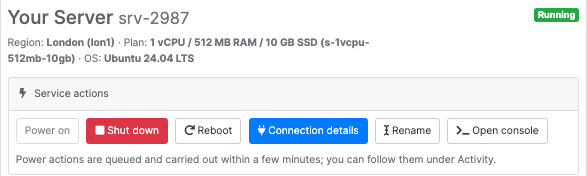
This actual client-area crop shows the running state and service actions. It focuses on the controls, excluding customer identity and networking values. The disabled Power on action also makes sense in the context of a server that is already running.
The documented functions include power on, shutdown, reboot, connection details, rename and an optional browser console. Separate tabs cover firewall, SSH keys, snapshots, automated backups, usage graphs and activity where enabled and applicable.
This matters to the service experience. A customer can return to the hosting company for a routine server action instead of needing your DigitalOcean account. Your brand remains the relationship through which the customer manages the VPS.
Those controls also give you something specific to demonstrate before purchase. “Customer self-service” becomes a set of visible actions and views, rather than a vague phrase on a feature list. Your team can explain which tools a product includes and what the intended customer can do with them.
Make SSH access and browser console part of the offer
Every server has its own generated SSH key pair available through the SSH Keys tab. A customer can also supply a public key when ordering, so it is installed as the server is created. The module supports saved, named team keys for subsequent server creation.
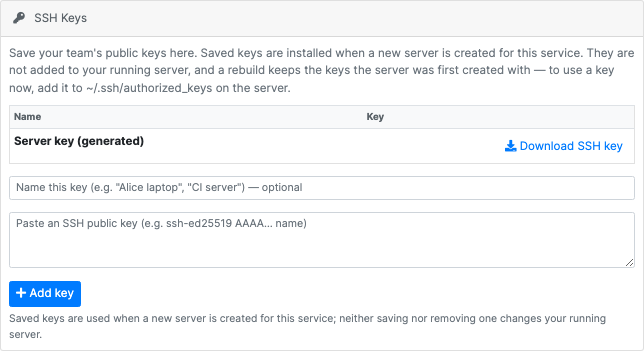
This genuine screen shows the generated-key download route and the form for saving public keys. No private key or customer identity is included. The screen’s explanation distinguishes keys for new server creation from changes to a server already running.
That distinction is important when explaining the feature. Saving a team key does not silently install it on the current server, and rebuilding keeps the keys the server was originally created with. A new key needed on an existing machine is handled on that machine through the customer’s normal administration process.
When enabled in the module settings and offered by the package, Open console provides a browser terminal to a running server. Customers can reach the command line without preparing a local SSH application. Connection details remain available for the normal SSH route as well.
The browser console is a useful part of the product demonstration: customers can see a route from their Blesta service to practical server administration. It is not a promise that command-line access repairs an application by itself or that every customer needs to become an operating-system specialist.
Offer snapshots and automated backups with clear scope
Snapshots and automated backups help you build a more complete VPS offer, but they serve defined resource scopes and should be described accurately.
Customers can create, restore and delete manual snapshots within the allowance provided by the package or purchased through the snapshot option. These snapshots cover the server’s main disk; additional attached storage is not included. That gives your business a clear feature to package and explain rather than advertising an unspecified backup of everything.
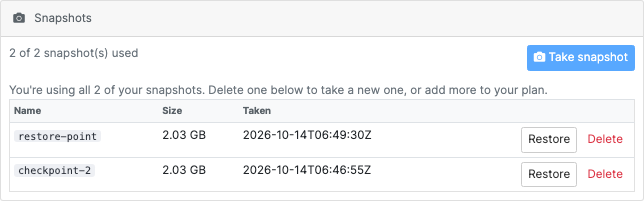
This actual module view shows a service using its two-snapshot allowance. The names and timestamps belong to the demonstration, not a customer recovery story. The screen makes both the allowance and available management actions visible.
Automated backups are a separate package option. Where enabled, customers can see the backups DigitalOcean reports and use the supported restore action. The client view reflects the provider’s reported schedule and retention information rather than asking customers to infer it from a generic product name.
Restoring or rebuilding replaces the relevant server disk with the selected state. Explain that operation when introducing the feature. A snapshot allowance and automatic backups can be valuable selling points without a claim that all restore operations preserve every later change or include additional volumes.
Manual snapshots also have a deliberate lifecycle distinction: they are retained when a service is cancelled, and the provider continues billing for retained snapshots. Include that in the team’s resource-management process so “cancelled server” is not mistaken for “all associated backup costs have ended.”
Put firewall and usage tools beside the service
A per-server cloud firewall lets the customer manage inbound rules by protocol, port and source. That makes a useful part of day-to-day VPS work available through Blesta, with the controls included according to the package settings.
For a developer service, the practical use might be opening the required application port to the intended audience or narrowing SSH access. The customer remains responsible for the rule they choose; the module supplies the supported provider operation through the client interface.
CPU and inbound/outbound bandwidth graphs add resource visibility over the recent reporting window. These give customers a way to observe activity while using the server. They are informative management views, not automatic application diagnosis or a guaranteed recommendation of the correct plan size.
The Activity tab records server operations such as creation, power changes, rebuilds, snapshots and firewall changes. That connects what the customer does to a visible history of the service rather than leaving every action as an isolated button click.
Together, these tools make the VPS feel like an ongoing service in the customer portal. Provisioning is the beginning; useful controls and information continue after the activation message.
Connect package changes to the server lifecycle
PD DigitalOcean Droplets applies supported package and Configurable Option changes to the service’s resources. A server plan change uses a power-cycle around resizing, while additional storage can grow online in the documented workflow. Describe the change as a planned resource operation, not an interruption-free transition.
The remaining lifecycle also has defined meanings:
| Blesta event | Resource behaviour |
|---|---|
| Activate | Provision the server and complete the associated setup |
| Suspend | Power the server off; the provider still bills for the retained Droplet |
| Unsuspend | Power the server back on |
| Cancel | Remove the server and associated resources created by the module, while retaining customer snapshots |
This mapping helps the hosting company connect its commercial policies to the infrastructure. A suspension retains the server rather than deleting it, while cancellation has a different purpose. Your customer communication should match the operation your team is performing.
Read-only drift reconciliation can also flag a service whose server was removed outside Blesta. It does not automatically delete or change resources in response. That provides visibility into the relationship between the billing record and infrastructure without treating every discrepancy as an instruction to modify the provider account.
An illustrative VPS launch for a hosting agency
Imagine an agency adding development VPS hosting to its existing Blesta service range. This is a hypothetical example, not a deployment testimonial or a measured efficiency claim.
The team connects its DigitalOcean account, creates a package with a suitable region and image, and generates a curated set of checkout options. It reviews provider-cost information, sets selling prices for the full service and chooses the customer controls it intends to offer.
When a paid service is activated through the agreed Blesta policy, the module provisions the server. The customer uses the service page for connection details, the enabled browser console, power actions and the relevant management tabs. The team can explain the snapshot allowance and backup scope in the package description rather than leaving customers to discover them later.
As the customer grows, supported package changes provide a route to larger resources. The agency keeps responsibility for its support promise and operating procedures, while the module connects package choices, infrastructure and self-service.
Explore PD DigitalOcean Droplets for Blesta to evaluate that workflow for your business. Start with the service you want to sell, then choose the package options and customer controls that make it useful.
DigitalOcean Droplets for Blesta FAQ
Can I sell DigitalOcean VPS hosting through Blesta?
Yes. PD DigitalOcean Droplets provisions cloud servers through your DigitalOcean account when the relevant Blesta services activate, and provides customer management tools through their service pages.
Can customers choose region, plan and operating system?
You can generate supported Configurable Options from the live catalogue and choose which dimensions to show. Hidden choices fall back to the package defaults, allowing a simpler or more flexible offer.
Does the module help me price the options?
The Products view provides provider-cost information and package margin suggestions. Generated pricing applies where a supported choice can use it; other dimensions remain for you to price. Saving a margin alone does not reprice live services.
Can customers open an SSH terminal in their browser?
Yes, when the browser console is enabled in the module and offered by the package for the running service. Customers can also use normal connection details and download their generated server key.
Are saved team SSH keys immediately installed on a running server?
No. They are used when a new server is created for the service. A rebuild retains the original server keys; an additional key needed on a running machine is managed on that machine.
Do snapshots include additional attached storage?
No. The documented manual snapshot feature covers the main server disk. Describe the additional storage’s protection separately when designing the hosting offer.
Does suspension stop DigitalOcean billing?
No. Suspension powers off the Droplet while retaining it. The provider continues billing for that resource; cancellation is a different operation.
Are customer snapshots deleted when a service is cancelled?
No. The module deliberately retains customer-created snapshots, and DigitalOcean continues to bill for them until they are deleted. Include that distinction in your resource-management routine.
