PD MCP Hub for Blesta: Connect AI to Business Data and External Tools
Connect AI assistants to Blesta, PD module tools and approved external MCP servers. Explore account context, Support Manager KB workflows and practical use cases.
A hosting business using Blesta already holds useful context about its clients, services, domains and support work. An AI assistant becomes more useful when it can retrieve the permitted parts of that context and use the tools your team actually operates.
PD MCP Hub is a free Blesta MCP server that connects compatible AI assistants to Blesta business tools, capabilities contributed by installed PD modules and approved external MCP servers. Your team chooses the assistant and the work; the hub provides the tool connection and enforces the access assigned to it.
That creates opportunities across account preparation, knowledge-base maintenance, DNS investigation and work involving other business systems. Your team can use its preferred compatible client while keeping business tools and connection controls in one hub.
Turn a Blesta question into a useful tool workflow
An assistant that only sees the text pasted into a conversation can help write an answer. An MCP connection can also let it request current information through defined tools. The Model Context Protocol provides the common tool interface between the assistant application and the server exposing those capabilities.
For a Blesta operator, the practical difference is the starting point. “Prepare me for this account review” can retrieve the relevant client and service context. “Find the existing setup guidance” can search the Support Manager knowledge base before proposing new content. A DNS question can use a contributing module’s supported record tools.
The assistant interprets the task and selects calls; PD MCP Hub makes the permitted operations available. This is tool-assisted work with your own installation, rather than a promise that the model automatically understands every relationship in your business.
That leaves an important role for a clear request. Give the assistant a confirmed client, service, domain or article reference when the task concerns one. A useful connection brings context into the conversation, while the operator still defines the intended result.
Three sources of capability in one hub
PD MCP Hub can bring together capabilities that would otherwise appear as separate systems or module screens.
| Source | What the assistant can reach when allowed | An illustrative use |
|---|---|---|
| Blesta tools | Client/service/domain context, supported account operations and Support Manager content | Prepare an account-specific service summary |
| Contributing PD modules | Supported DNS, SMS and security functions available on the installation | Inspect DNS records relevant to a customer question |
| Approved external MCP servers | Tools from compatible remote servers attached by the operator | Read a confirmed CRM record alongside Blesta context |
The Catalogue identifies the tools the installation can offer. Each assistant’s connection is narrower, based on the configured areas, ceiling, staff identity and other limits. A wider catalogue does not mean every assistant receives every tool.
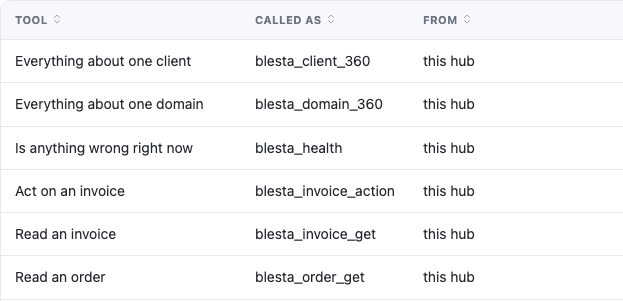
This actual Blesta Catalogue crop shows business-level tools and their toolsets. It is a sample of one installation, not a fixed tool count or a list of actions every connection must be allowed to perform. The image focuses on the tool rows, excluding the outer administrative identity and version information.
The module also supports tool discovery. A focused connection can search for other relevant tools without treating discovery as a way around permissions. This makes it possible to keep the initial toolkit purposeful while retaining a route to supported work within the granted scope.
Prepare account conversations with service context
A hosting customer’s account may include several services and domains. A useful answer often depends on the actual service, its status, billing cycle and associated options, rather than on a generic explanation of hosting.
PD MCP Hub includes composite client context plus more focused service and domain tools. The client overview brings together account information and related services, domains, invoices, orders and ticket context. Separate tools can read the detail relevant to a specific enquiry.
Imagine an account manager preparing for a call. An illustrative request is: “Using this confirmed client reference, summarise the active services and domains and identify the facts relevant to our review.” With suitable read access, the assistant can gather the available context and organise it for the staff member.
That is a useful outcome without asking the assistant to change anything. The team member begins the conversation with information tied to the account, and can ask follow-up questions using the relevant service references.
The same approach can support technical handovers. An operator can ask for the known service context before investigating a DNS question, then use the appropriate tools contributed by the installed modules. The assistant helps connect the information that the task needs; it does not need unrestricted access to every part of the business.
Maintain the Blesta Support Manager knowledge base
The knowledge-base integration is a distinct Blesta capability. PD MCP Hub works through Support Manager’s knowledge base, with tools for categories, article listing and search, reading, creation and editing. Supported operations include article language versions, category relationships and access levels.
For a hosting team maintaining guides, that allows a workflow built around existing material. Ask the assistant to find the current article, read the relevant language version and compare it with approved product instructions. It can prepare a useful change with the surrounding content in view instead of generating a disconnected document.
An illustrative request could be: “Find our existing DNS onboarding guide and update its introduction using these approved steps, keeping the intended access and category.” The operator supplies the source truth and the desired audience. The connection needs the appropriate write ceiling, and the staff group it acts as needs the Support Manager Knowledge Base permission.
Those access choices matter to content delivery. A public introduction and a private client procedure have different audiences. The tool supports the relevant access fields, but the editorial decision remains yours. Hidden content should not be casually treated as private client content merely because it is less visible.
This gives a concrete answer to searches for Blesta AI knowledge-base integration: the hub provides dedicated content tools, not just an assistant that can suggest wording. Exact task guides remain useful for carrying out an approved update with the right category, language and audience.
Extend the conversation with PD module tools
The PD module family can contribute capabilities beyond Blesta’s own business records. The documented contributions include DNS, SMS and security tools, depending on the modules available in the installation.
DNS contributions support zone and record reads and permitted record operations. Where several installed modules supply DNS capabilities, the hub shares a tool family with provider choices rather than duplicating an almost identical tool list for each backend. Writes identify the intended provider; deletion retains its required approval step.
For a hosting operator, that supports a practical investigation: obtain the confirmed service context, list the relevant zones and inspect the records at the intended provider. A multi-provider read identifies backends that did not respond, so a partial result can be recognised as partial.
SMS contributions can expose configured gateways and recent messages, with sending as a consequential operation requiring approval. Security contributions include environment-check information and recent sign-ins where the relevant module provides them.
The value is an ecosystem that can extend the assistant’s toolkit as the hosting business adopts supported modules. It is not a claim that every module exposes every screen or that a model can perform arbitrary operations simply because the module is installed. The Catalogue and the connection’s limits define the actual working set.
Attach compatible MCP servers from other business systems
Blesta may hold the service account while another system holds sales notes, documentation or an external support conversation. PD MCP Hub can attach remote MCP servers using Streamable HTTP over HTTPS, bringing approved tools from those systems into the same assistant’s available toolkit.
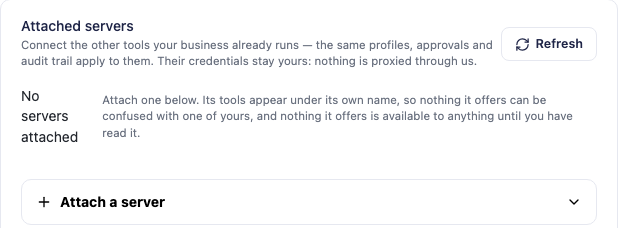
This genuine Blesta screen shows the attachment workspace before a server has been added. It demonstrates the product’s setup surface; it does not claim that a CRM, helpdesk or other named integration has already been configured in this example.
The operator supplies the external server address and its required authorisation, reviews the tools it offers and approves the definitions. The intended assistant connection must also be allowed to reach that attached server. Tool names are prefixed to identify their source.
The installation connects to the external server directly. If the tool definitions change, the server is held for review instead of silently making the changed tools available. The attachment capability covers remote tools; it is not a facility for running arbitrary local server programs on the billing host.
This makes the integration opportunity concrete while keeping its boundaries clear. A business system needs an appropriate MCP server exposing the operations you want. Attaching its server does not automatically create a database synchronisation or a new cross-vendor composite operation.
Two examples of cross-system hosting work
The following are hypothetical examples. They assume the external system supplies a compatible remote MCP server, the required read tools are approved and the account relationships are verified. They are not customer case studies or claims of certification for a particular CRM or helpdesk.
Prepare an account meeting with CRM and Blesta context
An agency records account plans in a CRM and delivers hosting services through Blesta. Before a customer meeting, the account manager wants the latest account notes alongside the services and domains actually in use.
The request might be: “Read this confirmed CRM account record and Blesta client reference. Summarise the latest account notes, current hosting services and questions for our review call.” The assistant can use the attached CRM reads and Blesta context tools to organise those facts with their source identified.
The benefit is preparation across systems. It does not require the hub to invent a permanent mapping between every CRM record and every Blesta account. The operator supplies or verifies the relationship for the task.
Investigate an external helpdesk enquiry about a hosted domain
A host might use a separate helpdesk while Blesta manages its services and domains. Staff can ask an assistant to read a confirmed ticket through an approved attached server, obtain the matching Blesta service context and inspect relevant DNS through a contributing module.
The result can be a summary of the reported issue and known service facts, with questions for the operator to answer before replying. Reading a conversation is different from being authorised to send a message; that later action depends on available tools and permissions.
These examples show why the module’s value extends beyond a single assistant brand. The hosting business chooses the systems and workflow, while the AI client coordinates the permitted tool calls.
Choose the assistant and model route that suits the team
MCP Hub supplies tools rather than an AI model. Your chosen client manages the conversation and calls, while its model or provider generates responses. Keeping those roles separate makes the available routes easier to understand.
Claude Desktop, Claude Code, Codex, Cursor and VS Code are examples of clients to evaluate against the hub’s transport and authentication. Codex’s remote Streamable HTTP and bearer-token support matches that connection method; the hub’s Connect tab supplies the actual endpoint for your Blesta installation. Follow the selected client’s current configuration guidance rather than copying a different application’s settings.
Local inference is another route when an MCP-capable host and a tool-capable model are used together. LM Studio supports remote MCP, and Open WebUI can connect an Ollama-backed model to an authenticated remote MCP server. These are documented compatibility routes to evaluate, not a promise that every model has been tested or will handle tools equally well.
For a team that prefers to work inside the panel, the PD AI Assistant bridge makes MCP Hub capabilities available to the in-panel co-pilot under the same limits. PD AI Assistant’s provider options include Amazon Bedrock, OpenAI and Google Gemini. That provider choice belongs to the assistant; the hub supplies its permitted tools.
Local models do not make attached remote services offline, and an external AI provider receives the information needed for the calls you permit. Choose the route with the task and data flow in mind. Explore PD AI Assistant for Blesta for the in-panel option.
Make delegation useful and specific
Each assistant connection has its own token, ceiling, areas and staff identity. Client scope, address restrictions, expiry and call limits can narrow it further. The assigned staff permissions apply alongside the connection settings.
You can require approval for all data-changing work. Operations with mandatory human review retain it, and the approval wording is built from the actual request. The audit trail records calls and refusals so staff can understand what was attempted and what happened.
Those controls support useful division of work. An account-preparation assistant can have read access for its job. A content assistant can receive the appropriate knowledge-base capability. Connections do not need identical authority just because both use the same hub.
Explore PD MCP Hub for Blesta to evaluate the module. Begin with a concrete staff workflow, inspect the Catalogue for the required tools and create the relevant connection before enabling the endpoint. The product’s value comes from the work you can connect, with the assistant and model route chosen to suit your team.
Blesta MCP server FAQ
Is there a free MCP server for Blesta?
Yes. PD MCP Hub is free, with connection controls, approvals, audit and attached-server capabilities included. You supply the compatible assistant and any external services you choose to connect.
Can I use Claude or Codex with Blesta?
Yes, through an appropriate MCP client configuration. Claude connection guidance is included in the module docs, and Codex’s remote MCP transport and authentication match the hub. Use your installation’s Connect tab and dedicated connection token for the intended client.
Can it create and update Blesta knowledge-base articles?
Yes. It provides dedicated tools for Support Manager knowledge-base categories and articles, including supported language and access operations. The connection ceiling and assigned staff-group permissions must both allow the action.
Can the hub use tools from other PD modules?
Yes, where installed modules contribute them. Documented tool families include DNS, SMS and security. The actual Catalogue reflects the installation, and each connection receives only the tools its limits allow.
Can I connect a CRM or external helpdesk?
You can attach a compatible remote MCP server and approve the tools it supplies. Cross-system work depends on those actual tools and verified account references; it is not automatic CRM synchronisation or universal helpdesk support.
Can I use a local LLM with the Blesta MCP server?
A local model needs an MCP-capable host and suitable tool-calling ability. LM Studio and Open WebUI/Ollama provide documented routes to evaluate. Remote business systems still exchange information for the permitted calls.
Is MCP Hub a customer-facing chatbot?
No. It is an operator-side tool server with no client-area surface. A customer-facing assistant is a separate product/workflow, not something enabled by exposing the hub to customer sessions.
Does PD MCP Hub also work with PD AI Assistant?
Yes. The assistant bridge lets the in-panel co-pilot use the hub’s capabilities within the configured limits. PD AI Assistant supplies the model/provider connection and retains priority for its own tools.
