Blesta Customer Onboarding: Checklists That Collect What Your Team Needs
Collect customer details, track package onboarding and guide the first days of a hosting service in Blesta. Explore PD Onboard checklists and Pro follow-up tools.
A hosting order can be paid, provisioned and still waiting for the customer. Your team needs the domain name, the right technical contact, a logo or a decision about the launch. The answers arrive in separate messages, someone sends another reminder, and the service never quite reaches the point everyone expected.
PD Onboard gives Blesta hosting businesses reusable customer onboarding checklists inside the client area. Each checklist tells the customer what to do next, keeps their answers beside the relevant step and gives staff a shared view of progress. Pro adds file uploads, live checks and automatic follow-up.
That makes onboarding a visible part of the service you sell. A customer can see what is outstanding, return to finish it and understand when your team has what it needs. Your staff can work from a checklist instead of reconstructing the position from an inbox.
The gap between “your hosting is active” and “we are ready”
Provisioning creates the hosting resource. Onboarding collects the information and decisions needed to use it successfully. For a web hosting company, reseller or agency using Blesta, those are often different milestones.
A migration customer may need to identify the website being moved. A design client may need to supply brand assets and a launch date. A managed hosting customer may need to confirm who should receive technical questions. The same welcome email is unlikely to serve all three particularly well.
The opportunity is to make that first interaction specific to the package. PD Onboard attaches a checklist to a package, package group or fallback rule, so the customer receives the questions that match the service. The checklist becomes a repeatable part of delivery rather than something each staff member invents again.
This is useful even when your team still handles the work personally. Automation does not need to replace the relationship. It can give the relationship a clear starting point: what the customer has supplied, what your team must do and what happens next.
Build a reusable intake process around the service
A PD Onboard checklist has a customer-facing name, an opening line and an ordered set of steps. You can target individual packages or package groups, pause a checklist and duplicate an existing one to create a variant. The duplicated copy starts paused so you can adjust it before use.
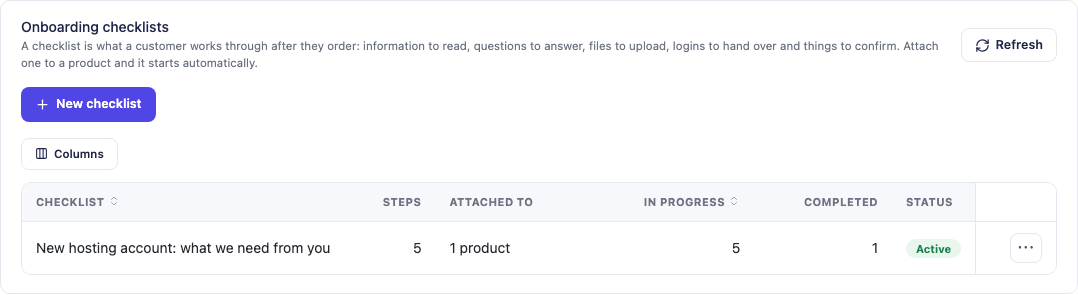
This actual Blesta module screen shows a five-step hosting checklist and its attached-product and progress columns. The counts belong to the example installation, not a claim about customer results or a limit on your business.
Start with the decisions your team repeatedly needs. “What is your launch date?” is more useful than an open-ended request for everything the customer might want to tell you. “Which domain should this service use?” gives a specific answer you can act on. A short information step can explain who will contact the customer after the required details arrive.
The targeting rules help maintain that relevance as your business grows. An exact package checklist takes precedence over a package-group checklist, with a fallback available for services that do not have something more specific. Each service has its own onboarding run, so buying another product does not require staff to treat every customer as a first-time account again.
A web design package and a standard hosting package can therefore share a familiar process without asking for identical information. Duplicate the useful structure, change the steps that matter and keep the customer experience connected to the product they actually ordered.
Use the right step for the information you need
A checklist works best when each step has a clear job. PD Onboard supports several types, letting you mix customer instructions, structured answers, confirmations and internal work.
| Step | A practical hosting use | Edition |
|---|---|---|
| Information to read | Explain the launch sequence or the next contact from your team | Free |
| Question | Ask for a domain, contact, date, web address or choice | Free |
| Confirmation | Ask the customer to acknowledge a completed task | Free; live verification is Pro |
| Staff task | Track an internal action that customers do not see | Free |
| File upload | Collect a logo or another supported document/image | Pro |
Required and optional steps serve different purposes. Where the checklist has required steps, those govern completion; a checklist with no required steps still needs its steps completed. Review the actual required choices so the progress matches what your team needs.
Internal tasks make the checklist useful to the whole delivery team. A customer may have supplied everything while staff still need to complete an internal action. Keeping that work in the same onboarding process gives completion a more meaningful definition than “we sent the welcome email.”
Questions can use short or long text, a list of choices, dates, email addresses or web addresses. That variety lets you ask a clear question in an appropriate format rather than turning every answer into an unstructured note.
Give customers one page they can return to
The customer sees a Getting started entry point and a checklist page with progress, ordered steps and saved answers. They can leave and come back without starting again. The page belongs to their signed-in Blesta account.
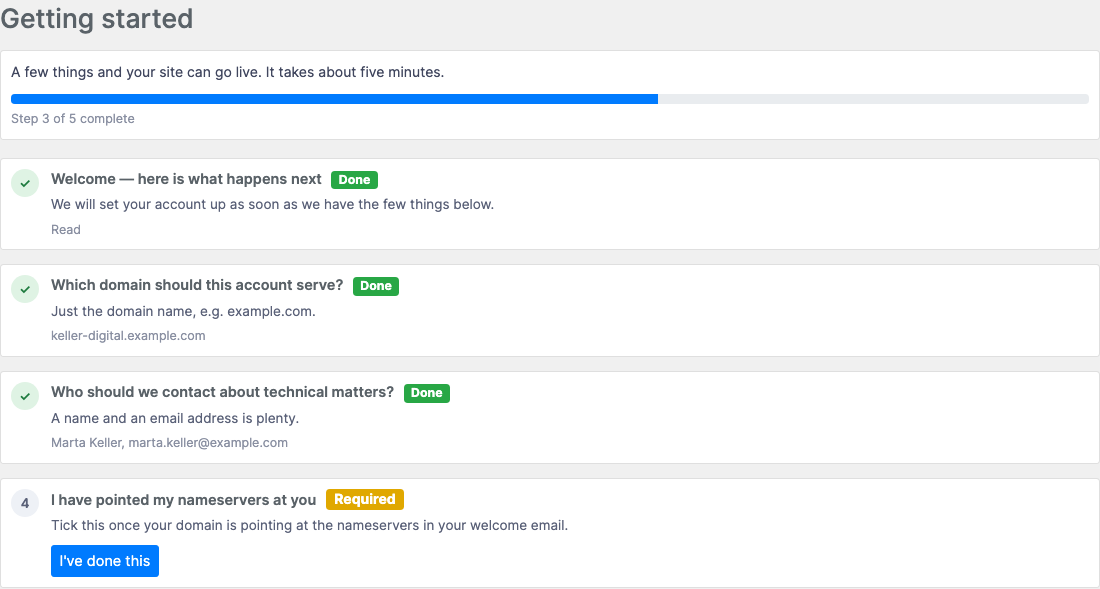
This genuine client-area screenshot shows example answers saved beside completed steps and the next required confirmation. It is a product demonstration with example data, not a customer case study. The screen helps show why the checklist is more useful than a welcome message that disappears into an inbox.
For customers, a visible next step removes guesswork. They can see whether they still need to name the domain, provide a contact or confirm a task. For your team, the answer stays associated with the question it resolves. A new staff member can understand the position without asking the customer to resend everything.
The customer-facing language is also part of your service. A clear opening line explains why you need the information, and the completion message explains what your team will do after receiving it. PD Onboard supports translatable and overridable wording, allowing you to make those instructions fit your business.
A progress bar does not guarantee a launch time or make a complex project simple. It does make the agreed steps and current position easier to understand. That is a useful improvement to the first days of a hosting relationship.
Keep the staff view connected to what customers do
The In progress view shows onboarding runs with the client, checklist, progress, last activity and status. Staff can open a run to read the supplied information, mark a step complete on the customer’s behalf or reopen a step that needs another answer.
This matters because real customers do not always follow the intended route. Someone may telephone with a launch date or reply to an existing conversation with the domain name. Your staff can record the completion rather than leaving the checklist falsely stuck. Staff completion is recorded as such, keeping the shared view understandable.
Blesta client profiles also have an Onboarding row in the shared PD Modules strip. A member of staff looking at the account can see the open checklist and follow it without beginning a separate search. That is a useful connection between onboarding and ordinary customer service.
For an agency with several people handling delivery, this creates a practical handover. The next person can see which answers are present and which required steps remain. The checklist becomes part of the account context, rather than a private memory belonging to the staff member who first spoke to the customer.
Add Pro where collection and follow-up need more capability
The free edition includes reusable checklists, information and question steps, simple confirmations, staff tasks, the customer page and staff progress view. That gives a business a useful starting process without requiring every advanced feature.
Pro adds the capabilities that collect files, check external conditions and follow up automatically. The distinction is important when deciding how far to take an onboarding workflow.
Collect the assets needed for the work
Pro upload steps accept supported documents and images through the onboarding page. This is useful for logos and other assets that belong to a particular request. The module controls access so staff and the owning customer can retrieve the relevant files.
Keep secret-credential handover separate from ordinary onboarding questions and file collection. Use an independently verified route suitable for that information rather than assuming a saved checklist answer is encrypted storage.
Check a confirmation against DNS or a website
A customer ticking “I changed my nameservers” can be a useful acknowledgement, but Pro can take the next step with a live confirmation check. Supported checks include expected nameservers, resolution to a specified address and whether the website answers.
When a check contradicts the expected result, the customer gets an explanation of the current and intended values. If verification cannot run, the documented behaviour accepts the acknowledgement rather than blocking progress. This is helpful guided confirmation, not a guarantee that every completed step has been independently proved.
Used well, the check puts a useful answer beside the task the customer is performing. They can understand what remains to change without your team writing another generic “please check DNS” message.
Follow up on inactivity
Pro reminders are off by default until you choose to enable them. You set the interval before a customer who has stopped progressing receives a message with the outstanding steps and a route back to their page. A separate stalled alert brings a quiet onboarding to your team’s attention.
Those are different jobs. A reminder gives the customer a convenient next action; a staff alert signals that a personal conversation may be useful. Pro also supports a completion email using your chosen wording when the required work is done.
You can therefore match follow-up to your service rather than making staff remember every outstanding checklist. It is an operational capability, not a promise that every customer will respond or that all onboarding needs can be handled automatically.
An example first-week journey for a hosting customer
Imagine a small hosting agency introducing a website migration package. This is an illustrative workflow, not a record of a real customer’s results.
The agency attaches a checklist to the package and starts onboarding after service activation. The first step explains the migration sequence. A question collects the website address, another records the technical contact and an internal task asks staff to review the supplied details. With Pro, an upload step can collect the relevant content asset.
A later confirmation asks the customer to complete the relevant DNS change. Pro live checks can add feedback where that is appropriate. The customer sees saved answers and remaining tasks; the delivery team sees the same progress from its staff view.
If the customer pauses, the agency can use its chosen reminder interval and stalled alert. Once the required steps finish, a completion message explains the next stage. The module does not perform the website migration itself; it helps the business collect and track what is needed to carry it out.
That is the value of customer onboarding automation for Blesta: make a repeatable part of the service visible, specific and easier to hand between people. Explore PD Onboard for Blesta and use the Blesta module guides to move from the idea to your own package workflow.
Blesta customer onboarding FAQ
Does PD Onboard work inside the Blesta client area?
Yes. Customers reach a signed-in checklist page through the Getting started entry point. Their answers and progress are saved so they can return to outstanding steps.
Can different packages have different onboarding checklists?
Yes. Target a specific package, a package group or a fallback. A more specific package match takes precedence, allowing your intake questions to follow the service rather than using one generic form for every order.
What can I use in the free edition?
The free edition includes checklists, information and question steps, simple confirmations, staff tasks, the customer page and staff view. File uploads, live checks and automated follow-up are Pro capabilities.
Can customers upload logos and other project assets?
Yes, with Pro upload steps. Review the requested file types and actual storage configuration, and keep sensitive credential handover separate from ordinary asset collection.
Do DNS checks always block the customer until propagation finishes?
No. A live check that contradicts the expected result keeps the step open with useful feedback, but a check that cannot run is accepted as the customer’s acknowledgement. Live checks are Pro and should not be described as universal independent verification.
Can staff complete a step when the answer arrives another way?
Yes. Staff can mark a step done on the customer’s behalf or reopen it. This keeps progress accurate when customers provide information by another agreed route.
Will PD Onboard send reminder emails automatically as soon as I install it?
Automatic reminders are a Pro option and are off by default. You choose whether to enable them and set the inactivity interval. Stalled alerts and completion emails are separate features to configure for your process.
