PD Domain Radar for WHMCS

PD Domain Radar — Domain Portfolio Health, Expiry Radar & Drift Detection (RDAP)

Know about a domain problem before your customer does

Made and supported by Projektif Digital Ltd. Runs inside PD Modules, the panel every module installs into.

Domains & DNS Monitoring & Alerts

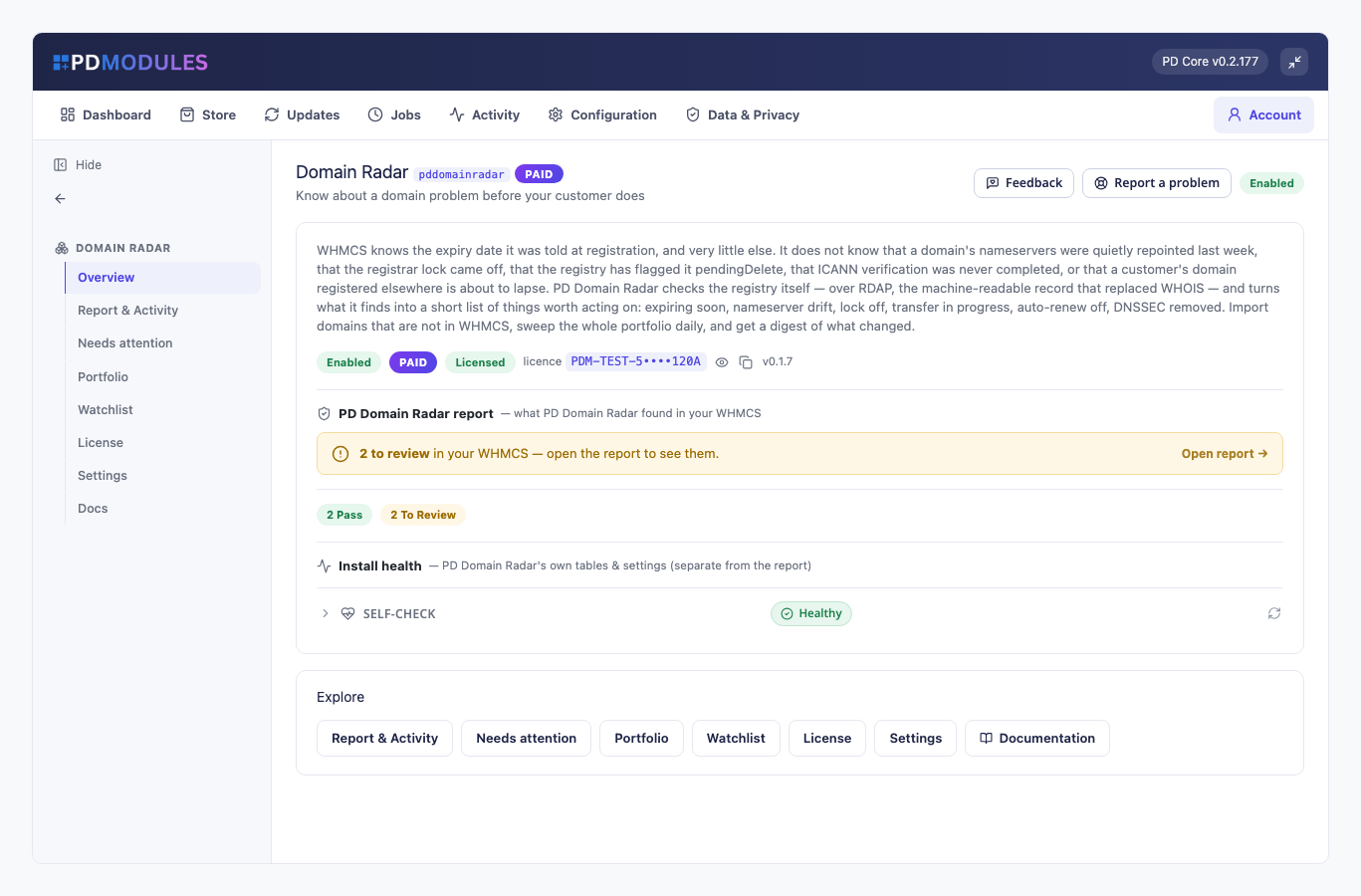
PD Domain Radar checks the registry itself, not your billing system's copy, and tells you when a domain you manage has a problem. WHMCS knows the expiry date it was told at registration, and very little else. Domain Radar reads the registry over RDAP, the machine-readable successor to WHOIS, and raises a finding when a domain is expiring, has had its nameservers changed, has lost its registrar lock, has a transfer in progress, is queued for deletion or was never verified.

It is built for hosting companies and agencies that manage domains for customers and want to hear about a lapse or an unwanted transfer from the module rather than from the customer. It also watches domains that are not in WHMCS at all, such as a customer's name held at another registrar.

Why hosts choose PD Domain Radar

Ask the registry, not the database. The things that cost you a customer happen at the registry: nameservers repointed, a lock switched off, a transfer started. Domain Radar looks there and shows what the registry said.

Findings ranked so the urgent ones stand out. A domain inside your warning window (45 days by default) is a warning and inside your critical window (14 days by default) is critical. Transfer in progress, pending delete, redemption and registry hold are always critical. Each finding shows when it first appeared, so a new problem stands out from one you already know about.

It does not cry wolf. A domain checked for the first time is never reported as "nameservers changed". Order, case and trailing dots never count as a change. When a lookup fails, you get one low-severity "could not be checked" note and no other claim about that domain, never a wall of false alarms.

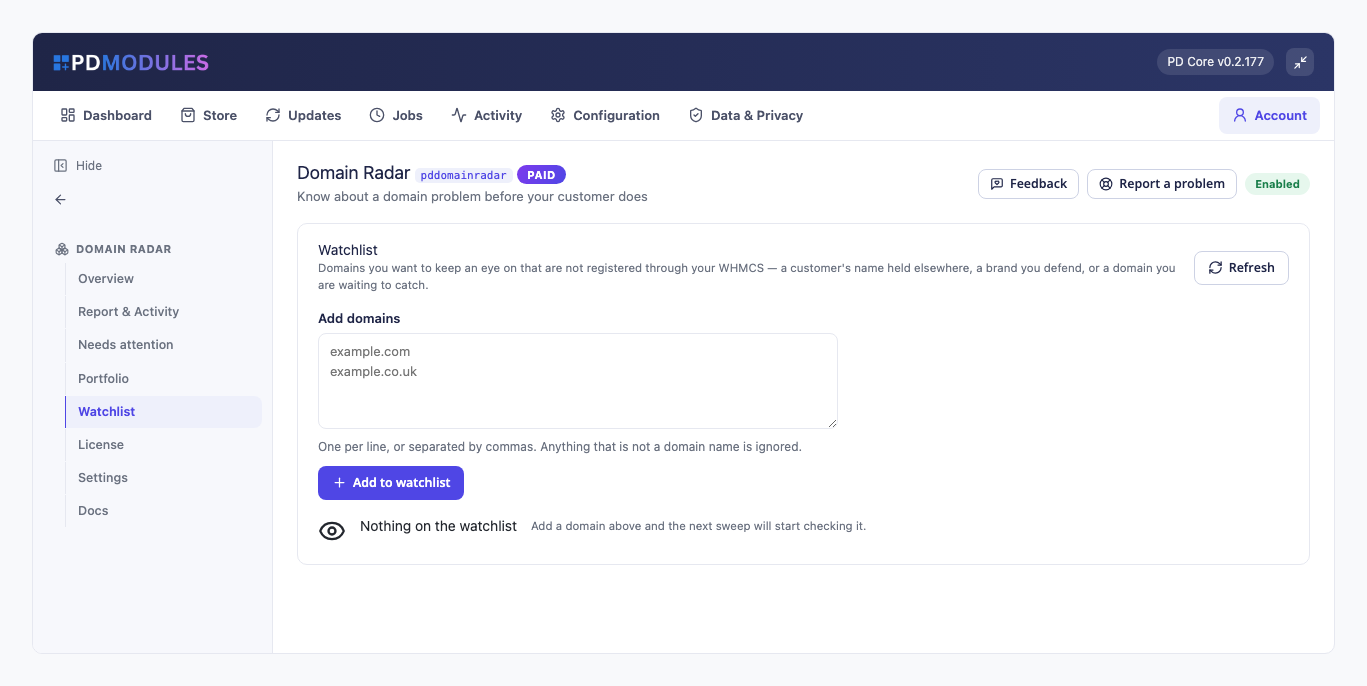
Watch domains you do not manage. Add a customer's name held at another registrar, a brand you defend or a domain you are waiting to catch, and it is checked in the same sweeps as the rest of the portfolio.

Accept what is expected. Accept a finding and it drops out of the default list while staying on record. If it changes, it comes back.

Read-only, by design. Domain Radar reads only. It never changes anything at your registrar. A lookup carries only the domain name, and goes only to the registry's RDAP service, with a monthly refresh from IANA. Nothing is sent to us.

Swept without you. The portfolio is swept automatically in batches (200 by default), never-checked domains first and then the oldest-checked, and a failure is reported as a failed run.

How it works

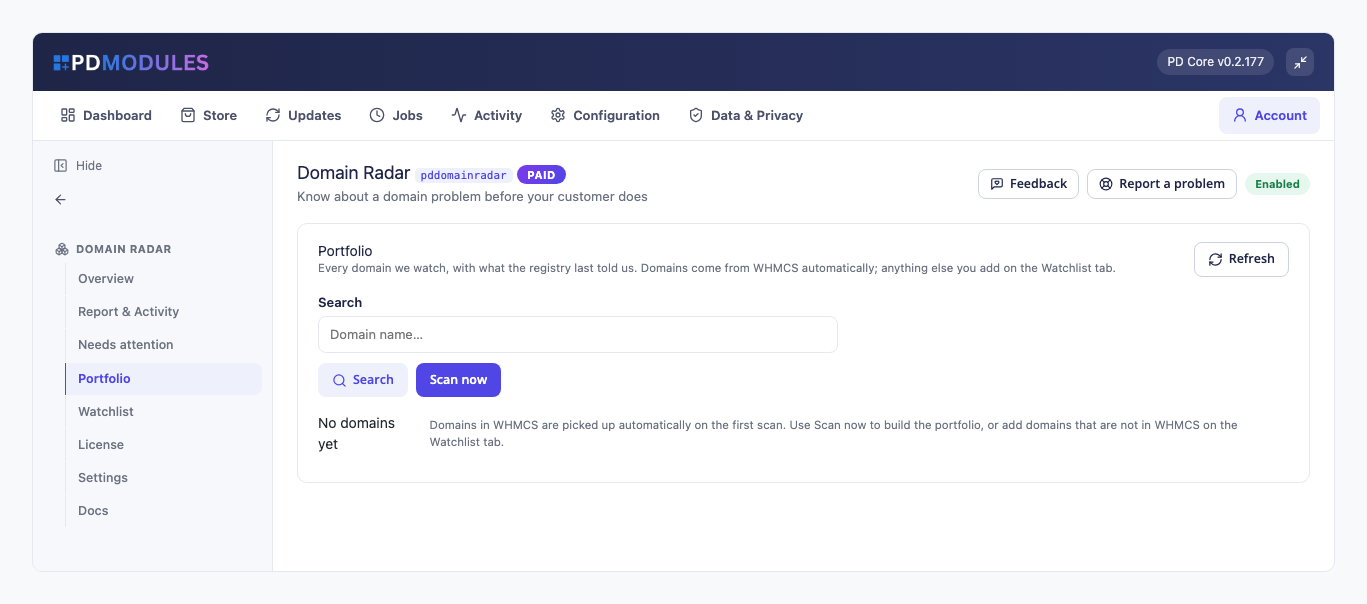
  1. Install it. Domains in WHMCS are picked up automatically on the first scan, and you can add domains that are not in WHMCS on the Watchlist.
  2. Run a scan. The first sweep asks the registry about every domain and builds the portfolio.
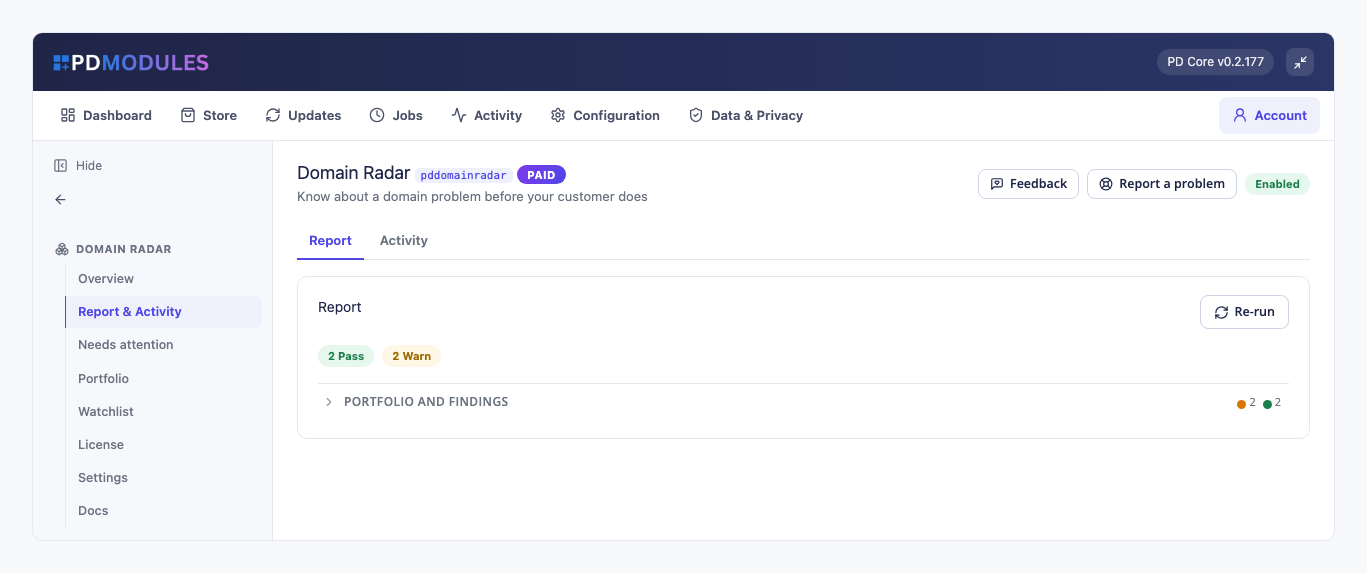
  3. Work the list. Needs attention shows what the registry disagrees with you about, with the severity and the date it appeared.
  4. Get the digest. Optionally, one email lists what is new since the last sweep, to your chosen addresses or your system address.

What you get in WHMCS

What it looks for

  • Expired domains, and domains expiring inside your warning and critical windows
  • Nameservers changed since the previous check, and, if you switch it on, domains not using your nameservers, compared on the registrable domain so dns1.yourhost.net counts as yours when ns1.yourhost.net is configured
  • Registrar lock off, auto-renew off close to expiry, and DNSSEC removed (the last two are switchable)
  • Transfer in progress, pending delete or redemption, and registry hold, all critical
  • Registrant not verified, a warning, because domains get suspended for it
  • "Could not be checked" for a registry that publishes no lookup service

Running it day to day

  • A Portfolio of every domain with the facts the registry reports, including real nameservers and lock state, which WHMCS does not store
  • A Watchlist for domains that are not in WHMCS: add them one per line or separated by commas, and anything that is not a domain name is ignored
  • A Needs attention list you can filter by severity, with Scan now
  • Accepted findings stay on record and come back if they change
  • Sweeps include expired domains until they have been expired for more than 30 days, unless you tell it to keep checking
  • The digest email lists only what is new, and you choose the lowest severity that triggers it (warnings and critical by default)
  • The assistant tools can read the portfolio, findings and watchlist

Security built in

  • Domain Radar never changes anything at your registrar. It reports, and you decide.
  • A lookup carries only the domain name. Nothing about your customers is sent anywhere.
  • No account with a third-party service is needed, and nothing is metered.

One product, every feature

PD Domain Radar is one paid module with everything included, at £15 per month or £150 per year. There are no tiers to compare.

If your subscription lapses, the portfolio stays readable. Sweeps, findings and the watchlist pause until you renew.

Requirements

  • WHMCS 9 or later and PHP 8.2 or later
  • PD Modules (free), which installs PD Domain Radar
  • The ionCube Loader
  • Domains on extensions whose registry publishes RDAP, which covers most gTLDs and many country codes. Others are shown as "could not be checked"
Questions

What is RDAP, and why not WHOIS?

RDAP is the registration data protocol that replaced WHOIS at gTLD registrars. WHOIS returned free text that every registrar formatted differently; RDAP returns structured JSON with defined fields. That is why this module can tell you the transfer lock is off rather than showing you text to read yourself.

Why do some domains say "could not be checked"?

Either that extension publishes no RDAP service — still true of a number of country extensions — or the registry did not answer in time. Rather than guess, the module says so, and claims nothing else about that domain until a lookup succeeds.

Will this hammer the registries?

No. Sweeps are batched (200 domains a day by default), oldest-checked first, one bounded request per domain with an eight-second ceiling and no retries. You control the batch size.

Does it change anything at my registrar?

No. The only write it makes is local: switching WHMCS's own "do not renew" flag back off when you click Turn auto-renew on. Everything registrar-side is a deep link into WHMCS's own domain page.

Can I watch domains that are not in WHMCS?

Yes — that is what the watchlist is for. A customer's domain held elsewhere, a brand name you defend, or a name you are waiting on. They are checked exactly like the rest.

Why does a domain show as unlocked when my registrar panel says it is locked?

The module reports the registry's status codes. If your registrar shows a lock but the registry does not, the lock has not been pushed to the registry — which is worth knowing, and exactly the sort of gap this module exists to surface.

A customer legitimately uses their own nameservers. Must I see that forever?

No — accept the finding. It stays on record, drops out of the default list, and comes back if it changes again.

Is anything shown to my customers?

No. This is an operator tool with no client-area surface.

What does it cost to run, on top of the subscription?

Nothing beyond the module subscription. PD Domain Radar runs entirely inside your WHMCS and does not connect to a paid third-party service, so there is no usage bill, no per-message or per-GB charge, and no metered anything.

What data leaves my server?

Your customers' data stays in your WHMCS. To confirm your licence, the platform sends us four things and nothing else: your licence key, the domain, your server's own IP address and the directory it is installed in — the four values recorded against your licence in your client area. Alongside that we see which module and version you run and whether its licence is healthy, so we can ship compatible updates. We never receive your clients' personal data, your credentials, or the contents of your WHMCS. Crash reports are off unless you turn them on, and a diagnostic report is only ever sent when you send one, after showing you a preview you can edit.

Which WHMCS and PHP versions does it need?

WHMCS 9 or later, on PHP 8.2 or later. It installs alongside whatever else you run — it adds its own tables and templates rather than modifying WHMCS files, so it does not collide with other vendors' modules or with a customised theme. Uninstalling removes its own tables and settings and leaves no orphans behind.

How do I get help?

Open a ticket from your client area, or use Get help inside the PD Modules panel, which attaches a diagnostic report — you see a preview of exactly what it contains, and can exclude any part of it, before anything is sent. Support is included with an active subscription; bug reports are welcome whatever your licence state.

What’s new in 0.1.26

  • The digest now lists only what is new since the last sweep, and says how many are still outstanding.
  • New "Your nameservers" setting: "not using your nameservers" now has your own list to compare against.
  • "Not using your nameservers" now tells another company's nameservers apart from yours under country suffixes such as .co.uk.
  • An accepted finding comes back when it changes — new nameservers, or an expiry that has turned critical.
  • The email digest now only goes out when a finding at the severity you chose appears, instead of re-sending what you already knew.
  • The findings list keeps its explanations readable on narrower admin screens instead of squeezing them into a thin column.

Get your website online with PD Hosting

UK hosting, domains and support from a real team. From a first site to a full server.

Terms and Conditions  ·  Privacy Policy

PD Hosting is the trading name of Projektif Digital Ltd, registered in England and Wales, company number 12482555.

PD Hosting
Privacy Overview

This website uses cookies so that we can provide you with the best user experience possible. Cookie information is stored in your browser and performs functions such as recognising you when you return to our website and helping our team to understand which sections of the website you find most interesting and useful.