Customer-Facing AI in WHMCS: Knowledge, Account Context and Useful Answers
Help WHMCS customers ask about their account and your service guidance. Explore PD AI Assistant’s client area, knowledge sources, audience choices and provider options.
A customer asking when a domain expires needs a different answer from a visitor reading a general domain guide. The useful response depends on that customer’s account. A setup question, meanwhile, may be best answered from the hosting company’s own instructions rather than generic advice about a different service.
PD AI Assistant adds an optional customer-facing assistant to the WHMCS client area, combining the signed-in customer’s account context with the knowledge sources you make available. Customers can ask about their services, domains and invoices, or get help based on your documented products and guidance.
For a hosting business, that gives customer self-service another useful route. The assistant can help people find relevant information where they already manage their account, while your team controls the knowledge, provider connection and customer-facing presentation.
Connect the answer to the customer’s actual account
A generic chatbot can describe what a domain renewal is. A client-area assistant with the right account scope can help a signed-in customer ask about their own domain. That is a more specific job, and one connected to the hosting relationship.
PD AI Assistant’s customer tools are scoped to the signed-in customer’s own services, domains and invoices. The request uses their customer session. This is a separate audience from an administrator asking for a business-wide overview in the staff co-pilot.
Typical questions include “What services do I have?”, “When is my next invoice due?” and “When does my domain expire?” The value is a route to relevant account information through a conversation, rather than expecting every customer to know the right screen before asking.
This can be useful for a hosting business with several products on one account. A business customer may remember the domain name but not the package name or renewal sequence. A scoped assistant can work with the available account facts to help explain the situation.
The result still needs to be understood as assistance based on the available tools and information. It is not a reason to give a customer access to staff-wide records or claim that every answer is automatically correct. The product’s account boundary is part of what makes this particular workflow appropriate for the client portal.
Ground product questions in your own guidance
Hosting businesses often have specific setup instructions, onboarding steps and product explanations. A general model may know WordPress or DNS in broad terms without knowing how your company delivers those services.
PD AI Assistant supports searching the hosting company’s own WHMCS knowledge base and citing relevant guidance, within the content available to that audience. This gives the assistant a way to use your help articles for setup and support questions instead of inventing an unrelated procedure.
For example, an illustrative customer might ask how to use a service your business has just introduced. A relevant, maintained guide gives the assistant a source for the answer and a route for the customer to read the full instructions. The knowledge base remains valuable; the conversation becomes another way to discover it.
The operator’s content quality therefore matters. Use clear article titles, accurate steps and an explicit audience. The assistant can help retrieve and explain useful material, but a vague or outdated source does not become a better operating procedure merely because a model can paraphrase it.
This is a practical reason to connect WHMCS AI support and knowledge-base maintenance. Your team’s expertise stays in the documented source, and the client-facing experience can help customers reach it in the context of the question they are asking.
Add documents with a deliberate audience
The module’s Settings → Knowledge area accepts pasted text and supported document uploads, including text, Markdown, PDF and Word documents. These sources are extracted and indexed so the assistant can draw on them and cite the source.
The audience setting distinguishes material for staff from sources intended for customer answers. An internal procedure and a customer setup guide do not need to be available to the same conversation.
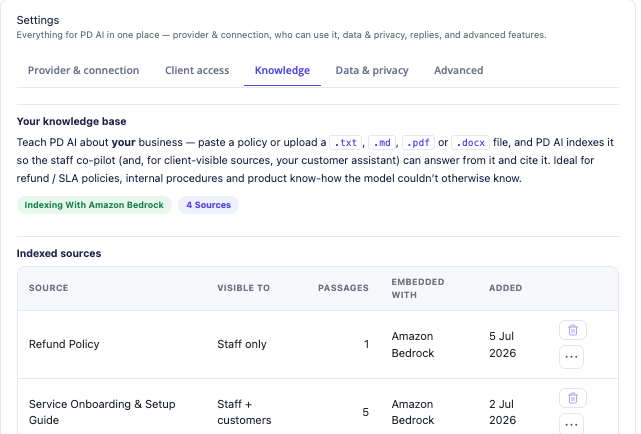
This actual module view shows example sources with their audience labels. It demonstrates the distinction between staff-only and customer-visible knowledge; the names and source counts are part of the demonstration, not a required document structure for your business.
A useful starting collection could include a customer onboarding guide, the explanation of a service’s included features and a maintained set of common product questions. Keep internal staff procedures separate. Those are editorial choices for your hosting operation, not a claim that all uploaded documents should be visible to everyone.
Documents and the existing knowledge base serve related roles. The knowledge base provides the published help structure, while uploaded sources can add specific business material. Together they can supply more relevant context than a conversation relying only on a model’s general training.
Make business instructions intentional
PD AI Assistant also supports business-wide Memory. Manual facts added through the Memory tab can supply house style, common answers and policies. The documented customer-facing behaviour uses the manually added business memory rather than automatically learned material from staff conversations.
This is an important distinction when planning customer answers. A passing comment in an internal conversation should not become the next policy a customer hears. Add the intended business facts deliberately and review them as part of maintaining the service information.
Think about a short explanation of where customers should look for a particular account action or how the hosting company describes a product. The useful memory is accurate, scoped and easy for your team to keep current. A lengthy set of conflicting instructions is harder to maintain than a clear source collection with a defined owner.
Use memory for the business context it suits, and keep detailed procedures in the knowledge sources where staff can review them properly. The assistant can draw these elements together without requiring every customer to know which internal document contains the answer.
Show the experience in the customer portal
The customer-facing assistant is an option you enable in the module settings. It appears in the client area, letting the signed-in customer ask a question alongside the services and account tools they already use.
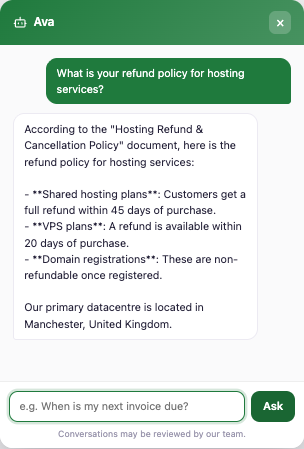
This is a real module capture using illustrative hosting-company content. The sample terms and location in the answer demonstrate knowledge-based replies; they are not PD Hosting’s service terms or datacentre information. The image is a demonstration of the interface, not a customer testimonial.
The client-area presentation can be translated and restyled through the documented language and template overrides, with those overrides retained across module updates. That lets the wording fit your hosting business and the rest of the portal rather than making the assistant feel like an unrelated service.
The example also shows a useful distinction in content planning. An account question needs the appropriate account facts. A question about the hosting company’s own offering needs the relevant documented business information. Both can be useful customer conversations without presenting the assistant as a replacement for every staff interaction.
Choose the AI provider behind the experience
The customer assistant uses the provider configured for PD AI Assistant. Supported routes include your own Amazon Bedrock connection, OpenAI or Google Gemini. Your chosen provider bills its usage directly; PD AI Assistant does not supply a separate pool of AI credits.
That keeps the model/provider choice in the operator’s configuration. A hosting company already using a supported provider can evaluate that route, while another may prefer the AWS account arrangement. The module supplies the WHMCS integration and customer-facing workflow around it.
The data flow should also be understood accurately. The questions and relevant retrieved context are sent to the configured provider to generate the answer. This is not a model running entirely inside the WHMCS server, and “bring your own key” does not mean no information leaves that server.
For a buyer, the useful questions are which provider route the business wants, what information is needed for the intended customer tasks and how usage will be reviewed. The module’s Usage view provides activity visibility, while the provider remains the source of the usage charges.
Design a helpful starting set of questions
A customer assistant is easier to introduce when the team can show the tasks it is intended to help with. Start with questions that have a clear account source or a maintained piece of guidance.
| Customer question | Relevant information | What the team should verify |
|---|---|---|
| When does my domain expire? | That customer’s domain record | The answer uses the correct domain/account context |
| What services do I have? | The signed-in customer’s services | The summary matches the intended account |
| How do I start using this product? | A current customer-facing guide | The answer reflects the documented service |
| What is included in this offering? | An approved product document | The source and its audience are appropriate |
These are illustrative acceptance questions, not measured customer results. Their purpose is to connect the assistant’s usefulness to facts the team can inspect.
Use real operating questions from your own service design, without putting confidential customer data into a public test example. Check the intended response as a relevant signed-in role and verify that staff-only material remains outside that customer-facing source selection.
A small, clear set of successful journeys provides a better foundation for expansion than asking every possible question on the first day. Add sources and use cases as the team understands what customers need.
Keep staff help and customer help connected
The same module also has an administrator co-pilot, agents and event-based automation capabilities. Those are useful parts of PD AI Assistant, but they have a different audience and purpose from the customer-facing assistant.
A staff member may need business-wide context or prepare an action for review. A customer needs their own information and the guidance the company intends them to see. Keep those roles clear when evaluating the product instead of assuming every administrative capability should appear in the client portal.
When a question needs a person, the customer assistant can direct the customer to the hosting business’s support route. That is part of a coherent service experience: helpful information where it is available, with the hosting team still responsible for decisions and work that need its involvement.
The opportunity is to connect the work rather than duplicate it. Maintain useful guides and business information, make the right sources available and give customers a convenient way to ask about them. Staff can then focus the conversation on the parts that need their expertise.
Explore PD AI Assistant for WHMCS to evaluate the customer and staff experiences together. Use the knowledge-base guides for the relevant provider, knowledge and client-access setup once the intended customer workflow is clear.
WHMCS client-area AI assistant FAQ
Can customers ask about their own WHMCS services and domains?
Yes. PD AI Assistant’s client-area tools use the signed-in customer’s account scope for services, domains and invoices. This is different from the staff co-pilot’s administrative context.
Can the answers use our own help articles?
Yes. The assistant can search relevant WHMCS knowledge-base content and cite the guidance available to that audience. Keep the sources accurate and maintain their intended access.
Can I upload our own product and onboarding documents?
Yes. Settings → Knowledge supports pasted text and supported document formats. Set the audience deliberately so staff-only and customer-facing material serve the appropriate conversations.
Does everything staff discuss become customer-facing memory?
No. The documented customer-facing behaviour uses manually added business memory rather than material automatically learned from staff conversations. Review those manual facts as part of maintaining the business information.
Does the module include an AI provider account?
You connect your own supported provider, such as Amazon Bedrock, OpenAI or Google Gemini. That provider bills usage directly; the module supplies the WHMCS integration rather than a separate credit allowance.
Does the AI model run entirely on our WHMCS server?
No. The configured provider handles inference using the question and relevant retrieved context. Understand that data flow when choosing the route for the business.
Can we change the customer-facing wording and styling?
Yes. The documented language and template overrides support translation and presentation changes that survive module updates. Use them to fit the assistant into your own client-area experience.
Is the customer assistant a replacement for our support team?
It provides account-aware assistance and documented answers for useful customer tasks. Your team still owns the service, source quality and work requiring human judgement. Evaluate it against specific customer journeys rather than a promise to handle every enquiry automatically.
