Blesta Promotions: Automatic Discounts, Bundles and Recurring Offer Control
Build Blesta promotions with customer and package targeting, renewal controls, bundles and early-payment credit. Explore PD Discount Manager’s invoice-based workflow.
A hosting promotion can do more than hand out a coupon. It can recognise an existing customer, reward a particular billing commitment or make a group of services more attractive together. The useful offer is tied to a commercial purpose and a clear renewal rule, rather than a discount applied to everyone indefinitely.
PD Discount Manager adds automatic promotion rules, product bundles, customer-product trials and early-payment rewards to Blesta. You decide the eligible packages and customers, the reduction and how long it lasts. On Blesta, the module applies the saving to the invoice raised for the order or renewal.
That platform detail matters: the customer sees the normal price in the Blesta cart and the applicable saving on the invoice. This guide explains the opportunities for a hosting business, the targeting available and how to design offers that staff and customers can understand.
Start with the commercial purpose
A promotion has a more useful role when the business knows what it is encouraging. A welcome offer, an existing-customer cross-sell and an ongoing loyalty reduction are different campaigns, even when each uses a percentage discount.
PD Discount Manager provides controls for those distinctions. Rules can apply to selected products or package groups and be narrowed by customer eligibility, cycle, date and other conditions. The module evaluates the matching rule as the relevant invoice is created.
An illustrative hosting company might want to introduce an email package to customers who already use its web hosting. Another might want an introductory reduction for a new service’s first invoice. A third might reward clients with an established set of active services. These are hypothetical campaign patterns, not reports of customer conversion results.
The value of the rule engine is that the offer can follow those conditions without requiring every eligible buyer to remember a code. Your staff still choose the business objective, write the customer-facing explanation and decide whether the proposed reduction fits the service.
Understand where Blesta shows the saving
On Blesta, automatic discounts are applied to the invoice when it is raised, before it is sent. The cart shows the normal package price. The discounted invoice line identifies the reduction, and renewal invoices use the relevant recurring rule.
This is different from assuming a promotion module can rewrite every part of the order-form display. Your campaign page and instructions should tell customers what happens so they can recognise the applicable saving on the invoice.
For example, an introductory offer can describe the eligible service and the first-invoice reduction. Do not illustrate it using a cart screenshot from another billing platform that implies a different sequence. A clear explanation of the Blesta workflow is more useful than a promise the interface does not implement.
The module works alongside Blesta coupons. The coupon remains the code-based route for promotions you want customers to enter; PD Discount Manager supplies the automatic rule layer. By default, a coupon discount on a service is not accidentally combined with an automatic rule. Stacking is an explicit setting discussed later in this guide.
Target products, customers and order conditions
Automatic eligibility is where the module becomes more useful than a blanket reduction. You can choose all eligible products, specific products or a package group, then refine who qualifies and when.
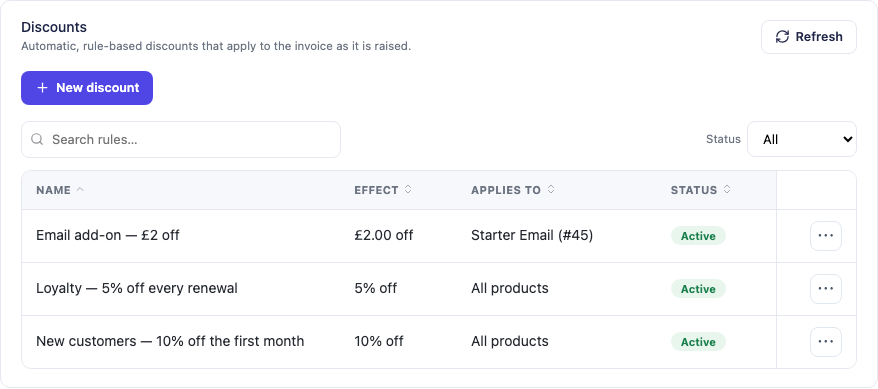
This actual rule-list capture shows several demonstration offer names and their effects. The examples are not current PD Hosting offers, and a name in the list does not prove every underlying eligibility setting. The rule configuration is what defines the campaign.
Supported targeting includes:
- Everyone, new clients, first orders, selected clients or client groups.
- Chosen billing cycles and an intended date window.
- Minimum order value or minimum item price.
- Products that must be included in the same order.
- Products the client already owns as active services.
- A minimum number of active services.
These conditions help distinguish a genuinely relevant offer from an indiscriminate discount. Existing ownership can support a cross-sell, while an in-order requirement can recognise a combination the customer is buying now.
The Blesta rules apply to products and package groups. They do not turn an “all products” rule into an automatic discount on domain renewals or every Configurable Option. Keep the advertised scope aligned with the module’s platform behaviour.
Choose the reduction and its duration together
PD Discount Manager supports percentage reductions, fixed amounts and free setup, with choices for the recurring charge, setup fee or both. The commercial meaning depends as much on duration as on the type of saving.
| Duration | What the customer is buying | A useful campaign purpose |
|---|---|---|
| First invoice only | An introductory reduction followed by the normal renewal arrangement | A defined welcome offer |
| Every renewal | The qualifying ongoing discount for the service | A continuing loyalty or partner arrangement |
| First N invoices | A limited sequence of discounted invoices | A stepped introduction with a defined endpoint |
The duration should be part of the public offer description. “Save on your first invoice” and “keep this discount on renewals” are different commitments. Staff should be able to explain the same arrangement the module applies.
For recurring promotions, the documented service keeps the discount arrangement it was sold with. An every-renewal offer acquired while the customer was new does not simply vanish because that person later becomes an existing client. The campaign end date and the purchased renewal arrangement therefore serve different purposes.
This is one of the module’s stronger practical benefits: offer targeting and renewal control can be designed together, instead of treating the first invoice as the whole promotion.
Bundle services when the combination is useful
A bundle can sell a group of products for a fixed total or a percentage reduction. On Blesta, the order must include every product in the bundle; the saving appears on the resulting invoice.
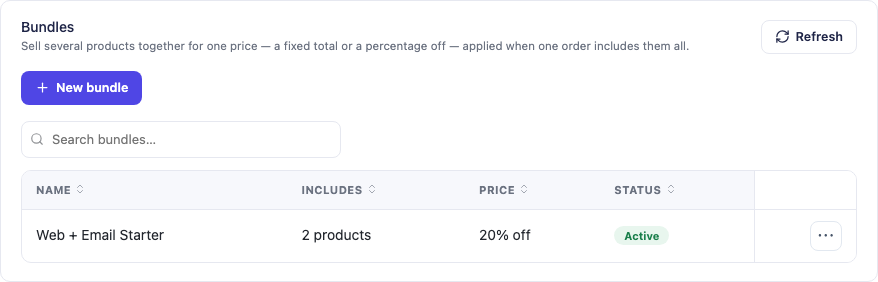
This genuine module screenshot shows an example two-product bundle. It is demonstration configuration, not a current commercial offer or evidence of a measured sales outcome.
A web-and-email combination can be useful when the services solve a connected customer need. Another business might group a hosting package with a related managed service. The bundle should explain that combined value rather than asking customers to buy unrelated items merely to reach a lower price.
The module can keep the bundle saving for the first payment, every renewal or the first N payments. Bundled products take their bundle pricing rather than an additional automatic discount rule. This helps the business define one intended arrangement for that combination.
The Blesta implementation does not provide a link that automatically fills the cart with the bundle. Explain which products the order needs and where the saving will appear. A campaign can still promote the combination without pretending the order form has a one-link cart function it does not supply.
Make overlap and usage limits deliberate
More than one promotion may be eligible for a service. With stacking off, the best single matching rule applies, with priority resolving a tie. Where a customer enters a Blesta coupon, that coupon normally supplies the service’s discount and an automatic rule steps aside.
If the business chooses stacking, matching rules and coupons can combine according to the configured behaviour. This is a different commercial decision from accidentally running two overlapping campaigns. Review the intended combination using the packages, cycles and customers the offer actually targets.
Total and per-client caps provide another layer of control. The documented rule limits count orders, with renewals not consuming the cap as though each were a new acquisition. That lets an offer limit participation without confusing the customer’s purchased recurring entitlement with a fresh promotional order each month.
Use the control that matches the purpose. A campaign window describes when new qualifying business is acquired; a usage cap limits participation; renewal settings describe the service afterwards. Treating those as separate questions makes the resulting offer easier to understand.
Let customers evaluate your own products
The module also supports trials of the hosting products your business sells. This is a feature for your customer offers, not a promise about obtaining a trial of PD Discount Manager itself.
You choose the eligible product, evaluation length, participation limits and what happens at the end. One route starts the first paid service period when the evaluation ends, using Blesta’s billing process. Another schedules cancellation at the end instead.
That gives a hosting business a structured option for an offer where evaluation makes sense. A limited customer opportunity should still have a clear endpoint and an explanation of what follows. Do not leave buyers to infer the billing sequence from a zero first invoice.
Eligibility limits can distinguish one opportunity per client for that product, one across the selected offering or new clients only. Your team decides the intended commercial design rather than treating every account and product as equally eligible.
Reward early renewal payments with account credit
A separate, opt-in early-payment reward can grant Blesta account credit when a qualifying renewal is paid sufficiently ahead of its due date. The reward can use a percentage or fixed amount, with an optional cap and a configured qualification interval.
This is different from reducing the invoice before payment. The customer pays the qualifying invoice, then receives account credit that Blesta can use on future invoices. Explain the mechanism plainly if you include it in a customer campaign.
For an operator, it offers another promotion pattern tied to an actual customer behaviour. It does not guarantee faster payment or a particular cash-flow result. The module supplies the configurable reward and its usage record; your team chooses whether the incentive is appropriate for the service.
Review the campaign and pause it correctly
The Usage view records discounts applied, their rules, relevant clients and savings, plus early-payment rewards and customer-product evaluation activity. This gives staff a way to see what the configured engine actually did rather than assuming every eligible customer received the expected arrangement.
Pause and deletion also have different meanings. Switching off a rule or bundle stops new sales under it while preserving the purchased recurring arrangement. Deleting the rule or bundle ends that ongoing application from the next relevant renewal. Choose the action that matches the business intention.
An illustrative campaign review could ask: did the intended packages qualify, did the first invoice show the saving, were non-qualifying orders unaffected and is the renewal arrangement the one advertised? Those are operational checks on the offer, not a fabricated conversion or revenue claim.
Explore PD Discount Manager for Blesta to evaluate automatic discounts, bundles and the other promotion patterns together. Use the knowledge-base task guides to configure the rule that matches the campaign your business wants to run.
Blesta automatic promotions FAQ
Does an automatic discount appear in the Blesta cart?
The cart shows the normal price. PD Discount Manager applies the eligible reduction to the invoice Blesta raises for the order, before sending it. Renewal invoices follow the configured recurring arrangement.
Can I keep using Blesta coupon codes?
Yes. Coupons remain the code-based route, while the module adds automatic rules. By default, an entered coupon and an automatic rule do not accidentally combine on the same service; stacking is an explicit option.
Can a discount target existing customers who own another product?
Yes. Supported conditions include products already owned as active services, products in the same order, client groups and a minimum active-service count, alongside package and cycle choices.
Can a customer keep an introductory offer on every renewal?
Only when that is the arrangement the rule sells. Choose first invoice, every renewal or the first N invoices and describe that choice clearly. An ongoing qualifying service arrangement is distinct from the campaign’s acquisition window.
Can I sell several Blesta products as a bundle?
Yes. A fixed-total or percentage bundle applies when one order includes all required products. The Blesta implementation applies the saving on the invoice and does not provide an automatic cart-filling bundle link.
Do product rules discount domain renewals or all options as well?
No. The documented Blesta scope is products and package groups; an all-products rule does not automatically discount domains or Configurable Options.
Is the early-payment reward an immediate invoice discount?
No. It grants Blesta account credit after a qualifying early payment, using the configured value and limits. The credit can apply to future invoices through Blesta’s normal credit behaviour.
Can I pause a promotion without deleting its configuration?
Yes. Pause the rule or bundle to stop new sales under it while keeping the documented purchased recurring arrangements. Deletion has different consequences for future renewals, so use it only when that is the intended result.
