WHMCS AI Workflows with Human Approval: Delegate Real Work Through MCP Hub
Delegate useful WHMCS work with PD MCP Hub: task-specific connections, request-based human approvals, role permissions and an audit trail.
The useful question about AI in a hosting business is not just whether an assistant can find an answer. It is whether the assistant can help complete a real job while your team retains control of the decision that matters.
PD MCP Hub gives WHMCS a governed connection for compatible AI assistants and business tools. Separate connections define what an assistant can reach, which administrator it acts as and how far it may go. Human approvals can stand between a proposed operation and the action itself.
That makes a practical middle ground possible: delegate the preparation, keep the consequential decision and review what actually happened. A hosting team can start with read-only investigation, introduce carefully selected changes and develop repeatable workflows without giving every assistant the same authority.
Move from a conversation to a controlled workflow
A conversation might produce a good draft announcement. A workflow also needs the right destination, the correct content permissions, a review decision and a record of the final change. Those operational details determine whether AI is useful to the team beyond a copy-and-paste window.
PD MCP Hub connects that work to WHMCS through the Model Context Protocol. The assistant uses available tools rather than inventing a procedure from memory. Your connection settings determine what is available and what must wait for a person.
This article focuses on approval-led operations. For the broader product, including assistant choices and attached business systems, see the PD MCP Hub overview. The aim here is to show how a hosting operator can give one workflow a clear boundary and a visible human decision.
Give each job its own connection
A research assistant and an editorial assistant need different permissions. Treating them as the same account makes it harder to know why a tool is available and which task justified that access.
PD MCP Hub provides a connection per assistant, with its own token, selected areas, risk ceiling and bound WHMCS administrator. Administrator role permissions also apply. Raising a connection ceiling does not create an administrator permission that the chosen role lacks.
For example, a hypothetical hosting company could use a read-only connection for service investigation and a separate editorial connection for knowledge-base maintenance. The first should not acquire publishing rights simply because the second needs them.
| Workflow | Useful starting boundary | Human decision |
|---|---|---|
| Research a service question | Read-only, relevant areas and administrator role | Staff decide how to act on the findings |
| Prepare shared knowledge-base changes | Dedicated editorial role and appropriate content tools | Review the proposed change before it is applied |
| Prepare a customer communication | Explicit communication capability where authorised | Approve the actual outgoing action |
| Join context from an attached business tool | Reviewed server, selected tools and suitable connection policy | Decide which cross-system operation is appropriate |
These are connection-design examples, not instructions to enable unrelated tools. Use the available tool catalogue and the permissions required by the particular job.
Human approval should describe the actual request
The approval queue is one of MCP Hub’s strongest features because it changes what a person is being asked to trust. The description is generated from the requested operation, rather than relying on the assistant’s reassuring explanation of its own plan.
A sentence in a chat such as “I will tidy this up” is not enough to approve an action. A useful decision identifies what will change, where it will happen and what consequence the tool is about to produce.
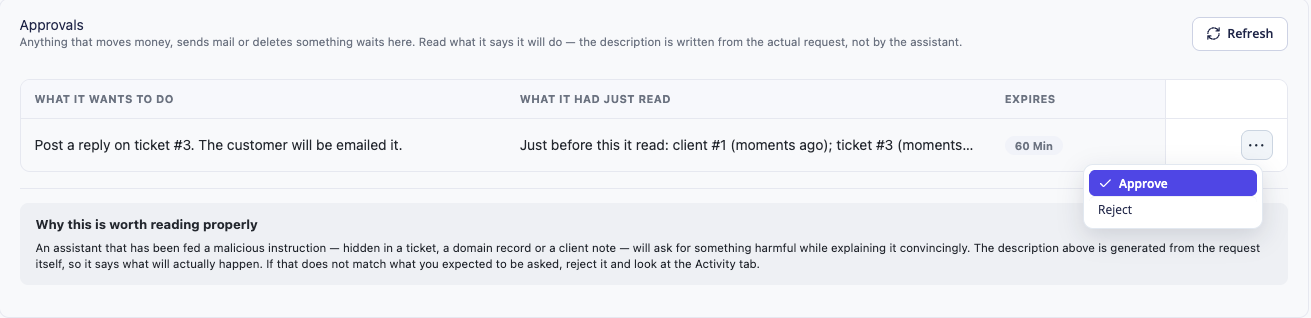
The demonstration screen shows the proposed operation alongside what the assistant had just read. That preceding context can help a reviewer notice an unexpected leap from reading a record to proposing a change.
Approval applies to the request shown. The module fingerprints its arguments and checks them again before execution; an approval is not intended as a reusable permission for a different request. Pending approvals also expire. The team should approve an understandable operation, not a vague promise of future discretion.
Start by confirming every change
The separate Read only control takes precedence over the risk ceiling. It is useful while you establish that an assistant can find the right information and use the available tools sensibly.
When you introduce changes, Confirm everything can make data-changing operations wait for human approval. That is a practical way to observe a new workflow before deciding which routine operations deserve more freedom.
Read-only lookups do not need to fill the approval queue. This keeps attention on the requests that change something. A useful approval system should help reviewers see a decision clearly rather than surrounding it with dozens of ordinary searches.
The risk classes also distinguish changing data from communicating outside the system. Preparing an article, changing a record and sending a message are different permissions. A workflow should receive the level it requires, rather than the highest level that happens to make every tool appear.
A concrete example: turn a repeated question into a KB update
Imagine a hosting team noticing that customers repeatedly ask how to use a supported account feature. The team wants an assistant to help maintain the relevant WHMCS knowledge-base article.
First, the operator supplies the approved product documentation and the existing article. The assistant identifies the gap and proposes an update. A dedicated editorial connection has the necessary WHMCS knowledge-base permission, suitable ceiling and shared-content access.
Next, the proposed write waits for review if confirmation is enabled. A staff member checks the actual destination and change, approves the intended operation and verifies the updated article. The assistant can help with preparation and execution; the team’s product knowledge still determines whether the instructions are right.
Shared content needs a suitable editorial connection. PD MCP Hub refuses knowledge-base operations on client-scoped connections, so narrowing an investigative connection to one customer is not a substitute for setting up shared-content permissions correctly.
The benefit is an accountable editorial route: a named connection, an appropriate administrator role, an identifiable article and a specific approved change. It does not depend on giving an assistant unrestricted access to the installation.
Extend the workflow to other business systems
PD MCP Hub can attach compatible third-party MCP servers, bringing reviewed external tools under the hub’s controls. A hypothetical hosting company with an MCP-enabled CRM or helpdesk could let an assistant gather relevant context from that system while working on an authorised WHMCS task.
For instance, an operator might ask for a summary of an onboarding milestone from the CRM alongside an allowed WHMCS service lookup, then decide whether a customer-facing action is appropriate. That example depends on the external server providing the required tool and on the connection being allowed to use it.
This is broader than exposing a single billing-system API. PD module contributions and attached MCP servers can add capabilities around the installation. The available tools and grants depend on the modules, server and installed release; inspect the catalogue rather than assuming a particular integration appears automatically.
A shared conversation does not make two systems synchronised. Nor does attaching a server certify all its tools. Review the external server, limit its tools and keep the same discipline around proposed changes. The module also separates attached-server access from destructive WHMCS tools by default unless explicitly acknowledged.
Review the sequence, not only the final answer
The audit trail helps the team examine which connection called which tool and whether the operation was allowed, queued or refused. This is useful both for improving a workflow and for understanding an unexpected attempt.
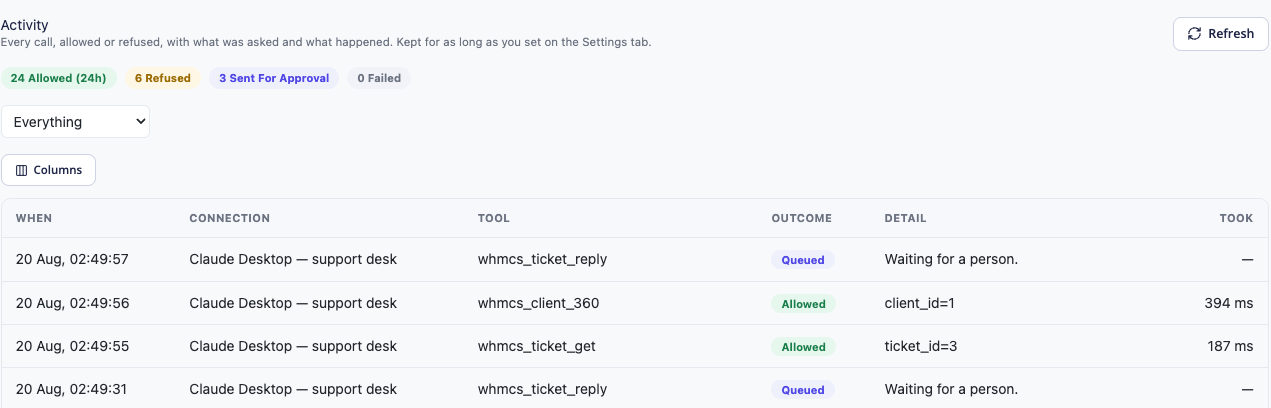
The example is demonstration activity, not measured customer usage. Its value is the sequence: permitted lookups and a proposed communication are visible as different events.
Use the recent view and filters for day-to-day review, and the retained-history export when a longer record is needed. The recent table is not the entire history. Recognised sensitive argument fields are redacted, but an export should still be handled as operational information rather than assumed anonymous.
If the workflow needs to stop, revoke the relevant connection or use the panel’s kill switch for the wider endpoint. Stopping future access does not undo an operation that already completed, which is another reason to make individual changes easy to identify.
Use the assistant that fits your team
The centre of this workflow is PD MCP Hub and the permissions you define. Compatible clients such as Claude or Codex can be entry points; the underlying product is not built around one assistant brand.
Provider-backed or local-model environments need an MCP-capable client or bridge that supports the hub’s transport and authentication. A local model does not, by itself, connect to WHMCS. Equally, choosing a local model does not make external business tools or provider requests local.
Choose the interface that suits the operator, then design the connection around the job. The same questions still apply: what can it read, what can it propose, who approves and how do we verify the outcome?
Build one useful workflow first
A focused first workflow is easier to evaluate than a promise to automate the entire business. Choose an existing task, define its success condition and give it the narrow connection it needs. Use human approval to learn how it behaves before broadening it.
Explore PD MCP Hub for WHMCS for current product details. The task guides explain read-only connections, knowledge-base permissions and the audit trail.
Frequently asked questions
Can an AI assistant work with WHMCS while a person approves changes?
Yes. PD MCP Hub provides connection permissions and an approval queue. Confirm everything can require approval for data-changing operations, while suitable read-only work remains separate.
Does approval trust the assistant’s description of its plan?
The queue describes the actual requested operation. Its arguments are fingerprinted, so approval applies to the request shown rather than an unrelated later operation.
Can I use the same connection for research and publishing?
Give each job an appropriate boundary. Shared knowledge-base operations need the relevant administrator permission and content capability, and are refused on client-scoped connections. Separate research and editorial connections make that distinction clearer.
Can MCP Hub work with another CRM or helpdesk MCP server?
It can attach compatible third-party MCP servers. A particular workflow depends on that server exposing the necessary tools, its transport and authentication being supported, and your review and connection grants.
Is this a Codex-only or Claude-only WHMCS integration?
No. The hub uses MCP and is intended for compatible clients. Client-specific connection support should be checked, while the module remains the centre of permissions, approvals and tool access.
Does an audit trail replace checking the result?
No. The trail helps identify requests and outcomes. Confirm the resulting article, service state or other intended change separately before calling the workflow complete.