WHMCS Domain and Email Forwarding: A Service Beyond Website Hosting
Offer domain redirects, individual email forwards and catch-all routing through WHMCS with PD Domain & Email Forwarder and customer self-service.
A domain can be useful long before its owner needs a website. A second brand name might send visitors to an existing shop. A former business address might need to keep receiving enquiries. A customer might want a simple email forward without buying another full hosting account.
PD Domain & Email Forwarder brings those services into WHMCS. Your team connects supported providers, assigns domains to customers and offers URL redirects and email forwarding through the customer account. Customers can manage the forwards you make available without needing access to your provider dashboard.
For a hosting company, that creates a practical service around domain ownership: help customers put a name to work, then let them maintain the everyday destination themselves. The value is the connection between domain, customer and forwarding controls, rather than another disconnected configuration screen.
Domain forwarding without a separate website
A URL forward sends a visitor to another web address. It is useful when a name should lead somewhere, but does not need its own set of website files or a separate content management system.
Imagine an agency supporting a business with a main website and a short campaign domain. The campaign domain can lead to the relevant landing page. When the campaign changes, the customer can change the destination through the hosting account instead of sending another request to the agency.
That is an illustrative workflow, not a claim about a particular customer’s results. The commercial point is simple: a domain-only customer still has a useful service to manage, and your WHMCS account becomes the place they return to do it.
Forwarding still needs a supported backend that can carry out the redirect. “Without hosting” means the customer does not have to build another website; it does not mean a DNS record, by itself, can return an HTTP redirect. PD Forwarder uses the capabilities of the configured provider.
Choose the redirect behaviour, not just the destination
PD Forwarder exposes more than a single target box. A URL forward can include a redirect type, the destination scheme, the www version, subdomain behaviour and path preservation. These choices let a host shape the service around the reason the customer owns the domain.
| Customer purpose | Useful control | What to decide |
|---|---|---|
| A site has moved permanently | 301 redirect | Choose the lasting destination and check important old links |
| A temporary campaign points elsewhere | 302 redirect | Keep the temporary purpose clear and review it when the campaign ends |
| Both versions of a domain should work | Also forward the www version | Test the main domain and www separately |
| Existing links should retain their route | Keep the path | Check that the destination has the corresponding pages |
| A whole set of subdomains needs one destination | Forward all subdomains | Check that no existing service is displaced |
The module also offers a 303 choice. Pick the redirect behaviour that fits the web request and the backend, rather than assuming every redirect code is interchangeable.
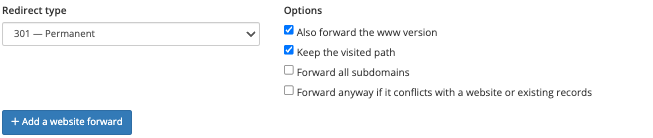
The real customer screen shows the choices that make this more useful than a bare domain pointer. It is a cropped product view; no forwarding operation was carried out for this article.
Path preservation is particularly useful for an old brand domain. It can carry a visitor’s route to the new site, provided the destination structure actually matches. It cannot invent missing pages. For a move with different page names, plan the destination mapping rather than sending every visitor through an unsuitable rule.
Email forwarding and a mailbox are different services
An email forward routes incoming messages to another address. It does not create a mailbox with its own storage, login and sending service. That distinction helps your customers buy the service they need instead of discovering the difference after setup.
PD Forwarder supports individual address forwards and a domain catch-all where the selected provider offers them. An individual forward suits a named address such as a sales contact. A catch-all sends unmatched addresses at the domain to a chosen destination.
Use the full source email address in the mailbox-forwarding form and one destination address for each forward. Do not assume comma-separated recipients are supported just because a particular screen or older help text suggests them. The task guides describe the supported input.
For a small business owner, the benefit could be receiving enquiries for a secondary domain in an existing inbox. For your team, the benefit is managing the rule against the correct customer and provider, without handing over an infrastructure account.
A catch-all needs a deliberate decision. It can capture mail addressed to names the owner has not individually configured, including unwanted messages. Offering the choice clearly is more helpful than enabling it on every domain by default.
One WHMCS interface, several provider choices
The module supports Cloudflare, cPanel/WHM, DirectAdmin and Plesk backends. You can add multiple providers and choose a default, while keeping individual domains attached to the appropriate backend.

This matters when a hosting business has grown across more than one platform. A domain on one backend should not require a completely separate customer experience from a domain on another. PD Forwarder gives your team a common place to work while respecting the backend’s available functions.
Capabilities are still provider-specific. Plesk mail forwarding depends on the mail setup. A cPanel domain without its own hosting account needs the configured fallback account to provide the service. Cloudflare redirects require the appropriate proxied traffic path; an unproxied record does not make an edge redirect run.
Cloudflare email routing also has destination-confirmation requirements. A pending destination is not a completed mail-delivery test. Configure the route, complete the required confirmation and verify receipt at the destination before treating a new email forward as ready.
Switching a domain’s mail routing can affect existing email. Establish where mail currently goes and preserve the services that must remain. A useful forwarding product should make a small change easier, rather than turning it into an unplanned mail migration.
Customer self-service with clear ownership
Customers reach the forwarding manager through the client navigation when enabled, or your chosen link to the module. They see domains assigned to their account and can open the relevant forwarding panel.
For the host, assigning the domain to the right customer is central. The administration interface provides Assign to client; that relationship determines which customer should see the domain. A familiar label and a consistent account location help prevent the “which dashboard do I use?” problem.
The customer can review current URL and email forwards, add supported forwards and remove those they own. Your team retains provider configuration and service policy. Optional notifications and activity records help staff understand changes without relying on someone remembering an email conversation.
Consider a hypothetical design agency that manages a customer’s main website while the customer maintains a short promotional domain. The agency sets up the provider and ownership once. The customer then updates the campaign destination from their WHMCS account. Both parties have a defined role, and the agency does not need to share its provider credentials.
Make forwarding part of the domain lifecycle
PD Forwarder can optionally prepare domains for forwarding when customers register or transfer them. This connects the domain sale to an immediately understandable next step: choose where the website visitors or incoming mail should go.
Automatic preparation and a working final route are separate milestones. Confirm the provider, customer assignment and routing requirements before describing a new domain as ready. Existing websites and email deserve particular attention when introducing forwarding to a domain that already has a purpose.
For an initial rollout, define a small service scope: which providers you support, whether customers may enable email routing, how you handle domains without hosting accounts, and which checks establish a successful redirect or received message. That gives staff a repeatable offering instead of a collection of exceptions.
Activity records then support day-to-day operations: what was configured, which destination is intended and which change happened most recently. They complement a real visitor or mail test; they do not prove that every destination website or inbox is healthy.
Turn domain ownership into an ongoing service
A domain service does not have to stop at registration and renewal. Redirect management, an individual email forward and a carefully chosen catch-all give customers practical reasons to use their account between renewal dates.
Explore PD Domain & Email Forwarder for WHMCS for the current product details. For exact setup steps, use the guides to create a URL redirect, forward an individual email address and set a catch-all.
Frequently asked questions
Can I offer domain forwarding through WHMCS without selling another website?
Yes. PD Forwarder connects supported forwarding backends to WHMCS, so a customer can direct a domain to an existing destination without building a second website. The configured provider still supplies the redirect or mail-routing service.
Can customers change their own URL redirects?
Customers can manage supported forwards for domains assigned to their account through the client forwarding manager. Your team configures the provider and enables the appropriate navigation and service options.
Does email forwarding include a mailbox?
No. It routes incoming messages to another address. Mailbox storage, sending credentials and a separate email account are different services.
Does PD Forwarder support Cloudflare and hosting control panels?
It supports Cloudflare, cPanel/WHM, DirectAdmin and Plesk, with capabilities and prerequisites that depend on the backend. Do not assume every mail function is available on every provider configuration.
Can I preserve old page paths when forwarding a domain?
The Keep the path option can preserve a visitor’s route. Check that the destination structure is suitable and that important old links reach the intended pages rather than assuming the option creates missing content.
Can I prepare forwarding when a customer registers a domain?
Optional registration and transfer preparation can connect the domain lifecycle to forwarding setup. Verify provider readiness, ownership and the final route before calling the customer’s forwarding service ready.