Sell AWS Lightsail Through Blesta: Packages, Provisioning and Customer Access
Offer Lightsail VPS services through Blesta with PD AWS Lightsail: defined packages, supported provisioning, customer power controls, SSH access and snapshots.
A VPS offer is more useful when the customer can actually use the server after buying it. They need to recognise the service, find its connection details and carry out ordinary management tasks without asking the hosting team to press every button.
PD AWS Lightsail connects Amazon Lightsail instances to Blesta packages and customer services. The host configures its AWS account and the intended package; the module provisions the supported server and exposes customer controls through Blesta. That can turn a cloud resource into a recognisable VPS offering under the hosting business’s own customer relationship.
The strongest starting point is a coherent service: a defined region, operating-system blueprint and instance plan, followed by the connection and management experience the customer will receive. The module provides the supported path between those parts.
Define the server package before designing the order form
A package needs to describe a real resource configuration. In PD AWS Lightsail, the platform family, region, blueprint and instance bundle establish what should be created for the service.
The blueprint describes the operating system or application image. The bundle describes the instance capacity. They answer different questions, and both should match the offer rather than be treated as interchangeable labels.
For example, a hosting provider could create a defined Linux VPS package in a supported region for customers who need a server they administer themselves. Another offer could use a different supported image and capacity. These are illustrative product choices, not a claim about an actual customer deployment.
The Blesta package guide gives the procedural detail. Keep the provider account connection separate from the package defaults, and review what the customer will actually receive before adding the package group to an order form.
A clear fixed package gives the customer a defined server offer. If you want to add selectable variants at checkout, verify the exact controls supported by your installed module before publishing those choices.
Connect the AWS account through Blesta’s native module structure
The host manages the installed module’s account under Blesta’s module-management area. Blesta calls that account connection a module row. It is distinct from an individual customer service and can be used by the relevant packages.
That lets the provider retain the infrastructure relationship while the buyer uses the familiar Blesta account for the service. The customer does not need the host’s AWS management credentials as a way to obtain ordinary server access.
Use the AWS connection guide for Blesta for the supported setup. A connection check and a completed provisioning operation answer different questions, so the intended permissions and resulting service still need to be verified through the normal controlled process.
There is no need to describe a management key as a customer login or recommend distributing a broad cloud identity to make the VPS usable. The module supplies the service-level handoff instead.
Connect ordering to a real provisioned service
Blesta’s order and service records are part of the commercial workflow. The module’s provisioning operation creates the provider resource, and the server’s running state and connection information complete the handoff.
Those are related stages rather than a single instantaneous event. A service can be awaiting activation or a provider operation can still be progressing after the customer has completed an order. The hosting team should verify the intended instance and settings before describing it as ready.
For a host, the benefit is repeatability: the package expresses the intended server and the service keeps the relationship with the customer. Staff do not need to reconstruct an entire cloud order manually from a free-text message after every sale.
A useful first-service review checks the chosen blueprint, plan, region, networking and the customer view. That establishes the particular offer the business intends to sell without requiring a promise that every possible AWS operation completes at the same speed.
Give customers power controls inside Blesta
The server panel brings ordinary actions together with the service context. The supported controls include starting, stopping and rebooting the instance, subject to the package’s enabled features and the current service state.

*Actual Blesta service-actions crop. The demonstration configuration has console access enabled. Server addresses, account identity and unrelated controls are excluded; no action was performed for this article.*
That is a concrete customer benefit. A buyer who needs to restart their own server can use the service interface they already know, rather than request that the hosting team enter the cloud account on their behalf.
The host decides which controls form part of the package. A managed offer may make different choices from a self-managed VPS service. The settings should reflect that arrangement so the customer’s portal and the product description tell the same story.
Stopping a server is not a statement that its provider costs cease. Describe the commercial service and provider lifecycle separately rather than presenting a power button as a complete billing control.
Make SSH access a service handoff
A Linux VPS becomes useful when the customer can connect to it. PD AWS Lightsail provides supported connection details and a generated server-key workflow, alongside customer SSH-key management where enabled.
Customers can add and name public keys through the panel. The keys are applied through the supported build or reinstall workflow; saving a different key should not be advertised as silently modifying every existing running operating system.
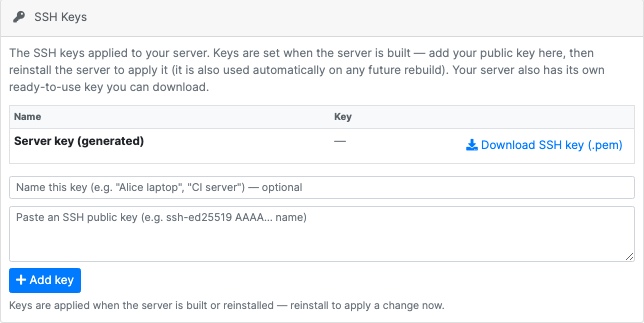
*Actual Blesta SSH Keys crop. No private or public key value is visible. The panel’s build/reinstall explanation is retained so the image does not imply instant key injection into a running server.*
That gives a host a clearer onboarding story: the buyer can find the service’s connection information and manage the supported key arrangement in the same portal. The SSH connection guide supplies the practical task details.
For an eligible Linux service, an enabled and configured browser-console route can add another way to reach the server. It is a feature to assess with the actual package and console setup, not a reason to claim that every image and installation automatically exposes the same terminal.
Put snapshots beside the server they protect
Where enabled, the customer panel exposes supported snapshot controls and the available snapshot list. That gives the customer a place to review the relevant recovery points in the context of their VPS service.
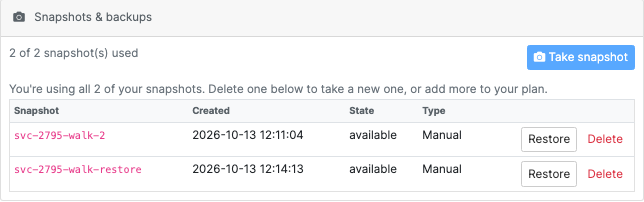
*Actual Blesta snapshot-panel crop. Names, times and allowance are demonstration data. The screen illustrates the supported controls; no snapshot or restore was run for this article.*
A practical example is a customer preparing for an application change. They can use the supported snapshot workflow, review the resulting state and understand which recovery point they would use if the planned change needs to be reversed.
A snapshot is not a reason to treat every operation as harmless. Restoring changes the server’s state, and the customer should understand what data would be replaced. Keep independent backup needs and application data consistency in the service discussion as appropriate.
The manual snapshot guide and restore guide explain the supported procedures. They are practical extensions of the hosting offer, not generic advice to open a ticket for every server task.
Make networking and first-boot choices purposeful
The package can include supported choices for networking, static-IP allocation and initial server setup. These should suit the workload rather than be enabled merely because a setting exists.
A fixed public address can make sense for an application whose DNS or external integrations depend on a consistent destination. IPv6-only networking needs a customer environment that can use it. A startup script is an initial configuration mechanism, not an unlimited promise to maintain the customer’s application forever.
The module’s documented first-boot and later rebuild behaviour should remain distinct. If a host uses a startup script to prepare a new Linux service, describe what that initial setup supplies and who maintains it afterwards.
This is where a provider can make its VPS offer more specific. The value may be a carefully chosen starting environment and useful customer controls, rather than simply repeating the name of a cloud instance plan.
Keep the provider and customer responsibilities clear
The host retains the AWS account and the Blesta package design. The customer receives the VPS service and its enabled management tools. The operating-system and application maintenance responsibilities depend on the offer the host actually sells.
For example, an agency could offer an agreed initial application environment while retaining a separate maintenance arrangement. A self-managed server offer could instead emphasise customer SSH access, power and snapshot controls. Neither should imply additional work that is not included.
That clarity also makes the module easier to evaluate. The important test is whether the supported package, provisioning and customer handoff fit the intended service, not whether the module advertises every feature available anywhere in the cloud provider’s console.
Explore PD AWS Lightsail for Blesta
Explore PD AWS Lightsail for Blesta if you want to connect a Lightsail-based VPS offer with Blesta’s customer and package workflow.
Begin with the intended server configuration and a verified provider connection. Assess the actual customer power, SSH and snapshot experience, then choose the additional supported controls that suit the service. That keeps your offer central and gives buyers a clear reason to choose it.
Frequently asked questions
Can I offer AWS Lightsail VPS services through Blesta?
Yes. PD AWS Lightsail connects supported package settings and provisioning with a customer service in Blesta. Review the provider account, package defaults and activation process for the intended offer.
Do customers need the host’s AWS credentials?
No. Customers use the supported service panel and server connection details. The host retains the AWS management relationship and its credentials.
Can customers start, stop and reboot their server?
Those supported controls can be exposed according to the package settings and service state. The host should describe which controls its particular offer includes.
Do saved SSH keys immediately change a running server?
Do not assume that. The documented workflow applies keys through the supported build or reinstall path. Review the actual key and server procedure before changing access.
Are snapshot controls available in the customer area?
The supported panel can expose snapshot controls where enabled. Review the actual snapshot state and the effect of a restore; the image in this article is demonstration data.
Can I choose which server controls my package includes?
Yes. Review the supported package settings for the intended offer, including power, connection and snapshot access. Confirm the actual customer view before describing the controls as included.
Is the browser console available on every package automatically?
No. It depends on the eligible service and the enabled, configured console route. Assess the actual package and setup rather than assuming all server images behave identically.
