Cloudflare DNS in Blesta: Zones, DNSSEC and Customer Record Self-Service
Bring Cloudflare DNS into Blesta with PD Modules: zones, type-aware records, customer self-service, templates and a deliberate DNSSEC workflow.
A customer needs to verify a business platform, point a website at a new destination or update the mail records supplied by their provider. If every DNS change requires access to the host’s Cloudflare dashboard, a small account task becomes a staff handover.
PD Cloudflare DNS brings Cloudflare zones and supported record management into Blesta. Your team manages the provider connection and zone relationships, while customers get a DNS interface for the domains they are allowed to manage.
For a hosting business, the benefit is a consistent service boundary: keep infrastructure access with staff, and give customers useful record controls through the account where they already manage their services.
Connect Cloudflare to the customer relationship
The module’s provider connection lets staff work with the Cloudflare zones available to the configured credentials. Zone search and tracking controls help organise that view inside Blesta.
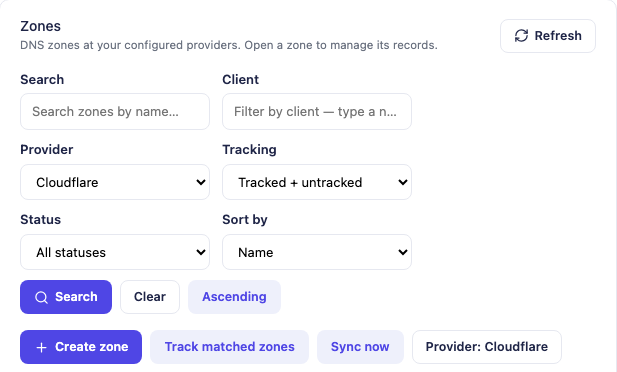
This real product crop shows the controls without exposing a live zone or provider token. It illustrates the operational view rather than a customer record accessed for the article.
The provider token’s scope matters. The module can only work with the zones and operations the credentials allow. A successful connection does not grant access beyond that scope or establish that every account function has been tested.
Tracking and customer ownership are separate from merely seeing a zone at the provider. Confirm the intended service or client relationship before expecting it to appear in the customer’s DNS area. A provider-wide list is not, by itself, a customer-access policy.
Give customers fields that fit the record type
The type-aware editor changes the relevant fields for supported DNS record types. A website address, an MX mail destination and an SRV service record need different information; they should not all look like an unexplained content box.
That makes common customer tasks easier to explain. A hypothetical business adding a verification TXT record can use the DNS interface in its account rather than asking the host to paste a value into a separate dashboard.
Another customer may need to update the website destination while preserving mail. The record editor gives them the relevant control, but the task still needs a clear understanding of which record serves which purpose.
Validation helps with supported field formats. It cannot determine that every syntactically valid destination is the right one for the business. Review the values supplied by the relevant service and verify the actual outcome.
Keep website, email and verification records distinct
A useful self-service DNS offering does more than expose an editor. It helps customers understand the small task they are performing.
| Customer task | Relevant DNS concept | What to preserve |
|---|---|---|
| Point the website | Appropriate address or alias record | Existing mail and unrelated service records |
| Receive email elsewhere | MX destination and related provider requirements | Website routing and required authentication |
| Verify a business platform | The exact TXT value supplied by that platform | Other TXT records with different purposes |
| Publish a service location | Supported SRV fields | Correct protocol, target and port relationship |
| Manage email authentication | Provider-specific SPF, DKIM or DMARC records | The complete sender inventory and current mail route |
For Cloudflare, proxy behaviour is another distinct choice. Only eligible record types use the proxy, and mail-related destinations need the appropriate DNS-only treatment. Do not turn on proxying simply because it is available beside a record.
A saved DNS record is also different from an application working. Authoritative answers, resolver caching and the destination service all affect what the customer sees next. Test the relevant website, verification or mail journey rather than assuming Save completes the entire business task.
Use templates for a repeatable starting point
PD Cloudflare DNS supports reusable record templates. That lets the host define a common starting set for a known service rather than manually reproducing the same structure for each new zone.
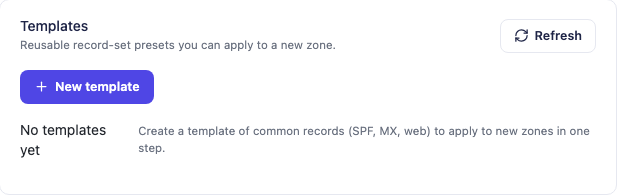
The real panel shows where staff create a template; it is an empty demonstration view, not a claim that a ready-made record set suits every customer.
Imagine a hypothetical hosting package with a consistent website and mail setup. A reviewed template can reduce repetitive entry while still leaving the host to supply the correct destination values and account-specific verification material.
Do not treat a template as a universal DNS recipe. Different mail providers, website destinations and customer platforms require different records. A useful template captures a known service pattern and leaves the final values subject to review.
Make DNS management part of the package
The module includes package controls for supported zone and record allowances. Those let a host define how DNS management fits into its commercial offering rather than exposing an undefined unlimited service.
A domain-focused package might include a small allowance, while another service has a different supported scope. The customer should understand what they can manage and where to find it through the account navigation available on the installation.
Blesta’s native module route and supported My Tools access can provide the customer entry point, depending on the installed setup. Teach the route your actual installation exposes rather than copying another billing platform’s menu instructions.
Automatic zone creation can connect supported domain or service events to DNS setup. Review the eligible event and provider configuration first. Creating a zone is not the same as changing the registrar’s delegation or importing every existing service record correctly.
Treat DNSSEC as a coordinated domain change
PD Cloudflare DNS exposes supported DNSSEC controls and the information needed for the registrar side of the process. That helps staff work with zone signing without leaving the DNS relationship entirely disconnected from the account workflow.
DNSSEC requires coordination. Enabling the zone-side function and publishing the appropriate DS information at the registrar are distinct steps. An incorrect or stale parent-side relationship can affect validation, so follow the actual provider and registrar sequence.
A hypothetical host moving a customer between DNS providers should plan that relationship alongside nameserver delegation. It should not assume that pressing one button in a zone completes every part of the domain’s DNSSEC state.
The feature is useful precisely because it makes the relevant controls and details accessible. Market the supported workflow without presenting it as an automatic repair for every domain configuration.
Keep a record-recovery plan alongside self-service
The module also provides zone export, backup and supported restore functions. Those can help staff review earlier record data, but restoration needs a deliberate scope and a check of the actual provider outcome.
A record snapshot is not a backup of the website, mailboxes or every Cloudflare setting. A restore may also involve several provider changes rather than an all-or-nothing operation. Preserve the intended records and verify the result instead of treating a success label as proof of the complete service state.
For the hosting business, this makes self-service more manageable: customers can perform everyday changes, while staff retain a defined way to review the zone and handle a planned recovery operation.
Offer DNS as a usable service
The strongest offer is easy to describe: your customer manages supported records in their Blesta account, your team controls provider access and service policy, and the task guides explain the common changes clearly.
Explore PD Cloudflare DNS for Blesta for current details. The guides cover customer access, website records and DNSSEC.
Frequently asked questions
Can customers manage Cloudflare DNS through Blesta?
Yes. The module provides supported customer record management for appropriately associated zones. Staff configure the provider access and customer relationship.
Does the customer need my Cloudflare API token?
No. Staff configure the provider connection. Customers use the permitted account interface for their own DNS tasks.
Can customers add TXT records for platform verification?
The supported type-aware editor provides a route for TXT and other supported record types. Use the exact value supplied by the platform and preserve unrelated records.
Does creating a zone change the domain’s nameservers automatically?
Do not assume that. Zone creation, customer tracking and registrar delegation are separate parts of the setup, with any automation dependent on the actual configuration.
Is enabling zone DNSSEC the whole process?
No. Coordinate the zone-side state with the appropriate registrar DS information and verify the resulting relationship.
Does a zone backup include the website and mailboxes?
No. It concerns the supported DNS record data. Website content, mailbox history and other provider settings require their own recovery plans.
