WHMCS AI Automation: Agents, Event Rules, Memory and Business Workflows
Build useful WHMCS AI workflows with PD AI Assistant: event rules, reviewable drafts, business memory, knowledge and goal-based API requests.
The most useful AI workflow is often a modest one completed well: prepare a first reply, gather the context for an order review or turn an account question into a draft a staff member can assess.
PD AI Assistant brings those workflows into WHMCS using your connected AI provider. It combines supported live account lookups, reviewable native action proposals, business memory, indexed knowledge and event rules. Goal-based requests are also available through its supported API.
For a hosting business, the opportunity is to reduce repeated preparation while keeping the meaning of the task clear. The team should know what starts the work, what the assistant can produce and which result still needs a person to review.
Choose one outcome before choosing an automation
“Automate support” is too broad to evaluate. “Prepare a first reply for this kind of new ticket” is a workflow with an identifiable starting point and a result staff can inspect.
Imagine a hypothetical hosting company receiving routine setup questions. An assistant can help gather the available context and prepare a reply, while the operator checks the technical instructions, tone and account-specific details before posting it.
That is a useful product role without inventing a customer success story or a percentage reduction in workload. The module makes the preparation and review route available; your team decides where it fits and measures the result in its own operation.
The same discipline applies to order review. A useful assessment note can summarise relevant context and identify a question for staff. It is different from automatically accepting an order, taking a payment or provisioning infrastructure.
Connect your provider to the work
PD AI Assistant supports your own Amazon Bedrock, OpenAI or Google Gemini connection. The provider supplies the model response, while the module supplies the WHMCS context and supported workflow.
This keeps the product’s role distinct from an external general-purpose chat window. Staff can ask supported account questions in the panel and prepare native actions in the context of the installation.
Provider readiness still needs verification. A connection status and a successful useful response are different milestones. Choose a supported model and the permissions appropriate to the intended chat or knowledge workflow, rather than assuming a key that can list models can perform every required request.
The module is not centred on one model brand. Start with the business task and the installed capabilities, then select the supported provider arrangement your team intends to operate.
Use event rules for supported, specific outputs
Automations are configured through the module’s advanced settings. The supported triggers include a new support ticket, a customer reply to a ticket and a new order. A rule combines the trigger, an instruction and its mode.
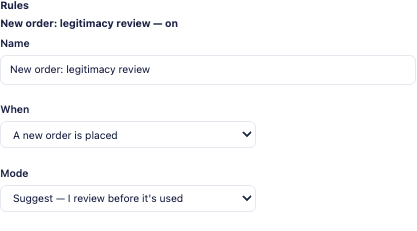
This actual product crop shows a demonstration order rule in Suggest mode. It illustrates the controls, not a rule run against a real customer for this article.
The event constrains the output. Ticket events produce reply proposals; the order workflow produces an assessment note. Writing “provision the server and send a campaign” into an instruction does not turn the rule engine into an arbitrary business-action scheduler.
That focused design can be useful. A hosting team can define the expected draft and review the same kind of output consistently, rather than giving an instruction whose consequences are unclear.
Start with Suggest. Review the generated proposal and the account context, then apply the intended native action. Auto is a different mode that invokes application automatically; choose it deliberately for an appropriate, reviewed workflow rather than treating it as the default way to remove a review step.
Make the staff review useful
The native Pending actions view gives staff a place to inspect supported proposals and choose Apply or Dismiss. That is where a draft becomes a decision in the operating workflow.

The demonstration shows order-review and ticket-reply proposals. It is not a claim that the recommendations shown were correct for an actual order.
A meaningful review checks more than grammar. Does the proposal address the right account item? Are the technical steps supported by the product? Has it inferred a fact that is not in the available information? Does the action match what staff intended to authorise?
Keep the supported native proposal flow distinct from other writes. Memory changes, direct notification tools and additional integrations do not all use the same Pending actions route. Do not describe the entire assistant as “unable to change anything until Apply” when the installed feature set has other paths.
Add house style through business memory
Memory can provide recurring business facts and style guidance across relevant conversations. A manually added business fact can help the assistant use the terminology and service boundaries your team has chosen.
For the hypothetical setup-reply workflow, that might include a preferred greeting style or a concise description of the support process. Record a fact the business has actually approved, then review how the response uses it.
Manual business memory is not made private to one customer simply because its wording contains a customer’s name. Per-client memory and whole-business memory have different scope, and the module distinguishes the sources used for customer-facing recall.
Memory is also not a guarantee of perfect recall or exact wording in every answer. It supports the workflow; staff still need to review a consequential response. Forgetting a memory does not erase earlier conversations or records held elsewhere.
Ground the answer in the right knowledge
Indexed knowledge gives the assistant reference material supplied by the business. That can include supported text and document uploads, with audience choices for staff-only or shared customer reference use.
This is a different task from publishing a native knowledge-base article. The indexed source supports retrieval by the assistant; the customer website or WHMCS KB remains its own publication destination.
Choose the audience carefully. Staff-and-customer knowledge is shared reference material, not a place for a document belonging only to one customer. Indexing can also send passages to the configured embedding provider, so a local file upload should not be described as remaining entirely local by default.
For a product-support workflow, use the current approved instructions and check important facts and citations in the resulting answer. A retrieved source title helps the reviewer; it does not make every generated statement accurate automatically.
Use goal-based requests where they fit
PD AI Assistant also supports goal-based agent requests through its module API. An external system you operate can submit an appropriate goal and receive a report, using the supported authentication and request format.
A hypothetical internal tool could ask for a bounded account-review task and present the report to staff. The API provides the integration route; it is not a promise that every named application has a prebuilt connector.
Keep this separate from the event-rule engine. A rule responding to a ticket and a goal-based API request have different entry points and behaviour. Do not assume an Agents navigation tab is exposed merely because the capability exists in the API.
The resulting report is also not proof that every intended business operation was applied. Inspect native proposals and any additional tool behaviour relevant to the configuration, then verify the actual outcome.
Keep background processing understandable
Event work is processed in the background through scheduled execution. That helps separate a customer event from the model-response time, but it also means there can be a queue and different processing states.
A manual Run now action processes a batch of eligible pending events; it is not a harmless dry run of only the rule you happen to be viewing. Review the event and rule scope before using it.
Disabling or deleting a rule affects future processing according to the current engine state. It does not recall an already posted reply, remove every earlier proposal or necessarily cancel work already in progress. Built-in ticket drafting is also a separate setting from a custom rule.
For a hosting team, the practical lesson is to record the trigger, instruction, mode and expected output together. That makes an unexpected proposal easier to understand without assuming the module is running a general background agent with unlimited authority.
Measure a workflow by the result staff can use
A useful evaluation can be straightforward. Did the proposal address the right question? How much correction was needed? Did it use the current product instructions? Was the intended action applied once and verified?
| Workflow | Useful output | Staff acceptance check |
|---|---|---|
| New ticket | A first-reply proposal | Correct context, technical steps and next action |
| Customer reply | A continuation draft | Responds to the latest information rather than repeating the first answer |
| New order | An assessment note | Distinguishes observed facts from a recommendation |
| Staff question | An answer using supported account context | Relevant account and important facts checked |
| Goal-based API request | A bounded report | Task scope and any resulting proposals inspected |
This is a framework for your own evaluation, not a claim about measured customer outcomes. It keeps AI work tied to service quality rather than the number of generated words.
Explore PD AI Assistant for WHMCS for current details. The guides cover Suggest rules, business memory and API requests.
Frequently asked questions
Can PD AI Assistant prepare replies from WHMCS events?
Yes. Supported ticket events can produce reply proposals. Configure the event rule and review its output through the appropriate native proposal flow.
Is Suggest mode different from Auto?
Yes. Suggest prepares reviewable output; Auto invokes application automatically. Choose the mode deliberately for the particular workflow.
Can an automation instruction perform any business action?
No. The event-rule engine has supported outputs tied to its triggers. An instruction does not turn it into an arbitrary provisioning, payment or campaign scheduler.
Can I use my own AI provider?
The module supports your own Bedrock, OpenAI or Gemini connection. Verify the chosen provider and model for the intended workload.
Does every assistant write wait in Pending actions?
No. That is the route for supported native proposals, while memory, notification tools and additional integrations can have different behaviour. Review the configured feature paths separately.
Can I submit an agent goal through an API?
The supported module API accepts goal-based requests. Review the request format, access boundary and resulting report; do not assume a particular external application is connected automatically.
Does disabling a rule undo its earlier actions?
No. Earlier proposals, completed actions and work already in progress need separate consideration. Disabling a rule is not rollback.
