Blesta Cloud Cost and Margin: Connect Provider Spend to Your Service Revenue
Review cloud-service margins in Blesta with PD Cloud Cost & Margin: provider cost data, service comparisons, unmatched-resource review and configurable thresholds.
A recurring cloud service can look healthy in the billing system while its infrastructure cost has changed. A larger resource, retained storage or a missed commercial adjustment can make the original package assumptions less useful over time.
PD Cloud Cost & Margin helps a Blesta hosting operator compare recorded cloud costs with configured service revenue. It brings provider cost data, service matching, monthly comparisons and unmatched-resource review into the PD Modules panel.
The benefit is a more focused review. Instead of looking only at a provider total or only at recurring customer charges, your team can investigate the relationship between them and decide which service needs attention.
Connect the cloud offering to its economics
Imagine a hypothetical Blesta host that sells several cloud-server and database packages. Its customer list shows recurring services, while provider exports show resources. Neither view, on its own, explains which offer needs a closer cost review.
PD Cloud Cost & Margin is designed as a companion to PD cloud provisioning modules. Their resource naming patterns help connect supported cost records to the corresponding service context.
That connection is useful, but it needs verification. The released matching uses recognised patterns; it is not a universal proof of ownership for every resource or every provider account. A match is a starting point for a service review, not permission to ignore an unexpected association.
Without suitable service markers, cost data can remain unmatched. That can still be useful provider context, but it is not the same as a complete per-service margin picture.
Bring the relevant provider data into one review
The module supports an AWS cost-reading route and resource-cost CSV import workflows for supported data. The Providers view helps staff inspect which sources have data and how much of that data is matched to services.
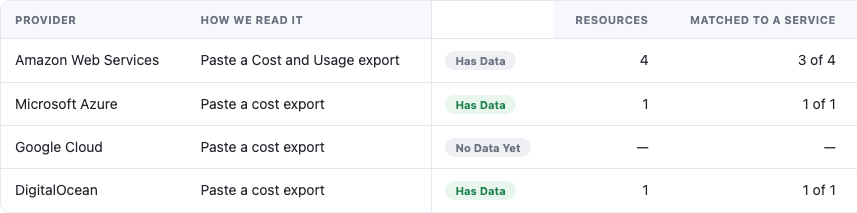
The real screenshot uses demonstration rows. Its value is the coverage distinction: data present, data missing and records matched to a service are different states.
AWS cost access has its own permissions, data availability and provider constraints. An account that can create a VM is not automatically ready to supply every resource-level billing detail. Current-period information can also be delayed or incomplete.
CSV imports need the expected resource and cost fields in a format the installed parser supports. Do not assume an arbitrary invoice PDF or every provider’s changing export layout is automatically understood. Review the imported rows and their period before using a summary to make a decision.
Re-importing is also not a full replacement of every row for a provider month. Previously stored rows omitted from a later import can remain. A careful review includes what was updated and what data is still present.
Read the monthly comparison with the right meaning
The margin view compares the recorded costs with the service’s configured recurring revenue, converted using the configured comparison rate. That is useful management information, but it is not the same as collected cash or a complete accounting profit statement.
For a host, it can answer a practical question: does this service deserve attention based on the costs and recurring amount represented here? It does not automatically include every tax, support expense, credit or unallocated provider charge.
A single configured exchange rate also needs deliberate handling. Set the comparison currency and rate appropriate to the review, then keep that context with the result. Historical views should not be described as immutable financial statements when settings or source data can change.
The module’s value is a service-level investigation tool. Use the comparison to find a question worth answering, then check the underlying records before changing a customer’s product or price.
Set a floor that makes review easier
A configurable margin floor helps distinguish a service below your chosen threshold from one that is plainly loss-making on the represented comparison. It gives the team an operational rule for deciding what to inspect first.
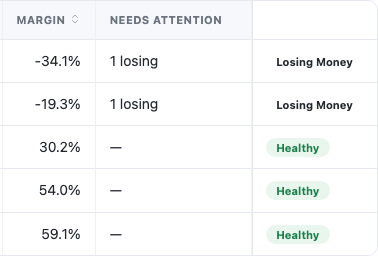
These are example percentages in a real product screen, not results achieved by a customer. They demonstrate how attention labels sit beside the calculation.
A hypothetical host might review the lowest margins each month, confirm the cost association and examine whether the service configuration changed. The next step could be correcting an internal product assumption, discussing an appropriate service change or identifying a data problem.
The module does not choose the commercial decision for you. A low margin can have a deliberate business reason, and an apparently healthy result can be incomplete if relevant costs have not been supplied. Keep the question and its evidence together.
Move between individual services and grouped views
A service-level view helps investigate one customer resource relationship. Grouping by product or client can reveal a different pattern: a package whose economics need review, or a customer relationship with several represented services.
Use the views together rather than relying only on the headline total. Display limits, grouping and filters affect what is visible. A filtered list is not proof that no other service needs review.
| Review level | Useful question |
|---|---|
| Provider data | Do we have the relevant source and period? |
| Resource association | Does this record belong to the expected service? |
| Individual service | What explains the represented cost-to-revenue relationship? |
| Product group | Does the offer’s resource assumption still make sense? |
| Client grouping | Which represented services account for the comparison? |
| Missing or unmatched data | What is absent, unrecognised or intentionally outside the service model? |
This is a better basis for a review meeting than treating one colour or percentage as the entire answer.
Treat Paying for nothing as an investigation queue
The unmatched-resource view can draw attention to recorded costs without a matched service. That is useful when a host wants to investigate retained infrastructure or resources outside its normal product relationship.
The label is not proof that an item is unwanted. A resource may be shared, deliberately retained, manually created or missing the expected matching pattern. Establish its actual purpose and dependencies before deciding what should happen to it.
An Expected flag records a local review decision. It does not change the provider resource or remove its cost. Likewise, the module is not an automatic cleanup engine: it does not delete infrastructure merely because a row is unmatched.
For a hypothetical cancelled project, the useful workflow is to inspect the recorded cost, identify the real resource and owner, then make an authorised retention or removal decision through the appropriate service process. The review view helps find the question; it does not replace that decision.
Make cost review part of operating the service
The strongest use is a repeatable routine: inspect source coverage, review low-margin services, check unmatched records and record why a decision was made. Compare the next review using the same understanding of period, currency and data scope.
Optional alerts can draw attention to supported stored findings, but they are not a complete record of every commercial change or proof an email arrived. Keep the panel review and the actual provider context available to staff.
That routine can help a hosting company keep its cloud offers understandable as resource use changes. It is a companion to provisioning and billing, giving the operator another view of the service rather than replacing either system.
Explore PD Cloud Cost & Margin for Blesta for current details. The guides cover monthly comparison, grouped views and unmatched-resource review.
Frequently asked questions
Can I compare cloud costs with Blesta service revenue?
PD Cloud Cost & Margin compares supported recorded costs with configured recurring service revenue in the chosen comparison currency. Review source coverage and matching before interpreting the result.
Does it calculate my complete business profit?
No. It is a service-review comparison, not a complete accounting statement. Collected revenue, overheads and costs outside the represented data require separate treatment.
Does it work best with PD cloud modules?
It is designed as their companion because recognised resource patterns support service association. Manually created or unrecognised resources may remain unmatched.
Does an unmatched resource mean it should be deleted?
No. Establish its actual purpose, ownership and dependencies first. The module provides a review view rather than automatic provider cleanup.
Does importing a new CSV remove omitted old rows?
Do not assume that. The supported import updates recognised records; previously stored rows absent from a later import can remain.
Can I set my own margin threshold?
Yes. The configurable floor helps prioritise represented services for review. The resulting label should lead to checking the underlying data and business context.
