WHMCS SMS Notifications: Templates, Event Triggers and Provider Choice
Send useful WHMCS SMS notifications with PD SMS Manager: reusable templates, event triggers, customer preferences, queue controls and your own provider.
Some customer updates are useful because they arrive at the right moment: a service is ready, an account event needs attention or a domain renewal has failed. A short text can complement email when the message is clear and the customer has chosen the appropriate updates.
PD SMS Manager brings one-off messages, reusable templates, event-triggered notifications and campaigns into WHMCS through your own SMS provider. It gives the hosting team a place to connect the business event, recipient, wording and sending route.
The opportunity is not to send more messages indiscriminately. It is to make selected account communications easier to prepare, manage and review without maintaining a separate manual texting process.
Start with a useful customer event
A hypothetical hosting company could begin with a service-activation update. The customer has been waiting for a service; a concise text tells them it is ready and directs them to the account for details.
PD SMS Manager supports triggers for events including invoice creation and payment, service activation, suspension and unsuspension, staff ticket replies and failed domain renewal. Each event should have a reason to use SMS and a message that fits the customer’s situation.
A failed renewal notification, for example, should identify the next account action rather than place a sensitive account history into the text. The fuller explanation belongs in the appropriate account page or existing support conversation.
Choose one or two useful events first. That makes it easier to review the wording, recipient source and resulting message before expanding the notification set.
Templates make the message consistent
Reusable templates provide a shared starting point for staff and automatic triggers. Supported merge fields can insert relevant customer, invoice, service or domain context into the message.
That matters for a team. Staff should not have to reinvent a service-ready message every time, or remember which detail distinguishes one customer service from another. A reviewed template makes the expected information visible.
Personalisation still needs review. Confirm which fields the selected event supplies and inspect the resulting message. A template that reads well before substitution may become unclear or much longer when real values are inserted.
| Message purpose | Useful content | Keep elsewhere |
|---|---|---|
| Service activation | A clear readiness update and account direction | Passwords and full connection secrets |
| Invoice update | The relevant reference and next step | Unnecessary financial history |
| Domain event | The affected name and appropriate account action | A long technical diagnosis |
| Support reply notification | An update that a reply is available | The entire support conversation |
| Staff operational alert | The event staff need to review | An assumption that the event is already resolved |
These are editorial examples, not sent customer messages. The purpose is to keep the text focused and make the account the place for the complete action.
Bring your own SMS provider
PD SMS Manager supports providers including Amazon SNS, Twilio, Vonage and Clickatell, alongside a custom HTTP gateway route. Your business uses its own provider account rather than buying a compulsory pool of marked-up message credits from the module.
Provider choice is useful when the host already has a messaging relationship or needs a particular sender and destination arrangement. It does not mean every provider account can send to every region without setup. Review the account, sender and intended destination together.
Connection tests have provider-specific scope. A local configuration check or a read request is not necessarily a successful test delivery. Distinguish provider readiness from an actual message accepted and received through the intended route.
The default gateway is a routing choice, not automatic delivery failover. An explicitly selected workflow gateway and a default-routed queued message can behave differently. Review the routing before changing defaults while work is waiting.
Keep manual messages close to the account
Staff can compose a one-off message for a selected client or an entered number, choose the gateway and review the body. A customer-profile panel also supports an in-context route for staff working on an account.
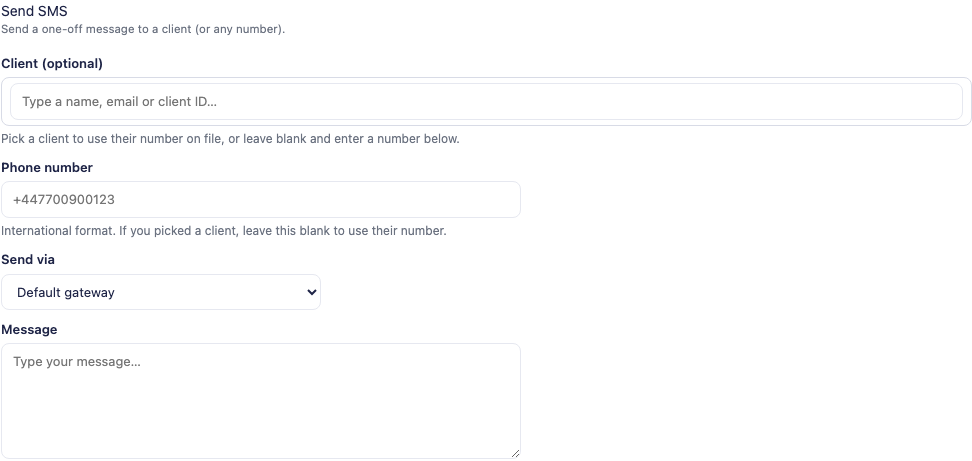
The actual product crop shows an empty composer and a reserved example phone placeholder. No message was sent to create this article.
For an illustrative service handover, an operator can prepare a short account update while reviewing the relevant customer. The benefit is fewer disconnected steps: the recipient relationship and message remain part of the WHMCS workflow.
A segment estimate helps staff understand how message length and encoding may affect sending. Treat it as a preview, not an exact provider invoice. Personalisation, provider processing and the final content can affect the result.
Let customers choose the updates they receive
The module exposes customer SMS preferences alongside account details. The hosting business chooses the offered categories and wording, giving customers an understandable way to manage the supported updates.
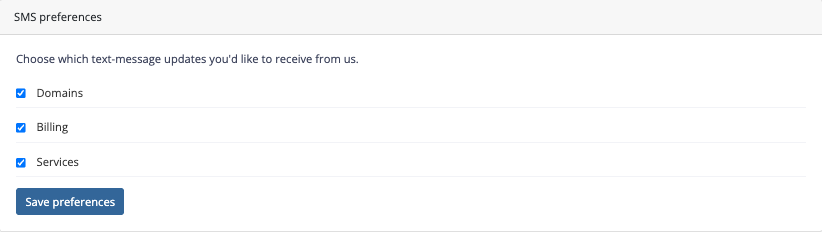
The screenshot shows the preference controls, separated from message history. A customer can see the categories rather than guess what a generic notifications switch includes.
Automatic triggers use the relevant preference and queue behaviour. Manual sending has separate controls and can bypass some preference paths, so do not assume every route is governed identically. Staff need to understand which operation they are using.
Useful wording makes the setting meaningful. “Service updates” should correspond to the type of message the customer expects, not become a catch-all label for unrelated campaigns.
Use the queue to manage sending work
With queue-based sending, the WHMCS cron processes messages in batches and applies the supported retry and quiet-hour behaviour. That separates queued work from a page waiting for a provider response.
Quiet hours apply to the relevant queue workflow, not every possible message path. Manual and staff-facing operations have their own behaviour. Review the actual route before promising that no message can ever leave during a particular window.
The history view helps staff inspect recipient, gateway, time, status and provider response information. “Sent” or provider acceptance is not the same as proof that a person read the text. An Unknown outcome needs reconciliation before repeating a potentially completed send.
For a hosting team, that record is useful operational context. It helps distinguish a message that was prepared, queued, attempted or failed instead of relying on someone remembering that they clicked Send.
Campaigns and staff alerts serve different purposes
Campaigns support audience selection, previews and immediate or scheduled sending. They are useful when the message genuinely applies to a defined group, rather than when an individual account event should have used a trigger.
Review the audience and final message before sending. A recipient count and segment estimate are decision aids, not a reason to expand the campaign to everyone in the database.
The Admin Alert Center addresses a separate audience: staff. Administrators can choose supported operational events for their own notifications. Keep those messages distinct from customer templates so the right person receives the right kind of update.
The module also has a WHMCS text-message sign-in capability. That is a separate authentication workflow to configure and evaluate, not something to enable merely because an ordinary notification trigger works.
Make the first notification reliable and understandable
A good rollout begins with one event, one reviewed template and a clear recipient route. Use the module’s Log only workflow where appropriate to inspect preparation without sending a real SMS, then verify the intended live route through an authorised test process.
Explore PD SMS Manager for WHMCS for current details. The practical guides explain templates, testing without sending SMS and queue and quiet hours.
Frequently asked questions
Can WHMCS send automatic SMS updates for account events?
PD SMS Manager maps supported WHMCS events to templates and gateways. Configure the intended event, recipient preferences and sending route before enabling it.
Do I have to buy message credits from PD Modules?
You use your own supported SMS provider account. Provider charges and account requirements remain with that provider.
Can customers manage SMS preferences?
The module provides configurable preference categories in the customer account. Explain what each category covers and review manual sending separately.
Are quiet hours applied to every possible SMS?
No. They apply to the relevant queued workflow. Manual messages and staff-facing routes need their own behaviour reviewed.
Is the segment preview the exact final SMS bill?
No. It is an estimate based on content and encoding. Provider processing and the final personalised message can affect billing.
Can I test preparation without sending a real text?
Log only supports a non-sending preparation workflow. It is separate from provider connection tests and from an actual test SMS.