Sell DigitalOcean Kubernetes Through WHMCS with Kubeconfig and Node Scaling
Offer DigitalOcean managed Kubernetes through WHMCS with PD Modules: cluster provisioning, reviewed checkout options, kubeconfig downloads and worker-node visibility.
A developer who wants Kubernetes does not necessarily want another billing relationship and another disconnected place to find cluster access. A hosting company can offer a more coherent route: order the cluster, find it in the customer account and retrieve the configuration needed to use it.
PD DigitalOcean Kubernetes makes managed DigitalOcean Kubernetes clusters a native WHMCS product. Each service connects to a dedicated cluster and worker-node pool, with customer status, node information and a supported kubeconfig download route.
For a hosting business expanding beyond individual virtual machines, that creates a focused offer for container workloads. The module handles the WHMCS integration; your team defines the package and the service responsibilities around it.
Sell the cluster relationship, not just a provisioning call
Creating a Kubernetes cluster through a provider API is one technical step. A sellable service also needs a product definition, customer ownership, recurring relationship and an understandable way to obtain access after provisioning.
PD DigitalOcean Kubernetes connects those pieces through WHMCS. The host uses its DigitalOcean account, while the customer purchases the cluster service from the host and manages the available account functions in context.
Consider a hypothetical agency that already buys infrastructure from your business and now wants a cluster for a containerised application. Keeping the cluster beside its other services can make account administration and handover more familiar than asking the agency to begin an unrelated provider relationship.
This does not make the hosting company responsible for every workload by default. DigitalOcean operates the managed control plane; the customer or your agreed management service remains responsible for the application work you define in the offer.
Define the resources a customer is buying
The module’s product settings include region, Kubernetes version behaviour, node plan and worker count. Those choices describe the cluster’s location and worker resources rather than a generic “cloud package” label.
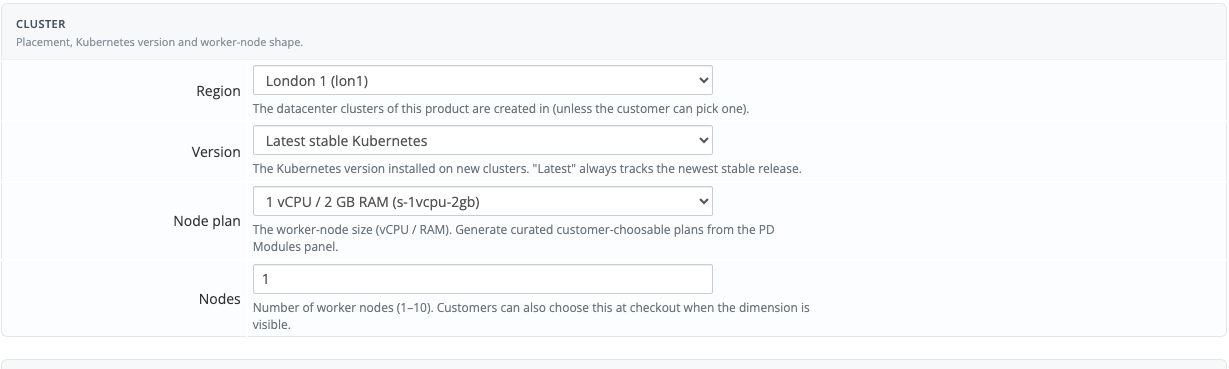
The real product screen shows how the host defines a sample cluster offering. It is not a current availability guarantee for every region, plan or version shown.
A useful starter product might fix most dimensions and offer a small set of worker choices. A more flexible product can expose supported region, plan or count options. The correct approach depends on the audience and on the choices your team can explain and support.
Generation of checkout options helps build the WHMCS product, but review the resulting group and prices. Catalogue information can be cached or use a supported fallback; an option appearing in the form does not reserve provider capacity.
Keep the version policy clear too. A default used for new clusters is different from automatically upgrading an existing workload. Do not imply that a “latest” label establishes every future maintenance action for the customer.
Kubeconfig turns a provisioned cluster into usable access
The customer needs more than a Running label to begin working. PD DigitalOcean Kubernetes provides a Download kubeconfig route for eligible services when the relevant feature and management access are available.
That configuration lets the customer use appropriate Kubernetes tooling to connect to the purchased cluster. It bridges the gap between a billing account and a developer’s working environment without giving the customer the host’s broad DigitalOcean account credentials.
Treat kubeconfig as access material. The recipient should store it appropriately and understand its scope and lifetime. Download availability is not a promise that a file grants permanent access or automatically renews itself forever.
For an agency handover, make this an explicit step: confirm the intended service, retrieve its configuration through the supported account route and verify access to the expected cluster. Do not paste a real kubeconfig into a ticket or a public tutorial merely to show that it exists.
Give customers a visible worker-node summary
The Nodes page shows the supported worker-pool information, including plan and node count. That helps the customer connect the resource shape they ordered with what the service currently reports.
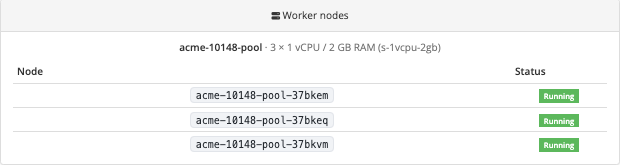
The screenshot shows demonstration nodes in the customer account. It illustrates a read-only view; it is not a claim that the page contains general-purpose node-pool creation or deletion controls.
A hypothetical application team can use that summary during an infrastructure review: does the reported pool match the intended service, and is the cluster ready for the next deployment step? The application still needs its own workload checks.
Cluster state and workload health are different. A cluster may be available while an application has not been deployed, a service is misconfigured or a workload needs more resources. The module gives infrastructure context, not an automatic verdict on every application running inside it.
Connect supported scaling to the commercial service
PD DigitalOcean Kubernetes supports worker-pool changes through the WHMCS upgrade flow. This links the service’s resource choices to the customer’s commercial relationship rather than leaving every change as an undocumented provider-console adjustment.
Before offering a particular change, review the supported plan and count transition and its provider outcome. Explain the maintenance implications for the workload. Scaling infrastructure is not a promise that every application can ignore the change.
The customer Nodes view remains a place to inspect the resulting pool. It should not be confused with an unrestricted Kubernetes administration console or an independent autoscaling policy.
For the host, the benefit is a defined route: the product describes the resources, the upgrade flow handles the supported service change and the customer can inspect the relevant result.
Make suspension and termination understandable
A managed cluster cannot be treated like an ordinary virtual machine with a simple pause switch. In the documented module lifecycle, suspension withdraws customer management access while the cluster continues running.
That difference matters to the product’s economics. Do not describe suspension as stopping all provider charges. Decide how your business handles service access and infrastructure cost in that state, and make the internal procedure clear.
Termination is a separate destructive operation. The module uses the provider’s associated-resource removal route for the cluster, but resource and billing outcomes still need verification. Do not replace a recovery and retention policy with a blanket “nothing can ever remain” promise.
| Service stage | What the host should make clear |
|---|---|
| Order and setup | When provisioning starts and what readiness means |
| Customer access | How the intended customer retrieves kubeconfig |
| Normal use | Which account views and controls are included |
| Resource change | Which worker-plan or count changes are supported |
| Suspension | Management access is restricted while infrastructure can continue running |
| Termination | Destructive removal and the required retention and verification process |
These distinctions help a hosting team sell a product it understands, rather than discovering lifecycle behaviour during the first account exception.
Build a Kubernetes offer around the right audience
Kubernetes is a useful expansion when your customers have container workloads and the skills or management service to operate them. It is not a reason to move every website from a simpler hosting plan to a cluster.
A strong offer explains the intended buyer, the worker resources, access handover and the support boundary. Your team can then add value through the relationship and any explicitly agreed management, instead of competing only on a list of provider resource sizes.
Explore PD DigitalOcean Kubernetes for WHMCS for current details. The guides cover the product definition, checkout options and kubeconfig access.
Frequently asked questions
Can I sell DigitalOcean Kubernetes through WHMCS?
Yes. The module connects supported managed-cluster provisioning and customer account functions to WHMCS products and services.
Does the customer get a dedicated cluster?
The product provisions a dedicated managed cluster with a worker-node pool for the service. Define its resources and the management responsibilities in your offer.
Can customers download kubeconfig?
Eligible services can expose the supported download when the feature and management access are enabled. Treat the downloaded configuration as access material.
Does the Nodes page manage application deployments?
No. It shows supported worker-node information. Application deployment and workload health need their own Kubernetes workflow.
Can worker resources change through WHMCS?
The supported upgrade flow can apply worker-pool changes. Review the particular plan or count transition and verify the resulting resource state.
Does suspension stop the Kubernetes cluster?
The documented suspension withdraws customer management access while the managed cluster continues running. It is not a universal provider-cost stop.
