PD PowerDNS — Self-Hosted DNS Zone & Record Management for WHMCS
Manage your PowerDNS zones and records inside WHMCS — fast, self-service, auto-provisioned
Made and supported by Projektif Digital Ltd.
Runs inside PD Modules, the panel
every module installs into.
Domains & DNS
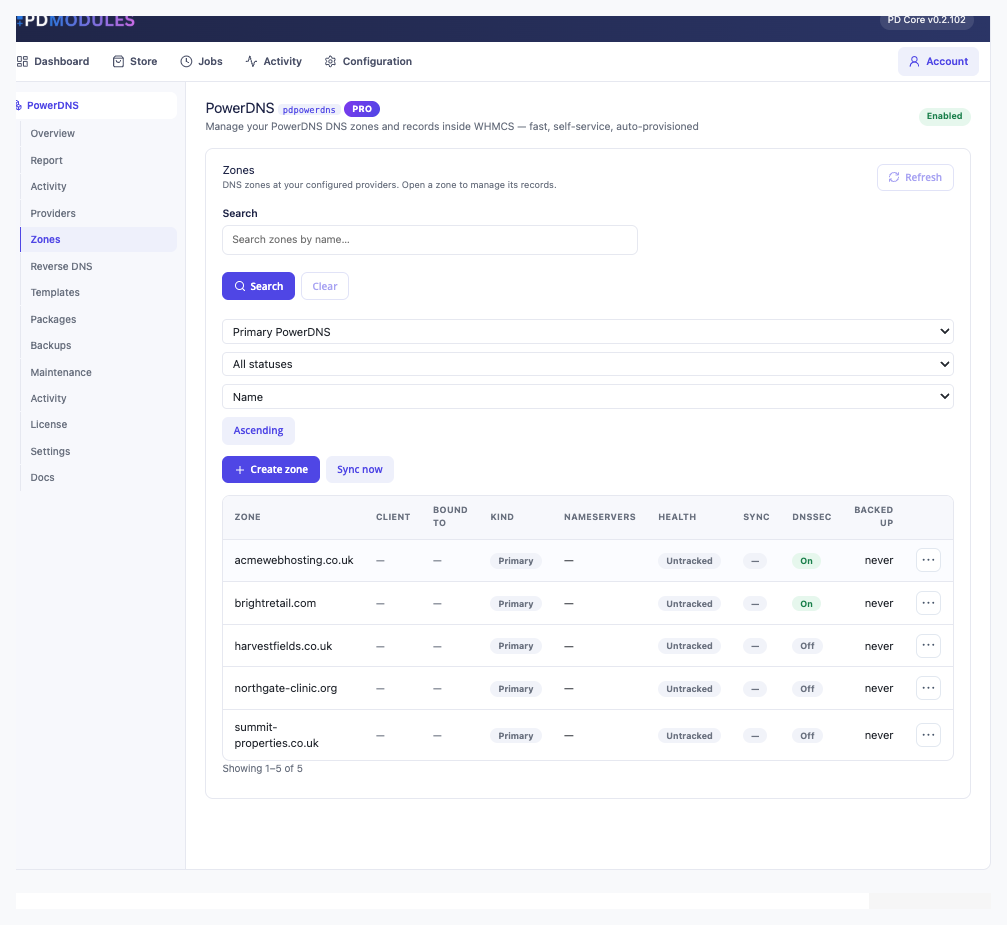
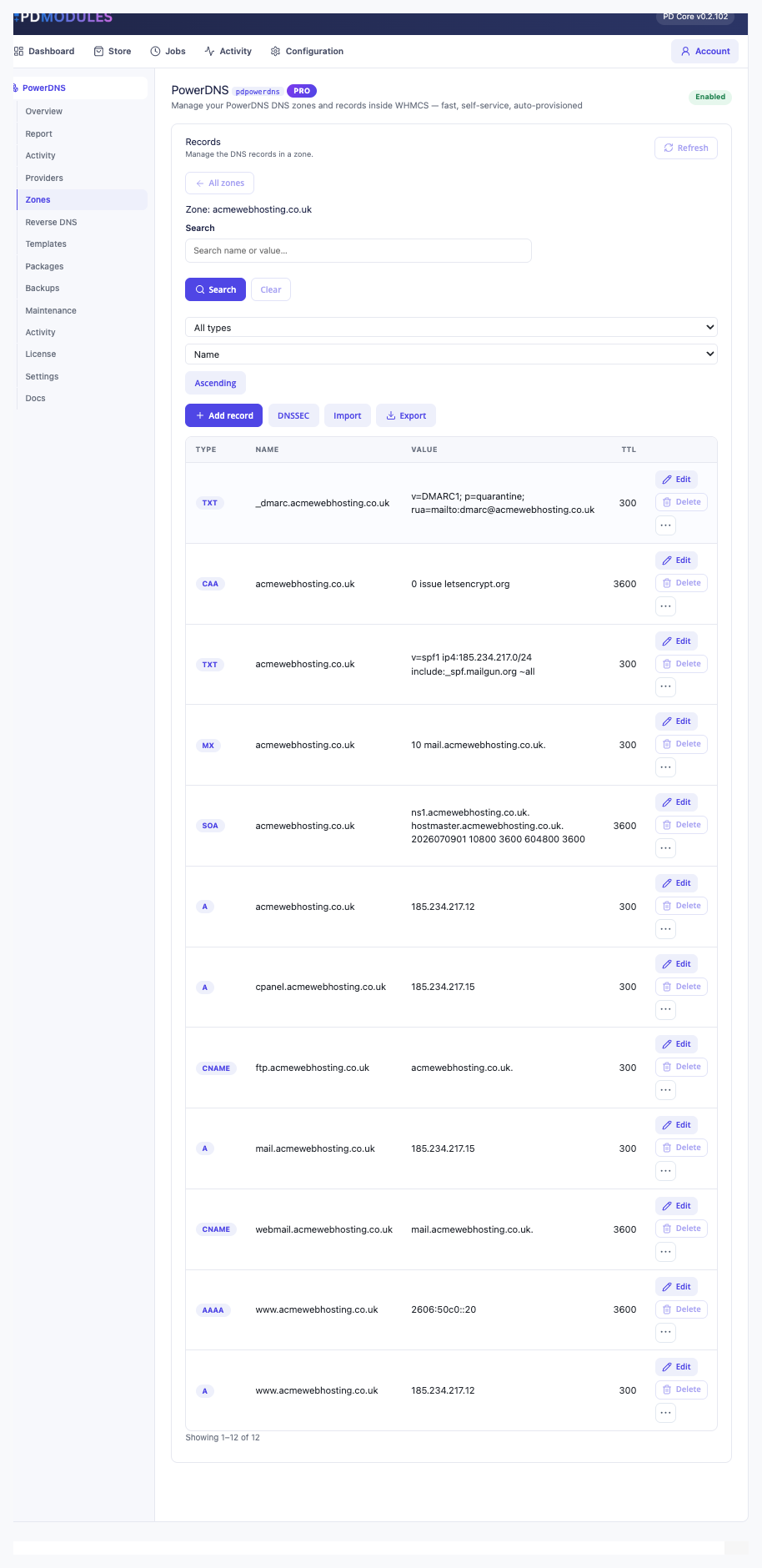
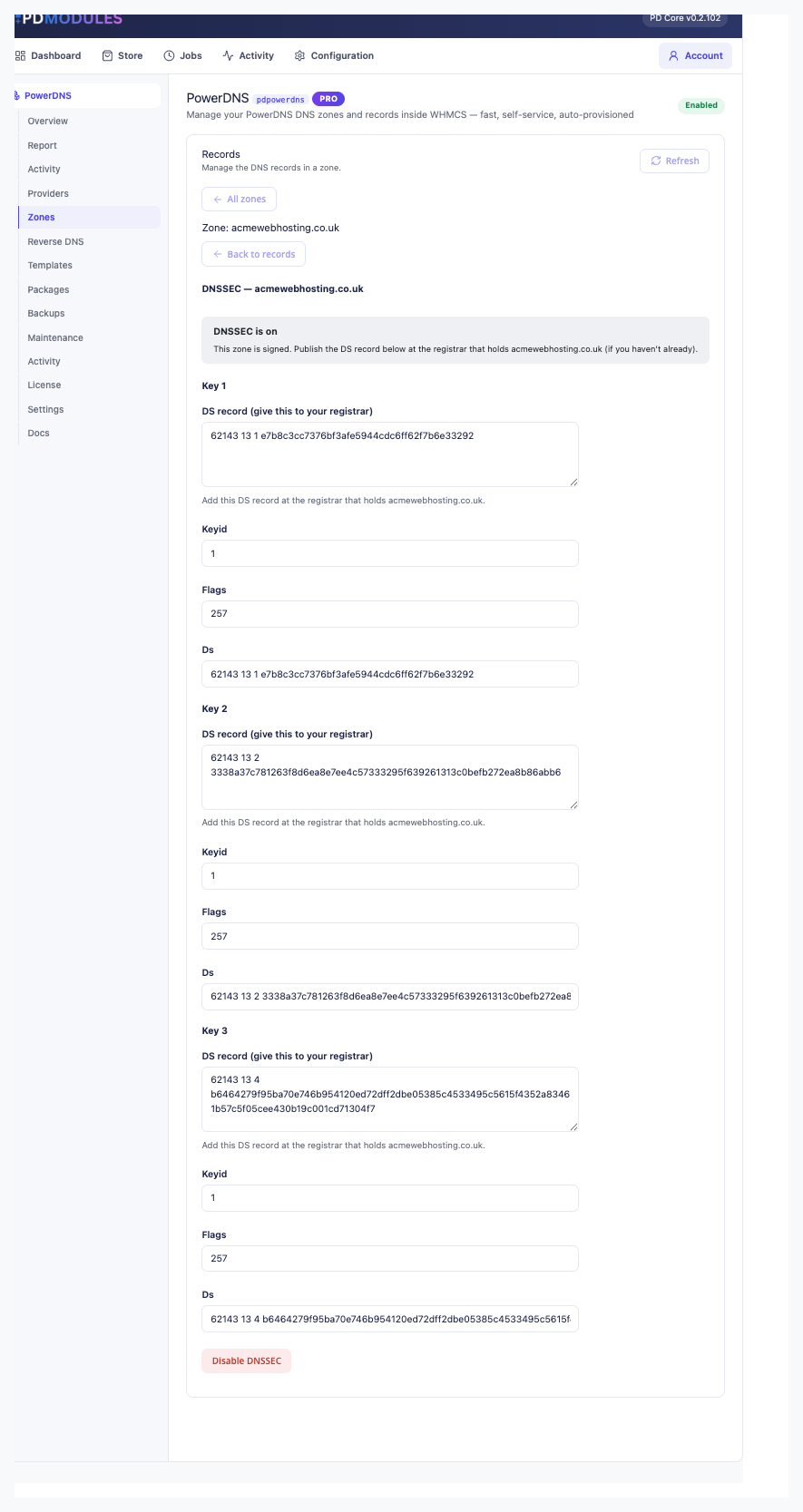
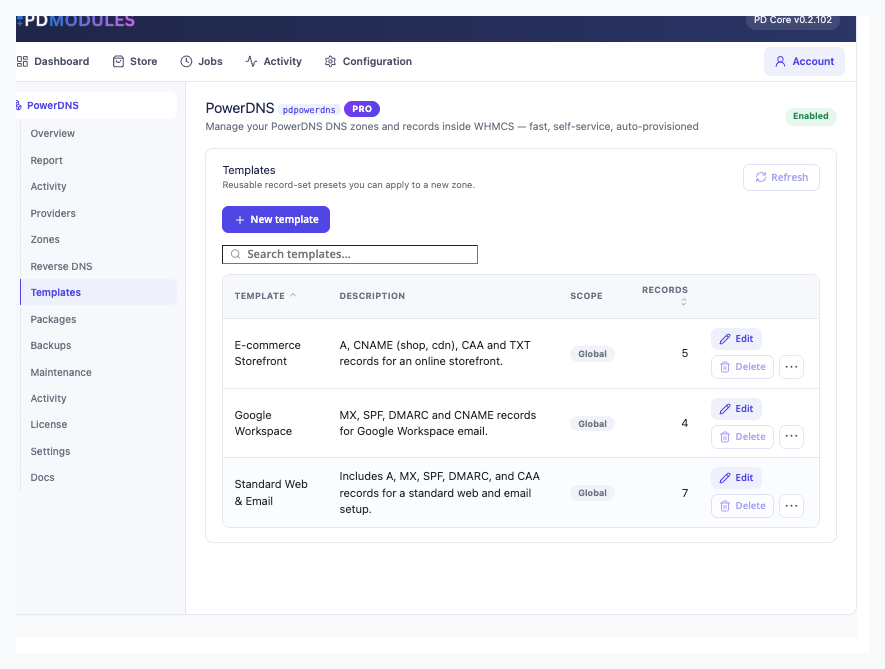
All your DNS zones in one place — search, filter by provider or status, toggle DNSSEC with one click, and sync any zone on demand without leaving WHMCS.Type-aware record editor for every standard DNS record type — A, AAAA, CNAME, MX, TXT, SOA, CAA and more — with inline Edit and Delete for every record in the zone.Full DNSSEC lifecycle managed from WHMCS — enable signing, view per-key DS records ready to publish at the registrar, and disable in a single click.Zone templates turn a blank new domain into a complete DNS setup in seconds — build presets for Google Workspace, e-commerce, or any standard stack once, apply forever.1 / 4
PD PowerDNS lets a hosting company manage its own PowerDNS authoritative servers from WHMCS. Connect a server once through its HTTP API and every zone on it appears in your admin area with no import. DNSSEC is one button, and your customers edit their own records from your client area without any access to the server.
It is built for hosts who run PowerDNS and want a control panel for it that their team and their customers can both use, with zone allowances they can sell.
Why hosts choose PD PowerDNS
DNSSEC in one click. Sign a zone, see the DS record for each key ready to copy to the registrar, and turn signing off just as easily. Customers can manage DNSSEC on their own zones.
Records written the way PowerDNS expects. PowerDNS's API works on whole record sets. The module writes them as whole sets without dropping the other values at the same name and type.
Reverse DNS included. Add an IP range, map addresses to hostnames, and each PTR record is written to the matching reverse zone.
Customers help themselves. Customers add, edit and delete their own records, turn on DNSSEC and restore their own snapshots.
How it works
Enable the API. In your PowerDNS configuration, switch on the HTTP API with a key, and allow your WHMCS server to reach it.
Add the provider. Enter the server's API address and key in Providers and press Test connection. Your zones appear straight away.
Link zones to clients. Assign zones with the client picker, or press Track matched zones to bind every zone that matches an active domain or service.
Sell and support it. Link DNS packages to your WHMCS products to set zone allowances, switch on auto-provisioning for new domains, and let customers manage their own records.
What you get in WHMCS
Connecting and zones
Add a PowerDNS server from Providers with its API address and key; Test connection says whether the module can reach it, and what to fix when it cannot
More than one PowerDNS server can be connected; secondary zones can be created from master IPs and are read-only
Every zone is listed with no import or sync step, read live from your PowerDNS server; changes are written straight back and the module keeps no copy of your records
Server-side paging, search and sort keep the list fast with thousands of zones; narrow it by name, provider, status or client
Track matched zones binds every zone matching an active domain or service to its client in one step, changing nothing at the provider
Lock a zone against the client's own changes; admins keep full control and the client keeps read access
Records
A type-aware editor that shows only the fields the type uses: priority and mail server for MX, priority, weight, port and target for SRV, flags, tag and value for CAA
Addresses and hostnames are checked before saving, so a malformed record never reaches the provider. Search by name or value and filter by type
Export a zone as a BIND zone file. Import adds only missing records and shows how many before it writes anything
DNSSEC per zone with one button on the Records page; with it on, the DS record for each key is shown copy-ready for the registrar
Records are written as whole record sets, as PowerDNS's API requires, without dropping other values at the same name and type
Selling DNS with your WHMCS products
Zone allowances: a DNS package caps how many zones a customer may have and is linked to your WHMCS products; the largest allowance wins
Record limits per zone and per record type, held in the customer's editor, imports, templates and the API
Templates: apply a named set of records to any zone in one click, with merge fields such as {domain}, {ns1} and {ip}; applying twice is safe
Auto-provision, off until you switch it on: a zone is created and bound to the client when a domain is registered, transferred or set up with a service. A failure is logged and never interrupts the order
TLD takeover: for the extensions you choose, a newly registered or transferred domain also gets its nameservers pointed at your PowerDNS server
Reverse DNS: add an IP range, then map addresses to hostnames; each PTR is written to the matching reverse zone
Running it day to day
Backups on by default: every zone is snapshotted as a BIND zone file each 24 hours, keeping the newest 10, with settings for both and an optional age cap. Back up one zone or all on demand
Restore makes a zone match a snapshot exactly, after a safety snapshot; a zone deleted by mistake is recovered with every record
Optional emails, off until you turn them on: admin alerts for drift or a failed backup, and customer notices when a zone is created, removed or changed by staff
A REST API with named read or write tokens and optional source-IP limits. Tokens are shown once and stored hashed, and writes pass the same checks as the panel. Every API write is logged in Activity
In your client area
A Manage DNS link on a client's domain and service pages whenever that domain or service has a zone, plus a navigation link whose text and place you choose
The link can replace the registrar's DNS Management link, sit beside it, or be left out; a zone's pages use sidebar links, tabs, or either alone
What your customers get
Their own zones, and only theirs. A customer sees and changes only zones bound to their account. This is enforced on the server, not just hidden in the page
The same editor your team uses. Add, edit and delete records in their own zones with the validating, type-aware form, written straight to the provider
Snapshots they control. With client backups on, customers snapshot their zone, download any snapshot and restore one, with a safety snapshot first. Turn it off to keep backups admin-only
One-click set-ups. Quick set-ups add the records Google Workspace or Microsoft 365 needs, or an SPF lockdown, without changing anything already there
Read-only where you say so. A locked zone is view-only, and for a domain with no hosting here you choose full editing, view only or hidden
DNSSEC for their own zone. A customer can turn DNSSEC on or off and copy the DS record, except on a zone you have locked or a domain-only zone you set to view only or hidden
Pages render natively on WHMCS's Six, Twenty-One and Nexus themes and are fully translatable, with wording overrides that survive updates.
Security built in
The API key is stored encrypted, with tamper-evident encryption, in your WHMCS database and is never shown back in the provider form.
PowerDNS has no scoped keys: one API key controls every zone on that server. The docs say so, and how to fence it with webserver-allow-from, a firewall or a dedicated instance.
The stored credential is used only to read and update zones and records on the connected server.
Credentials never reach a customer-facing page, and customers' DNS pages and emails never name the backend that serves their DNS.
Content policy: blocked patterns and IP allow and deny lists refuse matching customer saves; admin changes are never restricted
One product, every feature
PD PowerDNS is one paid module with everything included: zones, records, backups, templates, packages, auto-provisioning, the API and customer self-service. There are no add-on tiers to compare, and beyond the subscription there is no per-zone, per-seat or per-unit fee. It installs into PD Modules in one click, adds its own tables and templates, modifies no WHMCS files, and removes everything on uninstall.
Your customers are not cut off if your subscription lapses. DNS records are never touched and the provider keeps serving your zones. Admin management locks first while customers keep their own self-service; customer management stops later behind a neutral "temporarily unavailable" message, and renewing restores everything.
Requirements
WHMCS 9 or later on PHP 8.2 or later, with the ionCube Loader
A PowerDNS authoritative server with its HTTP API enabled and reachable from your server
PD Modules, the free control panel every PD module installs into
Questions
Does PD PowerDNS store my DNS records?
No. PD PowerDNS reads records live from your PowerDNS server through its HTTP API and writes changes back immediately. PowerDNS remains the authoritative source of truth. The module stores only metadata — zone ownership, backup snapshots and activity logs — in your WHMCS database.
What version of PowerDNS do I need?
PD PowerDNS works with PowerDNS Authoritative Server 4.x and 5.x, with the HTTP API (webserver) enabled and an api-key set. In pdns.conf that means api=yes and an api-key value; the module connects to the webserver on its usual port (commonly 8081).
How do I connect the module to my server?
Enter your PowerDNS webserver API base URL (usually on port 8081 — the /api/v1 path is added for you), the api-key from your pdns.conf, and an optional server id, which is almost always 'localhost'. The API key is stored encrypted and shown masked in the panel.
Does deleting a zone in WHMCS delete it from PowerDNS?
No, not unless you explicitly enable the 'When cleaning an orphan, also delete the zone at the provider' setting. By default, removing a zone binding only removes the local tracking entry — the zone and all its records remain on your PowerDNS server.
What record types are supported?
A, AAAA, CNAME, MX, TXT, NS, SRV, CAA, PTR. Additional types may be supported depending on your PowerDNS version and server configuration. Records are written as whole rrsets, exactly the way the PowerDNS API expects.
Is DNSSEC supported?
Yes. DNSSEC can be enabled or disabled per zone directly from the panel. When enabled, PD PowerDNS shows the DS record and DNSKEY details in a copy-ready block to hand to the registrar.
What happens to zones if my subscription lapses?
DNS records are never touched on subscription lapse — your PowerDNS zones and records stay exactly as they are. A lapsed subscription withdraws admin management and customer self-service access, but PowerDNS continues to serve the zones without interruption. Management resumes as soon as the subscription is renewed.
Can I auto-create zones when domains are registered?
Yes. Enable 'Automatically create a DNS zone on registration and new services' in Settings. You can also restrict this to specific TLDs using the TLD takeover list on your provider.
 Featured